I can install the software, but when I try to start Ron Arc the software gets stuck on the "logo", I have tried to reboot the phone and uninstall and reinstall the software, no luck.
Describe your network setup
Tele 2 router C4, from that I have an ethernetcable to my macmini where the Roon Server is installed (I have no problem with my apple equipment, just the Android on)
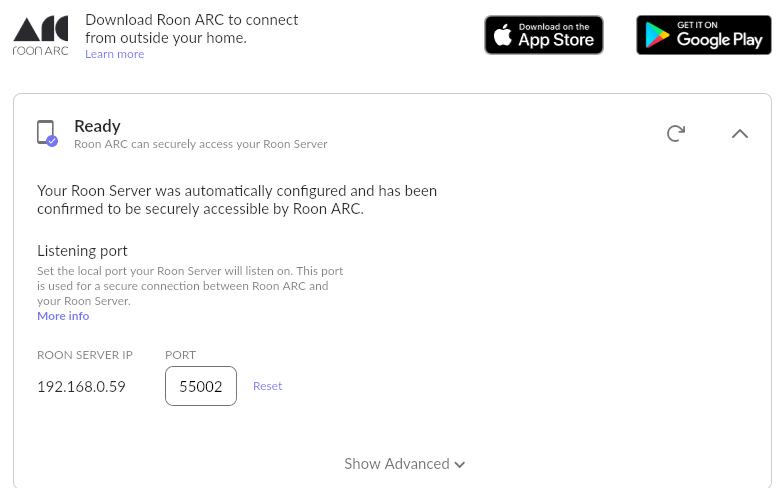
Have you noticed any difference in ARC’s behavior when you launch it while still connected to your Wi-Fi? Also, could you please share a screenshot of your Roon Settings → ARC page so we can take a closer look?
Thanks for giving that a try! As a next step, could you review any Android-related battery-optimization settings that may be enabled on the device?
Since you’re seeing a purple check mark in your Roon Arc settings, the issue isn’t between connecting Arc with your ISP, but more so with the phone itself. Here are a few areas to check:
Make sure mobile data is enabled:
Go to Settings > Network & Internet > Mobile network
Toggle Mobile data to ON
Also check:
Data Saver is off (Settings > Network & Internet > Data Saver)
ARC may be restricted if Data Saver is enabled
Ensure Roon ARC has permission to use data in the background:
Go to Settings > Apps > Roon ARC > Mobile data & Wi-Fi
Toggle "Background data" to ON
Toggle "Unrestricted data usage" to ON (especially if Data Saver is on)
Disable aggressive battery management:
Go to Settings > Battery > Battery usage
Tap Roon ARC
Set Battery optimization to Not optimized
Set Allow background activity to ON
This ensures ARC can maintain long-lived network connections when backgrounded.
If using Private DNS, try disabling it temporarily:
Settings > Network & Internet > Private DNS → Set to Off
If using a VPN, try disabling it to test ARC connectivity
Check that Roon ARC has appropriate permissions:
Settings > Apps > Roon ARC > Permissions
Allow Network, Storage (optional), and other basic access
I’ve check the settings that you mentioned and changed some… nothing new happened.
Then I tried to empty the software’s cache… nothing Then I removed the apps app data. Now stuff is happening:
I have logged in to my Roon Server account and it found the server,
Now we are toggling at “Syncing with Roon Server for the first time”.
So far we haven’t got to ever on this machine.
And now I am logged in, on my wifi
And now… what do you know… it works on the 5G network, too.
…there is only one little snag left
If I listen to music with my wifi on in Roon ARC
, I will get the music streaming in “high quality” if I am out and about and listning with my phones 5G I only get “Lossy”.
I have an unlimited cap for my 5G, and my download/upload is 100 mips.
How can I change that?