· I use a single personal router not provided by my ISP
ARC Status
· ARC is *Not Ready*
Roon Error Code
· None of these are listed. It simply says "TIMEDOUT" or similar.
System or third-party *firewalls *or *antivirus software* can sometimes block RoonServer from reaching ARC.
· Try adding RoonServer and its associated processes to the whitelist of any firewalls or antivirus software you have installed, including the Windows system firewall, if applicable. [You can learn more about firewall exceptions with Roon here.](https://help.roonlabs.com/portal/en/kb/articles/firewall)
Has the status in Roon -> Settings -> ARC changed after adding exceptions in your firewalls and antivirus software for Roon? I don't have any system or third-party firewalls or antivirus software.
Have you successfully located and enabled the UPnP or NAT-PMP settings in your router's web UI?
· UPnP is not listed in my router settings
· How would you like to continue with the network configuration? I will configure port forwarding manually.
Have you created a manual TCP port forwarding according to the instructions?
· Yes
What status do you see when visiting Settings > Roon ARC in Roon?
· ARC is "Not Ready"
Select the Diagnostic Keyword or Text String
· Something else
Don't give up yet.
· I'm stuck. I'd like to create a post to ask Roon Community for help.
Describe the issue
Roon ARC cannot connect from the outside
Describe your network setup
ISP: Superloop
Make / model of the network devices: GL.iNet Flint 2 router, Mac mini, iPhone, Synology NAS
How they are linked with each other: Mac to router: Ethernet NAS to router: EThernet iPhone: either WIfFI (then ARC works) or mobile (then ARC does not work)
OS where RoonServer / ARC are running: RoonServer runs on Synology NAS ARC runs on iPhone
Update:
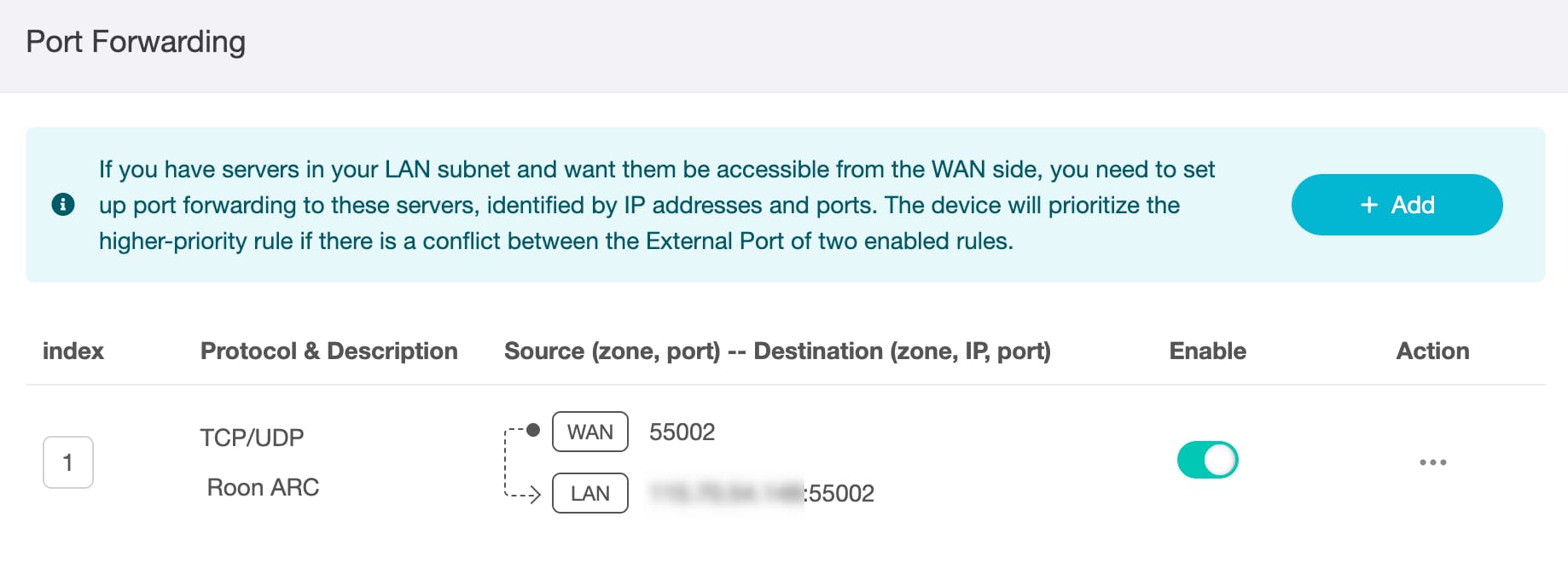
Here a screenshot of the the Forwarding rule in the GL.iNet router:
Could you post the diagnostic text from the Roon apps Roon ARC setting page in full please? That will give more clues as to the issue.
Don’t obfuscate any IP addresses in the text. The ones that pose a security risk are already obfuscated.
Also, can you confirm that the Roon Server ipv4 address used in the port forwarding rule is the same as that displayed on the Roon ARC settings page in the Roon app. There is no need to obfuscate this address in future posts because it is local to your network and cannot be used by any device outside of your location cal network and thus does not present a security risk (the same is not true of ipv6 addresses except link local ones - the ones starting with fe80::).
Thank you for the detailed description — that’s very helpful.
As a next step, could you please copy and paste the full diagnostic text shown in Roon → Settings → ARC in the Roon app?
Please include it in full and without obfuscating any IP addresses — the app already masks anything sensitive, and the remaining addresses (especially local IPv4) do not pose a security risk. This information will help us confirm whether the port forwarding rule is being detected correctly by Roon.
Additionally, please double-check and confirm that:
The local IPv4 address of your Roon Server shown on the ARC settings page exactly matches the internal IP used in your router’s port-forwarding rule.
That said, based on your description — manual port forwarding configured, no firewall in place, ARC still “Not Ready,” and access working only when on the local Wi-Fi — the most likely cause here is that your ISP connection is behind CG-NAT (Carrier-Grade NAT).
When CG-NAT is in use:
Incoming connections from the internet cannot reach your router, even with correct port forwarding
This results in ARC timing out when accessed over mobile data
Local Wi-Fi access continues to work normally, which matches what you’re seeing
Once you share the ARC diagnostic text, we can confirm whether CG-NAT is indeed the cause and advise on possible options (such as requesting a public IPv4 address from your ISP or using an alternative supported approach).
Looking forward to the diagnostics so we can confirm this for you.
I have checked everything again – and realised that I had entered in the Forwarding Rule in the " Internal IP" field my fixed external IP.
Now I used in the Port Forwarding rule instead the internal IP of the NAS/Roon server – and now it works! Yipee!
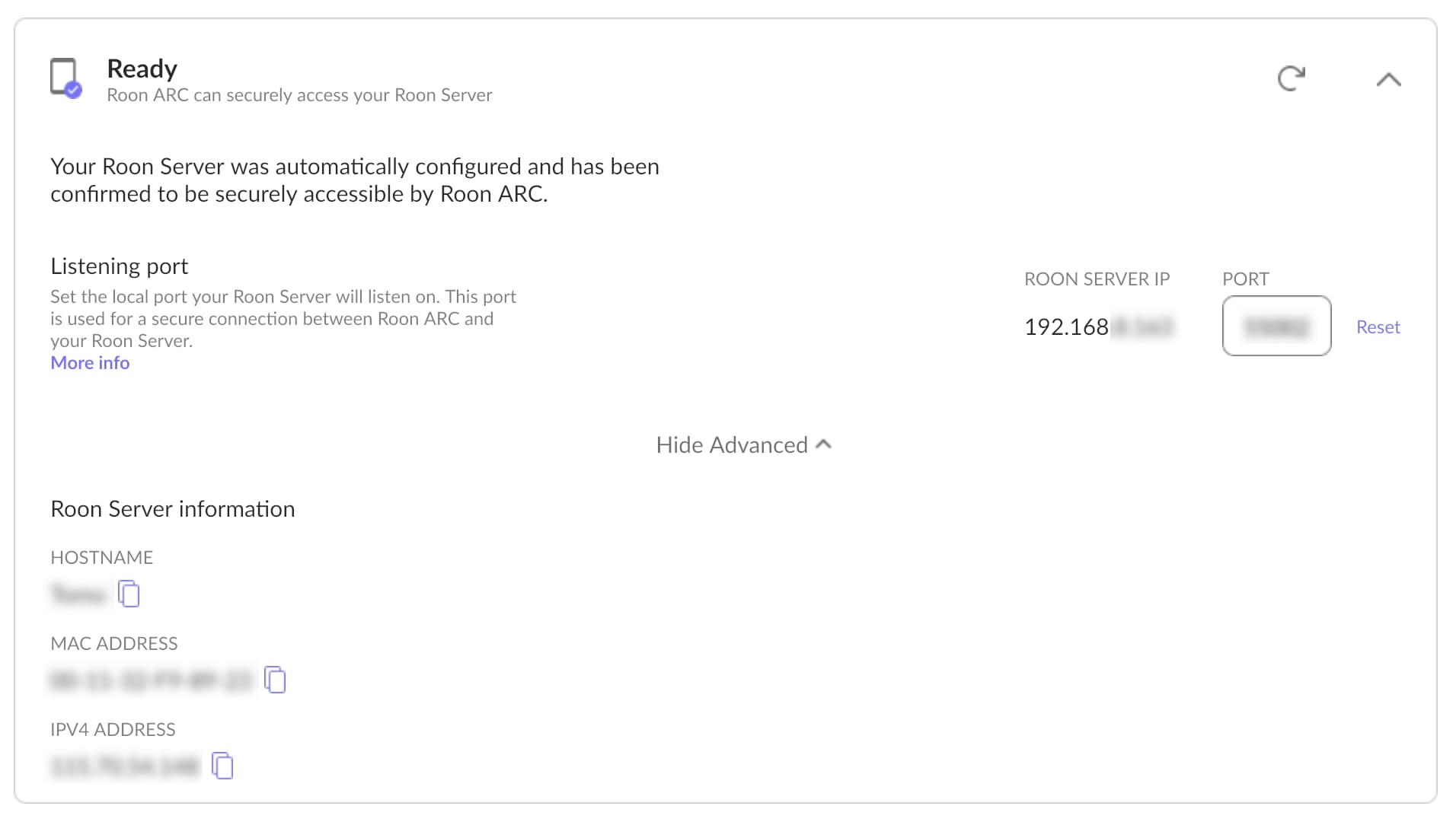
(However I think the UI in the Roon ARC Settings panel is a bit misleading, because only the external IP, called “IPV4 ADDRESS”, is copy/paste-able. But this one is not the IP address I need to copy for the port rule. For the rule I need the internal IP, called “ROON SERVER IP”, which is not copy/paste-able:
You’re absolutely right — at the moment, only the external IPv4 address is copy/paste-able in the ARC settings, while the Roon Server (internal) IP is not.
Functionally, this doesn’t affect ARC connectivity, but we understand how this can be confusing from a usability perspective, especially when configuring port forwarding, where the internal IP is the required value.
We’ll treat this as a UI/UX feature request and you can leave the feedback along to the product team for consideration in Feedback > Feature Suggestions. Thanks for taking the time to point it out.