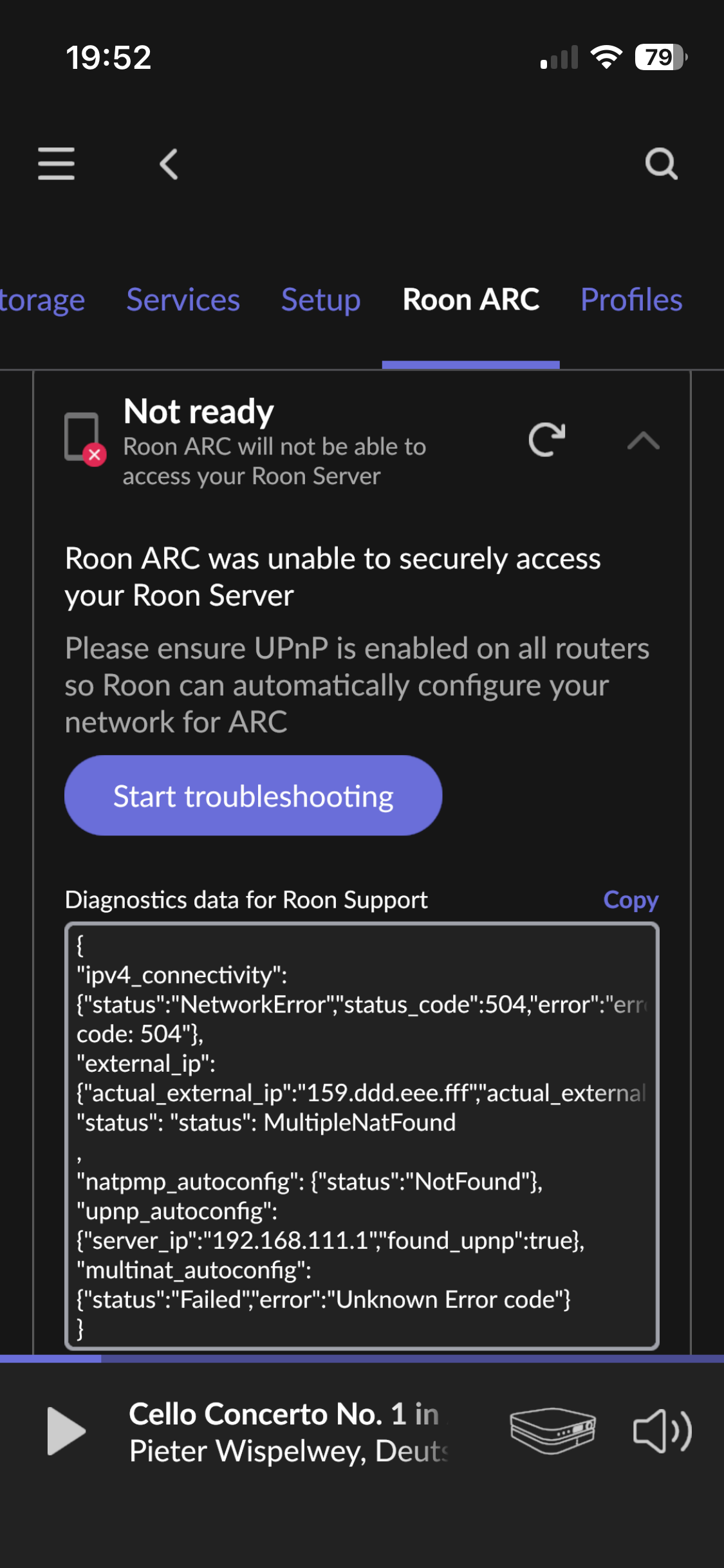
Can you copy the entirety of the diagnostic text from your screenshot above into a reply. This will give additional information to help diagnose the issue.
You can use the ‘copy’ link shown in the screenshot just above the text box and to the right.
That said, the issue that you have is indicated by the ‘MultipleNatFound’ indication.
This can be caused in one of two different ways (or both):
You have two routers in your local network
You ISP uses CG-NAT
If you have two routers in your network (e.g. the ISP supplied modem/router and the Ubiquity), then you will be able to solve the issue locally. However, if the ISP uses CG-NAT, then you only have two options: Contact the ISP and ask them to provide you with an ip address that supports port forwarding or use Tailscale. If you follow this link, you will be taken to a general description page but you will find links to other pages that provide setup instructions for different Roon Server types.
Note: Tailscale will also work with two routers in your local network and is this a universal solution but it might not be the best in some cases. Also, if Tailscale is setup correctly, ARC will work but the Roon Setting Roon ARC page will continue to indicate ‘Not Ready’ and you will still get the error text. With Tailscale, this can be ignored.
With two routers in your local network, you should be able to configure a port forwarding solution but it might be easier to explain how with the full diagnostic text available.
I’m going to be away from the forum for a few hours. In the meantime, I, and other forum members, have posted about the solution to this issue many times. A forum search for ‘MultipleNatFound’ should find previous explanations made by me and others.
Yes. The 100.aaa.bbb.ccc (obfuscated) IP address is indicating that your ISP is using CG-NAT since addresses in the range 100.64.0.0 to 100.127.255.255 are reserved for CG-NAT.
Unless you talk to your ISP, your only solution is to use Tailscale.
UPnP will not work with multiple nat layers no matter whether that is due to multiple routers or a CG-NAT service provision.