Roon becomes unresponsive and stops playback across all zones on Container Station version (ref#F51LSG)

What best describes your playback issue?

· Music doesn't start when I press "Play"

What type of Zone is affected by this problem?

· *Network Zones* are affected.

Is the affected network Zone connected with Ethernet or WiFi?

· Ethernet

Does the issue affect all file formats?

· The issue affects *multiple/all* file formats.

Does the issue happen with local library music, streaming service music, or both?

· *Both streaming and local* *library* music are affected.

Do you encounter any playback errors with the "System Output" Zone?

· I don't have a System Output available, but I'd like to keep troubleshooting

How is the affected Zone connected to your RoonServer machine?

· Network - Ethernet

Which network audio protocol is the Zone using with Roon?

· RoonReady

Does the device show up at all in Roon Settings -> Audio?

· Yes, it shows up there, but it isn't Enabled

Does the "Enable" button unlock the Zone?

· I pressed Enable, but the Zone remains disabled

Does the device play audio from another source when using the same connection?

· The device has no problems with another audio source

Have you checked that Roon is whitelisted in any firewalls?

· I've checked the firewall and the issue remains

If the device has multiple output options, do the other options work as expected?

· Multiple output types are affected

Is the device using the latest firmware as per the manufacturer?

· Firmware is up-to-date but the issue remains

Do you have an approximate timestamp of when the issue last occurred?

· Yes...Monday May 25, about 8:30 US EDT. Bad Case (Alternate Version) Lukas Nelson & POTR; Train Kept a Rollin Aerosmith, It Was A Very Good Year Pat Bianchi, American Romance Lukas Nelson

What are the make and model of the affected audio device(s) and the connection type?

· Aurelic Aries with Femto to NAD M51 DAC to Audio Research LS-2 preamp to Bryston 4B3 amp; Yamaha RX-A670 to Artisan Sketch speakers; Sonos Play 3

Describe the issue

It’s been about two weeks since I shifted to the Container Station version. Initially Roon was fine...remotes and Roon quick to respond to commands and no issues playing in all zones (we typically use only one zone at a time). After about a week, using Roon is like wading through molasses. Didn’t matter if I used iPhone, iPad Pro, or MBP as remotes.

Based on the experience of a few others on the forum, I stopped Roon and restarted Roon yesterday. That appeared to have solved the problem.

Using Roon this morning to listen to in one zone (Yamaha receiver with ethernet connection to the network using Airplay) was snappy. All of a sudden the music stopped.

And now Roon is nonresponsive in all zones (Aurelic Aries, the Yamaha, Sonos, and MacBook outposts). Remotes switch to the zones but pressing play does nothing. Have restarted iPhone and still nothing. Lightening DS plays on the Aries. And the Sonos app can play music and internet radio on Sonos.

Everything is Ethernet connected (except iPhone and iPad remotes) and I have no other problems on home network

Library is about 700 albums on server and about 400 Qobuz. Roon running on USB SSD attached to NAS and local drive with spinning drives on same NAS. Eight GB memory. Not running multiple zones at the same time nor any DSP.

Describe your network setup

Xfinity Cable to Netgear Voice Cable Modem (CM1150V) to Asus RT-AX88U to Netgear GSS108E Switch to QNAP TS-251 NAS
Hello @Pacoinmass,

Thank you for the detailed report. Given the behavior you’re describing—where Roon works perfectly for a while and then gradually slows down to a “molasses” state before failing entirely—it sounds like a resource exhaustion issue specific to your container environment.

Since you mentioned that other native apps (Lightning DS, Sonos app) work fine while Roon is unresponsive, we know your network and audio hardware are healthy. To help us narrow down whether the Roon Server process is hanging on cloud-service lookups or if the entire database engine is locking up, we need to isolate the source:

Could you please test the following and let us know the result?

  1. Local Library Test: Can you play a local file that is stored on the NAS (not from Qobuz) when Roon is in this “unresponsive” state?
  2. Toggle Roon Core: When Roon becomes unresponsive, does the Container Station report the container as “Up and Running” or does it show high CPU/Memory usage?

Please try playing a purely local file and let us know if that works. Also, if you can, check the Container Station > Resources tab during a “slow” period to see if the Roon container is hitting 100% CPU or maxing out that 8GB of RAM.

Thanks for the quick reply, especially on Memorial Day here in the US. The Aerosmith track was from a local file on the NAS. Lightning DS played that file on the Aries just fine.

Fortunately for me (but unfortunately for troubleshooting!), Roon is now working on Sonos and Yamaha. I suspect it’s fine on the Aries as well.

If this reoccurs, I’ll confirm the Container’s state and reference this ticket again if it’s closed in 7 days.

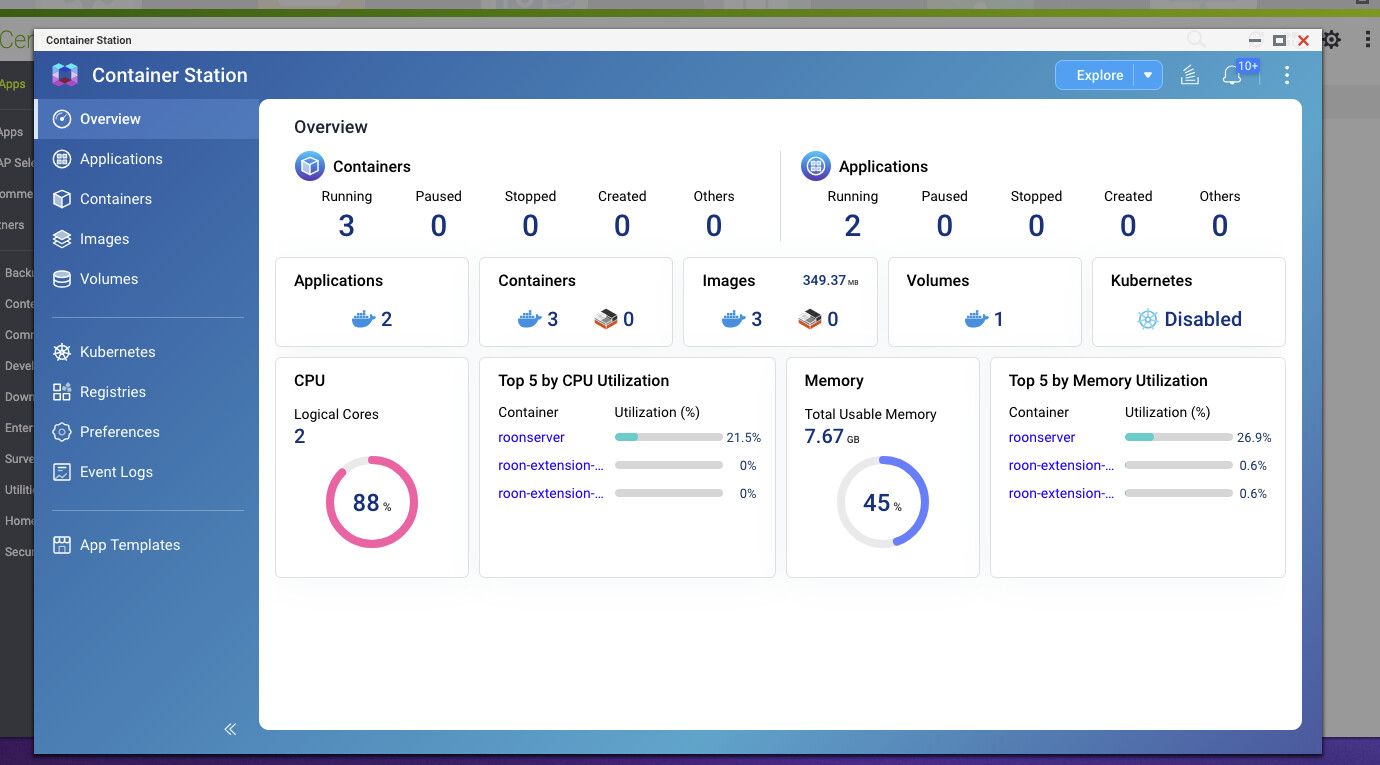
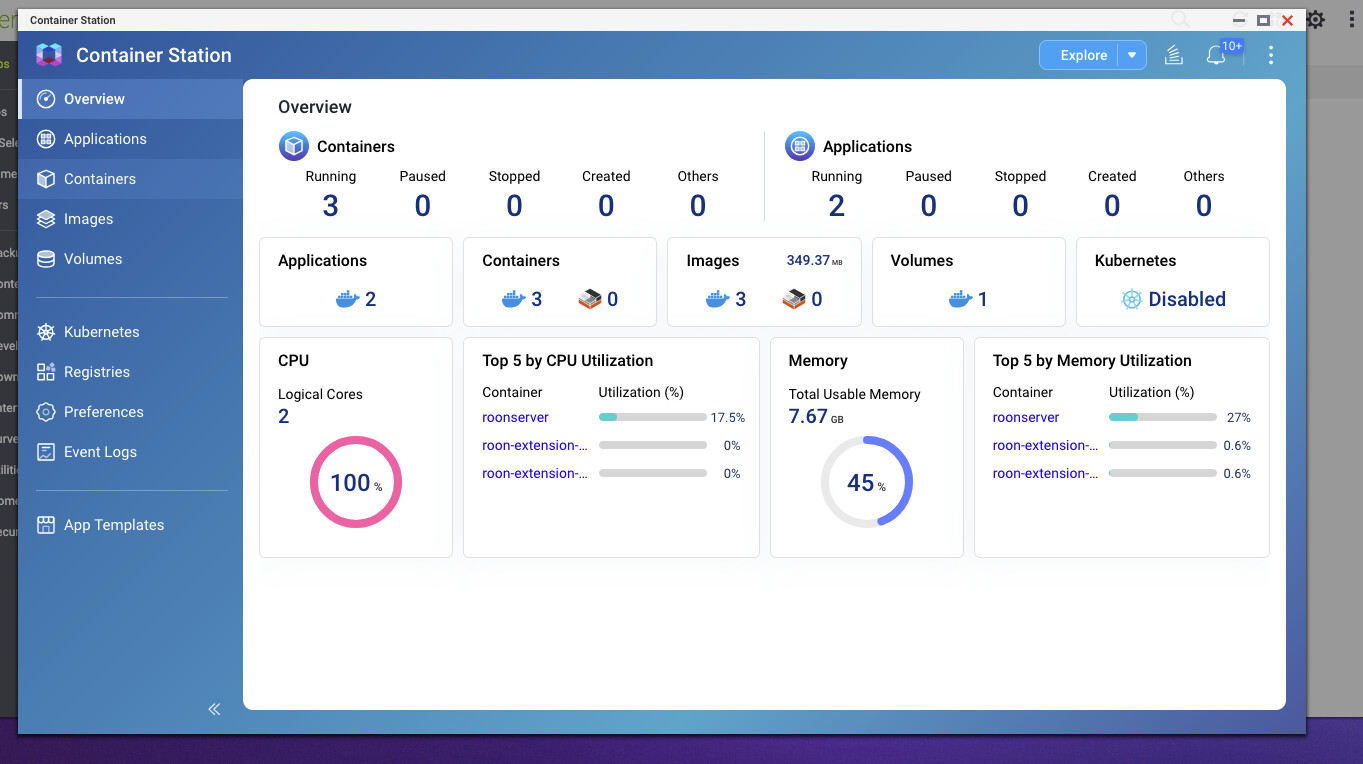
Similar behavior just occurred. Was out all day, came back and started Roon. Lag with a Qobuz album and managed to capture the following:

Then switched to a local file. About a 3-4 second delay and captured the following:

CPU running between 75% and 100% and music stopping. Just now stopped, skipped a song and started playing the third sone on Their Satanic Majesty’s Request.

Time stamp from about 8:10 pm to 8:19 pm US EDT.

Hey @Pacoinmass,

Thanks for the additional info and timestamps! From a fresh Roon Server diagnostic report, we can see that once your server was fully loaded, things stabilized. Local FLAC playback (Sonny Rollins, 24/192) ran cleanly at 100% buffer. But the Qobuz streaming has a recurring issue: on May 25, the logs show FTMSI-B qo/09CB1585: block downloader too much time locked firing every 10 seconds for an extended period, this is the Qobuz file transport getting stuck, which explains the Qobuz album lag.

For some next steps here:

  • Adjust the background work window if possible. In Roon Settings → Library → Background Analysis, you can limit when analysis runs. The overnight metadata refresh is normal, but if it's happening while you want to listen in the evening, narrowing that window to 1–4 AM keeps it from affecting your sessions.
  • Check if QNAP Container Station assigned CPU limits to the roonserver container. The container shows only 2 logical cores available. Roon is compute-hungry on startup; if the container is CPU-throttled, that makes GC pauses far worse. You may want to ensure no CPU quota is set, or increase it.
  • Restart the RoonServer container tonight or tomorrow morning. This resets the snapshot clock and clears the accumulated heap.

Thank you! :folded_hands:

Thanks for the reply.

I’ve confirmed that my schedule is 1-5 am. I’m unable to switch to 1-4 am because Roon indicates that the “window must be at least 4 hours long”.

I’ve confirmed that Container has unlimited CPU limit to the 2 CPUs; unlimited memory limit; and unlimited memory reservation. There was to CPU quota set.

I’ll restart the RoonServer container now and see how it responds over the next few days.

Thx.

Hi @Pacoinmass,

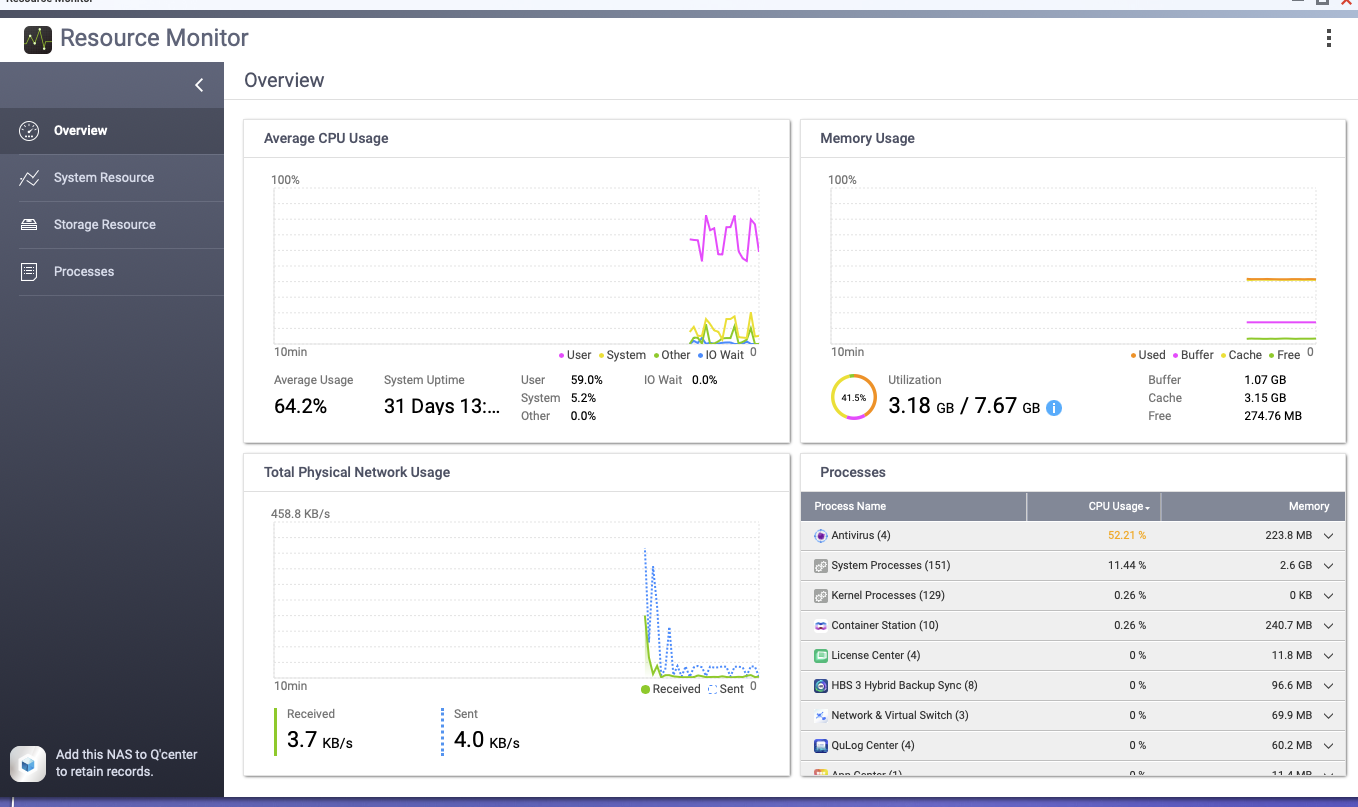
Thank you for the screenshot. This is very revealing — the Container Station Top 5 shows only Roon at 21.5% and extensions at 0%, yet the overall CPU is at 88%. This means the remaining ~65% is being consumed by the QNAP OS itself or its native services, completely outside of Docker.

Could you open the QNAP Resource Monitor (not Container Station — it’s a separate app in the QTS app menu) and check the Processes tab during one of these high-CPU periods? That will show us exactly which QNAP service or background task is responsible. Common culprits on QNAP include antivirus scans, Multimedia Console transcoding, thumbnail generation, or scheduled backup jobs. Once we identify the process, we can look at disabling or rescheduling it.

One additional thing worth keeping in mind: the QNAP TS-251 uses an Intel Celeron processor — a low-power chip designed for light NAS workloads. Under sustained load it throttles its clock speed to manage heat, which means that even Roon’s modest 21% share of a throttled CPU represents less real processing power than it might appear. Identifying and resolving whatever is driving that background load will help Roon get the most out of what the hardware can offer.

Let us know what you find!

It looks like antivirus scans may be an issue. Schedule was weekly starting at 1 pm on Mondays. Was still running when I took the shot below.

I’ve deleted the schedule and have added a new one for Thursdays at 6 am. Not sure why it was still running from Monday.

This is only the Music server. No other files except Roon running on the attached USB SDD. Have a 2nd USB HD attached that simply backups the QNAP so I have a back up of my music files.

Sounds good @Pacoinmass, let us know how things perform with your above changes. :+1:

Just happened now. June 7, around 4:30 pm US EDT. Playing A Rift in Decorum.

Hey @Pacoinmass,

Thanks for the follow-up! We were able to pull another diagnostic report from your server and saw that the Qobuz “block downloader too much time locked” problem we identified only occurred on May 25, and never again in any later log. That issue is gone, so it’s not what’s biting you now.

What is happening on June 7 is a recurring internal operation called profile-stats computation. Roon logged “computing profile stats” 54 times that day, and 27 of those took longer than 10 seconds each, several over 30 seconds.

For comparison, on quiet days (May 27, May 31) it ran zero times, and on June 3 only 6 times with none slow. So June 7 was an extreme outlier: dozens of expensive recomputations clustered in the 16:00–18:00 window, exactly when playback stuttered. GC pauses spiked to ~3 seconds during these (vs. the normal 165 ms), which is the audible “music stops” moment.

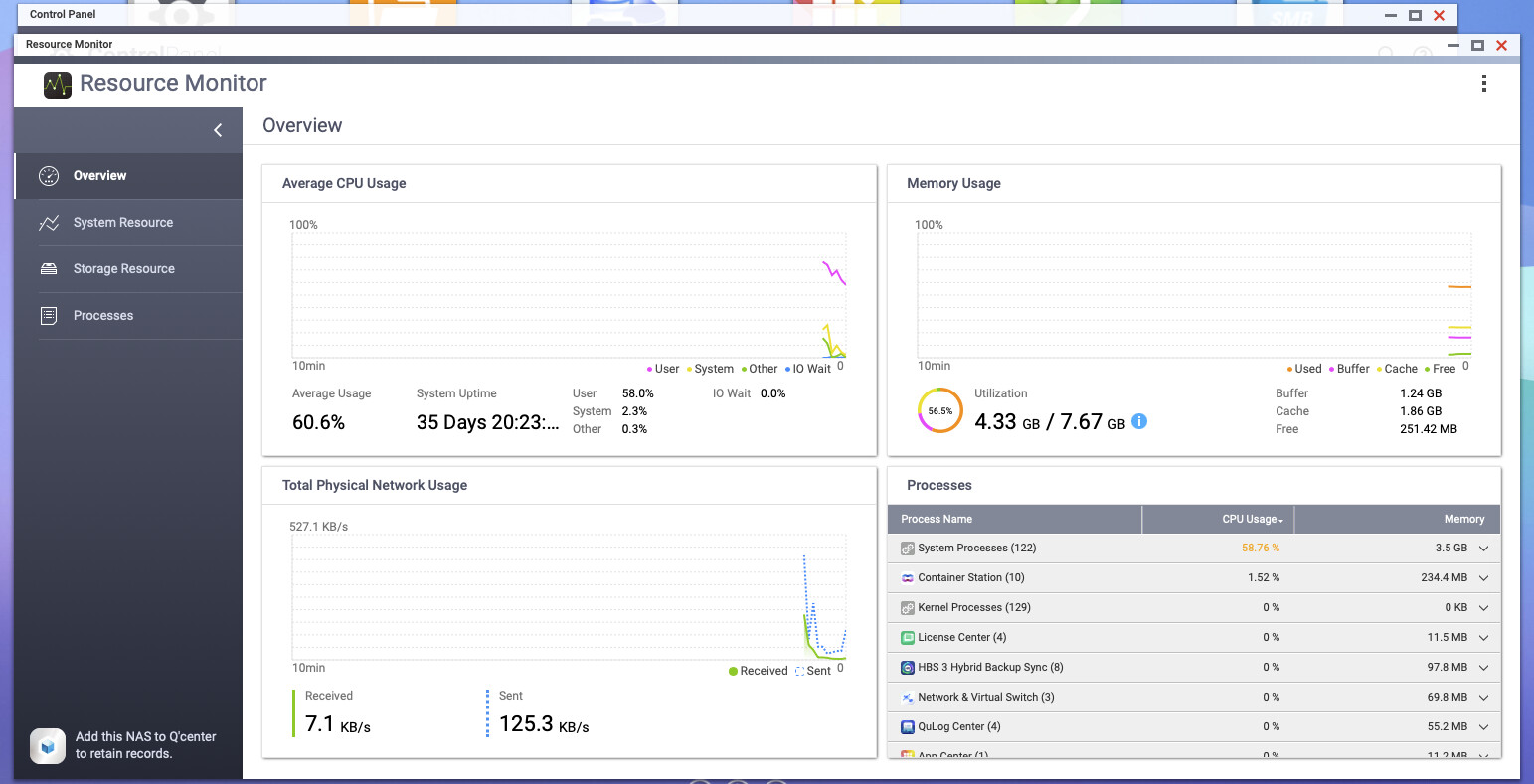
Importantly, the managed heap stayed flat (1630–2008 MB all day) and memory in your screenshot was only 56% used. So this is not a memory leak or accumulated-heap problem, restarting the container won’t durably fix it. It’s CPU saturation on the TS-251’s 2-core Celeron caused by repeated profile-stats recomputation, made worse by the chip thermally throttling under sustained load.

Your screenshot corroborates this: CPU averaging 60% with “System Processes” at 58%, Roon’s work on a NAS appliance shows up partly as system/kernel CPU, and the Celeron simply runs out of headroom.

Do you have a large number of classical compositions? If so, it could be a combination of the TS-251 (2-core Celeron, 8 GB), which has a CPU that could very well be underpowered to perform based on your library.

Moving your server to a stronger host would very likely rid you of these issues, if it’s something you’d consider testing.

@benjamin,

Thx for the report back. Glad that the Qobuz problem has gone away and memory leak and accumulated-heap problems were not the cause.

Curious what “profile-stats computation” does and why it runs so many times and for so long.

I have about 30 classical albums of which 28 are on my music server and 2 are Qobuz.

I would be open to moving to a “stronger host” if I can be relatively assured that the problems would go away. My library is relatively small…716 albums local out of a total of 1,169 albums. I recently set up DSP for a Sonos endpoint but don’t use it for other zones.

Can you please elaborate on what you mean by “consider testing”?

Hey @Pacoinmass,

Thanks for the follow-up and the details about your library size!

On “profile-stats computation”: This is an internal Roon operation that recalculates listening statistics and usage patterns across your library - things like play counts, skip rates, and listening history that power Roon’s recommendations and radio features. Normally it runs infrequently and finishes in under a second. On June 7 it triggered abnormally often, likely due to a combination of factors (a listening session that updated many records at once, plus the Celeron not being able to process each pass quickly enough, causing them to queue up and pile on).

On library size vs. hardware: Your library of ~1,169 albums is not large by Roon standards, so the profile-stats issue is almost certainly hardware-bound rather than library-bound. The TS-251’s Celeron is simply at its ceiling under Roon’s sustained load - even without classical metadata complexity being a factor.

On “consider testing”: What I meant is that moving to a stronger host doesn’t require a permanent commitment upfront. You could run Roon Server temporarily on another machine you already have — for example, a Mac, Windows PC - to confirm the stuttering goes away before investing in new hardware. If you have an always-on computer available, that would be a good low-risk way to validate the fix.

Let us know if you’d like help migrating your Roon database to a new host - the process is straightforward and your library, history, and settings transfer fully.

@vadim,

Thx for the information on profile-stats computation.

I’ld like to move on testing and have two options:

  1. A retired Dell desktop that I can take out and leave on for the test. It’s a Win10 Home Edition machine with 8 GB RAM running Intel i7-3770 CPU @3.40GHz.
  2. My everyday MBP M4Pro 48 GB running Tahoe 26.5.1. I have Roon installed on this laptop to use as a Remote.

My preference is to use the Dell…I can leave wired to my network. The MBP I could connect via wire to my network however wouldn’t want to do so for more than a few days.

Pls let me know which you think would be best. I’ll also need instructions on migrating. I’m not an IT pro…a consumer that knows enough to be dangerous!

Thx.

Hey @Pacoinmass,

Thanks for the reply! Your Dell should work, I’d first see if there are any needed windows OS updates or driver updates that are prompted when you bring the machine back online.

Here is a KB article based all around the migration process, which should help you!

The two most important aspects would be:

  1. Make sure you have a recent backup saved
  2. Make sure your local library will be assessable to the new machine running Roon Server
If you run into any other questions around the process, we’ll be here to help! 👍

Hi @Pacoinmass,

We’re testing some performance improvements over in the Early Access category that might also impact this issue.

If you wanted to try the Early Access branch (it involves downloading a separate Roon Server and Roon installation from the public release), you can take this step on either the QNAP Docker or your current server.

Here are instructions to migrate:

And here is the #earlyaccess release notes page:

We’re happy to answer any questions. Thank you!