No, I didn’t try those steps. I was hoping for a solution that fixes the problem rather than avoiding it by going back a version. Thanks for the workaround though.
More information here:
Looks like Wine 8.18 mediacontrol changes broke Roon · Issue #39 · RoPieee/roon-on-wine
1 Like
No problems whatsoever w/ fedora 38 or 39.
This week upgraded to f39 and reinstalled roon, just executed @spockfish 's script.
Under Fedora 39 and Bottles Roon client runs ok - and without much configuration (in fact I don’t recall configuring anything. )
EDIT: ah, yes - I’ve added the
arguments: -scalefactor=2.0
for my 3K display.
And there is a bug - when I’m using the touchpad Roon scrolls through menu (sometimes even quits completely)
So - yeaah - kind of working, but no 100% tbh.
I use Bottles provided in Fedora RPM repository.
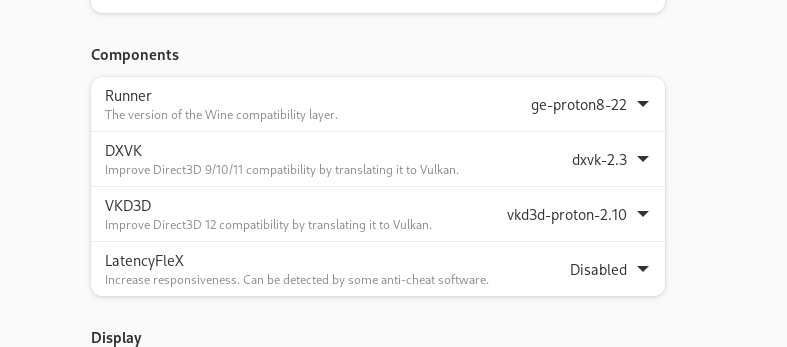
Here’s my bottle configuration if that helps anyone:
Arch: win64
CompatData: ''
Creation_Date: '2023-12-19 19:02:16.203877'
Custom_Path: false
DLL_Overrides: {}
DXVK: dxvk-2.3
Environment: Application
Environment_Variables:
    SCALEFACTOR: '2.0'
External_Programs:
    c3541562-0f17-4d8e-82a1-dd57ba2b72af:
        arguments: -scalefactor=2.0
        dxvk: true
        dxvk_nvapi: false
        executable: Roon.exe
        folder: /home/melon/.local/share/bottles/bottles/RoonT1/drive_c/users/melon/AppData/Local/Roon/Application
        fsr: false
        icon: com.usebottles.bottles-program
        id: c3541562-0f17-4d8e-82a1-dd57ba2b72af
        name: Roon
        path: C:\users\melon\AppData\Local\Roon\Application\Roon.exe
        pulseaudio_latency: false
        removed: null
        script: ''
        virtual_desktop: false
        vkd3d: true
Installed_Dependencies:
- arial32
- times32
- courie32
- dotnetcoredesktop6
Language: sys
LatencyFleX: latencyflex-v0.1.1
NVAPI: dxvk-nvapi-v0.6.4
Name: RoonT1
Parameters:
    custom_dpi: 96
    decorated: true
    discrete_gpu: false
    dxvk: true
    dxvk_nvapi: false
    fixme_logs: false
    fsr: false
    fsr_quality_mode: none
    fsr_sharpening_strength: 2
    fullscreen_capture: false
    gamemode: false
    gamescope: false
    gamescope_borderless: false
    gamescope_fps: 0
    gamescope_fps_no_focus: 0
    gamescope_fullscreen: true
    gamescope_game_height: 0
    gamescope_game_width: 0
    gamescope_scaling: false
    gamescope_window_height: 0
    gamescope_window_width: 0
    latencyflex: true
    mangohud: false
    mouse_warp: false
    obsvkc: false
    pulseaudio_latency: false
    renderer: vulkan
    sandbox: false
    sync: wine
    take_focus: false
    use_be_runtime: true
    use_eac_runtime: true
    use_runtime: true
    use_steam_runtime: false
    versioning_automatic: true
    versioning_compression: false
    versioning_exclusion_patterns: false
    virtual_desktop: false
    virtual_desktop_res: 1280x720
    vkbasalt: false
    vkd3d: false
    vmtouch: false
    vmtouch_cache_cwd: false
Path: RoonT1
Runner: soda-experimental_8.0
RunnerPath: ''
Sandbox:
    share_net: false
    share_sound: false
State: 0
Uninstallers: {}
Update_Date: '2023-12-24 15:04:26.101300'
VKD3D: vkd3d-proton-2.10
Versioning: false
Versioning_Exclusion_Patterns: []
Windows: win10
WorkingDir: ''
data: {}
run_in_terminal: false
session_arguments: ''
I use Bottles provided in Fedora RPM repository.
rpm did not work for me, I used flatpak, runs flawlessly.
Bottles com.usebottles.bottles 51.9 stable system
Thanks,
can confirm with these settings above for bottles, roon-remote runs fine and stable. But the CPU load is 40% and rather high.
3620 gebi 20 0 6396376 430980 77036 S 40.1 2.7 0:31.42 Roon.exe
Found these settings here