Roon Core crashes every few days

Roon Core Machine

I have the recommended ROCK hardware for Small to Medium-Sized Libraries:

  • NUC11TNHi3NUC11TNHi3
  • Crucial RAM 4GB DDR4 2400 MHz CL17 Laptop Memory CT4G4SFS824A
  • Silicon Power 128GB NVMe M.2 PCIe Gen3x4 2280 SSD (SP128GBP34A60M28))

Networking Gear & Setup Details

The Roon ROCK is connected (wired) directly to my router, a TP-Link AX5400 WiFi 6 Router (Archer AX73). My music server is connected (wired) to a TP-Link AX3000 running as an access point. That AX3000 is wired to the AX73.

My library is stored on a QNAP NAS (QNAP TS-451) which runs fine and I have no issue accessing my library using other software.

Connected Audio Devices

I have five endpoints in my house, some of which are connected by wire and some which are wireless. Three of the endpoints are Rasberry Pis running RoPieee (two wireless), one is a Bluesound Pulse Mini 2i and one is a Chromecast audio. I access RoonARC through my Samsung Galaxy S21.

I have not observed any connectivity issues on my home network (either with the Roon server or the endpoints, my QNAP, or otherwise). As mentioned, I have not observed the crashes happening while I am actually listening to music using Roon or RoonARC.

Number of Tracks in Library

I have just shy of 100,000 tracks. The server runs smoothly when it hasn’t crashed.

Description of Issue

I recently purchased and installed a Roon Rock server. The first time I installed the server, I tried to load my backup as I had previously been running Roon on a QNAP NAS. The server was very unstable and repeatedly crashed, so I reinstalled the firmware and started fresh (without loading backup). However, the server still crashes every few days.

The server crashes while I’m not listening to music. I’ll reboot, use it for a few days without issue, and then the following day when I try to open Roon, the server has crashed. Roon will not open (it just shows the loading screen / message that Roon is taking longer than usual to open), and I cannot access the web UI or the server directory using Windows file explorer. I have to power cycle the core to reboot.

To respond to some questions I have seen raised in other support tickets:

  • The crashes persist whether or not I am logged into Tidal in Roon.
  • I tried reinstalling the operating system using the WebUI. No change in behavior.
  • I’ve reviewed the logs and there isn’t an obvious or consistent warning or error (or other) message at the end of the log. But I’d be happy to share any log information that would be helpful.

Appreciate any guidance for resolving this issue.
Is this a new nuc or used? When you find it unusable is it powered off?

It’s possible the power supply has an issue.

You might consider going to at least 8 GB of memory. I’ve read that Roon will crash when it runs out of memory.

Not a nuc, this a Roon ROCK with brand new hardware.

Would be interested to learn how I could diagnose a memory issue. I purchased the hardware recommended by Roon for my use case.

Sorry for the confusing message. It’s an intel nuc (I thought you were referring to a nucleus). No issues with the power supply either.

I have no idea if the 4GB of memory is the issue but I read that large libraries 100k tracks should have 8gb minimum. Ram is inexpensive and having some headroom never hurts. Roon doesn’t do paging and it will crash when it runs out.

Just offering suggestions based on the specs and issues you mentioned.

I have the NUC/ROCK music server also and started out with 16gb ram. Never had any issues with it but when I had the NUC open to replaced my 1TB SATA SSD with a 4TB SSD I put in 2 16GB sticks that I had on hand.

Thanks Mike. I’m going to give your suggestion a shot and will follow up to report whether this solves the problem.

Got to agree with Mike here, when Roon runs out of memory it has a tendency to crash.
It might be as easy to go for 2x8GB and give yourself some headroom as well

A quick Google search shows me only dubious shops I would never go to for serious business (no known to me serious shop in the first five pages of search results).

PS: Yes, I don’t consider Amazon as a serious shopping platform.

grafik

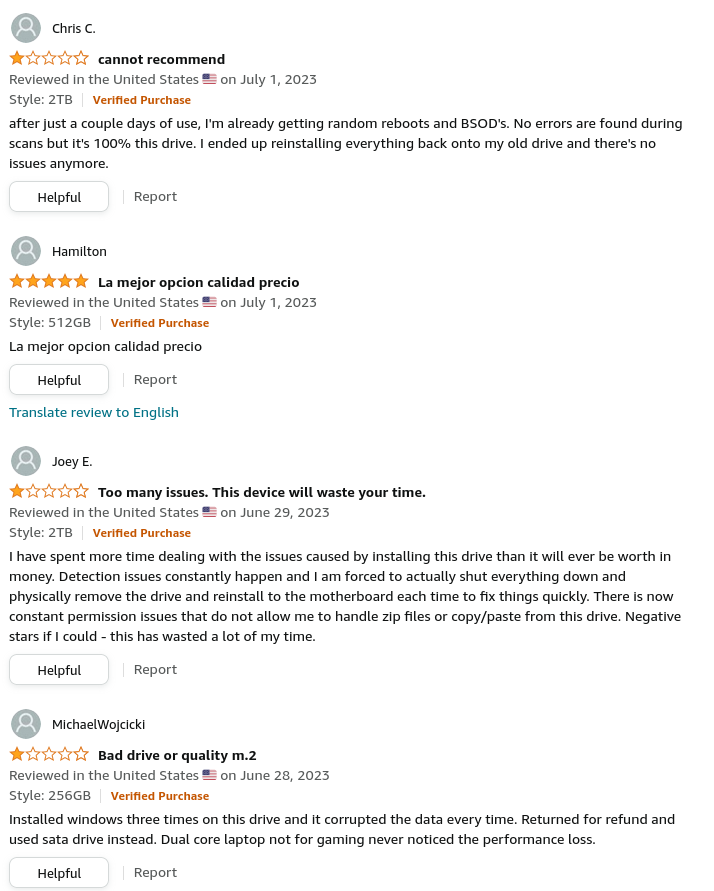
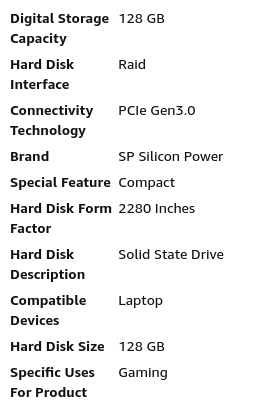
Looking at the provided specs on Amazon makes me question the seriousness of the offer. Looking into some of the most recent reviews reveals:

Maybe you want to try an SSD from one of the major brands (bought from a trustworthy shop with good guarantee service) instead?

Hey @BlackJack, that is another possibility I didn’t consider, not familiar with that brand.

I use Amazon but only purchase preferred component brands that I’ve used for many years without a failure. Depends on the availability when I search for items specifically.

For what it’s worth, this is Roon’s recommended hard drive for a ROCK for small to medium-sized libraries.

It seems like the consensus is it’s a hardware issue. Insufficient RAM makes more sense given the crashes always happen after a few days of use and not sooner but I’ll keep this in mind in case the extra RAM doesn’t solve the problem.

This topic was automatically closed 45 days after the last reply. New replies are no longer allowed.