MacMini Core that cannot be upgraded to 2.0 so runnning roon Legacy 1.8. Now core has downloaded an upgrade to an unknown version but won’t play until i complete the upgrade. Why won’t Roon core leave me on 1.8 Legacy? How can I stop the upgrade?
This 2.0 rollout is a mess and ruining my Roon experience.
Nobody reported any issues and you are missing a released update for 1.8 that it will definitely ask you to install, so I’d say it’s as safe to assume as anything can be where humans are involved.
Usually you can click on “Details” in that update dialog, which’ll take you to the release notes, giving concise version and change info, so no need to opine about…
I was finally able to access the release notes. The release is Roon 2.0.9. Since i’m running Legacy 1.8 how can i install this upgrade on an older MacMini?
I’m stuck:
Roon won’t work unless i install the 2.0.9 upgrade but that will remove 1.8 Legacy which is what i must run.
Is there any way to remove this upgrade before it installs?
Thank you for your patience in awaiting responses from Roon support.
I have a suggestion and I think it’s going to work out well for you. Roon Server. It puts a headless version of Roon core on your Mac and would also ensure you’re running the latest and greatest 1.8 build. It also doesn’t require that you leave Roon running for your remotes to function. I have a canned response I normally use but the links are all for 2.0 so let me know if anything isn’t clear here!
Take a backup of your database. Make sure it’s somewhere completely outside of the Roon ecosystem like your desktop or documents folder.
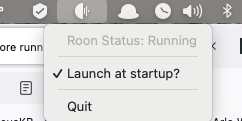
This will put a Roon icon across the top of your Mac like mine seen here:
Click the icon and check the launch at startup option. I would restart the Mac here for good measure.
Reinstall Roon with my link here. Both of my links will link directly to the legacy downloads you need.
Log in to Roon and you will see the Roon Server core as an option. Select it (don’t click use this Mac).
Reimport the database you backed up in step 1!
You would likely have to follow the steps to rename everything anyway. I’m hoping this setup will not only fix your problem but also, improve your experience.
I think this is a great suggestion, however, since my MacMini is over 10 years old with no ability to update the OS it is now likely a security issue with the handwriting on the wall.
I’ve decided to build or purchase a new server and decommission the MacMini. I will then move the core and database to the new server and put all my music on additional internal or external storage.
Well when it’s time, it’s time. I am using an M1 Mac Mini for personal, Roon, Roon work, and Roon Core functionality. I love it and would definitely suggest you look into Roon Server as a way to kick off the new setup. Feel free to message me on this topic if you want to go that route and need a hand.