What is the operating system of your Roon Server host machine?
· MacOS
What kind of device are you using to perform the login?
· Mac
Where are you trying to login?
· I can't log into TIDAL, KKBox or nugs
Have you been redirected to the Tidal/KKBOX/nugs login page in your browser?
· Yes
Please try clearing the browser cache and cookies for the [l](https://account.roon.app/)ogin page where you have been redirected
· No, the issue remains the same
Content / Popup Blockers
· No, the issue remains the same
Temporarily try to use a different browser
· No, the issue remains the same
Please try to restart your Roon Server by closing the Roon Server app in the taskbar (MacOS), task manager (Windows) or rebooting your Roon Server machine.
· No, the issue remains the same
Different device
· I cannot switch to a different device
Are you still facing the issue on the different device
· No, the issue remains the same
Record the timestamp
· I don't know how to do that
Describe the issue
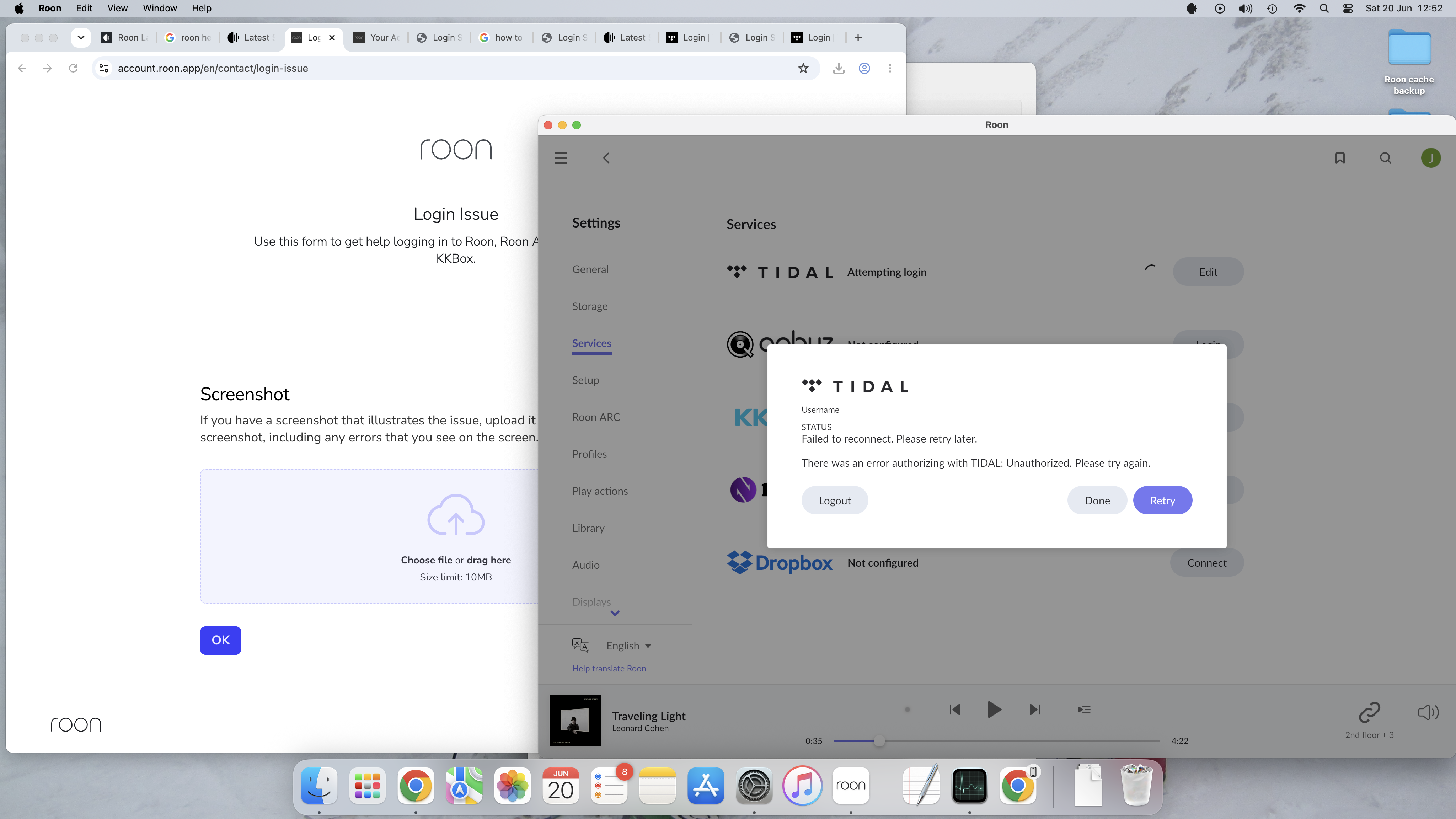
Each time i log onto Roon it is 'attempting login' with Tidal, and not succeeding. Sometimes, after many attempts (20mins of trying
I have gone ahead and enabled diagnostics mode for your account and what this action will do is next time your Roon Server is active, a set of logs will automatically be generated and uploaded to our servers for analysis.
For some reason it is not reaching our servers, even after I tried re-enabling diagnostics on your account. I also ran a quick test and I was able to submit a similar report from my setup here, so something else is going on.
So we can move forward, I was hoping for now you could use the directions found here and send them to our Logs Uploader Service and let us know after, thanks!
Wanted to follow up on this and see if you had a chance to try the log collection steps we sent over. We enabled diagnostics on your account, but since the logs still were not reaching our servers, we asked that you gather them manually from the logs instructions and upload them through the Logs Uploader Service. Let us know once that is done, or if you run into anything along the way, thanks.
From the logs, we can see the actual Tidal/account login POST (api.roonlabs.net/accounts5/accounts/3/login) times out. With that, your Tidal login is actually a symptom, not the cause. The real failure is that this Roon Server cannot reliably reach Roon’s cloud servers at api.roonlabs.net.
This signature of issue usually points to something on the local network or machine blocking or throttling sustained HTTPS connections to Roon’s cloud, most commonly:
A firewall, security suite, VPN, or content/ad blocker on the iMac or router interfering with *.roonlabs.net
ISP/router-level filtering or a flaky route to Cloudflare
A DNS setup that resolves to an unreachable or geo-wrong Cloudflare edge (some Pi-hole / custom-DNS / DoH configs cause exactly this)
Do you have any active VPNs or third party firewall/security active on your server machine or router?
Here are the best next troubleshooting steps for you with the above in mind:
Bypass local DNS and security layers as a test. Temporarily set the iMac/router DNS to a clean public resolver (e.g. 1.1.1.1 or 8.8.8.8), and temporarily disable any VPN, firewall, antivirus, ad/content blocker, or Pi-hole. Confirm Roon is allowed through the macOS firewall.
Try a different network path. Tether the iMac to a phone hotspot briefly. If login succeeds on the hotspot, the problem is the home network/ISP/router, not Roon or the account.
Reboot the router, not just the Mac. The single-IP Cloudflare timeout can be a stale NAT/connection-tracking state on the router.
It looks like I’ve got it working (at least it managed to connect 2 out of 2 times now).
What I did (differently) was to put ‘on’ the firewall (it was off) and make sure it has Roon, RoonServer and RAAT server are in the ‘allowed incoming connections’.
Still takes quite long to connect when I start it up but it did manage to start and play, which is better than the past several weeks..
That’s good news - thanks for the update and for detailing exactly what you changed, that’s a useful data point.
Let’s give it a few days of normal use before we call this one solved. Since the initial connection still takes longer than it should, the underlying issue may not be fully gone - so if the login stalls return, please note the exact date and local time of the attempt and post it here. Diagnostics are still enabled on your account, so with fresh timestamps we can check what’s happening on the connection to our servers at that exact moment.
Keep us posted - we’ll leave this thread open in the meantime.
Is everything still working as expected? If you encountered any issues, please let us know the time & date when you notice it. If we don’t hear back from you, this thread will auto-close, and should the issue persist later on, just let us know by submitting a reopen request using the same initial contact form. Thanks!
Hi Noris, looks like I celebrated too soon. It now can’t find the roon server (waiting for your roon server) and get through. (around 19:55-20:00 Singapore time)
ok, after quitting Roon and restarting the Roon server is now found. It then tells me that there is an issue logging into Tidal again. But if I ‘logout’ of Tidal and re-login it connects and then Roon works again. So with lots of trying I’m able to get it on, but it is not smooth yet. So I’d appreciate if you can dig into it some more.
Thank you for the update and for detailing your workaround.
While you are experiencing this as a Tidal login failure (and occasionally losing connection to the Roon Server itself), the underlying cause remains a network stability issue. As we noted from your previous logs, your iMac is having trouble maintaining a stable, sustained connection to Roon’s cloud servers (api.roonlabs.net). Forcing a logout and re-login to Tidal seems to temporarily push the connection through, but this behavior confirms that something in your local network environment—such as router settings, ISP routing, or DNS configuration—is sporadically dropping or throttling the connection.
To help us dig deeper into exactly what is interrupting this connection, we need to capture a fresh failure. The next time you experience this stall or connection drop, please note the exact date, time, and your local time zone, and share it here in this thread.
Since your account diagnostics are still enabled, having a precise timestamp will allow us to check our server logs to see exactly what is happening at the exact moment your connection fails.