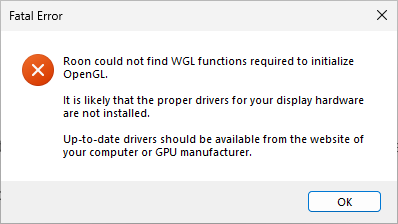
Roon fails to start due to missing Open GL Display Drivers [before and] after Intel Graphics update (ref#W7U04X)

Hi! What’s not quite right with Roon?

· Roon is slow, freezing or won’t start

Roon is slow, freezing or won’t start

· Roon won’t start up at all

Tell us what's going on

· Open GL Display Drivers are missing. I updated the Intel Graphics card to the latest version. Roon will not start.

Tell us about your home network

· WiFi 7 Router. Been running fine for two years straight. Never had this issue before. No other hardware or software has an issue.

Hi @Loyd_Turner,

After the graphics driver update was the machine rebooted? If not it’s worth performing a manual reboot to make sure there are no funny states.

If that doesn’t work, consider rolling back the Intel update.

You may need to install Microsoft’s OpenGL Compatibility Pack. See:

Thanks for the reply. I did reboot the computer several times after the Intel graphic driver update. The Roon - Open GL issue was happening BEFORE the Intel driver update which is why I was trying the Intel driver update, so I doubt rolling it back would resolve anything. I am going to try the reply above if I can figure out how to do what it says.

Thank you Geoff! I installed the Open GL Compatibility Pack through the Microsoft App store and that resolved the issue with Roon and Open GL. My stress is greatly reduced for this weekend!
Hi @Loyd_Turner,

Thanks for the clarification, I misinterpreted your first post thinking the issue had occurred after the driver update.

Glad @Geoff_Coupe advise helped and your up and running again.