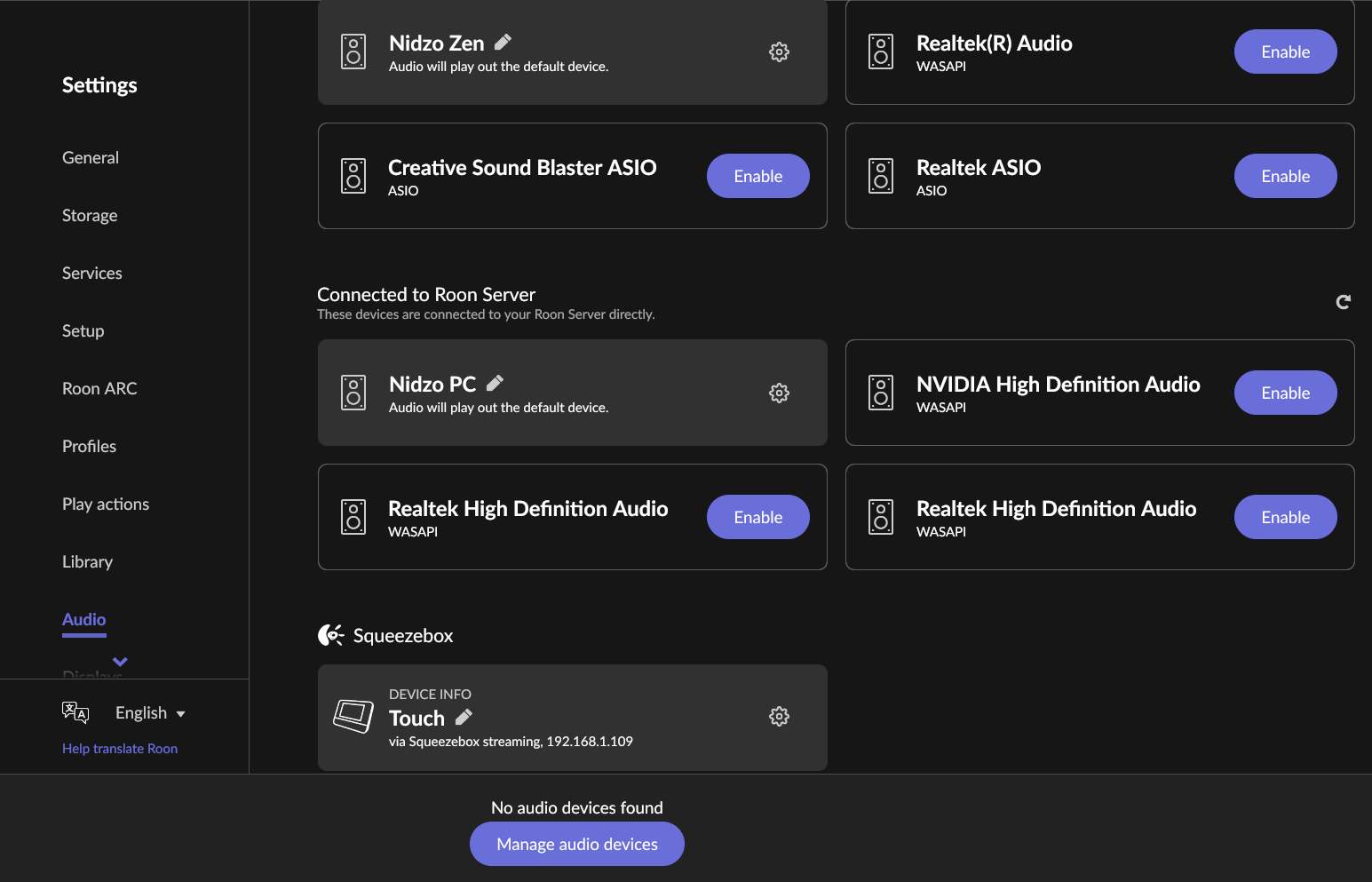
· Server on windows11 PC. In Audio settings i can see as enabled the local audio device, a SB Touch, a notebook connected with Roon, an android smartphone.... All enebled. But Roon says "No audio devices found - Manage audio devices". But the audio devices are already managed. The problem came after a restart of the core machine. I don't know if this is connected to the latest update (2.66): the day of the update, and the day after, everything was ok.
Tell us about your home network
· The router is a Fastgate (proprietary of the provider, Fastweb). It should be WiFi6, but the core is connected via WiFi5. Touch is on ethernet. There is an externder, but it's in the garden and is not used by the core PC. I have installed on the PC ZeroTier. But disabling it does not have effect. And basically the problem is not network related: the roon core PC cannot play on its own audio device neither.
Thank you for the detailed report! Since your core PC cannot even play to its own local audio devices, the issue isn’t with your Wi-Fi or router. Instead, it points to a communication block inside Windows between Roon’s core engine and its audio output process (RAATServer), or an issue with network interface priorities.
Here are the three most likely culprits we need to check:
1. Disable the ZeroTier Virtual Adapter Even when the ZeroTier app is paused, Windows often keeps its virtual network adapter active. Roon may be binding to this virtual adapter instead of your main local network.
Go to Windows Settings > Network & internet > Advanced network settings (or Network Connections).
Find the ZeroTier virtual adapter, right-click it, and select Disable.
Restart Roon Server and check your audio zones.
2. Refresh the RAATServer folder Sometimes the local audio configuration cache gets corrupted during a restart. Let's force Roon to generate a fresh one:
Exit Roon completely.
Press Win + R on your keyboard, type %localappdata%\Roon, and press Enter.
Find the folder named RAATServer and rename it to RAATServer_old.
Restart Roon, navigate to Settings > Audio, re-enable your devices, and see if they appear in the zone picker.
3. Check Windows Firewall A restart may have triggered a Windows Firewall update that is blocking Roon's internal traffic.
Please navigate to your Windows Firewall settings and ensure that exceptions are added for Roon.exe, RoonAppliance.exe, and RAATServer.exe, and that they are checked for Private networks. As a quick test, you can temporarily disable the Windows Firewall to see if the audio devices immediately appear.
Hallo @vadim
I’ve tried the 3 steps (all of them)
-disabled zerotier adapter
-disabled windows firewall
-“removed” the RAATServer folder (in my installation, it’s not a subfolder of /AppData/Local/Roon, but it is /AppData/Local/RAATServer
after rebooting and restarting Roon, a new RAATServer folder is created.
In Audio settings, the SB Touch is already enabled. While i had to eneble the PC local audio device.
But still, i get the “No audio devices found” message.
Sorry, I have a correction to my ticket: the core PC is a windows 10 OS, not win 11.
Hi.
Living without music is … impossible.
So, I’ve kept trying enabling and disabling stuff…
I’ve tried disabling the firewall and the zerotier adapter. it did not work.
But then, restarting roon server, the local device reappeared. it does not seem to be network related, and restarting the firewall and zerotier did not interrupt the device.
About the Touch: i’ve tried a factory reset… and after some struggling (the touch did not seem to connect to roon…)… finally it appeared on the avaiable devices!
And i’ve just tried with the android phone: and here it is.
The only device still not working is the win11 notebook. it is connected and enabled… but not available.
One thing: the notebook had zerotier (I use ZT since many years…), and after anabling/disabling the adapter, now i see in roon 2 istances of the notebook, with 2 IP addresses: the standard 192.168.1… and a zerotier 171.25… IP. as far as i remember, there used to be only ONE istance.
final piece of information: the problems have shown up after the first core PC restart since the 2.66 roon update.