· Roon server is only show Qobuz cd quality options. The Hi-Res album options are no longer showing. I changed my Qobuz subscription from monthly to yearly. After that I only see the CD quality album options. The Qobuz native application shows the expected Hi-Res album options. So I do not believe it is a Qobuz subscription issue. I have a ROON Nucleus One server running version OS 2.1 (build 271). The Roon Server software is version 2.71 (build 1683). I have signed out of Qobuz in setting services and restarted the Roon server. I have tried shutting down completely and even waiting a few days to see if it would start working. From what I have read it could be a caching issue but not sure how to correct this. Let me know what other information is required to help you identify what the issue is. Thanks.
Tell us about your home network
· I am using an eero 7 wireless router, the Nucleus One server is plugged into an unmanaged 5 port switch that is conned to the above router. No VPN. Internet router is plugged into the eero 7. Internal devices running the Roon app are connected via WiFi to the eero 7.
I have done this multiple times. I even tried signing out shutting down and leaving it down overnight before restarting. It always comes back to the same thing when I sign back into Qobuz.
AceRimmer
("I’m not just a hero; I’m a legend!")
6
Yeah, I see that now in your original post, my bad.
Silly question.
When you changed from monthly to yearly you are sure you kept the sublime subscription level option?
I know you said you can see the hires albums in native Qobuz but can you actually play them at full hires?
Yes. Thanks for the response. Good question. It shows my subscription as Studio Solo. I am able to select and play the Hi-res option from the Qobuz application. Since this is from my phone or iPad it says the actual file playing is 16bit. Without the Roon server i do not really have a good way to play the Hi-Res version.
AceRimmer
("I’m not just a hero; I’m a legend!")
8
Well I am out of ideas as Studio Solo is 24/192.
Hopefully Support will have some further insight.
Thanks for the logs. Your Qobuz sign-ins are all succeeding and the account comes back with Hi-Res available, so the subscription side is fine.
Could you please pick one album where the Qobuz app offers a Hi-Res version and Roon shows only CD, then open that album in Roon and note the date and time you did it, including your time zone? Please post the album name and artist, that timestamp, and a screenshot of how the album looks in Roon.
With the timestamp we can go into the logs and see exactly what came back for that album, rather than guessing from the library as a whole.
If I change the Mobile data streaming setting in the Qobuz mobile app to Hi-Res the phone does show it is playing a Hi-Res version now. So I think the Qobuz account is ok. But who knows. Will see what support thinks. Thanks agin for the suggestions.
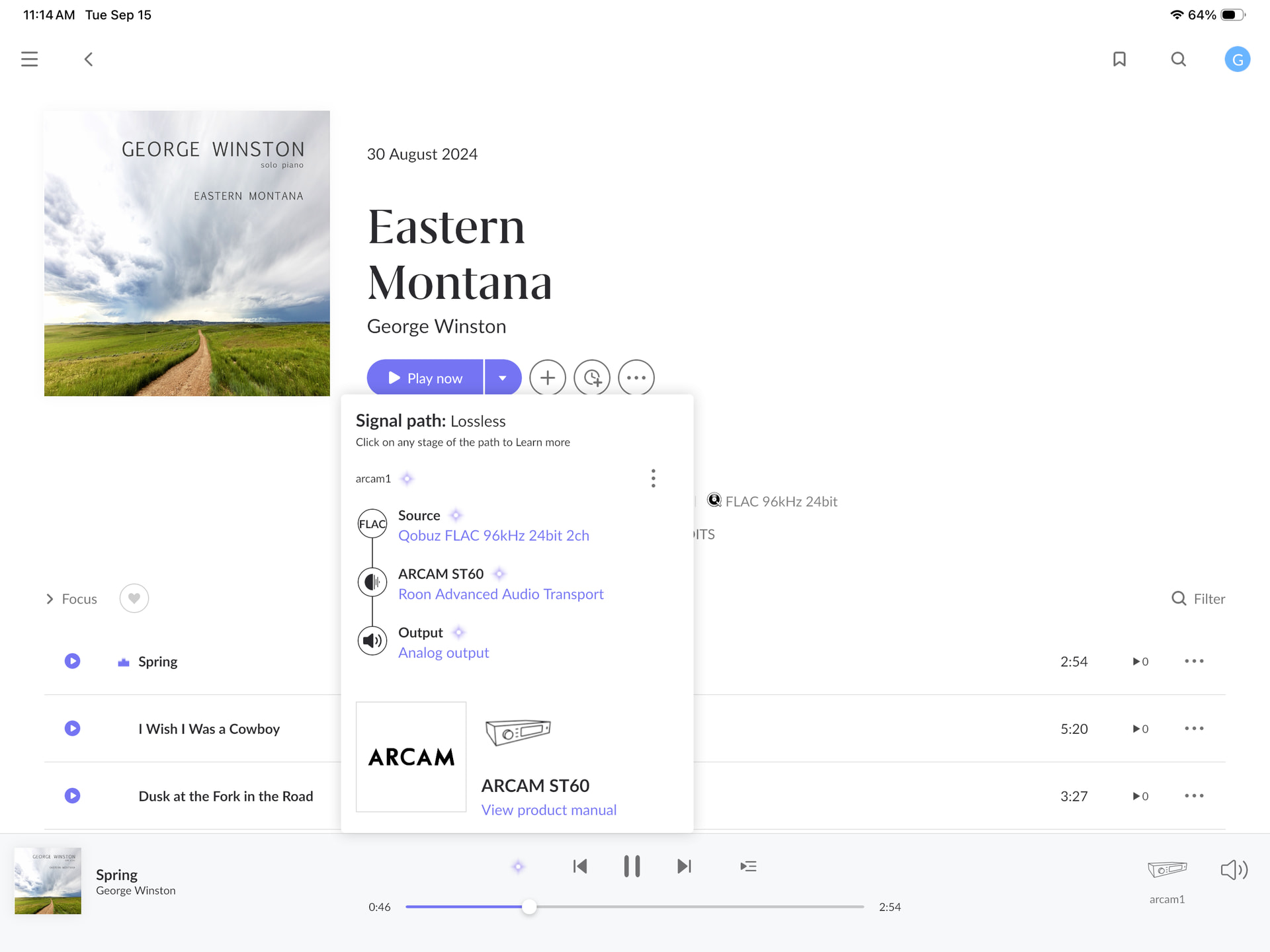
Hi Vadim, at 11:13am EST I played George Winston Eastern Montana. Song Spring. Interestingly the album icon does not show Hi-Res but the file is playing at 24bit / 96kHz.
Why would it not show as being a Hi-Res album in the Roon selection?
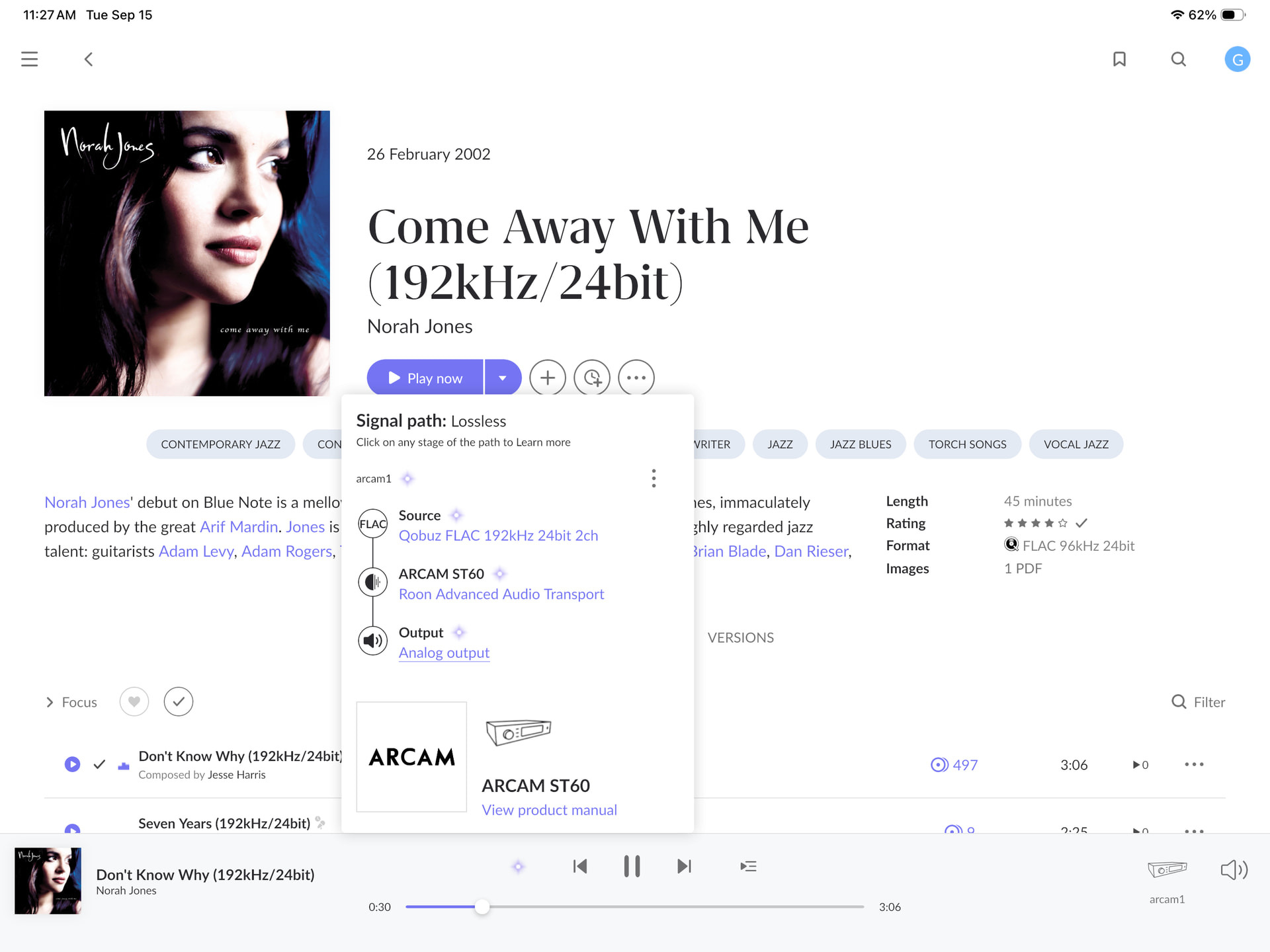
Here is another played at 11:27am. Norah Jones Come Away With Me. 24bit / 192kHz.
So this just may be an expectation issue. I was assuming Roon would label Hi-Res albums like the Qobuz application does. Under the version tab I can see the different versions and play them. The streamer is also showing the higher bit rate.
AceRimmer
("I’m not just a hero; I’m a legend!")
13
You need to look at the actual signal path in Roon to see what is happening.
The little coloured dot on the left, different colours for different sample rates.
So it looks like Roon is actually playing full 24/192 from the screenshot.
Thank you everyone for your assistance. It appears it is working as it should. Sorry for the confusion. I will look for the information on what the different colors are.