What best describes your playback issue?
A connected audio device is not appearing in Roon
What type of Zone is affected by this problem?
Network Zones are affected.
How is the affected Zone connected to your RoonServer machine?
Network - Ethernet
Which network audio protocol is the Zone using with Roon?
RoonReady
Does the device show up at all in Roon Settings → Audio?
Yes, it shows up there, but it isn’t Enabled
Does the “Enable” button unlock the Zone?
I can Enable the Zone, but the Zone disappears
Does the device play audio from another source when using the same connection?
The device has no problems with another audio source
Have you checked that Roon is whitelisted in any firewalls?
I’ve checked the firewall and the issue remains
Is your RoonServer on the same subnet as the device?
My devices are on a single subnet but is not visible to Roon
Do you have a complex network setup?
Both the device and RoonServer are connecting to a single router
Try to disable any additional networking interfaces on your RoonServer machine.
Disabling network interfaces had no change in behavior
Check to make sure RoonReady mode is selected on the device.
I’ve checked this and the issue remains
If the device has multiple output options, do the other options work as expected?
Only one output type is affected while the other output type works as expected
Is the device using the latest firmware as per the manufacturer?
Firmware is up-to-date but the issue remains
Do you have an approximate timestamp of when the issue last occurred?
The issue is reproducible on demand — it occurs on every connection attempt. Most recent occurrences (25 August 2026):
- macOS Core (Mac mini): 08:15:23 local = 05:15:23 UTC
- Windows 11 Core (PC): 14:57:00 local = 06:57:00 UTC
No track was playing — the failure happens at RAAT session initialization, before any zone can be selected or playback started. Note: the two machines are set to different time zones (UTC+3 and UTC+8), so please use the UTC values when correlating logs.
What are the make and model of the affected audio device(s) and the connection type?
Marantz CINEMA 40 (AV receiver), connected by wired Ethernet. Protocol: Roon Ready (RAAT).
- Current firmware: 3.139.173, RAAT version 1.1.47 — broken
- Previous firmware: 3.88.614, RAAT version 1.1.40 — worked correctly
Both values are as reported by the device itself in the Roon Server logs.
The same physical unit also exposes AirPlay 2 (two zones), Spotify Connect, TIDAL Connect and Qobuz Connect over the same Ethernet connection, and all of those work normally. It is additionally connected to the Mac mini by HDMI, and that output works as a Roon zone as well. Only the Roon Ready endpoint fails.
Describe the issue
Summary
Roon Ready stopped working on my Marantz Cinema 40 after the August 2026 HEOS firmware update. The RAAT session fails to initialize because the device rejects Roon’s signed base.lua script with Status=InvalidCodeSignature. The network connection itself succeeds — this is not a discovery or connectivity problem.
The firmware raised RAAT on the device from 1.1.40 to 1.1.47, the version that introduced mandatory script code signing. Everything worked correctly before the update.
What the user sees
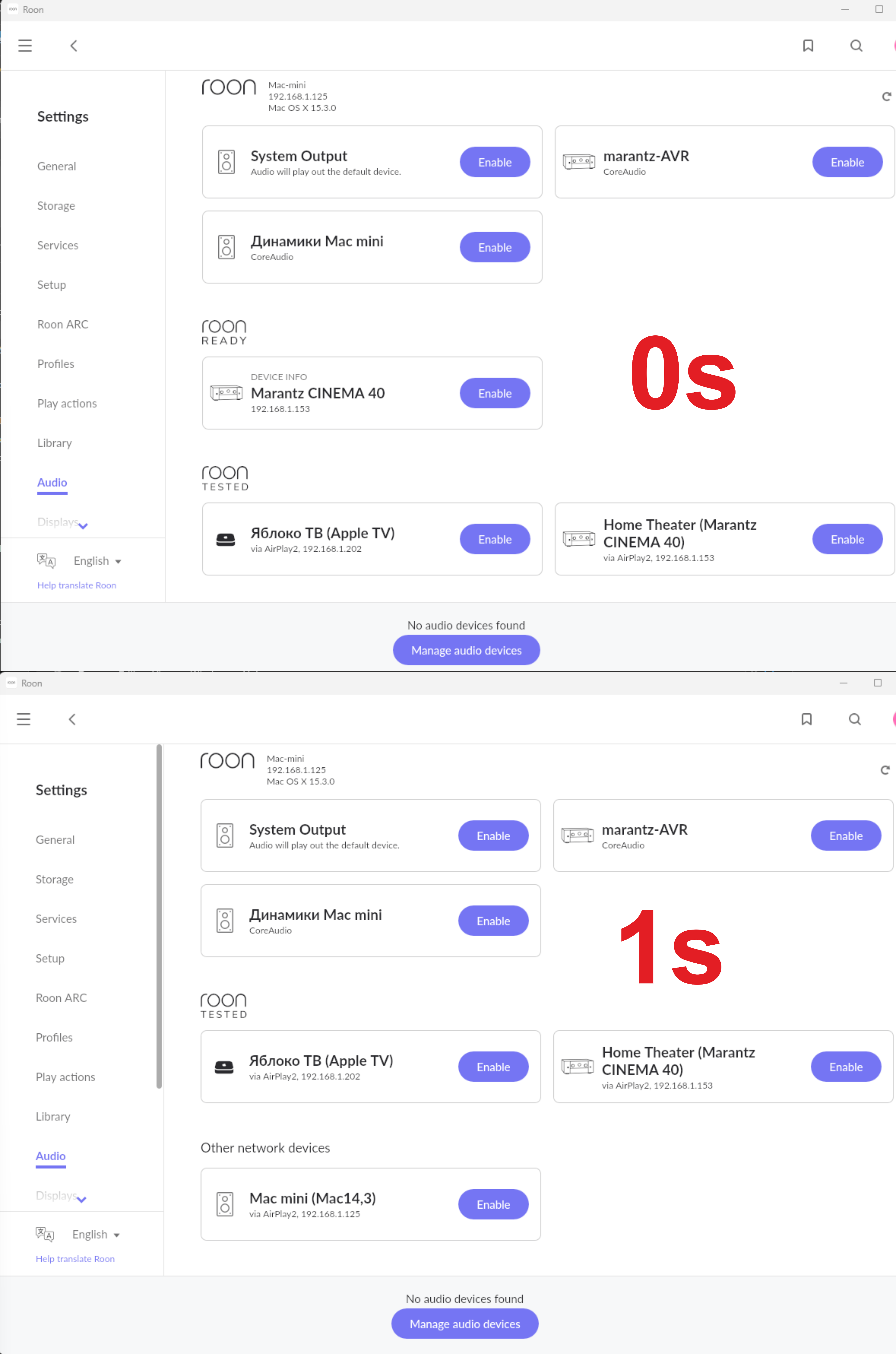
The device appears under Roon Ready in Settings > Audio for roughly one second, then the entire Roon Ready section disappears from the page. The Enable button is present but the card vanishes before it can be used — see the attached screenshot, taken 0s and 1s apart.
Log excerpt (Roon Server 2.70 build 1671 on macOS 15.3)
08/25 08:15:23 Info: [raat] Initializing RoonReady Device
08/25 08:15:23 Info: [raat]     Address:         192.168.1.153
08/25 08:15:23 Info: [raat]     Port:            35281
08/25 08:15:23 Info: [raat]     ProtocolVersion: 3
08/25 08:15:23 Info: [raat]     Version:         3.139.173
08/25 08:15:23 Info: [raat]     RaatVersion:     1.1.47
08/25 08:15:23 Info: [raat]     Model:           CINEMA 40
08/25 08:15:23 Info: [raat]     Capabilities:    []
08/25 08:15:23 Warn: [raat_ll/client] failed to connect(0) Object reference not set to an instance of an object.
08/25 08:15:23 Trace: [raatclient] Initializing RAAT session
08/25 08:15:23 Trace: [raatclient] Loading script .../Resources/base.lua as module base [1088 chars]
08/25 08:15:23 Warn: [raatclient] .../Resources/base.lua failed: Result[Status=InvalidCodeSignature]
08/25 08:15:23 Warn: [raatclient] RAAT Session failed to initialize
08/25 08:15:23 Trace: [raat] => ConnectionFailed
This repeats for 5 attempts, then gives up. Note that Roon successfully reads the model, serial and version fields from the device before the failure, which confirms the TCP connection is established. Capabilities comes back empty because the session never initializes.
Before and after the firmware update
Working, 07 July 2026: device firmware 3.88.614, RaatVersion 1.1.40, Roon Server 2.47 build 1510 (RAATVER 1.1.39). The same base.lua [1088 chars] loaded without error and the session initialized normally. I still have these logs.
Broken, 25 August 2026: device firmware 3.139.173, RaatVersion 1.1.47, Roon Server 2.70 build 1671 (RAATVER 1.1.48).
The script is byte-identical in both cases, so nothing changed on the Roon side. The signing key also loads normally on the server:
[raatmanager] added codesigning key keypair_name=Roon
public_key=9bb28e4e9e34ed4ff75c6a35339497cbdd3420713c941f5468571afc03555bf7
Reproduced on a second, unrelated machine
I installed Roon Server 2.70 build 1671 fresh on a Windows 11 PC — different hardware, different OS, different network stack, no shared configuration — and made it the Core. Identical failure:
08/25 14:57:00 Trace: [raatclient] Loading script raat.dat:base.lua as module base [1088 chars]
08/25 14:57:00 Warn: [raatclient] raat.dat:base.lua failed: Result[Status=InvalidCodeSignature]
08/25 14:57:00 Warn: [raatclient] RAAT Session failed to initialize
On Windows the script is loaded from the packed raat.dat, on macOS from the app bundle. Different packaging, identical size, identical rejection — which rules out local file corruption on the server side.
Setup
Roon Server 2.70 build 1671, Mac mini M2 running macOS 15.3, wired Ethernet. Second Core tested: Windows 11 PC, wired Ethernet. Marantz Cinema 40, wired Ethernet, Roon Ready enabled in the receiver’s network menu. Single router, single /24 subnet, no VLANs, no managed switches, no mesh.
Notes on my questionnaire answers
Some of the multiple-choice options above did not fit exactly, so to be precise:
- On whether the device shows up and can be enabled: it does appear under Roon Ready with an Enable button, but the card — and the whole Roon Ready section — disappears after about a second, so in practice it cannot be enabled.
- On subnets: everything is on one /24. The device is visible to Roon and the TCP connection to it succeeds; the failure happens after that, at signature verification.
- On additional network interfaces: verified on both machines. In the RAATServer logs Roon enumerates all interfaces and only the physical LAN adapter has an IPv4 address — every VPN/tunnel adapter is listed as
SKIPPED: no ipv4, and multicast sockets bind to the physical interface. Quitting the VPN clients entirely changed nothing. - On firmware: the device is on the latest version offered by the manufacturer’s update server. That version is what introduced the problem.
Also already ruled out
- Multicast/mDNS, IGMP snooping and AP isolation — discovery works and AirPlay endpoints on the same device are stable
- Firewall — checked on both machines; inbound Allow rules for
roon.exeandraatserver.exeare present and enabled on Windows - Device clock — the receiver resolves and reaches NTP normally, verified in my DNS server’s query log
- Static IP versus DHCP on the receiver — same result either way
- Network settings reset on the receiver, power cycling, toggling Roon Ready off and on, restarting Roon Server
- Renaming the RAATServer folder to force a fresh identity — a new
unique_idwas generated and the failure was unchanged
Other protocols on the same device work
Over the same Ethernet cable, AirPlay 2 (both zones visible in Roon), Spotify Connect, TIDAL Connect, Qobuz Connect and HEOS all work normally. The HDMI output from the Mac mini into the same receiver also works as a Roon zone. Only Roon Ready fails.
Question
Is this a known issue with RAAT 1.1.47 code signing on HEOS-based devices, and is there anything actionable on my side? Full logs from both machines, including the July logs from before the firmware update, are available on request — along with the device serial and UniqueId, which I have left out here since this thread is public.
Describe your network setup
Single router: ASUS GT-AC5300, stock firmware. No mesh, no range extenders, no managed switches, no VLANs. Everything on one flat 192.168.1.0/24 subnet.
All three devices are connected by wired Ethernet to the router:
- Mac mini M2 (Roon Server, macOS 15.3) — 192.168.1.125
- Windows 11 PC (second Roon Server tested) — 192.168.1.146
- Marantz Cinema 40 (Roon Ready endpoint) — 192.168.1.153
The receiver’s Wi-Fi is unused; it is wired only. Tested with both DHCP and a static IP on the receiver, with the same result.
DNS on the LAN is handled by a local AdGuard Home instance on the Mac mini. The receiver’s own network diagnostics report Connection, Router Access and Internet Access all OK, and its NTP and firmware-check requests resolve and complete normally (verified in the AdGuard Home query log).