Roon Remote 2.60 with EA 2.59 - phone audio disabled

Reporting what looks to be a bug with Roon Remote on Android.

I updated Roon Remote to early access version 2.60 on an Android 16 phone on Feb 13, 2026.

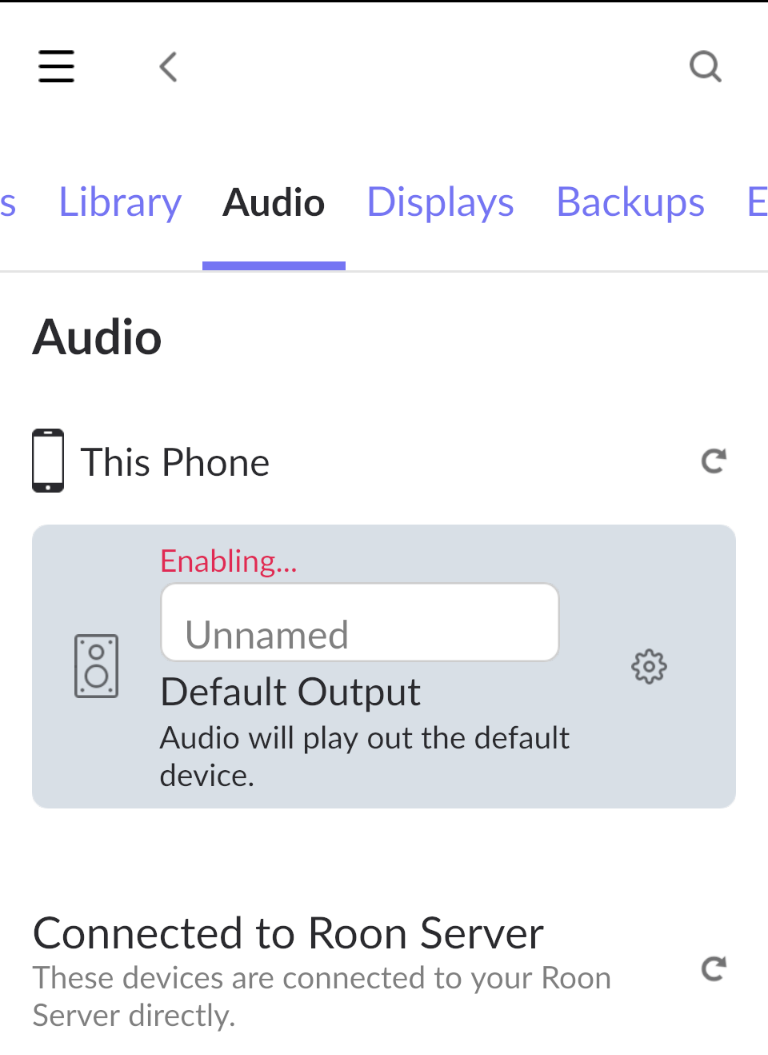
The Roon phone app shows “Default Output” is “Enabling…” but it doesn’t complete the activity. As a result, the phone is no longer listed as an available Roon audio device.

Roon server Early Access version is 2.59

1 Like

I actually just had this issue. Phone on 2.60, but I noticed my server was still on 2.58. Updating it brought my phone back as being an option to play audio on.

1 Like

There is an issue with Roon Bridge compatability between 2.60 and EA that has the same symptoms.

Roon is aware of the issue, but you’re unlikely to receive a response until after the weekend.

This has happened to me on iPhone for a very long time occasionally (not very often). I restart the app and then it works. I think I may have mentioned it once in a problem report but I can’t be bothered to follow up because it’s not often enough to annoy me

My Roon server is version 2.59 and I’m still experiencing the issue.

Restarting the Roon Mobile app hasn’t helped.

Sharing a snippet of logs from my phone in the hopes it will help track down the source of the problem. Note the InvalidCodeSignature error message:

`02-14 15:46:56.580 15122 15170 I raatmanager: [0000117] 184.458 [discovery] unicast socket is bound to 0.0.0.0:9003`
`02-14 15:46:56.605 15122 15170 D raatmanager: [0000118] 184.483 [discovery] broadcast op is complete`
`02-14 15:46:56.685 15122 15170 V raatmanager: [0000119] 184.562 [jsonserver] [192.168.114.76:49236] accepted connection`
`02-14 15:46:56.686 15122 15170 V raatmanager: [0000120] 184.564 [jsonserver] [192.168.114.76:49236] GOT[LL] [1] {“request”:“enumerate_devices”,“subscription_id”:“0”}`
`02-14 15:46:56.688 15122 15170 V raatmanager: [0000121] 184.566 [jsonserver] [192.168.114.76:49236] SENT [1] [nonfinal] {“devices”: [{“auto_enable”: true, “device_id”: “default”, “auto_name”: “Pixel 9 Pro”, “type”: “android”, “name”: “Default Output”, “is_system_output”: true, “config”: {“volume”: {“device”: “default”, “type”: “android”}, “output”: {“device”: “default”, “type”: “android”, “name”: “Default Output”}, “unique_id”: “00000000-1111-2222-3333-555555555555”, “external_config”: {“is_private”: true}}, “discovery_data”: {“tcp_port”: 45913, “code_signing_keys”: “Roon”, “unique_id”: “00000000-1111-2222-3333-555555555555”, “raat_version”: “1.1.47”, “version”: “N/A”, “vendor”: “N/A”, “protocol_version”: “3”, “model”: “N/A”}}], “status”: “Success”}`
`02-14 15:46:56.828 15122 15170 V raatmanager: [0000122] 184.706 [jsonserver] [192.168.114.76:49236] GOT[LL] [2] {“request”:“enable_device”,“device_id”:“default”,“subscription_id”:“119”}`
`02-14 15:46:56.828 15122 15170 V raatmanager: [0000123] 184.706 [jsonserver] [192.168.114.76:49236] SENT [2] [nonfinal] {“status”: “Success”}`
`02-14 15:46:56.834 15122 15173 V raatmanager: [0000124] 184.712 [RAAT::Default Output] [server] [192.168.114.76:49237] accepted connection`
`02-14 15:46:56.835 15122 15173 D raatmanager: [0000125] 184.713 [RAAT::Default Output] Reusing cached supported formats list.`
`02-14 15:46:56.837 15122 15173 V raatmanager: [0000126] 184.715 [RAAT::Default Output] [session] [192.168.114.76:49237] created: 0xb400007546d5ad90 (0xb4000075b6debb18)`
`02-14 15:46:56.848 15122 15173 V raatmanager: [0000127] 184.726 [RAAT::Default Output] [server] [192.168.114.76:49237] SENT[LL] [1] {“status”: “InvalidCodeSignature”}`
`02-14 15:46:56.857 15122 15173 V raatmanager: [0000128] 184.735 [RAAT::Default Output] [server] [192.168.114.76:49237] read: eof`
`02-14 15:46:56.858 15122 15173 V raatmanager: [0000129] 184.735 [RAAT::Default Output] [server] [192.168.114.76:49237] destroying client`
`02-14 15:46:56.858 15122 15173 V raatmanager: [0000130] 184.735 [RAAT::Default Output] [session] [192.168.114.76:49237] destroying session`

Not sure how the unique_id value is used so I obfuscated it for privacy.

Similar issue here. Just with my PC. On my phone Roon works normally.

Early Access is NOT 2.60, or shouldn’t be, I suppose:

The 2.60 version is in Production:

You are running a mix of EA and Production and you should not.

It’s possible that Roon somehow messed this up and the 2.60 was pushed through Android Play Store anyway, even if you’re in the Android Beta update channel for Early Access, and although it’s incompatible with the Early Access Server version. I don’t know. EDIT: Yeah seems like this is the case, see the next post below :roll_eyes:

It’s also possible you didn’t join your Android version to Beta in the Play Store (which are the EA versions) but are installing the Android production versions. Probably best to verify this:

Updating Android apps to earlyaccess

Access to Roon’s Early Access releases on Android is via the Play Store’s public beta program. You can join Roon’s public beta by following these steps:

Important: To get the beta version of an app, the app must already be installed on your device.

  1. Open the Play Store.

  2. At the top right, tap the profile icon.

  3. Tap Manage apps & devices → Installed.

  4. Tap the Roon app to open its detail page.

  5. Under “Join the beta,” tap Join → Join.

  6. Repeat steps 4 and 5 for the Roon ARC app if installed on your device

If you prefer you may also download and install the earlyaccess apk package from the link below.

See:

It looks likedespite having Early Access in Android Play Store the Roon download is the 2.60 production 1629 build so the ‘enabling’ spin forever will happen.

For some reason my Macbook wasn’t on the EA builds and worked OK until I updated to 2.60 this afternoon when it failed. Switching to EA fixed it, so that is the solution.

But how do I switch my Linux RoonBridge to EA (I can only find RoonServer on the EA site) or ditto Ropieee?

Wonder why Roon broke the EA like this by rushing through a production change without going via EA?

Ok, good info, that’s bad and apparently one more thing that Roon Labs missed to consider for EA users :frowning:

As for bridge, they apparently forgot about this incompatibility with EA as well:

1 Like

Suedkiez, good catch on the prod version and the early access mismatch! That was cause of my issue and was resolved by installing the Roon supplied APK file with the correct EA version.

The following was what happened to me.

1 Like

Yeah, thanks to @Brian_Jones1 for catching this.

Be aware that (as far as I know) once you install an APK, the Play Store will stop updating it. (Which is a good thing right now). But to get back to automatic updates later, you’ll have to uninstall the APK version and reinstall from the Play Store, I think.

I got round it by simply running ARC which has yet to update (or simply doesn’t have the problem). The Roon Devs seem pretty good and this should be an easy fix - simply push the Production 2.60 as the EA release and check all the clients (including Linux RoonBridge and Ropieee, which I suspect uses it under the covers) all work.
1 Like

This topic was automatically closed 36 hours after the last reply. New replies are no longer allowed.