What’s happening?
· Other
How can we help?
· None of the above
Other options
· Other
Describe the issue
Roon reporting hundreds of corrupt files
Describe your network setup
Hard-wired 1 and 2.5Gb network, Roon Rock using NAS to Mac storing music

· Other
· None of the above
· Other
Roon reporting hundreds of corrupt files
Hard-wired 1 and 2.5Gb network, Roon Rock using NAS to Mac storing music
Roon in general is working well. Plays music etc.
But in the log I noticed it complaining about lots of corrupt files.
Hadn’t seen that before. It’s in about 10 of the 20 Roon log files on my system.
Also, I tested one of the reported “corrupt” tracks via itunes and it played fine.
Not sure what’s going on. Thanks.
–Peter
Hi @Peter_Galvin1,
The warning and error traces you’ve shared related to Roon’s indexer and shouldn’t affect decoding or playback.
RoonServer was scanning files in your local storage in the background. The listed files tripped up the extraction service as it attempted to parse metadata and embedded file info. This could be something as inconsequential as an unexpected header format, or it could represent a more serious issue with tags you’ve added to these files.
Unless you’re experiencing discrepancies with the listed files when it comes to tagging, indexing, searching, or other features within Roon, you can consider this log trace to be functionally harmless.
You can try navigating to your Settings → Library tab in Roon and performing a library Clean Up.
You can also inspect these files in a third-party tag editor if you’ve used one.
Let us know if we can answer any questions.
Thanks much. Did the library cleanup.
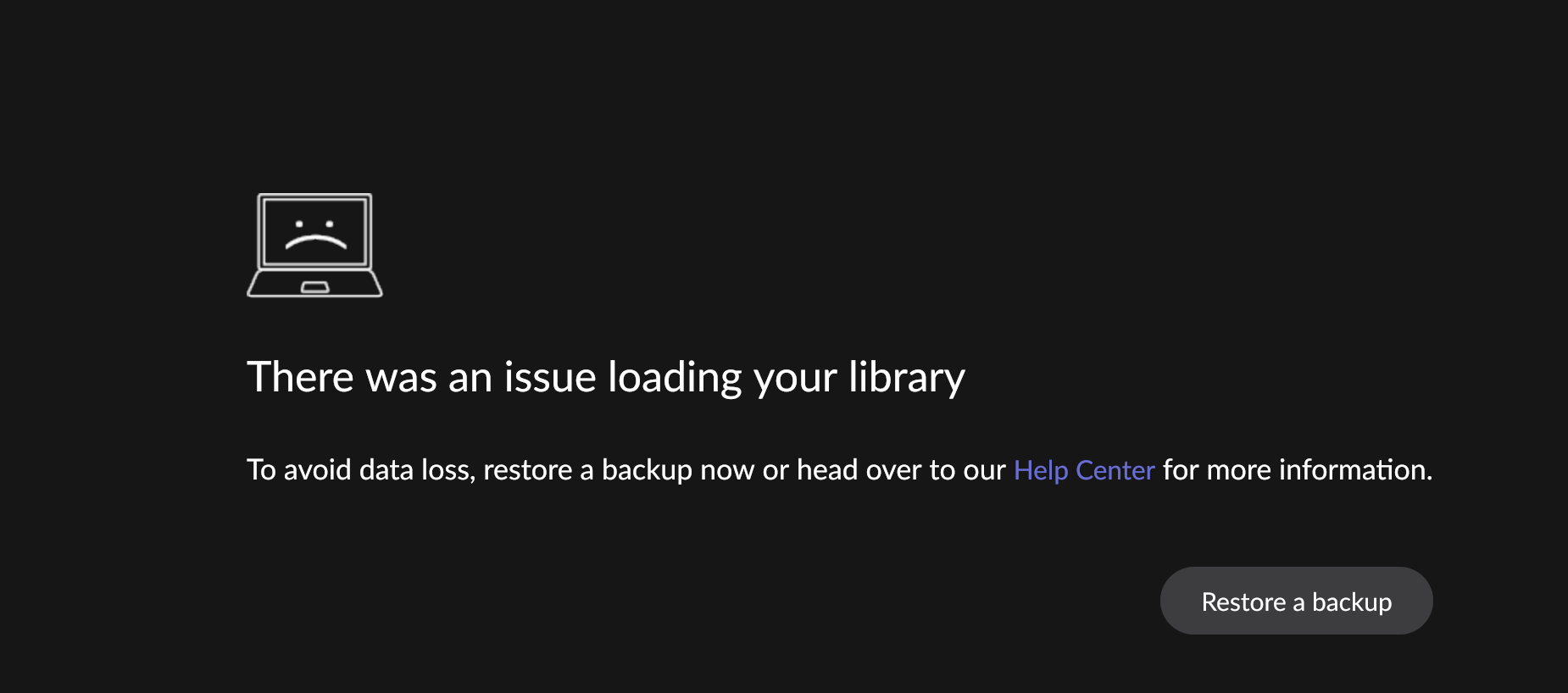
Possibly unreleated but over the past several days I’ve been seeing this every morning:
Rebooting the system seems to solve it each time, no restore needed.
In the log file I do see this:
 Error: [broker/database] corruption detected: Exception of type 'System.OutOfMemoryException' was thrown.
10/20 07:02:21 [Local 10/20 03:02:21] Warn: [broker] detected corrupt database, notifying client
10/20 07:02:21 [Local 10/20 03:02:21] Warn: [broker] detected corrupt database, halting broker threads
10/20 07:02:21 [Local 10/20 03:02:21] Trace: [broker/accounts] [heartbeat] now=10/20/2025 07:02:21 nextauthrefresh=10/20/2025 07:52:57 nextmachineallocate=10/20/2025 08:51:41
10/20 07:02:21 [Local 10/20 03:02:21] Info: [loadstatus] IsDatabaseCorrupt False => True
10/20 07:02:21 [Local 10/20 03:02:21] Trace: [mobile] [remoteconnectivity] Port Verification started due to: load status changed, not testing port opening because the broker is not loaded and ready.  account status: LoggedIn, machine status: Licensed, load status: DatabaseCorrupt
10/20 07:02:21 [Local 10/20 03:02:21] Trace: [leveldb] re-opening /roon/data/RoonServer/Database/Core/6fbfe46f171c4fb59a4974c86cf998fd/transport/zone_1601dd112aeabd6bec4e96505750f6e18e1a.db
Is my database during some overnight processing getting too large to fit in memory?!
–Peter
Good day @Peter_Galvin1 !
The log you have shared indicates that there is a corruption of database.
Can you please try to restore one of your previous backups which did not indicate such a problem and try to go with it for test purpose ?
If you don’t have a backup, can you please do the following:
Install Roon fresh on your Roon Server machine and roll back to one of your older backups. You can use these instructions to do so:
Please try to use a new database for a day or 2 and if it is not giving a sign of corruptions it means that your previous database was corrupted and it is better to stick with new database.
Looking forward to your reply!
Regards.
OK will do so.
I’m concerned that Roon keeps having a corrupt database. (At least for me this isn’t the 1st time.)
I make lots of changes in Roon, mostly fixing compilation albums and identifying albums it can’t. I lose those if I start from a new DB.
Databases shouldn’t get corrupt. That’s the whole idea of a DB. Hopefully y’all sort out what can cause it and resolve it…
–Peter
Not to mention having to re-set all of my settings including equalizers, adding back in storage and audio devices, and losing my listen later list…
Hi @Peter_Galvin1,
Database corruption is no doubt frustrating and, depending on the intervention point and the damage done, can be time-consuming to resolve. The recommended approach is to restore from your oldest available backup that predates the corruption. If no suitable backup exists, starting fresh with a new database is the alternative, but as you mentioned, you’ll need to re-create all your customization from scratch and re-import all your music again.
Roon thoroughly checks for corruption on-the-fly and during indexing, “inspecting” every database object to ensure nothing has unexpectedly changed. Despite these safeguards, there are several reasons why a Roon database can become corrupted. Common causes include failing hard drives, power interruptions, or external processes—like file sync programs—modifying the database files.
It can be difficult to pinpoint exactly what triggered the corruption in any given case. What is certain is that when Roon reads the database, the contents no longer match what was originally written, and the discrepancies are significant enough to prevent the database from loading correctly.
Sometimes corruption is “latent”: part of the database is damaged, but Roon can still load and operate normally. Latent corruption often becomes apparent when Roon updates to a new database format, because the upgrade process requires accessing every record. This appears to be what happened here—the backup you restored was likely created after the latent corruption had already occurred.
We’re happy to answer any questions.
Is there any disk check functionality in ROCK to check the SSD the database is on?
I’m not touching the database - certainly no syncing writes to it.
Could copy it off occassionally separate from the Roon backup I suppose.
Power failure should not and must not cause database corruption. That’s one of the many reasons databases use 2-phase commit protocol and transaction log replay.
That leaves the SSD within the NUC having issues as the only possibility…
–Peter
Nope.
@Peter_Galvin1 uses Rock, so not sure how any external processes would cause a database to become corrupt.
Over the years there have been a number of folks who have succumbed to corrupt databases. Latent corruption over years of backups made it impossible to restore a good database.
Users like @mjw lost circa 9 years of backups due to latent corruption and Roon’s failure to capture this and notify them.
A bad SSD, plausible but I feel less likely as Rock and the database are on the same SSD.
These corruptions appear (to me) to occur when the database goes through an update process. In the time I’ve used Roon I have experienced 3 or 4 database updates a year.
I am not saying Roon doesn’t do this, but Roon does not tell the user when a corruption occurs. It does not show which backups are corrupt either. Because it doesn’t, it allows for a corrupt database to be backed up multiple of times. Until a user faces what @Peter_Galvin1 has, and others, it only becomes apparent as to how far back the corruption goes when they need to restore from a backup.
Hello @Peter_Galvin1,
Based on the kernel messages from the diagnostic data, it appears that there may be an underlying issue either with the SSD itself or with the filesystem on which the Roon OS is installed and where the database is located.
Several log entries, such as:
exFAT-fs (sda2): Volume was not properly unmounted. Some data may be corrupt.
exFAT-fs (sda1): invalid boot record signature
mount: mounting /dev/sda1 ... failed: Invalid argument
indicate that the drive has experienced improper unmounts or boot record inconsistencies, which could lead to filesystem corruption. Such corruption can in turn cause Roon’s database files to become damaged.
We recommend checking the health of the SSD using a bootable diagnostic tool such as Victoria, GSmartControl, or another SSD testing utility. This will help verify whether the drive has any bad sectors, firmware issues, or early signs of failure.
If the disk passes the health check, it would still be a good idea to reinstall the ROCK from scratch. After this, you can try to restore one of the older backups where the issue with the latent corruption is not there.
A post was merged into an existing topic: Roon Displays link hangs at logo without loading content (ref#B6IK6D)
I’m trying to build a bootable USB diagnostic stick but having trouble. What tool is it that you want me to run on the boot drive - just fsck or other? Thinking of using a linux bootable USB and running whatever tool I need. Thanks.
Good day @Peter_Galvin1 !
I hope you’re doing well.
You can just install some live distro of linux on your USB stick and boot to it from BIOS/UEFI and then Run the check of internal disks with whatever tool you prefer. As @vadim mentioned you can use Victoria or GSmartControl .
Let us know please should you have more questions on this!
REgards.
Thanks Alex. Though there was something special about those tools like they were boot images.
So installed debian live boot on a USB stick. Booted the NUC + ROCK with it. Installed gsmartcontrol on it and ran the quick self test on the internal NVME drive. No errors detected.
Now running the extended tests but nothing detected so far.
Any other thoughts on what could be causing those Roon error messages?
–Peter
Hello @Peter_Galvin1,
Thank you for the update and for running the diagnostics — that’s excellent work.
If the extended SSD tests complete without any errors, the issue may be related to filesystem corruption rather than hardware failure. In that case, the best course of action would be to reformat the drive and perform a clean installation of ROCK.
Before proceeding, please make sure to create a fresh backup of your Roon database from the Roon Settings → Backups section and store it on an external USB drive or a network share.
After reinstalling ROCK, you can restore this backup during the initial Roon setup.
This will ensure that any filesystem inconsistencies are completely cleared out and you’re starting from a clean, verified environment.
Please let us know once you’ve completed these steps or if you run into any issues during the reinstall.
Ok I’ve done those steps and back up and running. Scanning the log files I don’t see any EXfat errors so hopefully this is solved.
This topic was automatically closed 24 hours after the last reply. New replies are no longer allowed.