While Cloudflare is experiencing outages this morning, I cannot use the search function in Roon, even with my local library. Is the search feature cloud dependent? I am the only one experiencing this?
Yes and no.
Looks like mostly yes, and Arc is also very unhappy right now… but all understandable and soon be fixed I’m sure.
…Says the Web Dev fending of clients 
2 Likes
I don’t have any streaming services linked via Roon and can’t even search my local content - error message “Can’t connect to Roon Search”.
You would have thought after the huge AWS outage recently that developers would be addressing these kinds of issues as priority.
4 Likes
Cloudflare is back… as you were
Although search still looks iffy.
I had to restart my Roon Core to get things working again after Cloudflare came back up.
It would be great to have someone from Roon address what happened here! Why did a Cloudflare outage result in Roon losing the ability to search files on people’s own storage ? Will any steps be taken to prevent this from happening again?
7 Likes
All search functions have been cloud based for several years the previous local search was slow and unreliable so it was redesigned to be cloud based where more processing power could be thrown at it
Outages like this are rare so I guess we live with them
4 Likes
Cloud based search for local storage is not an answer for slow local search… meanwhile, plex stayed rock solid with my local library 
8 Likes
It also affected Roon Arc.
Please don’t take this as a personal attack, but I’m genuinely surprised by your low expectation of performance from what is sold as premium software.
1 Like
If you only want local you can still use the local filter. Global search is global and that’s what many people demanded
1 Like
Can you please show where this “local filter” is as I can’t find any information on it in the Knowledge Base - are you talking about using the “storage locations” selector in Focus?
There is a “Library Icon” filter but that only surfaces after an initial search is completed as per
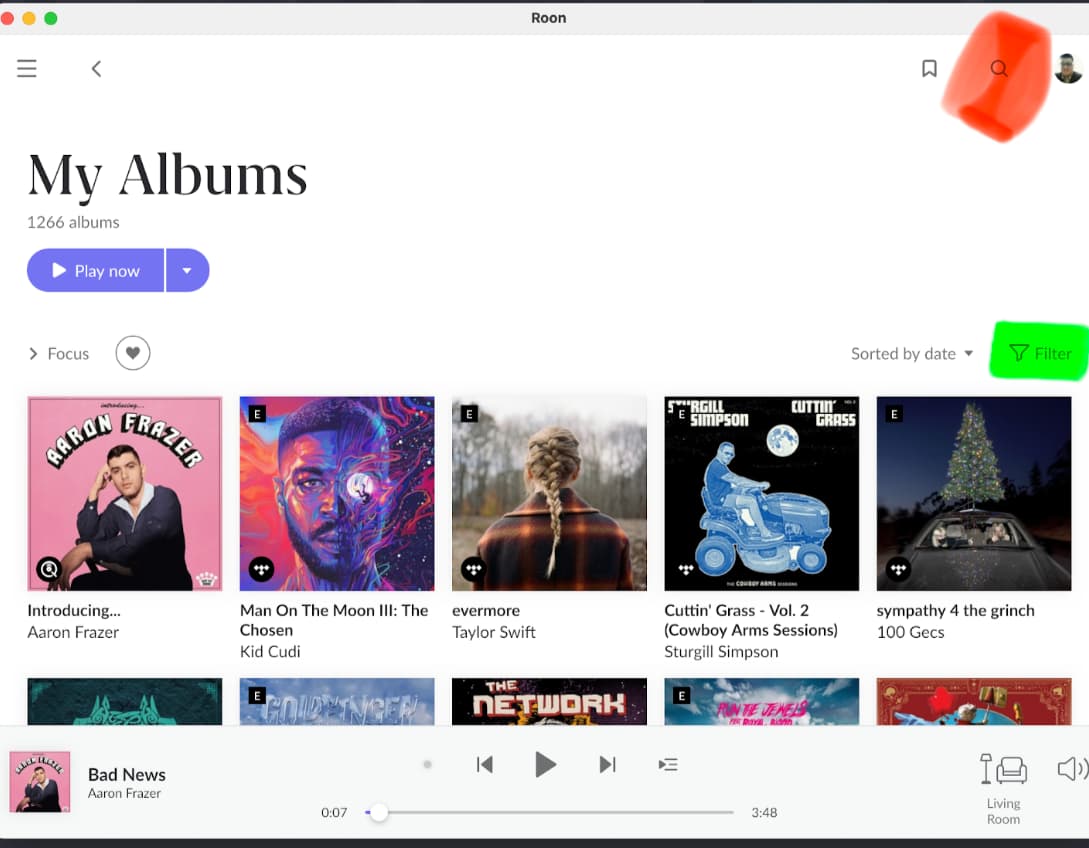
There are two magnifying glass icons, each with a text entry field next to it. (Not ideal that they are the same icon). The one in the top right in corner of the Roon window is the global search. There is another one further down on the right - it says „Filter“ in the text entry field if you haven’t yet clicked into it. This is the local dumb filter.
Can’t show screenshots because I’m not at home, but it’s not difficult.
Edit: Here is an old screenshot from the manual. The top right magnifying glass that I marked red is the global search. The other icon that I marked green is the local filter. In this screenshot, the icon is still a funnel shape. In current Roon, this is a magnifying glass as well.
5 Likes
Thank you!
I would not have looked there for a search function - I just use the keyboard shortcut.
It’s still reasonable to expect the default search function not to fail if an internet service goes down.
The best place to voice such things is the Feedback category of the forum. Roon Labs might not respond to every post there, but we were told they read them all.
They don’t monitor user discussions here in Roon Software Discussion.
1 Like
No offence taken , the point I was trying to make was that breakdowns of this Cloudflare type are hopefully few and far between and whatever the cause we should just roll with the punches.
Roon had absolutely no control over the outage. They did the best they could by posting a message on the top of the forum warning users of the outage.
If there is criticism it is basing the search engine on a cloud technology, if you were around when V2.0 came out you will remember the criticism of poor search performance when the search was done on the users server ,that was Roon’s technical response along with recruiting a search specialist.
I am sure there were more “mission critical” outages, not being able to search your music app for 3 hrs doesn’t count.
Add to that I rarely use search they are far slicker ways to get to content in a local library even with such an outage. As @Suedkiez points out the “filter tool” is a far more powerful tool in a local library I would put my usage at Search 2%, Filter 98 % hence why I didn’t get excited. I also rarely use Tidal as that was impacted too.
Interestingly the Tidal native app worked fine throughout.
I didn’t stop listening
2 Likes
Wow, this was news to me! Thanks for pointing it out.
2 Likes
Try this trick
If there is an artist you “fancy”, add JUST ONE of their albums to your library . This means that the Artist will now appear in your artists list. When you want to listen
Go > Artists > Filter 3 - 4 letters > Find Artist in view Click > Go Discography > Voila in a few taps/clicks
Choose a 3-4 letter that’s different eg use “Bowie” not “David” , lots of Davids very few “bow”
If you add loads of albums to your library it will slow things down, this way you get to all their albums in no time
Search does a load more work and is much slower
1 Like
Love this! You can see how Roon could probably be doing this for you though right? All your local artists (and even any you’ve ever listened to globally) could be searched very quickly on the core or even the client. I’ve made a suggestion about progressive results in the feedback discussion here.
1 Like
Apple shows since the invention of Spotlight in 2005 that searching local stuff with lots of metadata can be quick–even with terabytes of data. And the computers/disks were much slower at that time. So, I don’t see why, it has to be cloud only. Apple shows nowadays that also combining local and remote search is possible. Roon should at least fallback to the “bad” local search when the server is not reachable. “Bad” results are better than no results.