For Roon connectivity to work properly, both Roon Server and Roon Remote need to be turned on.
· I can't turn on Roon Server, I need help.
Describe the issue
The server doesn't start, or load on a regular basis and the main screen is perpetually stating that it is "Waiting for Roon Server" I have not used roon now for months, as it is just too unreliable.
In the past (months ago now) it has just started, with no understanding as to why one day it will and another it wouldn't. Due to this unreliability, I had/have got to the point where I stopped trying to even start it, which I have decided is not the right approach, as it is a service I am paying for.
Describe your network setup
The main router into the house is from Virginmedia and called a Hub4
Thanks for writing in and for sharing your report! Sorry to hear things have been rocky for you over the last few months.
Since you are using a Windows PC, I would verify that both Roon.exe and RAATServer.exe have been added as exceptions to your Windows firewall.
You can use these instructions to add the exceptions and the executables themselves would be located in your Database Location/Application folder path.
I would also add these exceptions to any Antivirus or other Firewall blocking applications you may have and ensure that you connected to your network via a Private network, not a Public one, see this guide for more information.
You can also easily test this out by temporarily disabling your windows firewall, rebooting the machine, and seeing if you experince the same issues.
Hi Benjamin,
I think that you have tried to help before on the same issue, as it has been a problem for quite a while now.
I can confirm that the firewall that is in use (Norton) lists both RAAT and Roon have access allowed. For good or bad, the Norton disables the Windows firewall.
I can also confirm that the network in use at home is classed under private.
Just to add some more details, sometimes everything boots up fine and it will all work, but this is an exception. The next level down is where it will all boot up, but the majority of tracks are missing from the database (NAS drive) yet some are, so playlists become useless.
I am beginning to think now, after having Roon for a few years and in that time it has always been unpredictable, unreliable, or just plain unusable, and this is due, I believe (please correct me here) to using a laptop as a hub. Although a laptop is a suggested route, along with others as an operating method, I now believe it is not the route Roon was designed for and I am just wasting my time and money using this configuration.
Therefore is the only way to permanently resolve this issue, is to have a dedicated Roon device as the hub and not a laptop/NAS?
I just need it to be consistent, open up and play when required, not have to wait an eternity for it to decide to connect, or reboot, or check, recheck settings, etc etc., as is happening at the moment. It is so frustrating seeing it sat there on my devices (laptop and phone), knowing it is a hit or miss to it opening up and as a result it does not get used.
Cheers
Mike
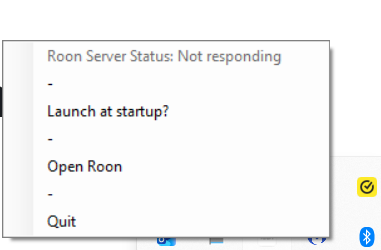
Yes the Roon Server shows in the task manager, but when right clicking on the icon, it just states “Not Responding” most of the time. When it does launch, then it does not seem to be recognising the media source, yet I can see all the tracks on the NAS drive via windows explorer. The laptop I am using is acting as both server and roon programme.
I don’t think I have accessed Roon or Event Viewer logs before, but if they are available from the Roon programme, then that may be a problem. At the moment all I am getting when launching Roon is the usual “Waiting for your Roon server” message; so, based on the previous comment above, can I access them via a different route?
Let’s start with Roon/RoonServer windows logs. To access these, you’ll need to folllow these instructions. I’ll also copy and paste the relevent sections below for easy access:
Windows Server
Open Windows Explorer
Click in the address area to the right of the text, to make it active like typing in a web browser, and type `%localappdata%
Find and open the Roon or RoonServer folder
Then, once you have the logs accessed, please create a .zip of both Roon/Logs + RoonServer/Logs and upload it to our uploader below, and let us know on this thread.
Thanks for the confirmation @mike_scott! Could you please head to our downloads page and install the latest version of Roon? Let me know if this helps:
A new copy of roon installed. But the same issue exists.
I think it is more to do with the server than the main programme, as the server never seems to be responsive, see attached screen shot. I get this most of the time.
Thanks for the follow-up! We reviewed a fresh diagnostic from your Roon Server, but didn’t see anything obvious that would point to the server issues you’re having.
Do you have a recently saved backup? If so, let’s test out refreshing your Roon Server database.
Make a Backup of your current RoonServer Database (or if you have a recently saved backup, that works)
That seems to have worked, the server notes that it is running and I can see all the tracks, so that is great.
The down side is it has pulled all the tracks in, including many I had deleted from Roon, so now punished for not deleting them from the NAS drive. I will have a clear out session at some stage.
Thanks for your persistence in getting it up and running.
Cheers
Mike