· Roon Server, NUC, ROCK dealing with multiple errors after simple network address change
Tell us about your home network
· I installed a replacement router and in the process, changed the network address from 192.268.1.x to 192.168.68.x I have a NUC Server running 2.71 (build 1683) and all remotes are the same release. The music files are on a Synology NAS, the NAS and main Roon are hardwired ethernet. Remotes are wireless. Both the ROCK and NAS were using DHCP and the ROCK Storage was mapped using SMB server Name/folder I used the new replacement router/network address change (as an excuse) to hard-code the ROCK/NAS configuration. Specifically, hardcoding the ROCK and NAS IP addresses and mapping the music libraries using SMB NAS using IP address/folder. I couldn’t find a way to “edit” my SMB name/folder mapping therefore, I “added” a new network share using SMB IP address/folder pointing to the same music folder as before. (note: I was going to keep the original folder “disabled” and ultimately “remove” that folder map when everything was validated. Roon scanned the folder like it was a new folder and everything “appeared” to be working fine. However, the appearance of working was short lived.
I am left with some perplexing issues I haven’t been able to resolve. My Qobuz service was logged out and I have been unable to get it reconnected to Roon. Every attempt to re-login returns this error: (see pic) Some research on the community site, I found a promising post with the same symptom. I navigated to the ROCK’s Data/RoonServer/Cache folder and deleted its contents. That did not fix my Qobuz issue. BTW, I can log into Qobuz’s website just fine.
Meanwhile I noticed that my Roon remote’s (top right) circling ring was still spinning. And has continued. Apparently stuck? When I click it, I get this box: (see pic)
Additionally, On the ROCK Web GUI, I noticed Tailscale had been logged out too. When I tried to re-login I’m greeted with: (see pic) Clicking the “Sign in to Tailscale” button is non-responsive. No action, nothing.
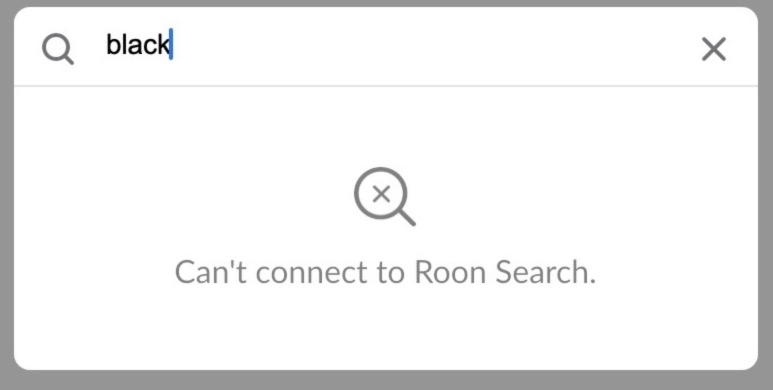
And finally, since the system is “working” I went looking for a song in search and was greeted with this: (see pic) Interestingly, previous searches in the drop-down can be selected and work perfectly (and fast!)
Epilog: I’m perplexed at how I arrived at this point doing a simple underlying IP address change but, here I am. I obviously missed a critical step or sequence but, I’m at a loss.
I have already tried to “Reinstall” the Operating System from the ROCK Web GUI but, like the Tailscale button, I’m greeted with the get ready dialog then nothing, no action.
Is the Roon OS/Recovery page instructions still valid? Is that a different option that wipe/reinstall? https://help.roonlabs.com/portal/en/kb/articles/roonos-recovery
I am looking for any next steps I should try prior to the “nuclear option” of wiping and reinstalling the NUC.
If it comes to a full reinstall, I have good backups of the "Pre-IP change state". Should I do a manual backup of the current state (Post IP address and mappings)? I'm wondering if I may be backing up a database corruption problem.
Any input is welcome! I would like to avoid a full wipe/install but, can go there if that’s the recommended path. Thanks!
Thanks for reaching out. The symptoms you describe sound like they could be a DNS issue, so let’s rule this possibility out first.
We have seen users have a better experience in the past if they change their Router’s DNS servers from the ISP provided ones to Cloudflare DNS, Quad9 or Google DNS. Can you please give this a try and let us know if it helps?
Hi Noris, thanks for your reply. I do in fact use Cloudflare as my DNS. Based on my long and compound series of server failures along with the single screenshot I was able to include, DNS was a perfect starting point. That said, I have “mostly” restored my roon system back to it’s previous working state.
Briefly, I used the roonOS recovery process on the NUC. USB thumb drive, Restore option, a few mins later I was choosing to restore from backup. All is working @ 99.9%.
The remaining bit (.1%) is viewing playlists. I always navigate to my playlists using the Playlists > header to launch a new window with all my playlists each preceded with the great thumbnail with artwork to remind me what’s in the list. Using the “header” method to go to my playlists, I find a small handful of the lists missing. Approx 4 out of ~40 playlists are not there. However, if I don’t click Playlists> and simply scroll down the list of playlists, they are ALL there. the “missing” ones that show up are selectable, they open, and are playable.
I’m not sure how to approach the Playlist viewing so please feel free to guide me to some next steps to try.
Also, since this is a different issue, should I open a new request to simplify the conditions that got me here?
Good result on the recovery, and thanks for reporting back with what you did.
No need for a new thread. The history here matters, since you restored from a backup taken before the address change, and that is relevant to what you are seeing now.
On the playlists: please try recreating one or two of the four that do not appear in that view. Build them fresh rather than editing the existing ones, then check whether the new copies show up under the Playlists header.
That tells us which of two things we are dealing with. If the new ones appear normally, the original entries carry something the header view cannot render, most likely from the restored database. If the new ones are also missing, it is the view itself and we look elsewhere.
Please tell us the names of the four affected playlists as well, and roughly when they were originally created. If they share something, a very long name, unusual characters, or a large track count, that narrows it quickly.
Hi Vadim, thanks for your questions. The longest of the “missing” playlists has 225 songs. And they were all created about 2.5 years ago. I have created new playlists since my restore and they work as expected, perfectly! I haven’t yeat tried to recreate the missing playlists yet because your questions prompted me to look closer and interestingly, these “missing” playlists were ALL imported from Qobuz. To add another layer, I would have used Soundiz to port this playlist from Pandora.
But here’s the thing, as a review, when my RoonOS reacted poorly to my IP address change, the first issue I saw was that Qobuz was logged out and refused to let me log back in. (additionally, Tailscale was logged out and refused to log me back in too. When I ultimately used the Restore RoonOS process, both Qobuz and Tailscale had logged me back in. And I had not yet restored the Roon database backup. (it was the backup restore that uncovered the playlist anomily)
I mention all this because they seem correlated if not connected. I also noticed on the Services page next to the Qobuz login, an option to “Sync with Qobuz”? I’ve never manually done this and although I plan to try it, I admit being a little skittish. If there’s anything I should consider or try before I “Sync with Qobuz” I welcome your thoughts. Many thanks!
So, when you log into Qobuz through Roon, they will automatically sync. In this case, all your Qobuz favorites and playlists should import directly into Roon.
Clicking the ‘Sync library now’ forces a manual check to see if, since the last sync, there are any changes.
Since you’re already signed into Qobuz through Roon, you should already have all your Qobuz content imported. Clicking the ‘Sync library now’ option won’t likely change anything. And with that, nothing at all to worry about!
For your missing playlists, if you access the Qobuz app directly, are you able to locate them? I’d be curious to see if they’re also missing on the Qobuz side.