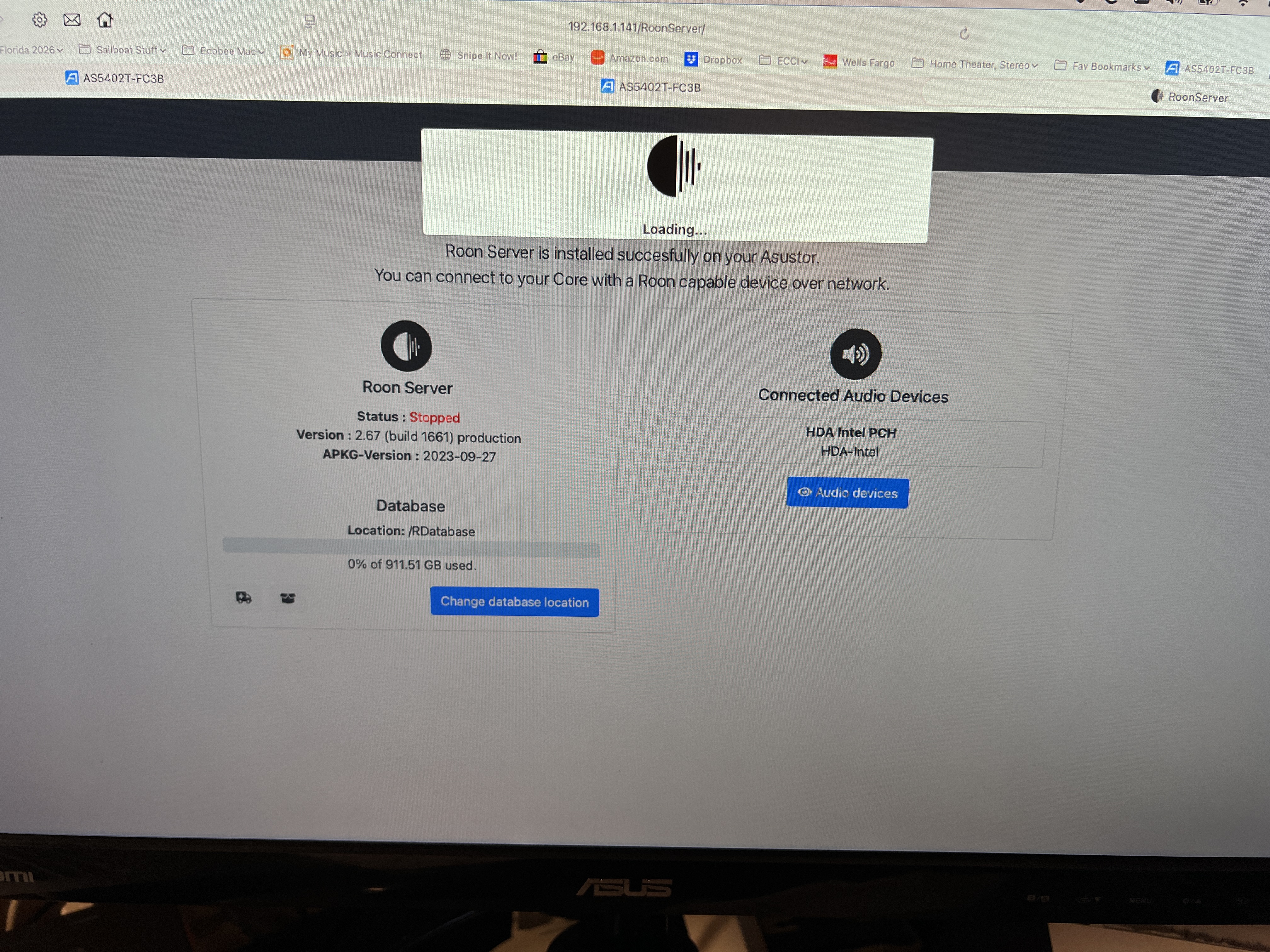
Roon Server stuck in 'loading' state on Asustor NAS after move (ref#49NWOQ)

Is Roon Server running?

· No, Roon Server is not running.

For Roon connectivity to work properly, both Roon Server and Roon Remote need to be turned on.

· I can't turn on Roon Server, I need help.

Describe the issue

Roon server v2.67 build 1661 running on Asustor AS5402T-FC3B. Has been working even after restarting after a recent move. Today it’s just sitting in a “loading” state. I’ve rebooted the nas a couple of times to no avail. Can anyone offer a solution?

Describe your network setup

The nas is connected to a data switch which is connected directly to my main router- uplink deco 9. Nas and deco are plugged in to an ups. All other devices or end point except one connect wirelessly.

Hello @William_Cheadle,

Thank you for the report, and sorry for the trouble here.

Native NAS packages, including the Asustor one, are unfortunately no longer supported as of Roon 2.65 - Docker is now the officially supported way to run Roon Server on NAS devices. This is most likely why your server is stuck in the loading state.

The recommended path forward is to migrate to the official Roon Server Docker image. The full guide is here:

A few important points for the setup: first, stop the native Roon app in App Central, but don’t uninstall it yet - we want to keep the old database in place as a fallback. Install Docker from App Central, then deploy the container in host networking mode - Roon relies on multicast for device discovery, and bridged networking will break it. Keep the /Roon volume on a persistent path on your NAS so the database and downloaded binaries survive reboots.

Once the container is running and you’ve logged in, restore your library from your most recent Roon backup via Settings -> Backups. If you don’t have a recent backup available, let us know and we’ll help you migrate the database from the old install.

Thanks!

Hey @William_Cheadle,

Wanted to follow up on this. Were you able to move the setup over to the official Roon Server Docker image, using host networking and a persistent /Roon volume as we outlined? If you have not tried it yet, the last steps we suggested were to stop the native Asustor app in App Central, leave it installed for now so the old database stays in place, install Docker, and then restore from your latest Roon backup once the container is up. Let us know where things stand and if you ran into anything we should look at.

Please note, if we don’t hear back from you this thread may close automatically soon. If the thread auto-closes and you need further assistance, please submit a reopen support request via the technical support help form below and specify that the issue should be reopened. Thank you.

Im not sure if what I did is correct. The server was already stopped, stuck in the “loading” state. So I installed docker. I haven’t found anything that enables or prompts me to configure anything about docker. Just a blur page when I click on it from app central. I noticed in the main adm page, roon was no longer present, so I went over to app central, selected installed, and see roon, it was switched off. I switched it on, and it started. I then opened the app on my iPhone (2.67, b 1661), and it found the server and my folders as well as quobuz.. It is running 2.70 build 1671. Docker is not appearing on the main adm page, nothing to configure? Reading the guide, this should not work. Any suggestions?

Hey @William_Cheadle,

Thanks for the update, and good news, nothing is broken. Let me clear up what happened, because your setup is actually working correctly right now.

Looking at your server logs, you’re not running the Docker container, you’re back on the native Asustor App Central package (which is exactly what you described: you toggled the Roon app back on in App Central).

When it started, RoonServer downloaded its own latest binaries over the network and updated itself from 2.67 to 2.70 (build 1671), independent of the App Central wrapper. That’s why it came back to life and why your iPhone found the server, your local folders, and Qobuz. The logs confirm it’s healthy: your music storage is online with all 4,615 tracks, Qobuz is connected, and your backups are syncing normally.

The blank page you saw when opening Docker is expected, Docker CE installed, but you never deployed a container, so there’s nothing there to configure yet. So to answer your question directly: you didn’t do the Docker migration, you simply revived the native install.

Here’s the honest picture on where to go from here. The native package works today, but it’s officially unsupported as of Roon 2.65, which means a future auto-update could eventually break it and we wouldn’t be able to patch the native-specific issue. Docker remains the durable, supported path.

The single most important thing to do right now, while everything is healthy, is to take a fresh backup: Settings → Backups → Back Up Now. That backup is what makes an eventual move to Docker quick and painless.

Whenever you’re ready to migrate (no rush, since you’re up and running), the key points are:

  • Deploy the official Roon Server Docker image in host networking mode, Roon relies on multicast for device discovery, and bridged networking will break it.
  • Keep a persistent /Roon volume so your database survives reboots, and bind-mount your music share (e.g. /share/Music).
  • Restore from the backup above once the container is up.
Let us know if you'd like to [url=https://help.roonlabs.com/portal/en/kb/articles/installing-the-roon-server-via-docker]tackle the Docker migration[/url] and we'll walk through it step by step. Otherwise, you're all set for now. 👍
This thread is closing due to inactivity, but you can request to reopen it anytime here and we’ll promptly reach back out. Thank you.