Thanks for writing in and sharing your report. Error 43 on ROCK typically points to a storage/drive problem, the installer can’t read or write to the OS drive (the M.2 SSD).
Next steps to try, in order:
Reseat the M.2 SSD. Power down the NUC fully, unplug it, open it up, and remove and reinsert the M.2 drive. A loose or poorly seated SSD is one of the most common causes of error 43.
Check the SSD is supported and detected. Boot into the BIOS (F2 during startup) and confirm the M.2 drive appears under storage devices. If the BIOS doesn't see it, the OS install will always fail. ROCK requires an M.2 SSD for the OS, a SATA drive in the OS slot won't work.
Update the NUC BIOS. An outdated BIOS can cause install failures. Get the latest BIOS from Intel's support site for your specific NUC model, put it on a FAT32 USB stick, and flash it.
Set BIOS to defaults. In BIOS, load optimized/default settings, ensure the boot mode is correct (UEFI, not Legacy), and disable Secure Boot if it's on.
Re-create the install USB. A corrupted USB image causes install failures. Re-download the ROCK image and rewrite it with Etcher to a known-good USB stick.
Test the SSD itself. If reseating and BIOS checks don't help, the M.2 SSD may be failing. Try a different known-good M.2 drive—if the install succeeds on a new drive, the original is the culprit.
If the install still fails with error 43 after a confirmed-good SSD, known-good USB, and updated BIOS, the issue may be the NUC's M.2 slot or motherboard.
Do you know which NUC model this is, and whether the BIOS is detecting the M.2 SSD? That’ll narrow down whether this is a drive issue or something deeper on the board.
It’s a NUC10i7FNH1 with a Samsung 512Gb SSD. I use a 5TB external USB3 drive for the music library. I had just finished listening to a new release (Qobuz via Roon) and less than a minute later I got a message that the client couldn’t reach the Roon Server. I’ll try reseating the SSD and if it doesn’t work, I’ll put it into a USB SSD holder and test it on a different computer. I’ll follow up with results.
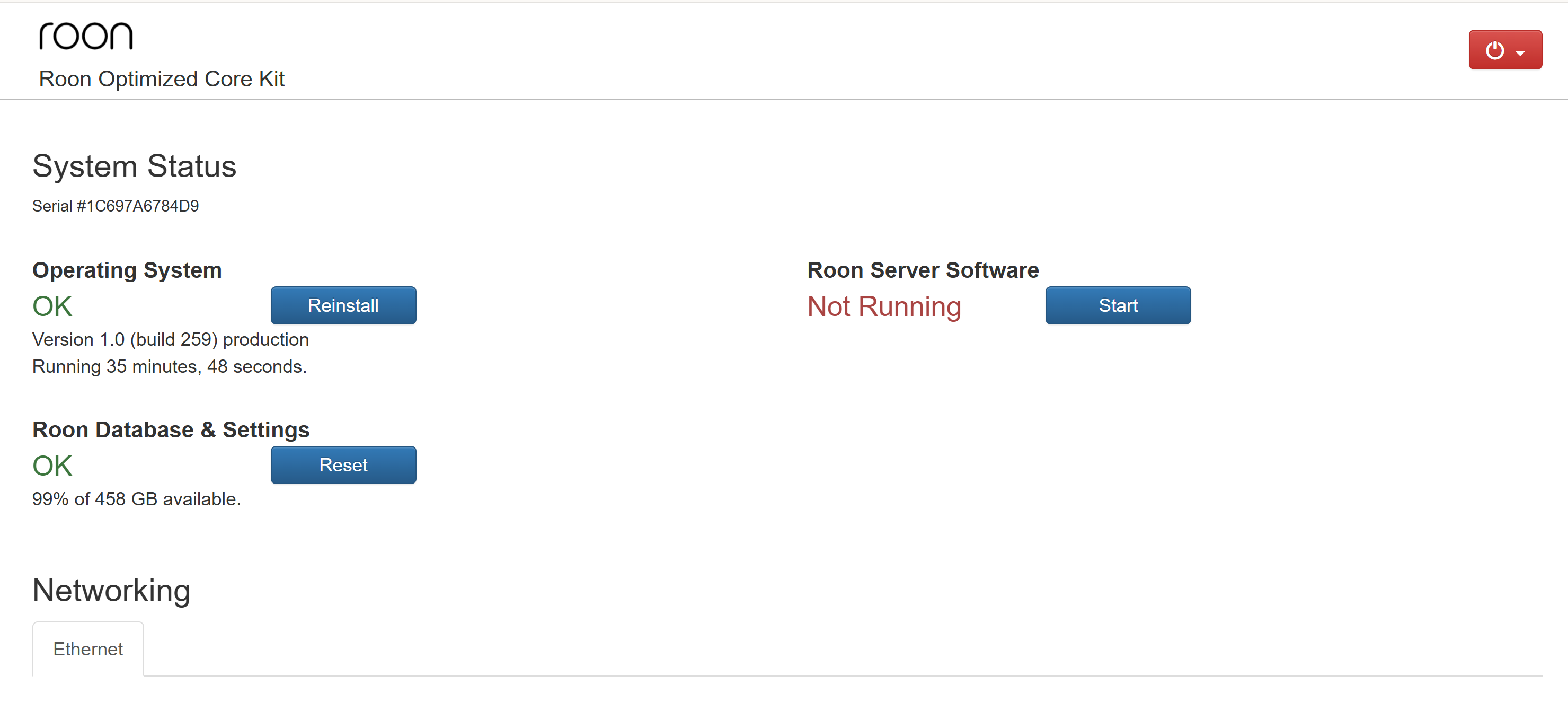
As far as I can tell, the SSD is fine. As you can see, I can connect to my local IP address to the NUC and it shows the ROCK is running. I can also plug in the HDMI cable which gives me the basic ROCK info and can connect with the external USB drive across the network and see all my music files. I think this might be due to the fact that you guys cancelled my account because the bank sent me a new debit card (although the client login works). I’ve been an annual paid account for years so you just should have just notified me so I could update the expiration date. This is definitely a software problem since the hardware checks out fine. Did you change my account number and the old one is still on the NUC?
Thanks for the update and for checking the hardware.
To clarify - an expired payment method does not affect your ability to run Roon Server or cause it to disconnect. Your account status is not related to this issue.
Error 43 means the ROCK installer was unable to extract and install the RoonServer software onto the drive. Before reinstalling, a couple of quick checks:
Is there enough free space on the 512GB SSD? If the drive is nearly full it can cause the installation to fail.
Do you have a Roon backup available? If not, before reinstalling ROCK you can connect to the NUC over the network and copy the database folder from \\ROCK\Data\RoonServer\Database to a safe location - this will let you recover your library data after the reinstall.
If space is fine and you have the database backed up, the next step would be a clean ROCK reinstall from a freshly written USB stick.
If you look at the screenshot I sent you at the top of this thread, you’ll see my NUC is still on version 1.0 build 259 so it isn’t updating automatically. Please send me the latest instruction files or give me a download location so I can try a manual update using the admin page.
Also, I will say again that my music drive is just fine. ROCK is running fine which can be verified with the NUC HDMI monitor and by connecting via HTTP to the admin screen which you can see in my earlier screenshot. I want instructions on how to reinstall just Roon OS using the reinstall button on the admin screen but need the instruction files. If you check the version on the screenshot it’s 1.0 259 which I think is the latest non-UEFI build. How do I fix this???
If space is fine and you have the database backed up, the next step would be a clean ROCK reinstall from a freshly written USB stick.
That is NOT using the Reinstall button on the Web Administration Interface, but a fresh ROCK install using a USB stick. You will find the steps necessary in this article:
Note also that this installation using a USB stick is the only way to move from RoonOS 1.0 to RoonOS 2.x.
Once you have ROCK installed and Roon up and running, then follow the relevant steps here to restore your backup.
Based on responses, there appears to be no tools or methods to troubleshoot or repair this issue where Roon OS won’t start on an existing ROCK 1.0 259 install other than a complete ROCK reinstall. If this is true, I don’t see the point of taking this approach. Will I be able to restore my existing backup after I install Ubuntu on my NUC and install Roon OS there? If you have any type on console login and tools that work with ROCK I would prefer to try this first since I’m busy.
Thanks for your help and for being part of the community. I’m a developer and Linux admin so I wouldn’t have a problem doing a complete reinstall. Roon used to support instruction files for ROCK where you could back-level the current install by placing them in the Reinstall folder. Can I assume your response means this feature is no longer available? If I can find a 1.0 258 (or lower) instruction file then the system will automatically do a reinstall then update itself back to 1.0 259. If the only solution is a complete reinstall then I will just put Ubuntu on this NUC and run the Roon OS on there since it gives me more flexibility. This why I never set it for UEFI in the first place but have been putting it off. Thanks again Geoff.
When I try to install ROCK using the USB drive flashed from your download I get "Secure Boot Violation: Invalid signature detected. Check Secure Boot policy in settings.
Secure boot and UEFI are enabled with “Standard” set as the secure boot policy.
Suggestions anyone?
Nevermind. Secure boot was enabled after the BIOS update and should have been disabled.
I’m now getting “Failed to partition disk”. This is a brand new WD SSD. I didn’t see anything in the instructions about preparing a new SSD, does it require a partition table prior to using the ROCK installer?
Is it possible that WD pre-partition their SSDs? Can you use a PC to delete all the partitions.
Searching for “Failed to partition disk” in the forum throws up some examples of this error. It is unusual.
Yes it was but I deleted the partition so its current state is unallocated. When I use a USB holder for the SSD and check on a different computer it reports as being fine.
Ubuntu didn’t have any problem installing. I guess I have 2 options now, I can either run Roon OS on Linux or for curiosity’s sake, see if the ROCK installer will work after Linux has partitioned this new SSD.
Interesting. ROCK install fine over the Ubuntu install. There must have been something very “non-Linux” with this factory drive setup that the ROCK installer didn’t like. I would suggest that if anyone else has this problem to try clearing the partition using Linux and not Windows.
Thanks for the additional information, and thank you @Geoff_Coupe for your assistance. Interesting the partition failed to clear over windows but not Linux.
It sounds like you’re solved @Dean_Kimball but I wanted to check to see if you’re back up and running with your music successfully, let me know.