What kind of performance/speed issue are you experiencing?
· Tracks take a long time to play
Please try to reboot your Roon Server
· No, the issue is still the same even immediately after a reboot
Please try to reboot your networking gear (Router/Switches/etc.)
· No, the issue is still the same even after a reboot
Is there any change in behavior if you try to navigate to Roon Settings -> Library and set both Background and On-Demand Audio Analysis to Throttled or Off?
· No, the issue is still the same
Does the issue happen on multiple Roon Remotes (controllers) or just one?
· Issue happens on multiple remotes
Router Domain Name System (DNS) change
· I was able to change my router's DNS servers but it did not help
What is the operating system of your Roon Server host machine?
· Prebuilt Branded Roon Server (SonicTransporter, Innous, Merging...)
Timestamp of issue occurrences
· 03/06/2026 from 21:30 - 22:00 04/06/2026 8:00
Describe the issue
Roon takes a long time to load tracks. When opening roon it takes some time to find it s server as well. Often 30 seconds or more. When browsing in the library albums artists or playlists it takes a long time to load. I cleaned up all the playlists(no dupicates etc) Our playlists or mostly imported from tidal. I think it has something to do with loading a lot of data each time altough when reading in the forums i do not think my library qualifies as extraordinary large.... Perhaps there are some tips to make it snappy as before... Thanks
Describe your network setup
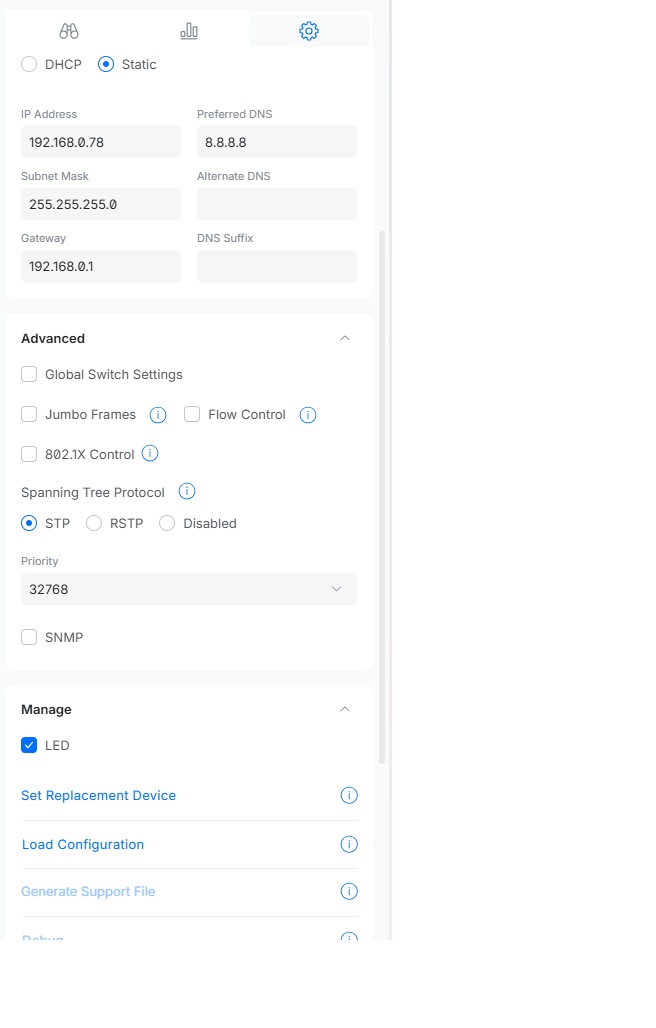
Silentangel Rhen V2 Z1 . Ubiquiti dreammachine with several managed switched. Everything is hardwired. Only my phone is connected through wifi.
Same problem, connected Roon Server to Router directly. This happened after Roon update. After rebooting Roon Server works fine for about 5 minutes, then crashes again.
Thank you for your reply. My setup is the following. My ISP modem(proximus) is connected to a ubiquiti dreammachine. From the dream machine I have several managed ubiquiti switches. On one of them I have my Rooncore(silent angel). From what I understand you want me to connect my roon core to my dream machine directly. I think if I connect it to my ISP modem directly I will not be able to access it since the IP adresses on the ISP modem are in a different range then my wifi network. Can you confirm. Just as extra info I have prioritized my internet traffic towards my silent angel and all other Roon End point.(setting in my dream machine) but this to no avail. Best regards, Floris
Wanted to follow up on this. Were you able to connect your Roon Server directly to the Dream Machine for a simpler test setup, and did you get a chance to check whether the multiple subnets on your network might be affecting things? If it helps, we can also revisit the Networking Best Practices steps we mentioned. Let us know what you found, thanks!
I did not had the chance to connect the roon server(silen angel) directly behind my dream machine. However I checked if all components are on the same subnet.( they are all in the 192.168.0.xxx range. So ther can t be an issue there. After I resetted my managed ubiquiti switch, I found that roon was more responsive. This was ok for several days and then it started to get really slow again. I did a reset again of this switch and roon was more responsive again… I went through the "network best practices steps"but could not find a setting which might improve this.
My silent angel is connected behind this switch because at this location I have a decoder in place connected with a usb cable to my silent angel. The decoder is then connected to my amplifier.
These are the settings which I have in this managed switch
Thanks for the update! I’m glad to hear it seems like you’ve narrowed the issue down to a potential ubiquity switch.
I do think, based on your previous reply, that this would be a crucial next step in troubleshooting. Bypassing the switch altogether would help us confirm if the issue does indeed stem from network components.
With that, what it is the specific make and model of the switch?
Hi Benjamin, i connected my silent angel roon server directly to my modem. However i am still experiencing problems. I have some extra info. I found that when using tidal through roon it is very slow. For example loading proposed daily mixes in tidal takes ages to start playing and very often it just stops playing. I have to press play again and this repeats itself. I have similar problems with playlists imported from tidal. I gave one playlist which i created in roon and this playlist is very responsive and does not have this problem. When i use the tidal app everything works very fast. Do you have encountered this before?
This is really helpful, thank you for the detailed test. The fact that the issue persists with the Silent Angel wired directly to the modem, combined with what you’ve described, tells us a lot. It also rules the switch out as the cause, so we can set that aside.
The key detail is the contrast you found: your own Roon-created playlist plays perfectly, while TIDAL daily mixes and TIDAL-imported playlists are slow and stop-start. That pattern points specifically at the TIDAL integration rather than your network or bandwidth. A self-made playlist just plays stored track references, whereas mixes, Roon Radio and imported TIDAL playlists rely on TIDAL’s backend to resolve and queue the next track, and that’s the part that’s failing for you.
I took a look at your diagnostics and that’s consistent with what I’m seeing: errors when Roon goes to build the next TIDAL track for a mix/radio, and some intermittent failures on the TIDAL token refresh. Single TIDAL tracks resolve fine, which matches your experience.
Could you try the following, in order?
Re-authenticate TIDAL: go to Settings → Services → TIDAL, log out completely, then log back in. This re-registers the connection cleanly and is the most likely fix for the queue-building errors.
After that, please test the two cases separately so we can confirm: (a) play a single TIDAL track, and (b) start a TIDAL daily mix or Roon Radio from a TIDAL track. Let me know if (a) works but (b) still stops.
If it persists, set DNS explicitly on the Silent Angel itself (try 1.1.1.1 and 8.8.8.8) rather than only on the router, since the server may not be inheriting the router’s DNS. If your setup allows it, disabling IPv6 on the Silent Angel is also worth a try, we occasionally see intermittent ‘network unreachable’ behaviour to streaming endpoints traced back to a dual-stack issue.
Give those a go and let me know the results, particularly the single-track vs. mix/radio comparison in step 2. That’ll tell us whether the re-auth resolved it or whether we need to dig further on our side.
Thanks again for your patience working through this with us.
I just logged my tidal account out of roon. I also have a qobuz account and logged in with this one. This works without delays so i think we found the problem. I will login with my tidal account later on to test your steps. My silent angel was already set at 8.8.8 8 i just checked.
I have two more questions which might be somewhat off topic.
I never login my qobuz and tidal account at the same time because for some strange reason qobuz duplicates all my playlist and makes roon very slow also.( i have to delete all playlist manually after this to get it back working. Is there a setting to prevent this so qobuz and tidal can work side by side without looking at each other? I prefer tidal at the moment since my family have all their playlists there.
2)some time ago i bought i mini pro 3 series full mqa decoder. I learned unfortunatly that mqa files are no longer provided through streaming services. The decoder still functions as a roon ready endpoint. But… here is my question. My silent angel was connected via its usb audio connection to my i mini pro 3 series. Now the silent angel has moved to my server rack for testing. So there is no physical audio/usb connection between my decoder and silent angel. Am i losing sound quality theoretically or can i leave it as it is?
That’s great news, the Qobuz test isolating the problem to your TIDAL account is exactly the confirmation we were looking for. When you log TIDAL back in, the logout/login refresh I mentioned (Settings → Services → TIDAL) is the first thing to try, as a stale TIDAL connection token is a common cause of the “stops, press play, repeats” behavior you described. If it persists after that, please grab fresh diagnostics with a timestamp of when it stalls and we’ll look at what Roon is reporting on the TIDAL side.
On your two follow-up questions:
Qobuz duplicating playlists. There isn't a setting to make TIDAL and Qobuz ignore each other's playlists, Roon syncs the playlists from whatever streaming services are logged in, so both sets appear together by design. What you're describing (Qobuz creating apparent duplicates and slowing things down) usually comes from the same playlist existing in both services, or from previously imported/copied playlists lingering. Rather than running them side by side, the cleaner approach since you prefer TIDAL is to stay logged into TIDAL only. If you'd like to consolidate, you can use Roon's Copy function (three dots next to a playlist) to move a playlist into a specific service's folder, but be aware that copying a local playlist into a streaming folder re-matches tracks to that service and can't be undone.
MQA decoder / USB connection. You're not losing anything by leaving it as is. Two separate points here: First, since MQA is no longer delivered through the streaming services, there's no MQA stream for the decoder to unfold anyway, so that capability isn't in play regardless of how it's connected. Second, your i mini Pro 3 functions as a Roon Ready endpoint on the network, which is a fully independent signal path from the old USB connection to the Silent Angel, Roon streams audio to it directly over the network. So whether the Silent Angel sits in your rack or next to the decoder makes no theoretical difference to sound quality, as long as you're playing to the i mini Pro 3 as a Roon Ready endpoint rather than relying on the USB link. If anything, removing the USB dependency simplifies the chain.
Just checking in on this, have you had a chance to log TIDAL out and back in under Settings → Services → TIDAL to see if that clears the stop, play, repeat behavior? If it is still happening, could you send over a fresh timestamp of when it stalls so we can take a look at what Roon is reporting on the TIDAL side. We also wanted to see whether you decided to stay on TIDAL only, since keeping both TIDAL and Qobuz signed in can make the playlist duplicates you mentioned show up together by design. Thanks, and let us know what you find.
Thank you for checking in on this. We have been listening to Qobuz the last week without to many problems. I just logged out of Qobuz and logged back in with Tidal. I will evaluate this week and get back to you on this later on. Thanks Floris
I am evaluating the use of Tidal now. I had roon stop playing several times. Before it stops playing I get the message “tidal media loading too slowly…etc” It happened this morning at 8:24. Yesterday it happened 3-4 times during the day. Is there something you can see?
Logged in with Qobuz again because it is not pleasant anymore to listen to. Very slow and unresponsive. Qobuz is also somewhat slow but slightly better. I think it is down to a network issue but have no clue what. The core is connected directly to my ubiquiti dream machine… I am clueless what to do now…
Just another update, when I use the tidal app or qobuz app and play music from there, i have no problems. I wonder what else I can do to make roon work better with these streaming services. Have been checking if there are certain ports blocked in my modem but cannot see anything strange. Hope you can help. Regards Floris
We haven’t seen any activity on this topic thread in several days and it will shortly auto-close without any new replies from the OP. Do you still require assistance here?