Time to try:
4 Likes
Thanks for the hint… I updated all my Roon versions (the core and the apps).
However, I’ve still got 73 days in my trial version left, so I try to put Roon through its paces in this time so that I can arrive at a based conclusion about the software.
Short Status Quo Summery about my experience with Roon so far:
-
It was easy to set up. The Roon Core on the NAS, the Database, pointing to my music collection, and the integration and separation of my music library, my NAS, and Qobuz just all works.
-
Most of my albums – including most classical music albums – were identified out of the box. So the way I tag my music doesn’t seem to bother Roon, which is good. (As I said, if Roon had trouble with my way of tagging, fine, I would see if I could work it out of live with the trouble but would not actually change the tagging, but so far I haven’t even encountered an issue. No trouble on that front as far as I can tell.)
-
A few albums were not recognized out of the box. Often that is just because Roon has several entries that could match (because there are several versions or variants of that album), so that’s mostly easy to rectify. Typical example was this:
Roon had this album listed as “unidentified”:
Why? When I clicked on “identify”, the track timings in its database and mine differed. Which is interesting, because mine is an AccurateRip confirmed EAC rip, so the timings of my album are definitely “correct”. In any case, I could click on “match” and it matched. So that’ all easy. But that is one “issue” that I have come across a couple of times, that “track times” vary across databases; that is as far as I can tell the number one reason why Roon sometimes fails to recognize an album, because the track times in the database don’t match up with what it finds. -
I was “warned” that Roon doesn’t have a folder view and mangles up all your music with all your streaming service music, but I did not find that an issue at all. Quite the contrary, Roon allows me just the music on my NAS, or just my music on Qobuz, or all at once, if wanted with icons or not. So that’s all very smooth and comfortable to use. I enjoy that.
-
My playlists (set up in MusicBee) were all recognized out of the box and integrated into Roon just fine.
-
What I really like: the Focus function. Thanks @Geoff_Coupe for bringing that to my attention again, it was actually one of the first things I noticed and then forgot about. That’s quite a nice tool to filter music.
-
I have one album which I produced myself in my collection that does not exist anywhere in the world (because only I have a copy). While that is “unidentified”, Roon lists everything about that album “correctly”.
-
My side question with the album covers is more or less answered… Roon seems to pick the highest resolution cover from wherever it is allowed to look, and so more or less often picks the “largest” cover. If an album has more than one embedded album art in the same resolution, Roon seems to look for the “biggest”.
Now I like the Roon interface, and the many ways I can use and configure stuff.
There is still some stuff I have to figure out how to integrate into Roon, and there are some albums of mine that Roon cannot recognize because I actually do tag some albums in a way that is unconventional, so Roon cannot recognize them (though that has nothing to do with “Album Artist”), but that’s a different story and not really relevant. I can either make that work or live with it, but it’s all smooth.
But, and that is why I continue to write in this thread rather than a new one, what and how Roon considers a “compilation” is puzzling to me.
Since Roon is splitting up some compilations and not others, without apparent pattern, I have decided to just take a look at “compilations” in Roon, and it was quite interesting what Roon identified as “compilation”. For me, a “compilation” would be an album with, say, different songs from different artists, an album which is “compiled” from other albums, or an album where you have tracks from many different composers, performers, etc.
Apparently, that is now how Roon sees it.
For example, here are some albums Roon rightfully does NOT consider to be compilations.
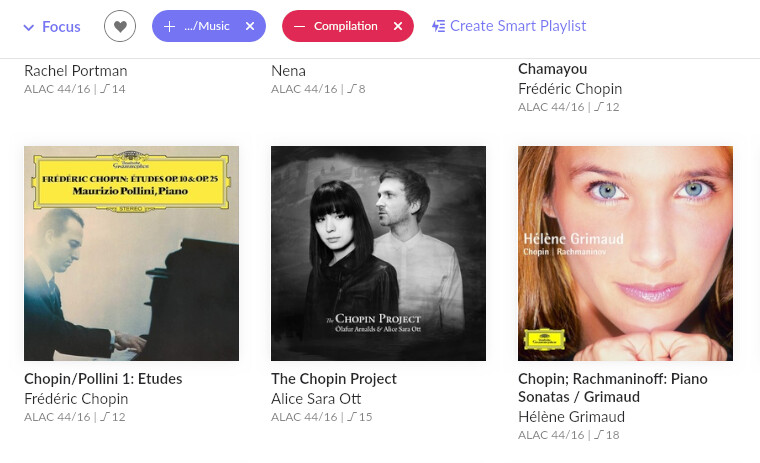
They all have an “album artist” and a clear focus.
But here is an example of albums Roon DOES consider to be compilations, though in my opinion they are not:
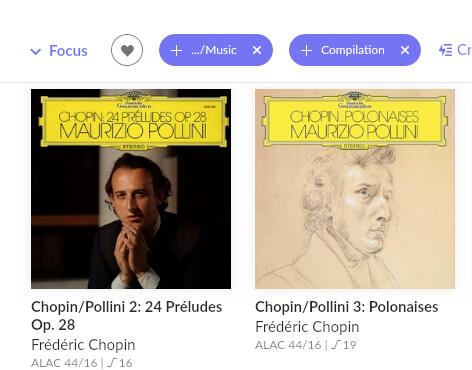
So there is definitely something strange and off about when, how, and what Roon considers a compilation.
Why does Roon consider an album with Chopin Etudes performend by Maurizio Pollino to be NO compilation, but an album with Chopin Preludes by Maurizio Pollini is considered a compilation?
There are other “puzzling” examples of what Roon considers a “compilation”, which is why I wonder what markers Roon uses to identify a compilation.
For example, these three albums here are “compilations” in Roons view, even though I don’t view them like that at all:
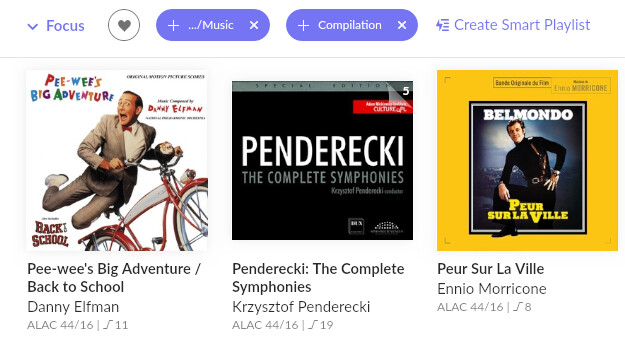
Pee-Wee’s Big Adenture/Back to School by Danny Elfman
Complete Symphonies by Krzysztof Penderecki
Peur Sur La Ville by Ennio Morricone.
These albums have a clear focus and a clear performer and a clear album artist and composer. Peur Sur La Ville is one composition (a film score) by one composer, Ennio Morricone. There is nothing there I would in any way consider a “compilation”.
Especially not in contrast to these albums:
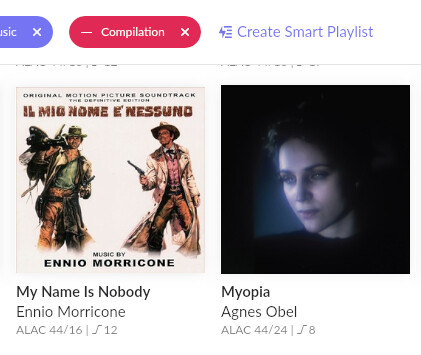
Which Roon does NOT consider to be a “compilation”.
This makes no sense to me: why is PEUR SUR LA VILLE by Ennio Morricone a “compilation”, but IL MIO NOME E NESSUNO by Ennio Morricone is not a “compilation”.
Both albums are by the same composer and contain one film score each. I view neither as compilation, but I don’t even see how or why they “differ” in Roon?
There is something, some marker, that identifies some albums as “compilations” and some others not, and it does not seem to be very consistent. And inconsistency is really annoying in a program that is used to list, sort and find things, in this case music.
The “compilation issue” is so far the most inconsistent and puzzling problem in Roon, I haven’t yet quite got a handle on that.
I agree the Chopin are not compilations , one reason could be that the album has been extracted as a pseudo album from a Box which could be considered a compilation
Don’t forget Roon doesn’t decide , that information will be supplied by a 3rd party db MusicBrainz or TiVo, Roon simply copies this metadata.
At each album page , if you hit the 3 dots menu and select Edit , then Edit Album There is a selection for Compilation that you can adjust

BTW did you know that there is a monthly sub for Roon , if your 3 months isn’t long enough and you don’t want to commit yet.
I’m afraid you will find we are scratching the surface here. The more you use roon the more you will realise roon does not follow defacto standards followed by other players. Until quite recently roon didn’t support folder navigation of any sort, whatever your preferences. Depending on your replay equipment, local library file formats and tagging habits you will soon find that roon doesn’t support DLNA, cue files, iso SACD’s, ape and wv files either. Following industry defacto standards where no real standards exist was never a roon design priority. That may or may not be important to you. It does cause issues when trying to use other players in parallel. I do use other players but over the years have generally prioritised roon requirements and dealt with any subsequent incompatibilities with the other players I use frequently on a case by case basis. Some like JRiver I have just given up with.
Hi Mike,
thanks, that was very helpful.
I had read somewhere that I can set the compilation/not compilation information ín Roon, but I didn’t find it. Now thanks to you I have. I was looking in the general library import settings for this thing, not on individual album settings. I don’t consider any of the albums I chose as example as “compilation”, since they are all "one composer, one performer (mostly even the same), but yeah, the Penderecki is of course a box, but it’s a “unified” box, with one composer, one performer (who even happens to be the composer) and just his symphonies.
Wow, I now see there’s a lot of stuff on how to configure and toggle albums that I haven’t even tried out yet. :-)… that’s nifty. So you can let Roon do its thing and then just tidy up.
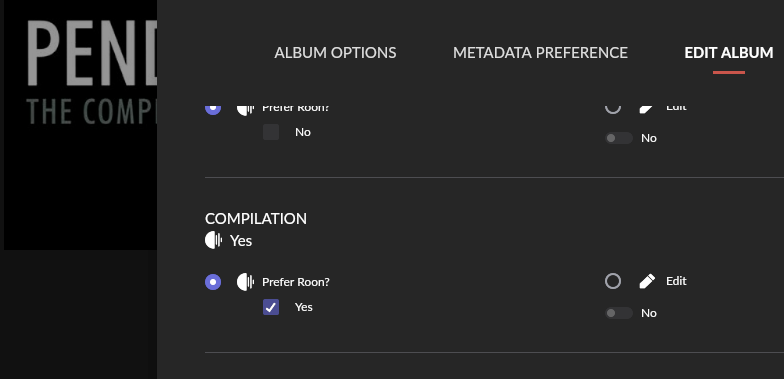
Yes, obviously Roon doesn’t literally “decide” anything on its own, it relies on outside information. Which is why it is great (even necessary) to tidy things up. The Morricone album is a good example: in principle, no matter how and where you sort the albums, they should be sorted the same. They contain one film score each by Morricone, so there isn’t anything that makes that a compilation of any kind, but regardless, it should be both or neither. So I know Roon uses the metadata from somewhere to determine that, and Internet music metadata is in my experience anything but unified and consistent. And it isn’t (as this example shows).
But obviously, there is an easy way to tidy things up, and that’s pretty cool. Thanks again!
Hi TripleCrotchet, thanks.
I’m just trying to get some inconsistencies out of the way, and so far, the only actual issues I have encountered is the way Roon treats compilations. And that seems to be partly because of the inconsitent metadata some of these albums have out there “in the wild”.
I’m sure I’m just scratching the surface so far, but I use Roon every day now to play some music, anything from classical to jazz to film scores, and I have to day, anything else is just fine, really. Amazing, but it is so. Albums are recognized (with some notable exceptions, but it’s obvious to me why Roon cannot recognize some albums, so it’s not an issue), additional information provided, cross-referenenced…as far as I’m concerned, most things just worked “out of the box”.
Perhaps because my setup actually is rather consistent and quite streamlined, all files are ALAC (except for 5 MP3 albums), all files are more or less consistently tagged, all files are in one clear folder structure. So far, Roon has no problems with them and neither have I with how Roon displays or accesses them. It works.
Other players and systems (which yes, are important to me) and Roon don’t even notice each other, so that’s all fine and as it should be. Works across multi-plattforms and multi-server just fine for me.
It’s just a heads up. Roon software upgrades and database changes are quite frequent. Because backwards compatibility with other players is not a principle, my experience is that eventually something breaks, so I just gave up with more complex players like JRiver. Having said that I still use foobar in a very simplistic way on a regular basis and also the Qobuz web player, the Primare DLNA player and YouTube. Other family members tend to use Apple Music and Spotify.
Yeah, thanks, okay, I keep that in mind. It is quite interesting how many of you are concerned or worry about problems that might occur at some later point. Perhaps Roon throws around now and then some things with updates? I’ll watch out for that. 
That is actually one of the reasons I have long decided on a straightforward configuration in my music collection, that so far works across just about every platform I’ve tried out. Including Roon.
Even my playlists in a separate folder were recognized correctly in Roon without issues. Because if something does not work, it is usually easy find out what and why if everything else is consistent.
So far, despite this lengthy thread here, my experience with Roon has actually been a smooth one.
These are not “mights”. It is the roon experience of long-time users. I think that is telling you something.
LOL, yep, for sure. Thanks for the warnings and heads-up. Though if anything, that seems to me a rather good reason not to rely solely on Roon. 
BTW, Roon obviously has a lot of functions. I already looked through a lot of them in this forum and found many answers for questions I had.
My own experience with Roon has been, as I have said, quite smooth, apart from the “split album” issue, which seem to be the result of a combination of factors we’re narrowing in here.
But other than that? I didn’t give it too much thought, because I thought “let’s see what happens” when I let Roon create the database, but the vast majority of my music, classical or not, was correctly identified, sorted, provided with additional information, etc. So I had no trouble at all setting up Roon and using Roon with most albums in a comfortable manner… which is why I could quickly zoom in on some of the idiosyncrasies (like compilations). Perhaps because my music collection was tagged consistent and complete. The only “inconsistent” behavior I noticed in Roon were the covers (which is more or less clear now) and the compilation albums. Anything else? Not a lot of issues I encountered. Am I content too early? Maybe, who knows.
But in any case, the inconsistent way in which Roon treats compilations (and that is really the best term “inconsistent”) is the only actual issue I have with Roon so far. And that is probably precisely because it is inconsistent, because problems that are easily reproducible and consistent across the board are much easier to narrow in on. But I think I’m getting now close to solving this, because the “compilation issue” seems to be a combination of what Roon finds in its database (or if it finds anything at all), tags within the album (like disc number… though I haven’t tested that yet), and how the “compilation identifier” is set in Roon. So it’s a multivariable issue, which is why the problem seems puzzling and inconsistent at first.
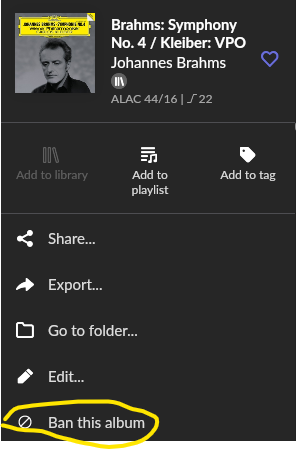
By the way, what exactly does “Ban this album” do? I looked for it, but did not find an explanation yet of how this works or what it does? (I’m sure it’s my fault for not searching deeper.)
Not sure why I would “ban” my own albums? Is that if an album shows up from a streaming service that you don’t want to see? What exactly does that do?
I’m going through some albums and one thing I have found, if Roon has sometimes problems correctly identifying an album, it usually doesn’t seem to have much to do with my metadata, but rather than Roon objects – or tries to confirm – that the album in its database is indeed the album it finds. It leaves it “unidentified” because the track timings differ. That seems to be – so far and in my collection – the main reason why some albums were left “unidentified” (that was also the reason Roon had not yet identified the Adam Fischer Haydn set up there).
Which is interesting, because my tracks usually come from AccurateRip confirmed CD rips or were bought as digital download from Qobuz or Chandos etc. Not much I can do about track length.
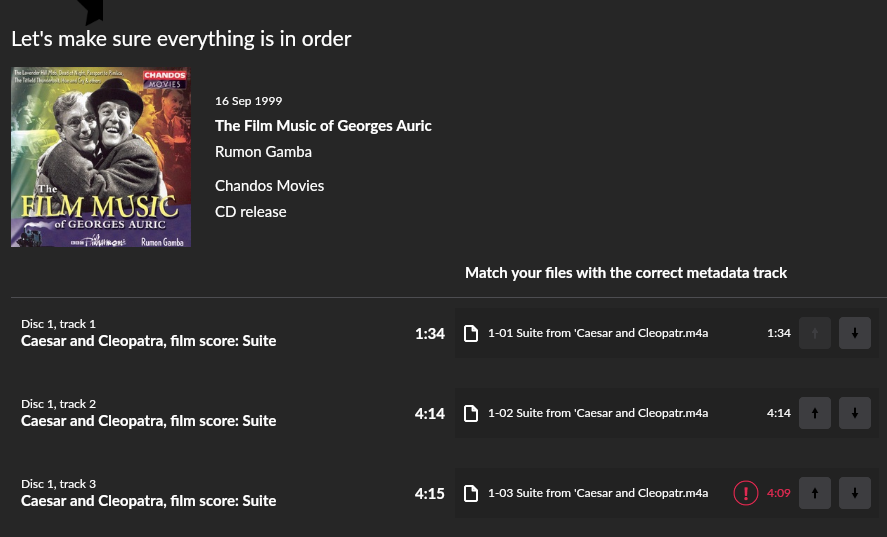
Track 3, so suggests the metadata, should be 4:15, but Roon finds 4:09.
4:09 is the length the title is listed with on Chandos’ site:
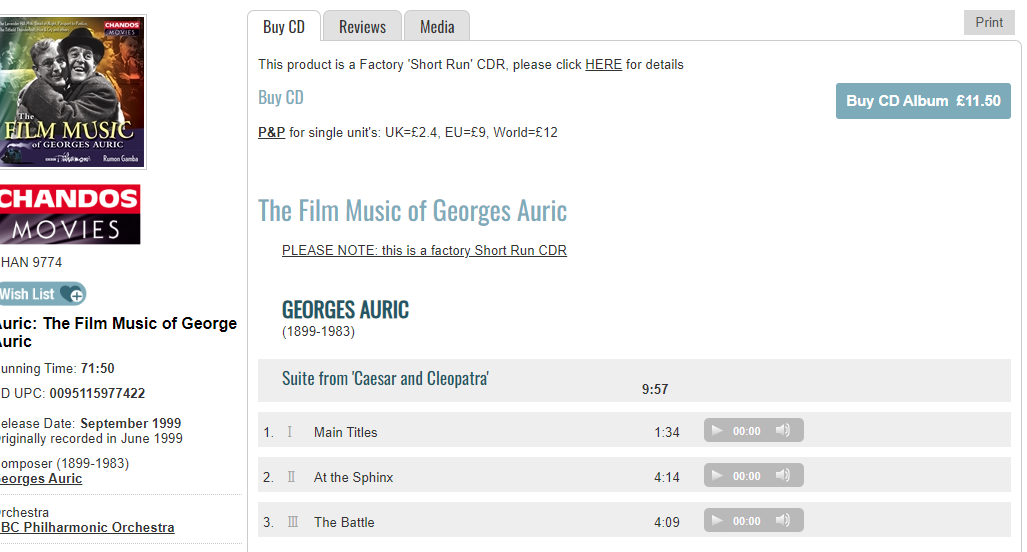
But 4:16 is listed at MusicBrainz:
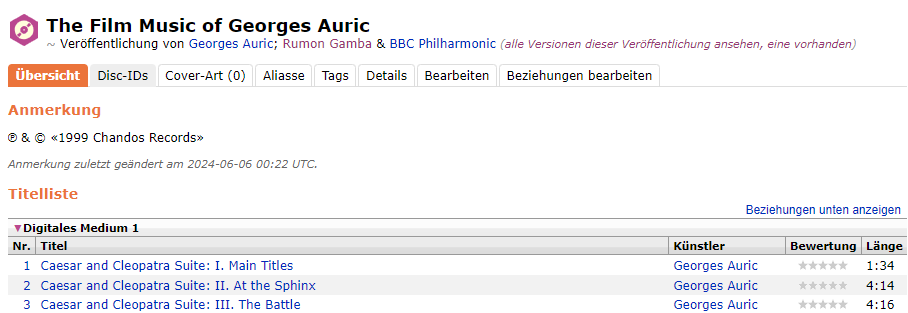
So that seems to be the main reason for the remaining “unidentified” albums in my collection: track times.
In most cases, I can easily “match” an unidentified album with one in the database, and it’s usually just the track timings that are off. So quite an easy thing to do.
1 Like
What breaks , I still use JRiver fairly often I find that Roon and JRMC play nicely together !!
My experience with Roon so far:
Very nice interface, does most things “out of the box” quite right. The majority of my albums are recognized and correctly assigned and sorted.
There are a few albums Roon does not recognize, either because they are so obscure they are not in any database (just very few), or because of timings that are off.
The classical music convention of tagging the “composer” in “Album Artist” tag does not seem to be any issue at all, despite what some people here have said. I experimented a bit with that and found ZERO advantage of putting a performing artist into the “album artist” tag rather than the artist who wrote the composition in the first place.
In many case it made no difference at all, except for some minor differences in how the album would be displayed:
That’s it… now some may prefer “Lang Lang” to be there, some “Johann Sebastian Bach”, but across the board, the tagging works either way and Roon identifies the albums either way.

Since MOST programs – including even Roon – easily list albums according to “Album Artist”, I would not only not switch that, I see no reason to either. This is how, for example, various Goldberg variations are listed when scrolling through the interfaces of various programs (here iTunes, but it’s essentially the same in MediaMonkey or MusicBee or whatever…)

So that’s how it should be, and I gather most classical music listeners prefer to have their albums (physically or digitally) listed under composer and not performer. Just imagine going into a store and looking for a Verdi opera, but not knowing whether to look for “James Levine” or “Luciano Pavarotti” or “The Met Orchestra” or whatever. Most people would expect to find it under “Verdi”, and that’s where it should be. I am so far happy to report that Roon has zero issue with that, so I don’t even know why there was such a lengthy discussion about it.
“Album Artis”=“Composer”, “Artist”=“performer” and “Composer”=“composer” works for thousands of classical music CD that Roon has out of the box correctly identified.
I have also found that there are no issues between Roon and other MusicServers, you can easily use both. They don’t seem to notice each other. Roon keeps its own database anyway, completely independent from anything else, so I don’t even see why there should ever be a conflict. I have not tried JRiver though.
Last but not least, I found the folder view extremely helpful to fix things and find out about things. There were some compilations that Roon was confused with, but it was easy to go to the folder, group them into an album, and bingo, they were all nice and together again. It was also easy to sort out some albums where Roon ONLY had the single albums in its database, but not the multi-disc set. Again, going to the folder section, grouping the appropriate tracks into one album, and voila, Roon then knew better what to do with them. So the folder view is quite helpful for “fixing” some things.
Interesting thread.
For what it’s worth, I experienced “split albums” in the Lightning DS program from Aurelic (I use Aries as my streamer). My files are on a QNAP NAS and at some point many, but not all, SACD albums were “split” into 2 or3 albums in the Lightning DS. In addition, the display titles included Disc Number-Track Number - Name in the “title”. (Note that the file structure remained the same: Music/Album Artist/Album.)
My first instinct was to confirm that the affected albums were tagged correctly (they were) and then I retagged to confirm.
These albums were not classical and not “Various Artists”. In Room they showed up fine.
Aurelic support couldn’t determine the cause. Someone on the QNAP community forum thought that perhaps this was being caused by QNAP permissions. So I ended up creating a new folder and move the music to the new folder through File Station rather than through my MacBook.
Not sure what happened however several weeks later the split albums were merged properly and all have bee “restored” and display correctly in Lightening DS.
While I don’t use Lightening DS often, it was annoying enough that I wanted to address the issue…I probably could have ignored it and it would have gone away!?
Yes, that’s why I always try to figure out how programs work and why they do what they do.
I haven’t had experience with Lightning DS, but like you, I have my music on a QNAP NAS, in the structure "Music/ALAC/Album Artist/Album/disc-number track-number track-title.
And it’s been tagged consistently (still catching small errors now and then, but nothing “big”) over the years to work with many different players, music servers and apps.
That’s probably why Roon worked “out of the box” quite well for me. It had no trouble identifying my classical music correctly, even box set; as I said, the “Album Artist”=“Composer” (which I think in classical music it should often be) was a non-issue for Roon, as that didn’t stop it from identifying most albums correctly.
I think Roon uses a number of factors to determine what an “album” is, including the location of the album, disc numbers and metadata, and compares that to its database. Most times (for standard albums) it finds a match, sometimes it finds more than one and asks “which one”.
That’s especially when the track timings in the database are off, I have found that is one of the main reasons for Roon to not identify an album. If you click “identify”, I have often found that Roon matched the album correctly (as its first suggestion often fit), but that the timing of a track was “off” (say “3:35” instead of “3:32”) so Roon wanted confirmed that it’s the right album.
There is apparently still an issue in Roon with some compilation albums, though the program offers you the ability to correct that manually, so it’s not that big of an issue for me (it might be if you have a lot of compilations Roon doesn’t recognize). I left some compilations “split” just to see what happens should there ever be an update.
One of the key issues is that metadata on the NET is often very inconsistent (in classical music) or unreliable (often in film music).
Case in point, I played this Varèse Sarabande album via Roon yesterday, and the source for Roon’s metadata was clearly off. For example, in the Titanic Suite, “James Horner” was listed as “performer”, when that’s actually the composer and the suite was conducted by John Debney and performed by the Royal Scottish National Orchestra, Horner had nothing at all to do with that particular performance. My own tags were also correct, but I guess the metadata “in the wild” had the composer here inserted as performer as well.
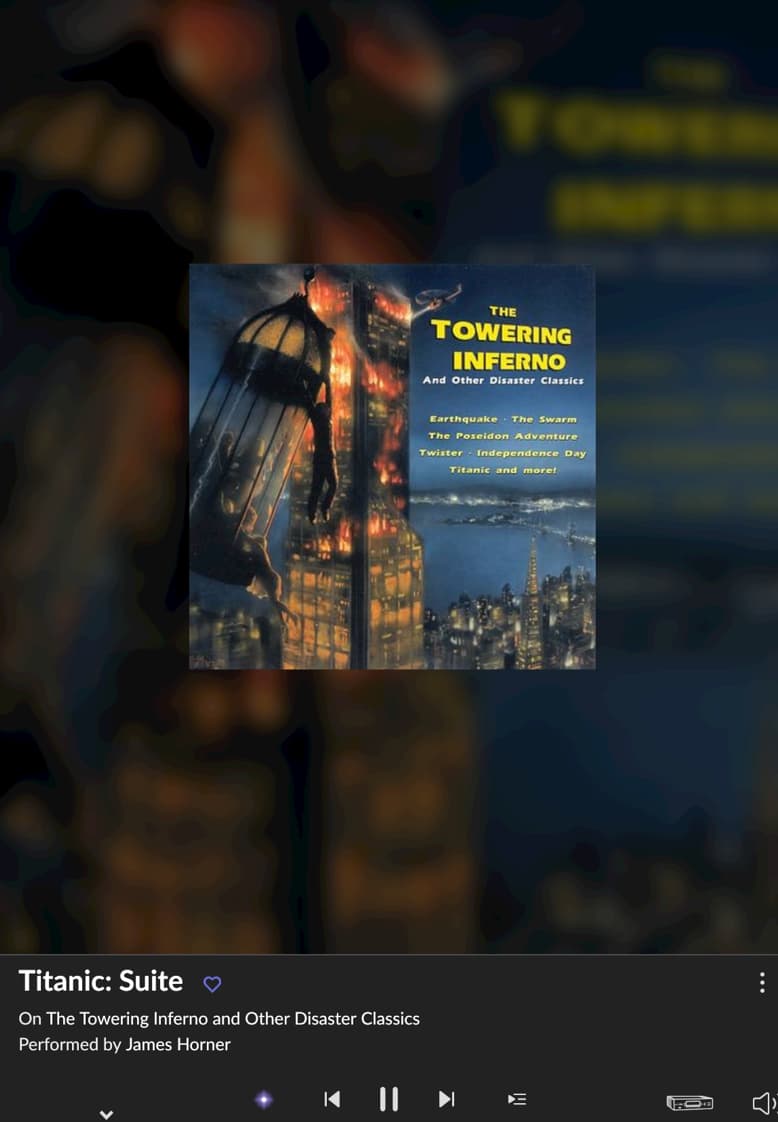
However, this is also a compilation disc with various performers, composers, and no “album artist”, but Roon had sorted it and recognized it correctly and kept it together.
Roon is highly configurable, so you can solve most problems when you know where to look, that’s quite nice. It also doesn’t touch the actual metadata (is it even possible to actually edit or delete tracks via Roon? I don’t think it is?), which is fine, because especially when one has a well tagged collection, sometimes – as in this example – the Internet metadata are simply not correct.
Yes it is possible to delete tracks or albums in Roon.
Oh, that’s good to know. But only delete, not edit, right?
What do you mean by “edit”? If you mean editing metadata, then yes, there are Album and Track editors in Roon (which can also work with multiple tracks or albums at once). The editors (Album, Track, Artist, Composer, Composition) in Roon allow manipulation of Roon’s metadata held in its database and will work for both local and streamed content.
However, a lot of us use third-party metadata album/track editors for our local data simply because they are more flexible.
Merry Christmas to you! Yes, I noticed you can do edits to the metadata in Roon, but it will not be written to the files, right? That’s what I mean. Third-party metadata album/track editors are needed to edit those, as far as I know at least.
I found this:

Which obviously states that Roon can actually delete files from you drive, but no option to edit the metadata of the actual files. It was my understanding from the beginning that Roon is not designed as a tag editor and therefore does not have that feature.