thanks so much for your help! it does show build 1653. I’ll try rebooting though I have done that a number of times.
tried what you suggested and still no luck. thanks anyway for your help
It’s weird  Good luck, I’ll be watching what official support finds out that I forgot checking
Is official support going to give me some help? I’ve been without Roon for over a week now and am frustrated.
Hey @Clark_West,
Thanks so much for your patience here, I completely understand how frustrating it can be when software is updated and ultimately breaks without much wiggle room.
That said, we were able to review a fresh Roon Server diagnostic report from your Mac, and see that the machine ID mismatch is the core problem.
Roon’s account server believes your licensed machine is a specific ID (likely from an older macOS installation or before some system change), but your current Mac is presenting as a different ID.
This would explain exactly why a reinstall didn’t help, the reinstall doesn’t change your machine’s ID or fix the account-side allocation.
Some Next Steps to Fix This:
Step 1 — Perform a “bump” (de-authorize the old machine) via Roon’s website
This is the specific action the server is requesting but can’t complete on its own because it requires user interaction:
- Go to https://account.roon.app and log in
- Look for a section called "Login Sessions"
- You should see an old/duplicate entry for "Mac"
- De-authorize or remove that old machine entry (you can also remove all sessions to refresh this.)
- Fully quit Roon Server (click the menu bar icon → Quit), then relaunch it
machineallocate call should succeed instead of returning NeedsBump, and the broker should become properly licensed.
If this doesn’t help, let us know. The good news: Roon Server is running, your library and settings are intact, and your DAC (D&M Holdings HD-DAC1) and HQPlayer are being detected correctly. This is purely an account authorization blockage. 
I tried to remove the old login sessions but am still having the same issue of not being able to access Roon. perhaps I did something wrong?
Hi @Clark_West,
Apologies for the slow response, are you still having trouble connecting to Roon? Do you have any backups of your database, or would you be okay starting over? The best next step may be to do a clean install of Roon and see whether that clears things up. I’ll provide the instructions below:
- Exit out of Roon + RoonServer (from taskbar area)
- Navigate to your Roon Database Location
- Find the folder that says “Roon Server” and “Roon”
- Rename the “RoonServer” folder to “RoonServer_old” and “Roon” to “Roon_old”
- Reinstall the Roon App from our Downloads Page to generate a new Roon folder
- Verify if the issue persists on a fresh database before restoring the backup
Here is the process outlined from a macOS machine:
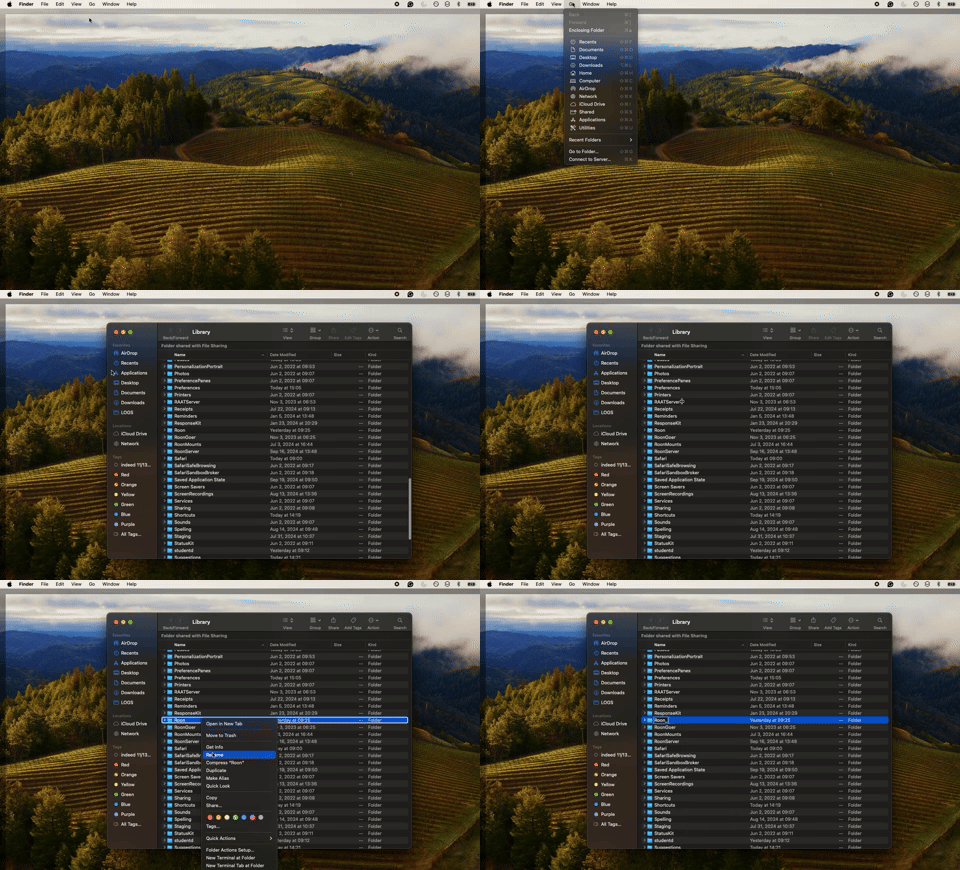
I followed these instructions and am still unable to access Roon. is there any other solution?
Is there anyone from Roon who can assist me? I don’t want to get rid of Roon. I love it and really want to get this fixed.
Hi @Clark_West,
Did you see @noris’s reply to you on this topic (it was posted about 7 days ago)?
He suggested some troubleshooting steps, give them a go and let him know if they helped or not.
I guess he would like next steps after this:
Hi @Clark_West,
Thank you for your patience and we apologize for the delay on our end.
Our diagnostic servers indicate that a consumer VPN or another separate network interface is also active on the same machine hosting your server. If Roon Server connects using one interface and Roon Remote with another, the connection can fail or you’ll lose sight of the server entirely.
If you’ve installed Tailscale to use with ARC or have another consumer VPN (NordVPN, Mullvad, etc), try disabling it temporarily.
We’ll watch for your reply and respond promptly. r
Connor, I disabled Tailscale and still have no luck connecting to my Roon Server.
Hi @Clark_West,
Thanks for your continued patience! Based on today’s Roon Server diagnostic report, it appears your server is fully running with active playback.
Are you still having issues?
If so, another area to investigate, given that macOS Tahoe has tightened local network and firewall permissions further, go to System Settings → Network → Firewall → Options and verify that both Roon and RoonServer are set to “Allow incoming connections.” This is separate from the Privacy & Security → Local Network toggle that was discussed.
Thanks, Clark!
yes, I am up and running again, though I had to start over and lost all my playlists, favorites, etc. it was indeed frustrating but I thank you for your efforts.
I’m really sorry to hear that @Clark_West - do you have any available backups by chance? That way, you’d be able to restore your prior playlists and saved settings.
Here is more info around backups in Roon:
I found my backups and used this to restore my playlists, etc. thank you for your assistance.