Roon Unable to Access NAS on MacOS via SMB (ref#6CMQTT)

What’s happening?

· Other

How can we help?

· None of the above

Other options

· Other

Describe the issue

Roon has stopped accessing to my NAS (MacOS). It was working fine with my music folder located on the NAS. Going to settings/storage it cannot connect to smb//192.168.1.253/Roon_Music ... I can access this folder with finder. I have checked the permissions. Impossible to connect. I had this problem may be one year ago. Shall I reinstall ROON. The backup file is one month old as ROON does not connect to the NAS where the backup is located.

Describe your network setup

I have an ethernet network so the connection is not with wifi. It is a MacOS setup. I have a Synology NAS.

Hello @Richard_Raquillet

Thank you for the update. We have checked the diagnostic report enabled on your account

Before anything else, I want to clarify an important point:
Roon does not require SMBv1.
Roon is fully capable of using SMBv2+, and many Synology users (including in this thread) run SMBv2 without issues. So you do not need to enable insecure SMBv1 on your NAS.

Your log snippet shows:

[831] 11/26 13:07:25 Debug: [broker/filebrowser/volumeshare] TryConnect: share volume was not available, so attempting to connect: \\192.168.1.253 Volume1
[832] 11/26 13:07:25 Info: [broker/locations/directorystoragelocation] drive availabilitychanged: False, FileBrowser.Entry: \\192.168.1.253, VOLUME1 : \Music\ITunes2020RR\Music (it was False)
[833] 11/26 13:07:25 Warn: [roon/cifs] [roon/cifs] mounting failed: mount_smbfs -N -s -o nobrowse '//192.168.1.253/Volume1' '/Users/r2raquillet/Library/RoonMounts/RoonStorage_b0cd8008cb30c932e2f4990b380ff6275d059632' [rc:68, output:mount_smbfs: server connection failed: Operation timed out]```

This tells us the MacOS Roon process is attempting to mount, but the request never completes — which indicates a connection or authentication issue between macOS and the NAS, not a protocol-version mismatch.

To move forward efficiently, could you please confirm the following:

1. Can you mount the share manually in macOS Finder using the exact same credentials Roon is using?

Please open Finder → Go → Connect to Server and enter:

smb://192.168.1.253/Roon_music

When prompted, enter the same username/password you entered in Roon.

Does it mount successfully from the same Mac that is running Roon Server?

This is the most important test — if Finder cannot mount with the same credentials and path, Roon won’t be able to either.

2. Did the NAS user’s password or permissions change recently?

Please check on your Synology:

Control Panel → Shared Folder → Roon_Music → Permissions
and
Control Panel → File Services → SMB → Advanced → “Enable SMB” (v2 or v3 is fine)

Make sure the user Roon is authenticating with has:

  • Read/Write access to the share
  • SMB enabled
  • Password unchanged

3. Try connecting via the NAS hostname

Sometimes macOS fails to resolve SMB mounts by IP, especially on networks with mDNS quirks or multiple interfaces.

Please try:

smb://<your_NAS_name>/Roon_music

Option 2 — Windows-style UNC path

\\192.168.1.253\Roon_Music

Please let us know if you were able to connect using the guidelines above
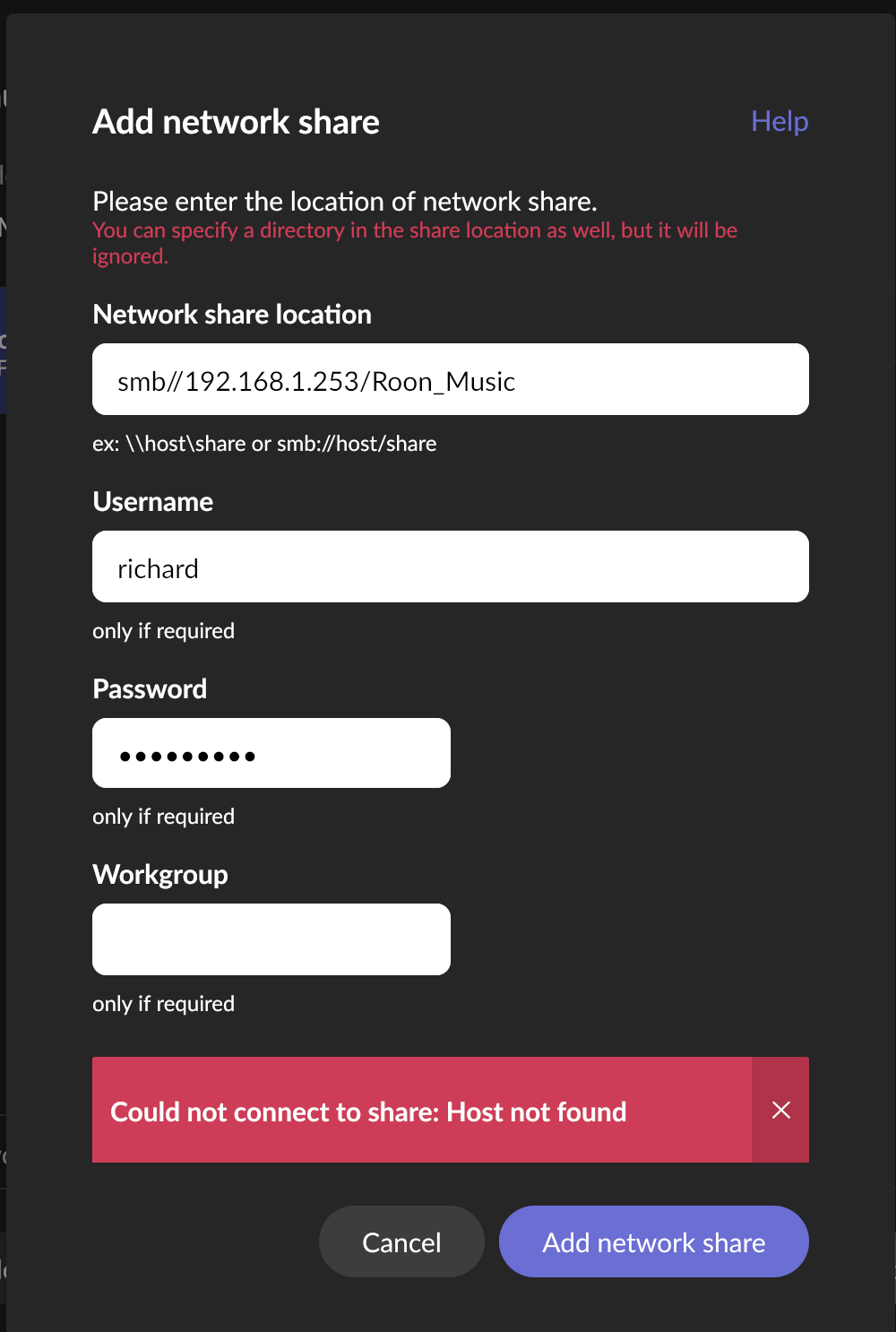
Hello. Thanks for the help but no success.

  1. I have tried to connect directly through Finder Go to Server and I CAN access the library : this is working.
  2. I have tried the different methods with smb, \, without success
  3. Prior to this problem Roon was working with \192.168.1.253. I have updated DSM and remove audio station.

—> still unexpected error

Hope for a solution. Re-install Roon ?

Hello @Richard_Raquillet,

Since Finder can access your NAS but Roon still can’t mount it directly, the easiest solution is:

Mount the NAS in macOS first, then point Roon to the local path.

1. In Finder:
Go → Connect to Server →

smb://192.168.1.253/Roon_Music

Mount the share.

2. In Roon:
Settings → Storage → Add Folder →
Browse to the mounted folder at:

/Volumes/Roon_Music

This bypasses Roon’s internal SMB and uses macOS’ native SMB (which works on your system).

Please try this and let us know if Roon can see your library again.

Hi @Richard_Raquillet,

Just a due diligence item - have you ensured in System Settings → Privacy & Security → Local Network that Roon still has local network access?

Do you have any third-party network security or antivirus software installed on this Mac or on the NAS itself?

To be clear, you should still be able to point Roon to this location per the steps in @vadim’s post above. If the OS is presenting the location to Roon, Roon won’t discriminate between a network share and a locally-stored drive.

Waouh ! Bingo ! Merci ! Roon Server has lost local network in system settings / Privacy & Security. I do not know why ? Anyway this is the solution and it works. Many thanks to all of you who have been helping in this matter.
Season Grettings to all Roon fans

Hello @Richard_Raquillet

We are happy to hear that the issue is solved. Enjoy your music!

Yes, as I and other users like @Nepherte have kept repeating. Maybe this could be the time to remove this misleading SMBv1 reference from the documentation?

It’s already been pointed out to Roon Labs (more than once). It’s on the list apparently, but some things move at a glacial pace…

2 Likes

This topic was automatically closed 24 hours after the last reply. New replies are no longer allowed.