Sorry, did not know this. I’m located in Switzerland.
Well I am in the UK and track still locks up at 55%
Yup, for me too, also UK. Jumped to the next track at 4:30/8:30
It gets stuck at about 35seconds into the song, then skips it to the next, and then the next until it decides to play a track. Different Buddha Bar albums, across the board. Also, learned that when searching for a compilation / DJ albums, roon doesn’t actually show the entire available library do Qobuz, it only shows a subset. Opening up Qobuz doing the same search, you find a lot more. Try it with Buddha Bar.
I’m joining this thread late I guess but using Roon has been an utterly miserable experience for a while now. I use an Intel NUC with ROCK installed. I have never had any issues with Roon since I set up my ROCK server in 2020 but now if I have Qobuz enabled I get freezes and hangs, tracks skip, if I’m playing even a locally stored track and I browse onto another album that is on Qobuz the track skips with a “playback is slow” message.
Searching for an artist can take minutes to return a result.
If I disable Qobuz it is back to running how it used to.
Honestly it’s dire and I’m fed up for paying both Roon and Qobuz for this.
I literally do not care where the issue is or who’s fault. It’s been going on far too long. Fix it or stop expecting our subscriptions for both Roon and Qobuz.
Your issue sounds slightly different to the one discussed in this thread. You might want to open your own Support Request.
To equip the Roon Technical Support team to assist you directly, please follow this link to provide the details of your case to Technical Support: Technical Support Request
Respond to the prompts there to ensure that you’ve performed basic troubleshooting and to ensure Technical Support has the full details necessary to expedite Technical Support’s investigation into the case.
Your responses will create a ticket in Roon Lab’s support tracking system and auto-generate a Community thread in the appropriate section.
Because this Community thread will be in a public forum, please do not include any personal information, such as your email address, postal address or telephone number in your submission.
Thank you.
It happens again: the track ‘I will remember’ of the Toto album ‘Tambu’ does not play. The song is skipped, also the next song…
Workaround does not work as well: the qobuz settings in Roon switched from 192khz to 96khz. The the song is played until 1:16 and then stops.
I updated Roon to build 1671 and then went back to build 1670. Same behaviour…
Worse than before. What happens here ? Any information from Qobuz ?
Hi! What’s not quite right with Roon?
· Music won’t play or issues with my library
Music won’t play or issues with my library
· Streaming tracks greyed out or unavailable
Tell us what's going on
· Roon often skips the first track of an album when playing from Qobuz. When I quit Roon and play directly from the Qobuz app or Audirvana, neither of them have problems, they play all the tracks.
Tell us about your home network
· Router is from Explore ZTE model ZXHN H298C. Switch is a Cisco Catalyst 1200 28 port.
Hi Support Team, I am very happy to report that Track 4, “fortune,” is now playing perfectly from start to finish without any interruptions. Between your coordination and Qobuz’s backend team, the streaming data has been completely fixed for my region. Both Track 2 and Track 4 are working flawlessly in 96kHz/24bit now. Thank you so much to the Roon support team and the Qobuz team for your incredibly swift response and excellent assistance. I truly appreciate your dedication to resolving this issue!
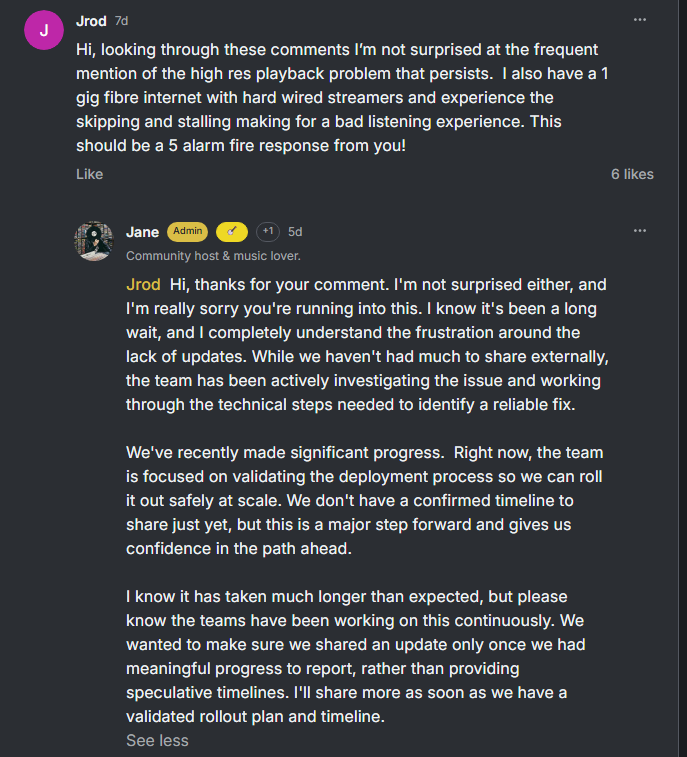
Thanks for posting Qobuz’ update; alas, it really is just waffle.
They said on Facebook on April 8 that “The situation should be resolved very shortly”. Over three months later they are now saying “We don’t have a confirmed timeline”.
This is not acceptable. Even worse, we now we have the additional issue of people’s Qobuz favourites disappearing from their Roon library.
This bug has been popping up now and then for years. 
Here’s more:
Location: US
Artist: John Mayer
Album: Continuum
Track: Gravity
FLAC 96kHz 24bit
Location: US
Artist: AVAWAVES
Album: WAVES
Track: Entire album
FLAC 44.1kHz 24bit (44.1kHz 16bit is fine)
Just saw one of these for the first time.
The song is “Stone Over Water” from I Built You A Tower by Death Cab for Cutie. The rest of the album plays fine. The track does not play and gives me the “playback was interrupted because track failed to load” warning.
If I switch my quality in settings>services from Hi-Res 24-bit/192khz to 16-bit 44.1khz CD quality, the Death Cab track plays fine, and so does that John Mayer song mentioned in the last post. I think I will stick to Qobuz CD quality in Roon because of this issue until it’s fixed.
Sending a kudos to @benjamin for his answer here for solving my issue with this Death Cab track, at least. Qobuz songs fail to play in Roon but work in Qobuz app (ref#W03UP2) - #2 by benjamin
 Hi everyone,
This has gone on far longer than any of us wanted, and I know the wait must be feeling long and frustrating. 
Even so, you have continued sharing reports (that helped us better understand the breadth of this issue) and even updates you received from Qobuz yourselves. Thank you for that. 
Through all this time, we’ve stayed in touch with Qobuz, and it seems they have made progress. We should start to see improvements in the coming days.
Please, keep listening as you normally would and, if you can, tell us what you see. On our end, we will keep this thread updated as things become clearer 
8 Likes