RoonServer Docker Image Looping on PopOS Linux (ref#6LKXDW)

Hi! What’s not quite right with Roon?

· Roon is slow, freezing or won’t start

Roon is slow, freezing or won’t start

· Roon won’t start up at all

Tell us what's going on

· I'm running the latest docker image (roonserver@207101683+production) on PopOS Linux, a Ubuntu variant.

Roon server starts, but loops. My firewall is turned off.

$ sudo ufw status
Status: inactive

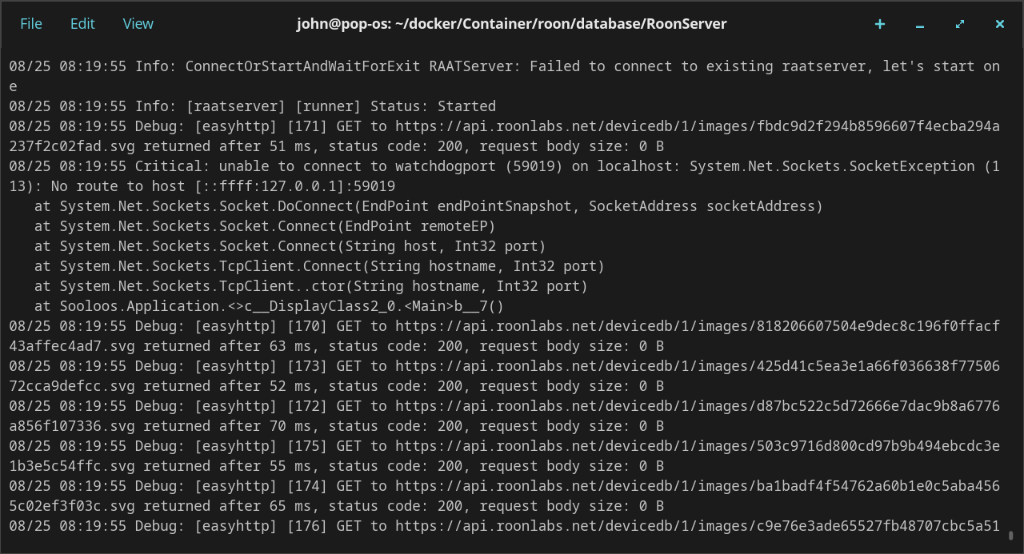
According to the logs, it's looping on:

08/24 16:18:48 Critical: unable to connect to watchdogport (56093) on localhost: System.Net.Sockets.SocketException (113): No route to host [::ffff:127.0.0.1]:56093
at System.Net.Sockets.Socket.DoConnect(EndPoint endPointSnapshot, SocketAddress socketAddress)
at System.Net.Sockets.Socket.Connect(EndPoint remoteEP)
at System.Net.Sockets.Socket.Connect(String host, Int32 port)
at System.Net.Sockets.TcpClient.Connect(String hostname, Int32 port)
at System.Net.Sockets.TcpClient..ctor(String hostname, Int32 port)
at Sooloos.Application.<>c__DisplayClass2_0.b__7()

I should note, I am not running IPv6 at all on this machine. It's disabled for my machine with:

/etc/sysctl.conf
net.ipv6.conf.all.disable_ipv6 = 1

and also in my Docker environment:

Default networking mode = ipv4
Inhibit DNS resolution for IPv4 / IPv6 = Filter IPv6 (AAAA records)

My docker-compose file:

$ cat ~/apps/roon/docker-compose.yml
services:
roonserver:
image: ghcr.io/roonlabs/roonserver:latest
container_name: roonserver
network_mode: host
environment:
- ROON_INSTALL_BRANCH=production
- TZ=America/New_York
volumes:
- /home/john/docker/Container/roon:/Roon
- /home/john/docker/Music:/Music
- /home/john/docker/Container/roon-backups:/RoonBackups
restart: unless-stopped
logging:
driver: local

Tell us about your home network

· Single subnet, 10.14.89.0/24
Hello @roon16

Thanks for the detail in this report, and for including your compose file and the sysctl settings. Those two together answer it.

When that connection fails the server process exits deliberately, and restart: unless-stopped policy then brings the container back up, where it fails the same way. That is the loop.

Why the connection fails. Look at the address in your own log:

No route to host [::ffff:127.0.0.1]:59019

That is the IPv4-mapped IPv6 form of
http://localhost
. The connection is being made through a dual-stack socket, so even though the target is 127.0.0.1 it needs the IPv6 stack to be present. You have:

net.ipv6.conf.all.disable_ipv6 = 1

With IPv6 disabled in the kernel, that address is unreachable, which is exactly the error code 113 you are seeing. Container runs with network_mode: host, so the host’s setting applies directly to it.

Your firewall is not involved, and neither is your Docker DNS configuration.

Please try this to confirm it. Temporarily re-enable IPv6 on the loopback interface only:

sudo sysctl -w net.ipv6.conf.lo.disable_ipv6=0

Then restart the container. That leaves IPv6 off everywhere else on the machine and only restores it on lo, which is where this connection is being made. If the server comes up and stays up, we have it confirmed.

If that alone is not enough, please try re-enabling it fully as a second test:

sudo sysctl -w net.ipv6.conf.all.disable_ipv6=0

Neither change survives a reboot, so nothing is committed until you decide to make it permanent.

Please send the container’s own output, which will show the exit code repeating on each cycle:

docker logs roonserver --tail 200

And please upload the full log set from /home/john/docker/Container/roon here so we can attach it:
https://workdrive.zohoexternal.com/collection/nocvrfc5b2ddab55140af8640f1d7ce13291e/external

I disabled ipv6 first on lo, and then globally, with no difference. Logs uploaded.

Hello @roon16

Apologies for the confusing wording. That setting is a double negative: disable_ipv6=0 turns IPv6 on. We need it enabled on the loopback interface, not disabled further.

Please run this, which enables it:

sudo sysctl -w net.ipv6.conf.lo.disable_ipv6=0

Then verify rather than trusting the command. Both of these should show IPv6 present on lo:

sysctl net.ipv6.conf.lo.disable_ipv6 # must print 0
ip -6 addr show lo # must list ::1

If the first prints 1, or the second shows nothing, IPv6 is still off and the test has not happened yet.

Once ::1 is there, restart the container and see whether the server stays up.

If it still loops, then enable it fully as the second test and check the same two commands again:

sudo sysctl -w net.ipv6.conf.all.disable_ipv6=0
sysctl net.ipv6.conf.all.disable_ipv6

Neither change survives a reboot, so nothing is permanent until you choose to make it so.

On the logs. We cannot find an upload from you. Please send them again and tell us roughly what time you upload, along with the username you used, so we can match it:

https://workdrive.zohoexternal.com/collection/nocvrfc5b2ddab55140af8640f1d7ce13291e/external

The most useful single thing remains the container’s own output, which you can paste straight into a reply here rather than uploading:

docker logs roonserver --tail 200

Hello @roon16,

Circling back on this, have you had a chance to try the IPv6 loopback change we mentioned and restart the container afterward? If it still loops, please also check the full IPv6 setting, and if you have not yet sent them, the container logs plus our Networking Best Practices notes would still be useful here. Please reply with any updates when possible.

Please note, if we don’t hear back from you this thread may close automatically soon. If the thread auto-closes and you need further assistance, please submit a reopen support request via the technical support help form below and specify that the issue should be reopened. Thank you.