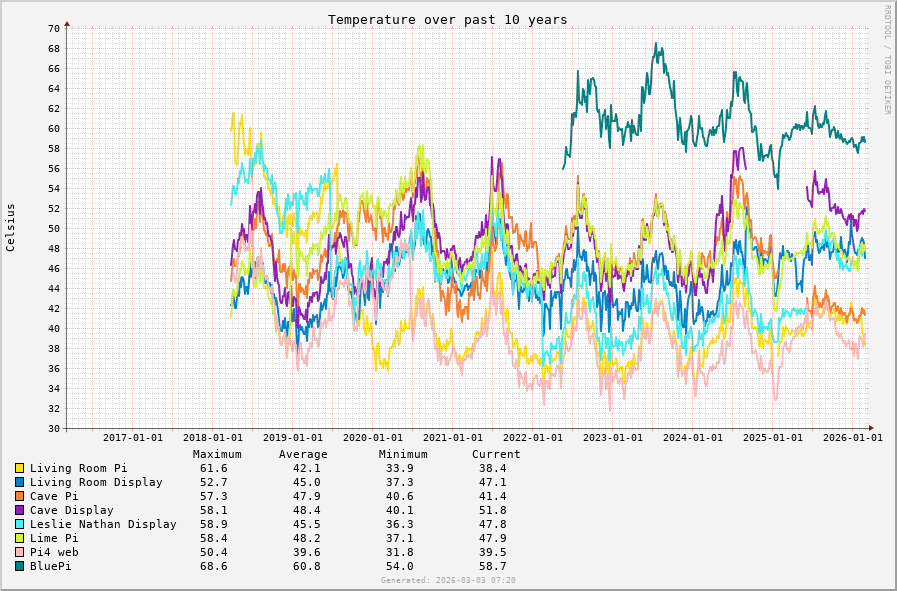
Hi all - I know this has come up a few times but not super recently. I’m wondering what sort of temperatures others with a Flirc case are getting on their RPi4 these days? Mine (RPi4b 1.4) seems hotter than ever, at around 59 degrees, which I know is in tolerance but can’t be doing it any favours. By contrast, my RPi3b runs at <40 degrees. I only use Roon and HQP NAA on Ropieee and am running 2026.01. Thanks!
Something is definitely off. I have two Flirc cases running Pi4, and they are always in the lowest temperature group in my environment (Living room as an example below).
Thanks @Nathan_Wilkes - it’s now at 61 degrees and rising so definitely doesn’t seem quite right.
Edit: Curiously after a reboot it is down to 44 degrees, perhaps suggesting a software glitch.
Edit 2: It’s settled down to 38 degrees now - @spockfish I’m wondering if you might have a chance to look at the feedback in the first post to see if anything might explain this? Since I’m the only report, I’m assuming there must be something about my use or environment that’s triggered it, so would be good to know what if possible. Thanks!
So, this seems to have been stable since the reboot, which makes me curious about what happened.
I did have one thought, which is that the Windows machine on which I run HQP Desktop (as well as lots of other stuff) crashed at some point - I’m just wondering whether this may have provoked the NAA into doing some sort of loop. @spockfish if you have a chance would you mind looking at the feedback to see if there’s anything to suggest this (or something else) as the issue? I just feel a little nervous about a 24/7 device that seemingly randomly turned itself into a radiator, and would like to pin it down if I can. Thanks!
Oh, one more thing. Quota (“guarding”) is in place since recently, but I only use it for memory usage, and for several processes… I need to think about this, but with some CPU quota in place this would not have happened (the operating system then kills the process which is running too long above a certain load).
So, to play it safe and as an example: if the max load would be above 90%, for 10 seconds continuously, in this case the kernel would have killed NAA.
Bingo! Thanks very much - based on that I’d lay money that it was because the Desktop app disappeared unexpectedly. The quota protection you mention certainly sounds really good as an insurance against runaway processes. @jussi_laako - I don’t suppose you’ve seen this before and/or it is mitigated in the most recent NAA?
Edit: By way of background, I am running HQP Desktop 5.16.2 on Windows 11 outputting to NAA 6.1.1 on RoPieee. The windows system is just a mutli-purpose desktop but unfortunately, every now and again when essentially idle it completely dies, presenting the BIOS screen. I have yet to work out why (originally I thought it was down to the 13th gen Intel CPU saga, but the replacement behaves the same, every component tests fine and it never happens under load). However, the pertinent issue here is that this unexpected crash seems to be associated with NAA using excessive CPU on the endpoint and raising the temperature accordingly.
NAA doesn’t establish connections. HQPlayer connects to the NAA. If DAC is not available, it is normal that HQPlayer asks NAA for the device once per second. However this doesn’t cause any notable load.
No, I have not seen anything special and no other reports either. 6.1.1 should be fine.
This is a hardware / BIOS issue. On a properly functioning computer and modern OS, application running in user space, such as HQPlayer, has no way of affecting the OS or machine such way.
On 13/14th Gen at least there were such CPU microcode issues Intel have fixed with later updates. The idle operating point adjustments inside CPU were incorrect and could lead to crashes and hardware failure. So please check that your BIOS is up to date with latest Intel’s CPU microcode.
Ah, that sounds like a red herring then, since NAA is generally up but the DAC generally off.
Indeed, I had assumed it was down to the CPU being affected by these bugs, but the BIOS is up to date, the CPU replaced and it still happens. Obviously nothing to do with HQP but it does have the consequence of breaking it! Unfortunately I’ve yet to pin it down and the fact it only happens every 4-8 weeks makes it tricky to do so.
Of course, that doesn’t really explain what was going on with NAA but perhaps it’s impossible to know.
Thanks - not a full 24hrs - I did do some testing with it but maybe not sufficient - will investigate this again as it was a long while ago now. I assumed that because it only ever happened when idle it was less likely to be a memory issue.
So, in case it’s of help to others - I found there was a recent new firmware for my Samsung 990 pro drive - 8B2QJXD7. The change log said something about addressing random disconnects. Since installing this about a month ago, my desktop has been completely stable Memory tests were all clear.
Hi Harry - don’t suppose you ever looked at this? I again had the same issue today - I noticed that HQP wasn’t working with Roon, checked the Ropieee device and it was at 67 degrees, presumably because the HQP process got stuck again. It would be really good if there was a way to kill and restart the stuck process automatically. I should say that I’m just updating it to 2026.05.0 now, so it was a version behind. Of course, it remains unclear why the process is getting wedged in this way.