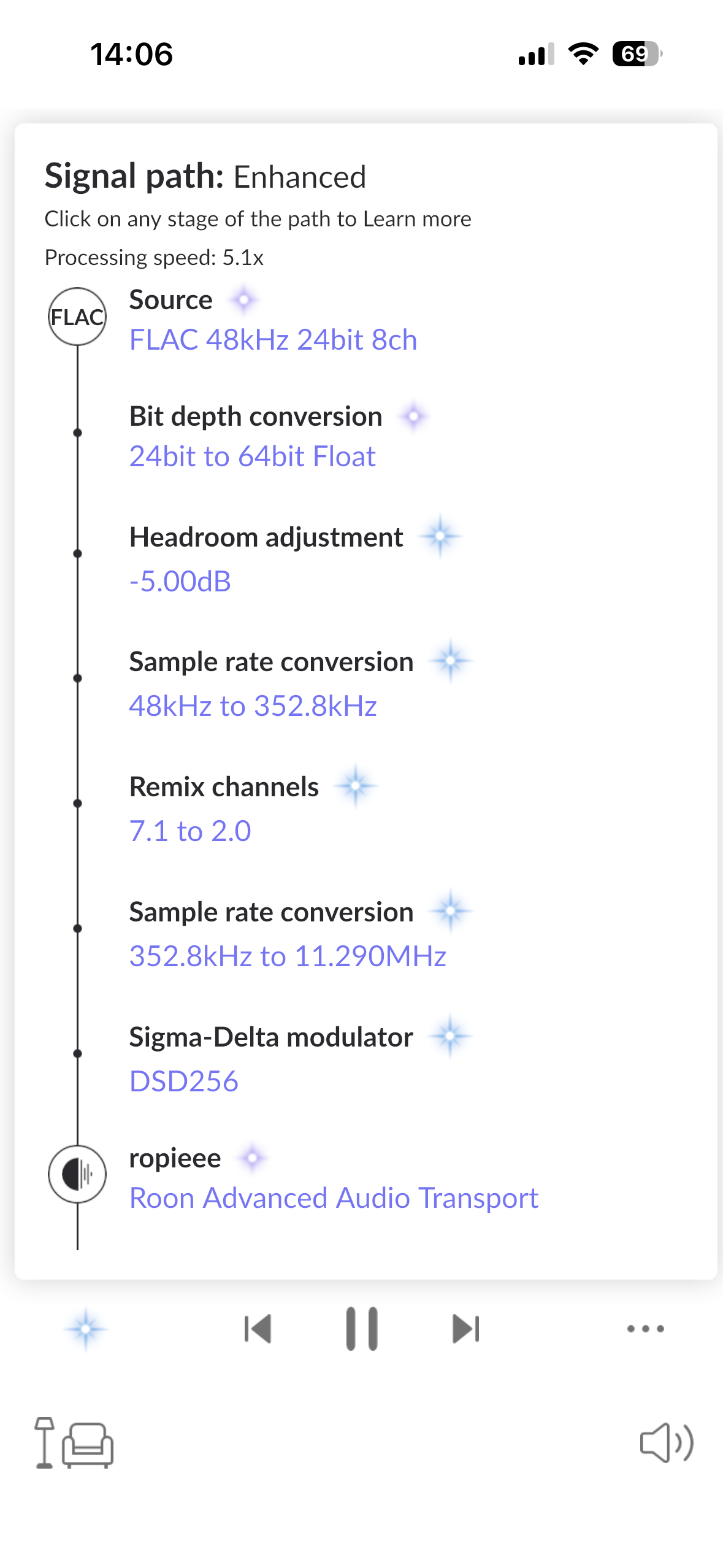
Here Knowledgeable community members will be able to shared their advice based on real world experiences.
To aid them could you detail what size your music library is (number of tracks) and how you intend to use Roon (Single Roon, Multiroom, using DSP features like DSD upsampling) as these factors need to be consider when selecting suitable hardware to run Roon.
Also what DAC(s) do you use and how are then connected to Roon (USB or Network).
I’ve been really happy for almost three years running a Roon server on a dedicated Mac Mini M4, paired with a Synology DS224+ (upgraded to 6GB) for my library and database backups. It’s been completely trouble‑free. I don’t think I’d ever choose to run Roon directly on a NAS, even though it’s technically supported. I just feel like I’ve seen more quirks and issues reported by people running Roon solely on a NAS — but that’s just my personal impression.
I have a NAS Synology 218+ upgraded with extra RAM (a 8 GB RAM update up to 10 GB RAM as per system information) and I am simply… Happy. No issues.
I do not like to have separate devices for making same work, so, after running ROCK on a dedicated NUC, which I purchased for this work, I moved to all-in-one with the NAS (not the most powerful one) and it works for me.
I know there is no “black” or “white” answers to this question (size of the library, players, quality, streaming or local music…) but it can be a simple and reliable solution
Can pick up NUC8s for under £150, and NUC10s for under £250. You have a lot of choice. Sorry should add, second hand prices. You can spend more for new units.
A base m4 Mac Mini is a wonderful Roon Server and even handles Multichannel DSD up and Downsampling to DSD512 without breaking a sweat while doing other stuff like ripping Blu-ray’s .
It also does HQplayer DSD256 and some DSD512 if you ever want to look into that.
You could either keep using your NAS or hook external drives up the mac mini with Thunderbolt 4 (in case you want to do some video editing as well).
Having an M1 Apple Mini I can totally believe your statement Marc. Just so power efficient and quiet too. I have no concern leaving my Mini on 24/7. It just works. Fast, responsive and no issues. I actually feel sorry for all the NUC users using Windows to manage memory swap, etc.
Mine is also running 24/7 . And while doing all this + Splashtop remote screen I have a cpu usage of under 20% in Low Power Mode: Reduces CPU/GPU clock speeds (e.g., CPU to ~80%, GPU to ~33%) to save significant energy, great for light work or preventing drain during outages
Keep the library on the NAS.
Get a 2nd hand NUC, NUC7, NUC8, NUC10 probably a i3 or i5 will be fine. Put 8GB RAM in it, just in case and a fast NVMe drive for Roon’s database.
Install ROCK, restore the backup from your current image and play some music,
I have a little nuc PC and I use this on 10gbps USB.
No nas. No raid. I have had those fail and lose data. I’m using StableBit Drivepool and scanner for monitoring health and load balancing the drives. One drive failed, but it migrated the data to the other drives.
I would , I hate this anti Windows attitude of Apple users !!
I have used Windows since 3.1 and probably every version. I have never that I can remember had a problem that was Windows specific. My disclaimer is that I don’t mess about with it .
I turn it on, accept all updates as they happen which takes maybe 10 minutes a month if that.
I read in the forum about the trials and tribulations of new Mac OS ad how they don’t really work with Roon for a while “Is it safe to use Tahoe” was good one.
Yes I am biased I am a certified MS developer so Windows is my OS of choice
Well…, It also happens the other way…
May each one choose the OS he’s happy with. And a bit of diversity is good, so we can learn from each other.
For me, at home it’s MacOS and at work it is/was Windows.
There is really no reason to be anti-anything just because you prefer or use something else. I have four Roon servers including a Nucleus (Rev 2), Mac Mini (late 2014), NucBox G5, and Dell XPS15 (Windows 11). They all work well for me.
I paid $1190 for the Nucleus, $200 for the MacMini (used), $180 for the NucBox, and already had the Dell before Roon.
I started with Roon on my Dell but soon purchased the Nucleus on a Black Friday deal. Running Roon on my everyday computer was somewhat of a pain.
When Roon ARC came out, I purchased the used MacMini for remote access to the Nucleus using Splashtop for reboots and reconnection to Tidal and Qobuz when away from home.
I later purchased the NucBox G5 just playing around and to see how well it would work.
They are all at our house except when the Dell travels with us on occasion.
Been using Windows since NT/2000 and state properly on XP. I have many Windows machine. Was a beta tester for Longhorn/MSDN, etc. I do love Windows. And I’ll always have a Windows machine somewhere. But, MacOS and the experience is really second to none. I’m no fan boy and I was very late to MacOS after being a hater for many years. But now, I like it. It just works.
For this instance, ROCK wins hands down rather than being installed on a Windows or Mac OS. But, of course this is just my opinion.
I also tried Roon on MacOS before migrating to ROCK running on an optimised NUC. I can recommend the Cirrus7 Nimbini - completely silent, passive cooling, and German build quality. I have subsequently upgraded both memory and the internal SSD myself - the user support is outstanding and email responses are far better than any other hifi or tech company I have dealt with. And it’s much cheaper than a Nucleus!