Focal Dac>>nucleus. Music is stored on the Internal Drive when I play a song any level DSD or Tidal, music skips through songs to next song. If I plug the dac into my PC it works fine but does not play in DSD level, only "high quality". Roon storage shows that Internal storage is targeted. Viewing ////NUCLEUSONE data storage..... I can see my files. HELP!!!!!
Describe your network setup
Roon Nucleus is connected to the house ethernet, pc console connected too house ethernet. When Focal Dac is connected directly to Nucleus the skipping occurs. When Focal Dac is connected to pc it works but at a lower quality.
We haven’t seen a response to this thread and we’re eager to ensure you have sufficient information to resolve your issue.
Which model of Focal DAC are you using, specifically? It sounds like you have the correct drivers installed on Windows, but not on the Nucleus, which relies on the standard UAC2 for directly-connected USB devices.
If you can provide a screenshot of the Signal Path in Roon on Windows when you’re using this DAC, that should provide the information we require to take more action on this report. Please also try testing a different USB port as @alex_h suggested in the post above, for due diligence.
That means Roon is trying to play DSD512 content directly to your FOCAL Arche DAC,but the device (or its RAAT driver) is reporting that this format isn’t supported over the current connection.
It appears that the Arche supports up to DSD256 in DoP (DSD over PCM) or native DSD, depending on driver and operating system.
If Roon is trying to send DSD512, it’s beyond what the device can handle, so the RAAT engine refuses the stream.
Set “DSD Playback Strategy” to Convert to PCM (instead of “Native” or “DoP”).
This will downsample DSD512 to a supported PCM format.
Downsample DSD512 to DSD256 using offline conversion (e.g. with HQPlayer, dBpoweramp, or foobar2000 with SACD plugin) if you want to stay in DSD format.
Sorry. That is not the problem. The 512DSD files downSample just fine. The problem is the skipping that occurs with anything, Tidal DSD256 etc. I am well aware that the Arche is limited to DSD 256. We have another device on the Ethernet that plays DSD 512.
May I send new time stamps and I will ensure they are not DSD512?
The skipping occurs with ANY file I play when the DACis plugged directly into the Nucleus. When I plug the DAC into my pc via usb, yes, the DSD512 down samples to PCM. But it also down samples the DSD 256 files to PCM. If I set ROON to play only DSD level, absolutely no sound comes across. I want to play my files in DSD format.
Here are the test times for today, Saturday November 8:
1:17pm PDT Tidal
1:18pm PDT DSD256
Left USB
1:20PDT DSD256
1:20PDT Tidal
Right USB
No DSD512, my bad shoulda caught that.
When I click play, ROON speeds through each tune then errors out. If this isn’t showing up in the diagnostic, I will have to try to capture a visual.
Is it possible that my files are in the wrong location on the Nucleus? I read something about file location being critical so I reinstalled the files but the problem persisted.
Storage shows “Nucleus One internal storage.”
Under “Library”, Background audio analysis speed is set to throttled and On-demand audio analysis speed is set to fast, both by default.
Under “Audio” the Focal Arche is set as ALSA, playback strategy is set to DSD over PCM. Multichannel mixing is set to Downmix as needed.
Max DSD is set to DSD256 - there is obviously no setting for DSD512.
Just for grins, I changed Playback strategy to PCM and repeated one test, same error.
1:44 PDT Tidal
I sure hope these tests reveals something.
BTW, I am on an iPad running iOS 18.7.2 and have had no editing issues. I had real editing issues on my iPad running iOS 26 just FYI.
We have analyzed the diagnostics data and unfortunately we still see the same issue - RAAT__OUTPUT_PLUGIN_STATUS_FORMAT_NOT_SUPPORTED happening to all of your attempts even tho we can see that advertised formats are matching for your DAC and for what Roon is Streaming.
However, we were able to spot few issue records in the system events log claiming that your Focal DAC has some issues syncing on the USB level.
Thus, we’d like to ask you, do we understand correctly that when you have your ROON server running on Windows PC the Focal DAC is working fine (for most formats) and does not work at all on the Nucleus ?
P.S. If you consider getting yourself a Ropiee endpoint - it might help you to solve this problem with connection of the Focal DAC to Nucleus. You can check one track indicating this issue here:
Yes, Alex. The Focal Dac works fine via PC but not at all on the Nucleus. I tested a Mojo 2 directly to the Nucleus, and it worked just fine, so the problem is definitely not with the Nucleus.
That article you pointed me to was wonderful, they had exactly the issues.
Ropieee on a Raspberry Pi 5 sounds like the solution. However this it totally new technology to me and I am trying to understand what it is I actually need. The Raspberry is very interesting!
You have probably figured out that I am a “listener” not an audophile, but I do have a bit of technical knowledge.
If this isn’t the place to ask this, I apologize, but as I understand the Raspberry Ropieee configuration I would need the basic Raspberry Pi 5 board, burn the microSD card with the Ropieee image, connect via USB from Focal Dac to Nucleus. (Of course get a power supply and case.)
Let us know how it goes with the Pi, hopefully it will help resolve the issue. And not to worry, we can reopen the thread if it ends up closing before you have a chance to test. The best way to do so if that’s the case would be to open a new ticket and reference the current one (ref#J7408X). Thanks!
Received the Raspberry, verified that it works as a computer. Burned sd card with ropieee image, put it back into Raspberry and…got a partial install. It is hung at a certain point. I can see the ropieee under WiFi even though it is hooked through ethernet. However, the the ethernet connection on the hub is not flashing - I verified that the port on the hub is working with another working connection. Think the Raspberry ethernet port is defective. Cannot get to ropieee.local even by means of its IP address.
I wonder if the HDMI connection is using too much power?
Time to hit the x box and blast some undead.
I will contact Raspberry in AM for further info. Wanted to keep this open.
Tried a known working cat 5 cable and was able to finish the install! (3 non-working ones how does that happen?) Consequently, I was able to access ropieee.local.
Anyway, plugged the Focal Dac directly into the Raspberry and the Arche appears in Ropieee and the Ropieee appears in ROON. However, there are no extensions listed in ROON.
Did reinstall the ROON bridge via Ropieee.
Playing files is still the same - skipping over them.
I have ordered some new cat5 cables since I pulled the one from my PC. I am going to reinstall the Focal update - I am sure I already did that, but we will see.
Does this mean that non-DSD files are playing as expected?
If you would like to investigate the PC option more as a solution, you would need to make sure you are not playing to “System Output”, but rather to the DAC driver, this can be enabled in Roon Settings → Audio, and typically you’d want to make sure that Exclusive Mode is enabled (in Device Setup, right click zone name in bottom right of Roon→ device setup).
Well, good and bad news.
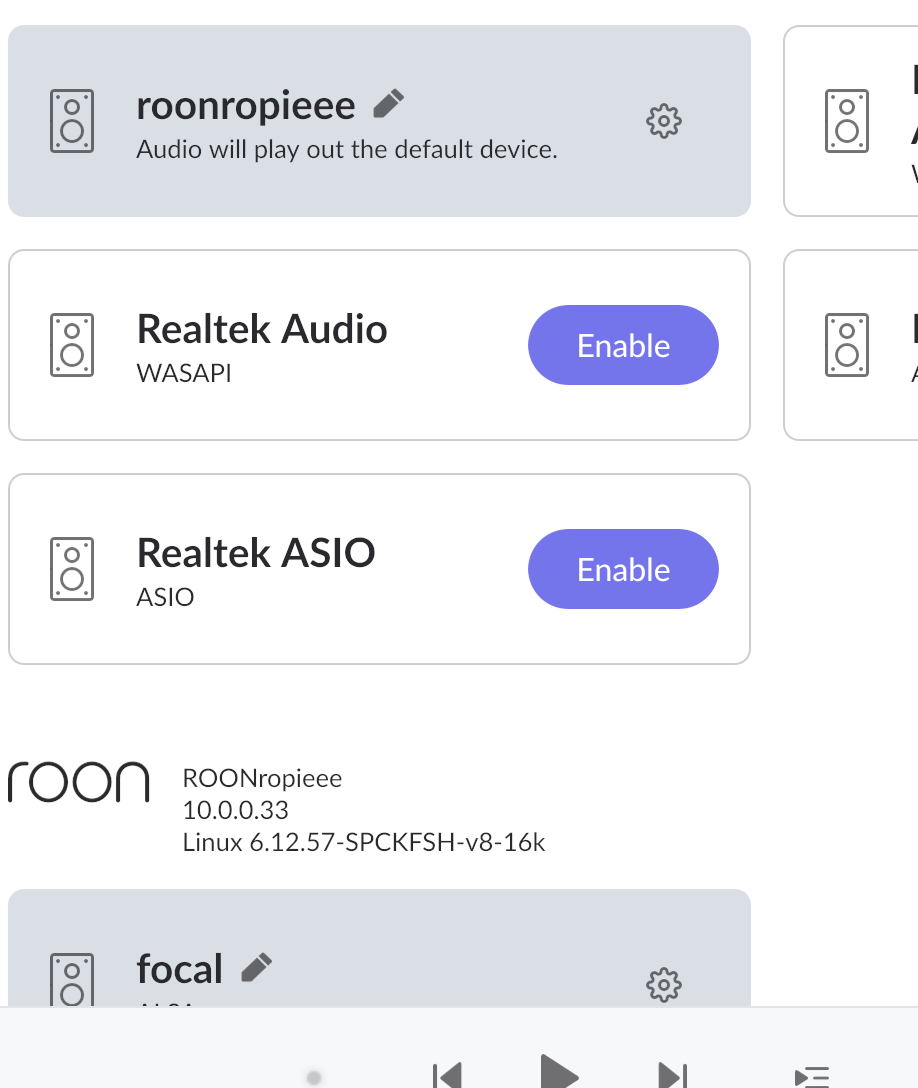
I can see the ropieee in ROON but it is defaulted to the System Device.
There are no extensions available in ROON, so I guess the next step is to download DIET-PI or some such thing, not sure which file to download.
Focal>>ropieee>>ethernet
Ropieee on ROON is on the Private Zone as is the Focal. If I take it off the Private Zone, it skips again.
The Focal 2 is listed in the ropieee.local audio tab.
I am really sure I updated the Focal a long time ago. I knew about that issue when I hooked up ROON the first time.
The good news is that the songs are no longer skipping!
The bad news is that I can’t figure out how to change the default audio output. I am on my MacBook, I checked output options on the Mac and neither the Focal nor the ropieee is listed.