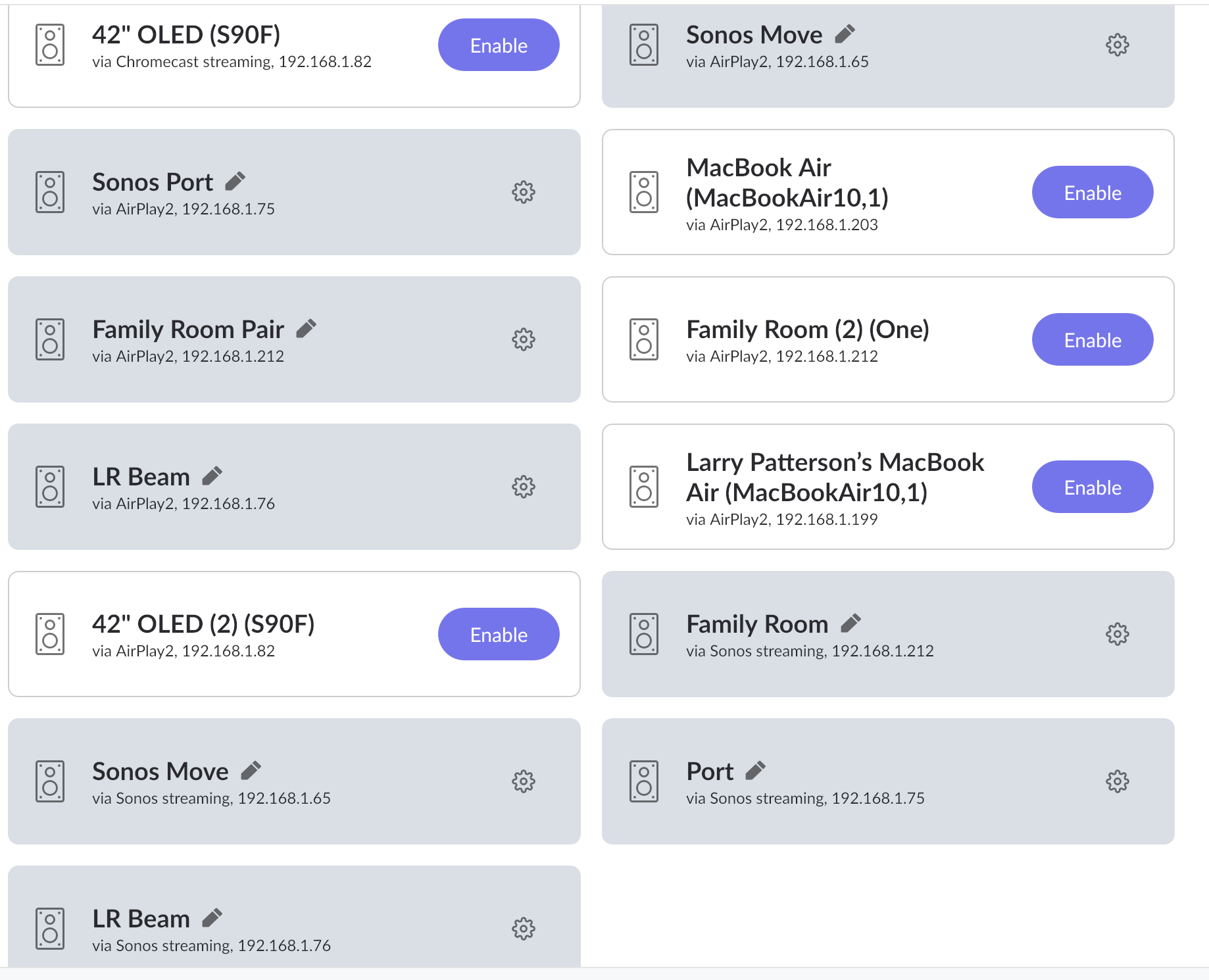
Diagnostics show eight Zones connected via Roon’s integration with the Sonos native protocol. They’re sending Sonos native device announcements via UPnP as expected, and they’re not advertising as Roon Ready.
Certain Sonos models also have AirPlay functionality, so Sonos One, Port, Beam, and Play devices will likely also appear as AirPlay Zones.
AirPlay and Sonos Zones for the same device, while they’ll play to the same speaker, are entirely separate Zones in Roon.
None of these should appear as Roon Ready Zones or locally-controlled (RAAT) Zones in Roon.
Can you please upload a screenshot of Settings → Audio in Roon so we can determine what’s happening?
Thanks for the screenshots. They clear this up, and you’re right that it’s a setup issue, not a labeling problem in Roon. Two things are causing the confusion:
1. Two zones named “Kitchen”
The “Kitchen” listed under your Nucleus One in Settings → Audio is the Nucleus’s own built-in output (it says “Audio will play out the default device”). It isn’t your Sonos speaker. It looks like it was renamed to Kitchen at some point. Your actual Sonos Kitchen is the one further down, under Roon Tested (“via Sonos streaming, 192.168.y.165”).
Unless you have a USB DAC connected to the Nucleus, click the gear icon next to the Nucleus “Kitchen” entry and choose Disable. Otherwise, rename it to something like “Nucleus Output” so it’s easy to tell apart.
2. Some Sonos speakers are enabled twice
Some Sonos models support AirPlay as well as Sonos’s own protocol, so Roon can find them both ways. These speakers are currently enabled both ways:
Sonos Port / Port (192.168.y.75)
Family Room Pair / Family Room (192.168.y.212)
LR Beam (192.168.y.76)
Sonos Move (192.168.y.65)
We recommend keeping the “via Sonos streaming” version of each and disabling the “via AirPlay2” one (gear icon → Disable). That gives you one zone per speaker, and they’ll all group together with your other Sonos zones.
Once that’s done, your zone list should match your Sonos rooms one-to-one. Let us know how it goes or if anything still looks off.
Just checking in on this, have you had a chance to disable the duplicate AirPlay entries and keep the Sonos zones under the Sonos streaming path, plus rename or disable the extra Nucleus Kitchen output so the list is one-to-one? If you want a quick refresher on the device layout, our Nucleus Manual and Networking Best Practices pages may help while you compare the zones. Let us know what you’re seeing now and we can keep going from there.
Please note, if we don’t hear back from you this thread may close automatically soon. If the thread auto-closes and you need further assistance, please submit a reopen support request via the technical support help form below and specify that the issue should be reopened. Thank you.
I did, thank you. Yes, I cleared up that issue and it stabilized my Sonos performance with Roon. There is still something a bit odd. When I play any music off of the Nucleus server through Sonos, it takes about 30 seconds for the music to start to play after I select “play”. I simply have to be patient. It is like “hit play and walk away”. Once it starts to play it is fine. I can pause and re-start or change music without any delay. So yes, it is working fine aside from this oddity. I can live with it, just have to keep it in mind.
Thats great news @pattersonld if you’d like us to investigate the 30 pause further, please reproduce the issue, grab the date and time as well as the track name of the first song played, and we’ll take a look.