I tried that and there is no sound out of the Arc, then it switches back to the mac internal speakers.
Good day @Mark_Gatliff !
Thanks for confirming.
R&D is working on Jira and we will get back to you once there is an update for this thread.
Have a nice day!
Regards.
Similar issue with an ifi zen streamer. It lights up when i start a stream via airplay with i tunes but no music, despite what seems a stream coming thru. On the other hand roon stream via airplay into same ifi client works well. It actually says airplay 2. Never had this problem before, so could it be an airplay proprietary issue following recent Apple upgrades?
Note that on the ifi zen streamer, airplay is called shairport-sync.
What best describes your playback issue?
· Music doesn't start when I press "Play"
What type of Zone is affected by this problem?
· *All of my Zones* are affected.
Does the issue affect all file formats?
· The issue affects *multiple/all* file formats.
Does the issue happen with local library music, streaming service music, or both?
· *Both streaming and local* *library* music are affected.
Do you encounter any playback errors with the "System Output" Zone?
· The System Output has *no problem*, it's only my other Zone.
How is the affected Zone connected to your RoonServer machine?
· Network - WiFi
Which network audio protocol is the Zone using with Roon?
· Airplay
Since this is an Airplay Zone, have you tried toggling Airplay Compatibility Mode for this Zone in the Device Setup window?
· There is no change in behavior.
Does the device show up at all in Roon Settings -> Audio?
· The Zone is listed under the wrong protocol
Does the device play audio from another source when using the same connection?
· The device has no problems with another audio source
Have you checked that Roon is whitelisted in any firewalls?
· I've checked the firewall and the issue remains
If the device has multiple output options, do the other options work as expected?
· Only one output type is affected while the other output type works as expected
Is the device using the latest firmware as per the manufacturer?
· Firmware is up-to-date but the issue remains
Do you have an approximate timestamp of when the issue last occurred?
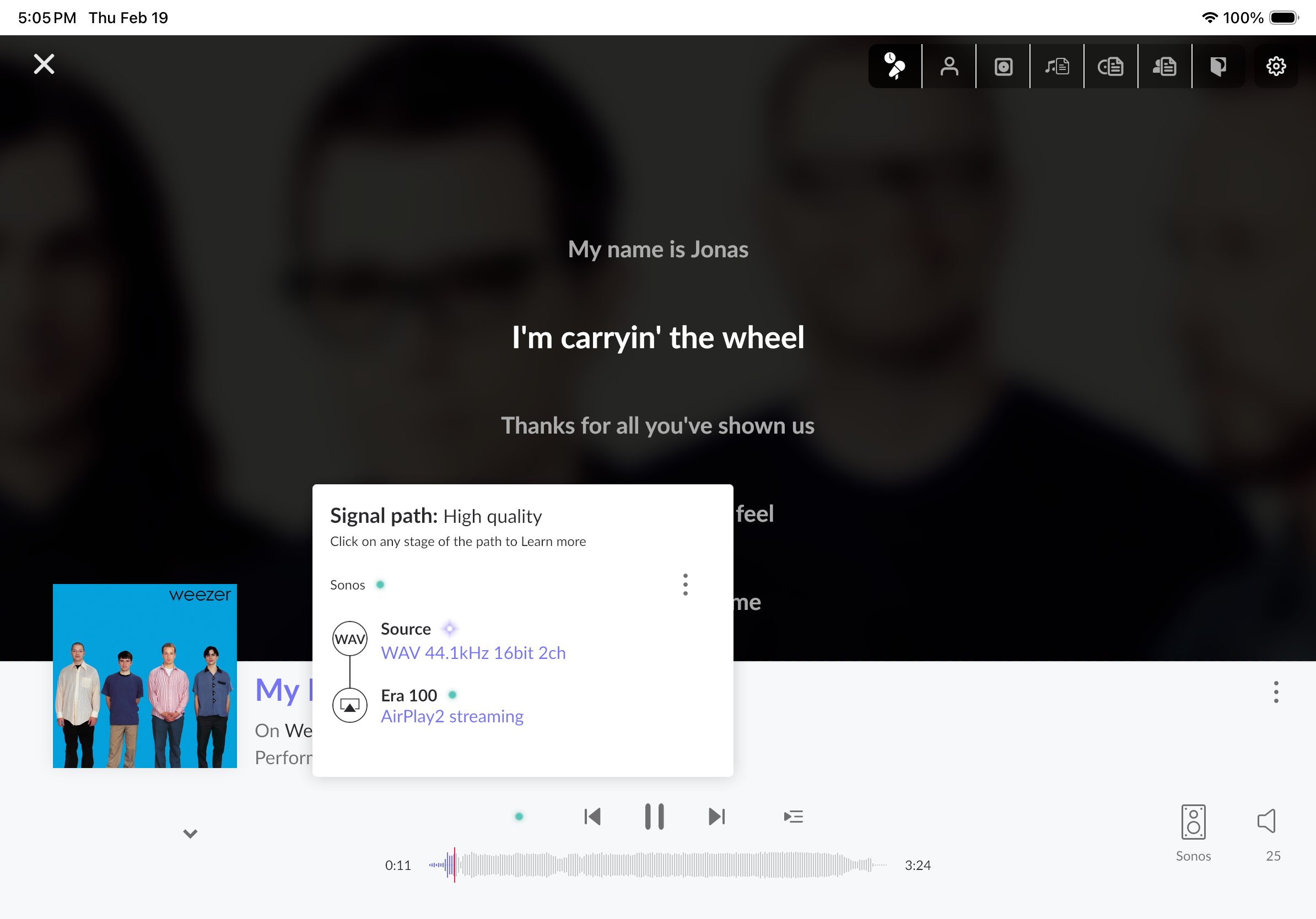
· Weezer - My name is Jonas
What are the make and model of the affected audio device(s) and the connection type?
· Sonos Era 100s stereo pair
Describe the issue
Apple AirPlay 2 does not work on a pair of Sonos era 100s. It works as an ip address endpoint but I can’t put it into a group and that is a problem for me. I have posted twice about this issue and it has been going on for over a year. Is there any update? I keep checking the release notes but there has not been any progress. I do not want to have to sell them. Thank you to your attention to this matter.
Describe your network setup
WiFi through Verizon fios. Access point in the room. I don’t know the model number.
Hello @Aaron_Burns ,
Thank you for reaching out again and for taking the time to provide the detailed reproduction steps and log snippets.
I want to sincerely apologize that you are still dealing with this issue. I completely understand how frustrating it is to wait for a resolution for over a year, and we know how disappointing it is to keep checking the release notes without seeing a fix.
Thank you for the logs showing the error when attempting playback in Compatibility Mode. This perfectly highlights the conflict between the legacy protocol and the newer Sonos architecture. Please know that our development team is still actively investigating this AirPlay 2 stereo pairing issue. While I cannot give you a concrete timeframe for when a fix will be implemented, it remains very much on our radar and is being worked on.
We truly appreciate your patience and that you’ve held off on selling the speakers. I have attached your latest logs and notes to the open developer ticket to ensure they have this fresh data.
Thanks.
Thank you for your response. I look forward to the conclusion of this issue.
Hi @Aaron_Burns,
Upcoming Airplay2 implementation fixes with the Sonos Era series will be announced in this tracking thread:
If you’d like, we can merge your report into the main tracking thread so you automatically receive notifications when we announce a fix.
Please merge the threads. Thank you.
Hi everyone,
Unfortunately, this ticket remains in the pipeline at this time and a fix was not included in the most recent early access or main production Roon releases.
We appreciate your patience and we will share updates here as they become available. Thank you.
Hi Roon Support,
thank you for the update, but this sucks! Sonos is not some NONAME brand with no users. This case is open way too long and I am becoming a very unhappy (perpetual license) customer/user of Roon. Can’t recommend Roon currently… because you are not treating problems in the priority your PAYING customers deserve.
We completely understand your frustration, as it has been a long-standing issue.
I do want to remind you that any general opinions and feedback are always welcome, just not within technical support threads. To keep this thread on track, we ask that general feedback be shared in the Feedback category rather than technical support threads. It helps us stay focused on resolving the issue here, and ensures your feedback reaches the right people.
Appreciate you working with us on this!
Hi Benjamin,
noted. general feedback will be shared in the Feedback category.
Regarding my latest post, I must say that this does not belong to general feedback as it is very specific and tied to this individual case that is frustrating for me and for all other concerned users. I think it is important to show all users who are looking for solutions for this problem, that it is a long lasting unresolved issue and customers are not happy.
Nevertheless, all I want is a timely solution
Hi @Aaron_Burns,
While that might be the case, sharing opinions or feedback will still need to be posted over in the Feedback category as mentioned above. Technical Support threads are a dedicated space for troubleshooting issues, and only this.
Thanks so much for your future cooperation here.
We don’t have any immediate updates to share around this issue, but our development team is making progress behind the scenes on some potential solutions. Thanks again for the ongoing patience. 