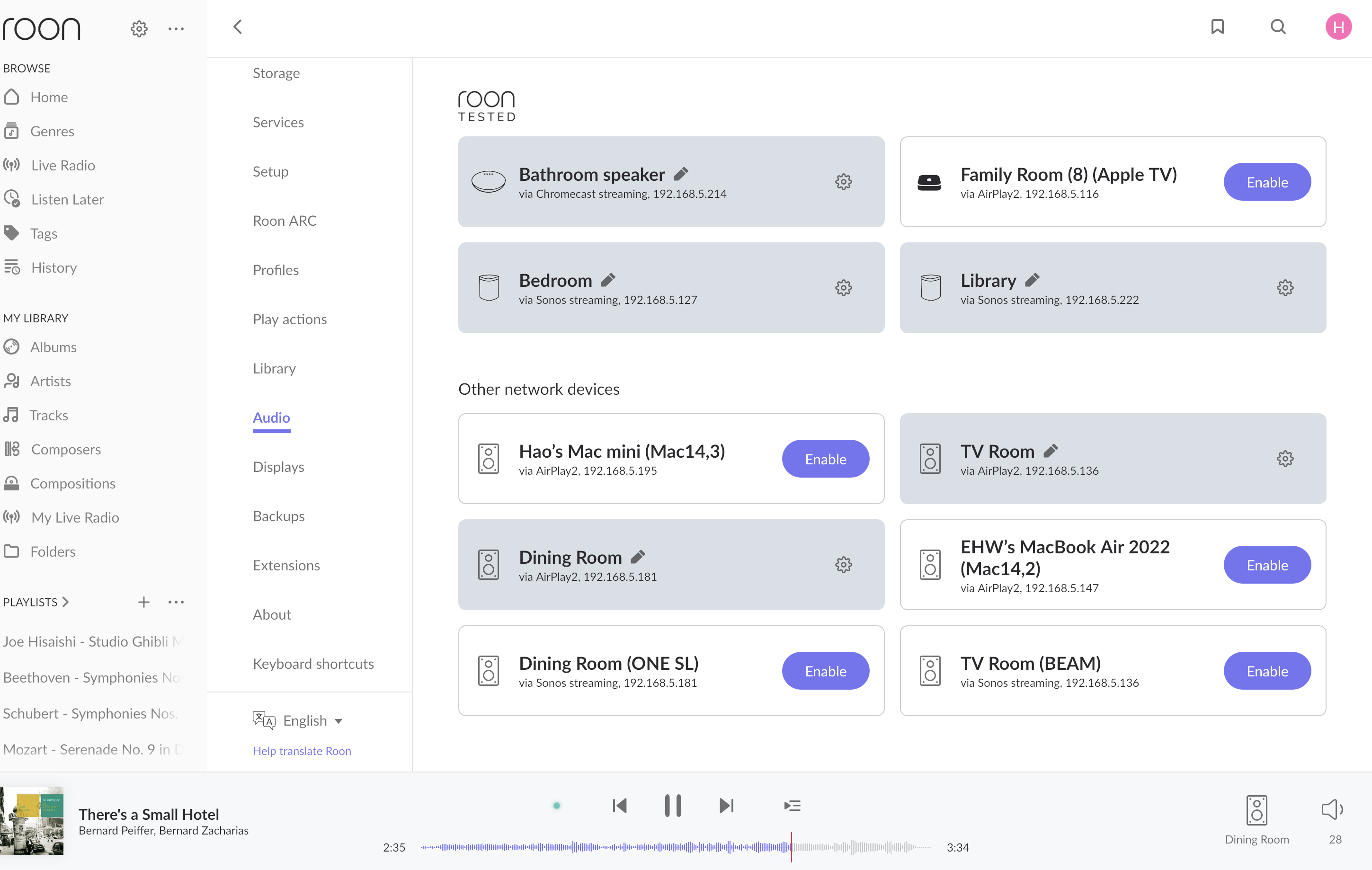
· Sonos zones split into two incompatible types after router replacement — Beam and One SL visible as AirPlay2 only, cannot group with Play:1 (Sonos streaming) zones
Tell us about your home network
· My router is a GL-iNet GL-BE6500 (Flint 3e), a Wi-Fi 7 dual-band router running iStoreOS — a customised OpenWrt-based firmware — rather than the GL-iNet stock firmware. The router has OpenClash installed, which runs the Mihomo proxy kernel in Fake-IP enhanced mode; this is used exclusively for outbound internet traffic routing (bypassing geo-restrictions) and does not create VLANs, additional subnets, or separate network segments. All wired and wireless devices share a single flat LAN on 192.168.5.0/24. There are no additional switches, mesh nodes, or wireless access points — the GL-BE6500 is the sole router and AP in the home. The Roon Core (Mac Mini) and all Sonos endpoints are on this same single subnet with no firewall rules between them.
The Roon Core (Mac Mini M2 2023, 192.168.5.195) is connected via Ethernet directly to a LAN port on the router. The Sonos Beam Gen 1 (TV Room, 192.168.5.136) is also connected via Ethernet to a LAN port on the router; being wired, it serves as the SonosNet coordinator, with the two bonded surround Play:1s and the Sub connecting to the network wirelessly through the Beam's SonosNet mesh rather than directly to the router. The remaining Sonos zones connect to the router directly over Wi-Fi: Sonos One SL (Dining Room, 192.168.5.181), Sonos Play:1 (Bedroom, 192.168.5.127), and Sonos Play:1 (Library, 192.168.5.222) — the Library unit connects on 2.4GHz due to weak 5GHz signal at that location, while the others connect on whichever band the router assigns automatically. All devices — Roon Core and all Sonos endpoints — reside on the same subnet (192.168.5.0/24) with no VLANs, no network segmentation, and no firewall rules between them.
Diagnostic steps already completed Port 1400 connectivity test: I accessed http://[IP]:1400/xml/device_description.xml from a browser on the same LAN for all three tested devices. All three returned valid XML responses, confirming TCP connectivity from LAN clients to all Sonos devices on port 1400 is unobstructed. Roon Core version: Roon Server 2.62 (build 1641) production, running on Mac Mini M2 2023 . Sonos app check: Confirmed all devices are on S2 firmware. No S1/S2 split.
Thanks for writing in and for sharing your thorough report, as well as your troubleshooting steps!
Even though you have a flat subnet, Roon relies on UPnP/SSDP and mDNS to identify Sonos devices as “Sonos Streaming” endpoints. When that discovery fails, Roon often “falls back” to seeing them only as AirPlay 2 targets because AirPlay uses a different discovery mechanism (Bonjour) that might be successfully traversing the bridge while the Sonos-specific discovery is being dropped.
Some additional areas to check for next steps:
In OpenWrt, the Ethernet ports and the Wi-Fi radios are bridged. Sometimes, the bridge filters multicast traffic to save bandwidth.
In your router’s web interface (LuCI or iStoreOS dashboard), go to Network > Interfaces > Devices. Find your bridge device (usually br-lan). Ensure IGMP Snooping is disabled, or if enabled, that a Multicast Querier is active. For Sonos and Roon, disabling it entirely is often the quickest fix.
Under the Wireless settings for both 2.4GHz and 5GHz bands, ensure "Multicast to Unicast" (sometimes called mcast_rate) is disabled. While it helps Wi-Fi performance, it can break discovery for multi-room audio systems like Sonos.
I would also test temporarily disabling OpenClash/Mihomo entirely and restart the Roon Server. If the "Sonos Streaming" zones reappear immediately, you’ll need to add your local subnet (192.168.5.0/24) to the "Bypass" or "Direct" list in your OpenClash settings so the proxy kernel doesn't touch local discovery traffic.
You also mentioned that the TV Room (Beam) is wired and acting as the SonosNet coordinator.
The Dining Room (One SL) and Library (Play:1) are on Wi-Fi, while the Bedroom (Play:1) and others are on SonosNet, and so your server (Ethernet) is trying to "see" the Wi-Fi nodes through the router's bridge, and the SonosNet nodes through the Beam's Ethernet link.
Try a "Hard Refresh" of the network stack. Power down Roon Server and all Sonos units. Turn on the router first, then the wired Beam, then the server, then the remaining Sonos units. This forces Roon to re-poll the discovery table after the SonosNet mesh has stabilized.
Let me know if any of the above help, thank you @Hao_Wu! 🙏
Just checking in on this, and I wanted to see whether you were able to test the OpenWrt settings we talked about, especially IGMP snooping on br-lan, multicast to unicast on both Wi-Fi bands, and the OpenClash or Mihomo bypass for 192.168.5.0/24. Have you also had a chance to try the full power cycle we outlined, starting with the router, then the wired Beam, then Roon Server, before bringing the rest of the Sonos units back online? Let me know what you found, or if anything is still sticking out.