I have used Roon and HQPlayer since 2019.
Over time, I tested:
-
Roon, Tidal, Spotify, and local FLAC.
-
Different PCM-to-DSD settings in HQPlayer.
-
Dirac Live filters made with REW measurements.
-
HouseCurve convolution filters.
-
Several control and automation methods.
This is the setup that currently works best in my room.
It is not a claim that Spotify is better than Tidal, Roon, local FLAC, or hi-res recordings. It is simply the combination that gives me the best sound and the easiest daily operation.
Quick signal chain
Spotify → Dirac Live → HQPlayer → NAA → Cyan 2 → PM-10 → KEF R3
Spotify Lossless can deliver up to 24-bit/44.1 kHz on supported paths. In this system, sound quality depends on the entire chain, not source resolution alone.
Overall system map
My room is an irregular living room of about 20 m². One side opens into a hallway.

Main roles
| Component | Role |
|---|---|
| Mac mini | Spotify, SoundSource, Dirac Live, BlackHole, HQPlayer, macOS Shortcuts |
| Raspberry Pi 4B | NAA endpoint; receives HQPlayer output |
| Holo Audio Cyan 2 | NOS R2R DAC |
| Marantz PM-10 | Integrated amplifier; shared with Denon X3800H |
| KEF R3 | Main speakers |
| Synology DS918+ | Runs Homebridge |
| Logitech Harmony Hub | Controls the hi-fi activity and PM-10 |
| Apple TV | Apple Home hub |
| iPhone / iPad / Mac | Spotify Connect, Apple Home, Control Center, Shortcuts |
Audio signal path
Spotify runs on the Mac mini.
I use Spotify Connect on an iPhone, iPad, or another Mac for music selection, queue management, and playback control.

Processing sequence
-
Spotify plays on the Mac mini.
-
SoundSource hosts the Dirac Live plug-in.
-
Dirac Live applies room correction.
-
BlackHole routes the processed audio to HQPlayer.
-
HQPlayer converts PCM to DSD512.
-
HQPlayer sends audio over Ethernet to the Raspberry Pi NAA endpoint.
-
The Pi sends audio by USB to the Cyan 2.
-
The Cyan 2 feeds the PM-10 and KEF R3.
SoundSource can apply Audio Unit effects to application or system audio, which allows Dirac Live processing before audio is passed to HQPlayer.
HQPlayer settings
| Setting | Value |
|---|---|
| Output | DSD512 |
| Filter | poly-sinc-ext2 |
| Modulator | ASDM7EC 512+fs |
| DAC correction | Holo Audio Cyan 2 correction enabled |
| Output device | Raspberry Pi 4B via NAA |
The NAA endpoint separates HQPlayer processing from the USB DAC connection. The Mac mini performs processing; the Raspberry Pi provides the network audio output close to the DAC.
Control and automation path
The Mac mini is in another room.
I therefore use two remote-control methods:
-
Apple Home / Harmony for the physical hi-fi equipment.
-
iPhone Shortcuts / SSH for the Mac mini audio-processing functions.
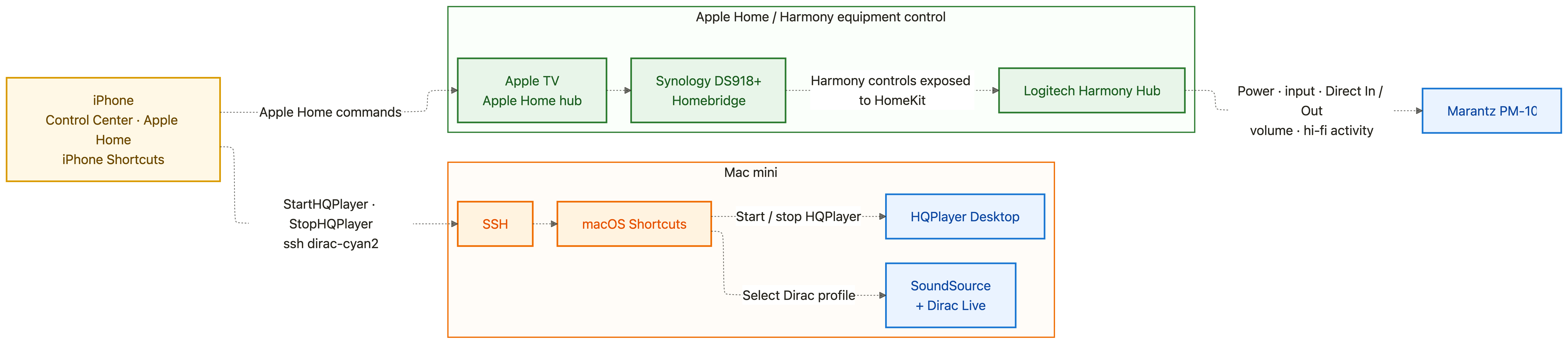
Apple Home and Harmony
Homebridge runs on the Synology DS918+.
It exposes Harmony activities and commands to Apple Home. Apple TV acts as the Home hub.
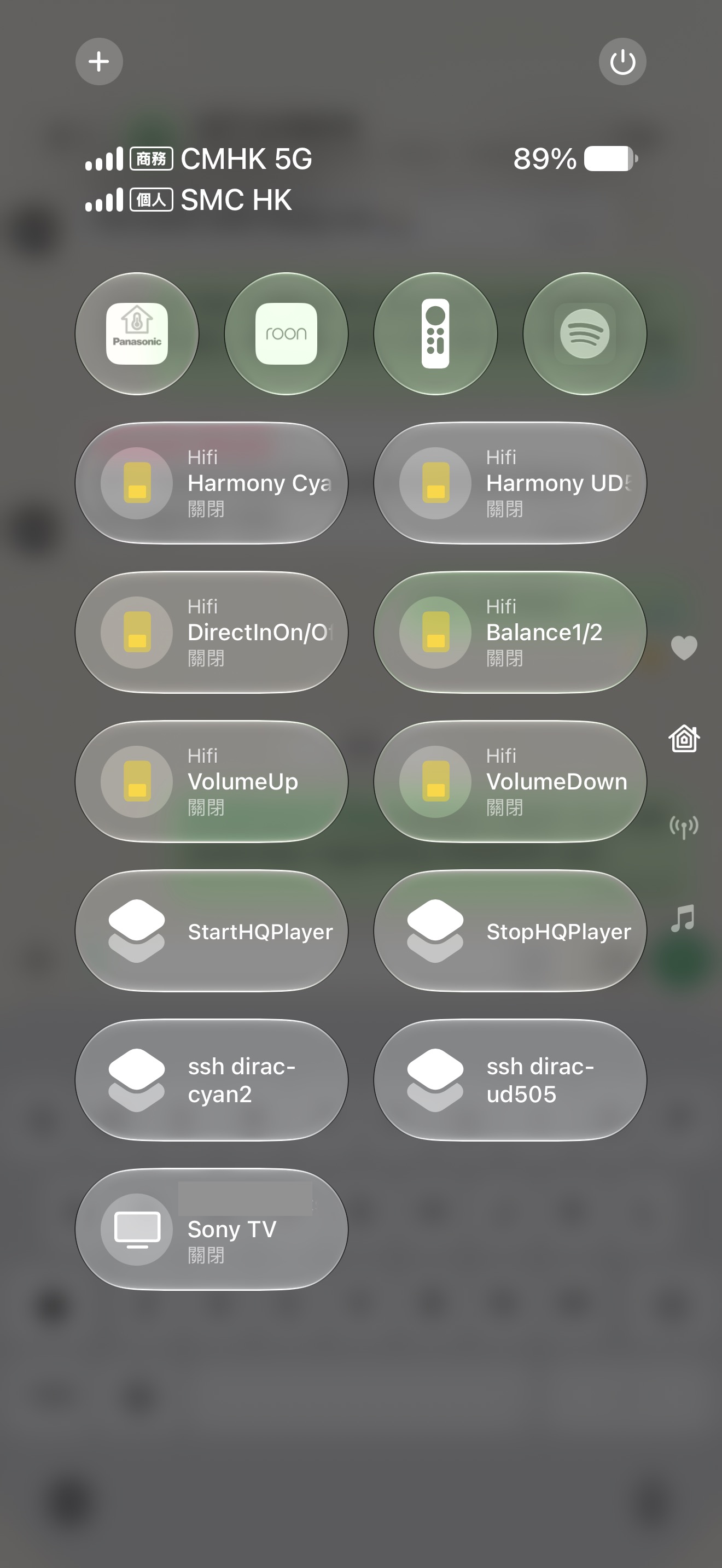
This makes Harmony controls available in the iPhone Home app and Control Center.
| Control | Function |
|---|---|
| Harmony Cyan 2 | Starts the main hi-fi activity |
| Direct In / Out | Toggles PM-10 Direct In mode |
| Balance 1 / 2 | Selects PM-10 BALANCED 1 or BALANCED 2 |
| Volume Up / Down | Adjusts PM-10 volume |
iPhone Shortcuts and SSH
The iPhone sends SSH commands to the Mac mini.
| Shortcut | Function |
|---|---|
| StartHQPlayer | Starts HQPlayer |
| StopHQPlayer | Stops HQPlayer |
| ssh dirac-cyan2 | Selects the required Dirac Live profile in SoundSource |
SSH carries control commands only. It does not carry the music signal.
Together, these two control paths let me operate the complete system from the listening position.
Typical listening session
-
Open iPhone Control Center.
-
Run Harmony Cyan 2.
-
Run StartHQPlayer.
-
Run ssh dirac-cyan2 if a different Dirac profile is needed.
-
Open Spotify Connect on an iPhone, iPad, or Mac.
-
Select music and start playback.
-
Use Apple Home, Control Center, or Harmony for power, input, and volume.
Why this works for me
I have compared this setup with:
-
Roon.
-
Tidal.
-
Local FLAC.
-
Hi-res recordings.
-
REW-based Dirac convolution filters.
-
HouseCurve convolution filters.
Many listeners understandably prefer 24-bit/96 kHz or higher-resolution material.
In my system, Spotify Lossless through this processing chain currently gives me the most satisfying result.
Spotify Lossless is not necessarily technically superior to hi-res streaming or local FLAC. It is simply the source and processing combination that gives me the best balance of detail, dynamics, tonal naturalness, bass control, and long-term listening enjoyment in my own room.