No worries, just report the date/time back to Roon when it next happens.
You don’t, Roon staff will enable.
No worries, just report the date/time back to Roon when it next happens.
You don’t, Roon staff will enable.
OK, I restarded server 5mins ago, Sveriges Radio P1 refused to start, gave message that station wasnt ready. Approx 16:20 GMT +1
(never mind) i had other issues.
Short dropout 30s today at 8:43 CET, and 8:50,a full stop. 15 july, 7:49, playing stops after 20sec, then restarts after 40s. Full stop at 8:10. Again minor stop at 8:48, and full stop 8:50
Hello @Peter_Aspegren1
We went back through the diagnostic logs and found a clearer picture. At both 8:43 and 8:50 on July 14, the Veranda zone (the Raspberry Pi with the HiFiBerry amp) lost a few seconds of audio over its network connection. When that happens, Roon Server stops the stream on purpose rather than let it keep playing out of sync, then reconnects. With an internet radio stream, reconnecting takes longer than resuming a track from Tidal, Qobuz, or your local library, which is why it shows up as a longer dropout or a full stop.
A few things would help us narrow this down further. Could you please let us know:
My livingroom zone is also affected, but I listen less on radio there. (Thats a SOtM sms2000 high end server/player) It is only appearing listening to Swedish National Radio. I have read that Danish National radio is also affected. Other internet radio is not prone to this.
see also this topic
Hey @Peter_Aspegren1,
Thanks for the precise timestamps, they made a real difference. We went back through the fresh logs with those in hand and have a much clearer picture now.
Every stop lines up with the same thing: the Sveriges Radio streams specifically. We can see it across all four of your players, Veranda, Kitchen, Living Room and Office PC, and even on both endpoints at once when Kitchen and Veranda are grouped. As mentioned already, on those exact same players, Qobuz and your local library keep playing without a single interruption. That combination tells us this isn’t your network and it isn’t any one player or its wiring, if it were, Qobuz would drop too, and it never does. The common thread is the SR feed itself.
The drops also cluster almost entirely in the morning (roughly 07:30–09:00), which is peak listening time for P1 Morgon. What the logs show is Roon Server briefly running dry of audio from SR’s stream, just a few seconds, and because internet radio is live and can’t be re-buffered, we stop and reconnect rather than play out of sync. That reconnect is why it surfaces as a longer pause or a full stop.
So the earlier suggestions around DNS and your network can be set aside, your own tests already pointed that way, and the logs confirm it.
Here’s what we’ll do next: our team is going to attempt to reproduce this against SR’s stream during the Swedish morning peak (earlier attempts ran at quieter times, which is likely why they played cleanly for us), and in the meantime, please keep noting the date and time whenever it happens, it’s genuinely helping.
I’ll keep you posted here as we make progress. 
Thanks for the thorough testing and fault finding. You are correct, it is mainly at peek hours as you stated. To my recollection, this might have coincided with an update , two or thee versions before. I cant say that it has to do with that, but that was when it occured. Please also note that there was someone who had similar issues with Danish National radio as well. Intermittent issues with Danish Radio streaming quality (30 min Delay HLS Stream) (ref#SOI0FP) [Fix in Early Access]
Hi @Peter_Aspegren1,
Thank you for your patience.
To clarify, the Danish Public Radio issue was a specific HLS implementation mismatch between the stations and Roon; we don’t have evidence that’s the case here. Roon was receiving the station’s feed, but not dissecting or timing the segments of data appropriately.
What we see here is a data transit failure between the station servers and Roon Server. Roon is not receiving data as expected.
If this were consistent when you attempted to play the station, it’s possible that the log error was a red herring, generically documenting a possible deeper failure with how Roon was handling data. But in the absence of consistent reproduction of the failure, it’s very difficult for our team or volunteers to take any preventative action here beyond double-checking that the edge node is reliable to Roon. We have to first reduce the number of variables involved here.
The next time the failure occurs in Roon, do you have any issue loading the URL for the same station on their website? Try playing to the speakers on your computer or phone (whichever you are using as a Roon Remote).
What is the actual network hardware sitting between your Roon Server machine and the main upstream router?
Hi Connor,
Let me describe the topology of my system:
Fibreconverter Goes into Unify UGC Ultra router
This goes to Luxul unmanaged gigabit switches. 3 roaming Unifi U7lite APs
In my hifi rack there is a SOtM unmanaged switch.
My SOtM sMS 2000 Server is wire connected to above switch
Other clients are wired and connected to the Luxul switch.
All stationary equipment has static ip based on Mac address reservation in the switch.
When it comes to streaming same radio channels via their apps in ios or android it works flawless over wifi locally and over 4G/5G network.
My PC wired to the same network gets 800-900 mb/s up/down w 1.5ms ping on a 1gig subscription
Hey @Peter_Aspegren1,
Thanks, that topology is really helpful, and one detail in it is the key: SR plays flawlessly through Sveriges Radio’s own iOS/Android apps, both on your local WiFi and over 4G/5G.
That tells us a lot. Those apps connect to SR’s geo-selected CDN node, whereas Roon connects to SR’s edge servers directly (edge1/edge2.sr.se).
From your logs, edge1 is unreachable and edge2 connects fine but the TCP session is being reset every ~4–5 minutes, which lines up exactly with your “stops after a few minutes.” Because every zone streams from your one Roon Server (the SOtM sMS-2000), that single reset is what all your zones are inheriting. So this isn’t a per-zone or WiFi issue, and it isn’t Roon’s playback engine, something is dropping a long-lived connection from your network to that specific SR edge host.
A few targeted tests to pin it down, roughly in order of value:
edge2.sr.se stream URL directly in VLC (Media → Open Network Stream) and let it run 10+ minutes. If it dies around the 4–5 minute mark too, the reset is in your network path, not Roon. If it plays clean, we'll refocus on the server side. This is the single most useful test.
Please start with tests 1 and 2 and let us know what you find. 
*Testing #1 streaming via VLS now, failed at 08:38 after 6:30mins
regarding #2, i cant locate those settings
#3, this setup has been running +1 year without issues, nothing has changed here regarding software or hardware
#4 UCG fw/sw updates by auto, and what should I disable??? Dont understand latter part
Hey @Peter_Aspegren1,
Thanks for testing that. Since the stream also failed in VLC after 6:30, that points away from Roon and toward a network issue. Your note about not being able to find the UniFi settings is helpful too, and if you have not changed anything in the setup, that makes the behavior even more worth isolating at the network level.
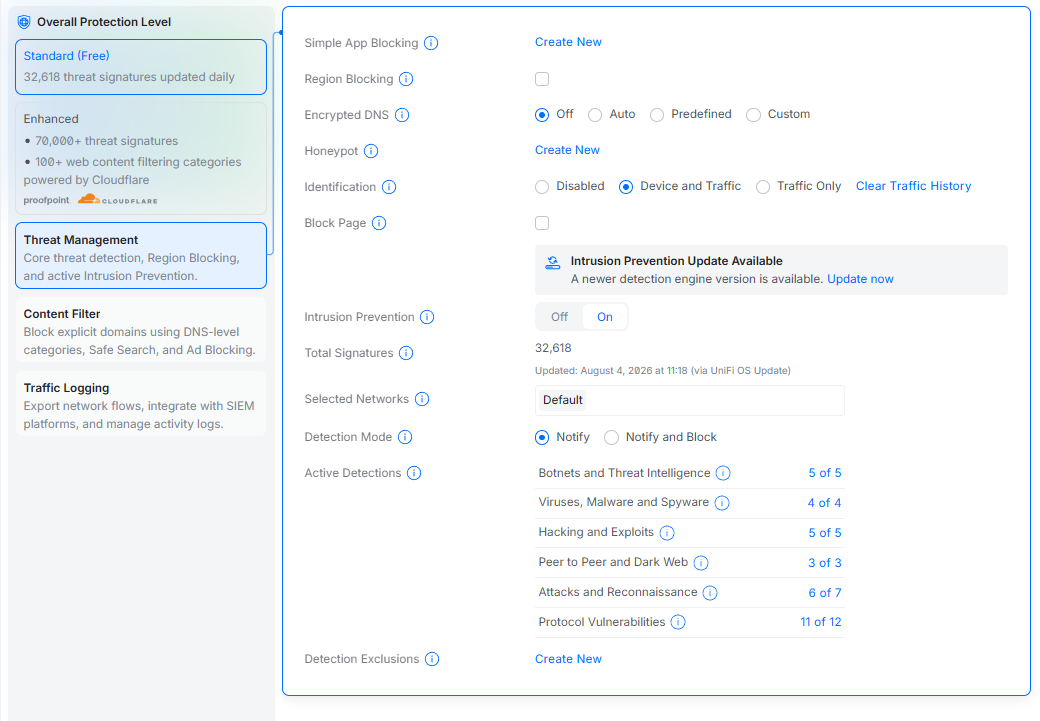
For the UCG Ultra, please look into Threat Management, including IPS and IDS, along with any DPI or GeoIP filtering. Since your firmware and software update automatically, the next useful step is still to test whether one of those network features is interrupting a long-lived stream to the SR edge host.
Please report back with what you find, and we will take it from there.
Hey @Peter_Aspegren1,
Thanks for the screenshot.
Looking at your Threat Management page, nothing there should be causing this. Your Detection Mode is set to Notify, not “Notify and Block,” which means the IPS engine is only watching traffic, not dropping or resetting it. Region Blocking is off, Simple App Blocking is empty, and Encrypted DNS is off. So my earlier suspicion about IPS/DPI killing a long-lived stream doesn’t hold up against your actual config. Apologies for sending you down that path.
If you’d like to close it out definitively, it’s a 10-minute test:
edge2 stream in VLC for 10+ minutes.If it still dies around the 5–6 minute mark, we can strike UniFi off the list for good. And on my earlier point 4 about “hardware offload”, ignore that, it was too vague to be useful. The only thing worth checking is Settings → Internet → (your WAN) → Smart Queues; if it’s off, leave it, it’s not relevant here.
The more important test. Your VLC result is the most valuable thing we have, something is dropping a sustained connection between your house and edge2.sr.se.
So the test that actually splits this open:
Install VLC on your phone, turn WiFi off so you’re on 4G/5G only, and open the exact same edge2.sr.se URL you used on the PC. Let it run 10+ minutes.
One thing to be clear about: playing SR through their own iOS/Android app doesn’t answer this question, because the app connects to SR’s geo-selected CDN, not to edge2 directly. It has to be the same URL in VLC for the comparison to mean anything. Ideally run it in the morning window (07:30–09:00) where you see the failures cluster.
Thank you
Running through VLC on my PC gives the same result even after the tweaks in the unify router
We can jump down to the phone/VLC thing: It drops out here as well.
Thanks @Peter_Aspegren1!
That phone test is the most useful data point in the thread. Before I read too much into it, can you confirm WiFi was off (cellular only), and that you pasted the edge2.sr.se URL straight into VLC rather than using the SR app?
Assuming yes, here’s where it leaves us. The stream now fails on your fiber line, on your PC outside of Roon, and on a separate cellular connection, while SR’s own apps play fine on all of them. That clears your router, your LAN, your ISP, and Roon itself: Roon can’t be the cause of a dropout that reproduces identically in VLC. What’s left is the specific server we’re connecting to. SR’s apps go through SR’s content-delivery network; the stream address in our directory points at SR’s edge2 server directly, and that’s the connection being reset every few minutes.
Something worth trying while we look at this: Sveriges Radio publishes their own public stream addresses (their open API at api.sr.se lists a liveaudio URL for each channel). You can add one directly in Roon under My Live Radio → Add Station and run it alongside the built-in P1 entry. If SR offers a segmented stream, a URL ending in .m3u8, try that one first; that format re-requests audio in small chunks rather than holding one long connection open, so a periodic reset wouldn’t interrupt it. Roon plays those natively.
If one of those addresses runs clean for an hour, you have a working setup and we’ll have solid evidence to take to the team that maintains the station directory. If it drops in exactly the same way, that confirms the problem sits with SR’s own streaming infrastructure and would be worth raising with them directly.
Either way, you can stop rolling back UniFi settings hunting for this. Your network has been ruled out.
To help, I’ve added the .m3u8 stream to Sveriges Radio: P1 .
However, although the stream advertises a number of speeds, Roon just picks the first in the list, which is 32k.
I’ve thus added the included 192k stream directly as well - it’s the one ending .pls.
Streams seem OK to me
Hi @Peter_Aspegren1,
It has been a while since we last touched this one, so I wanted to check whether you still need help with the Swedish National Radio stream dropping out after a few minutes.
If you do, we can pick up from the latest tests and keep going. If things are already working again, just let us know and we will close this one out.