What’s happening?
· Other
How can we help?
· None of the above
Other options
· Other
Describe the issue
Playing track not highlighted
Describe your network setup
LAN via asus router
· Other
· None of the above
· Other
Playing track not highlighted
LAN via asus router
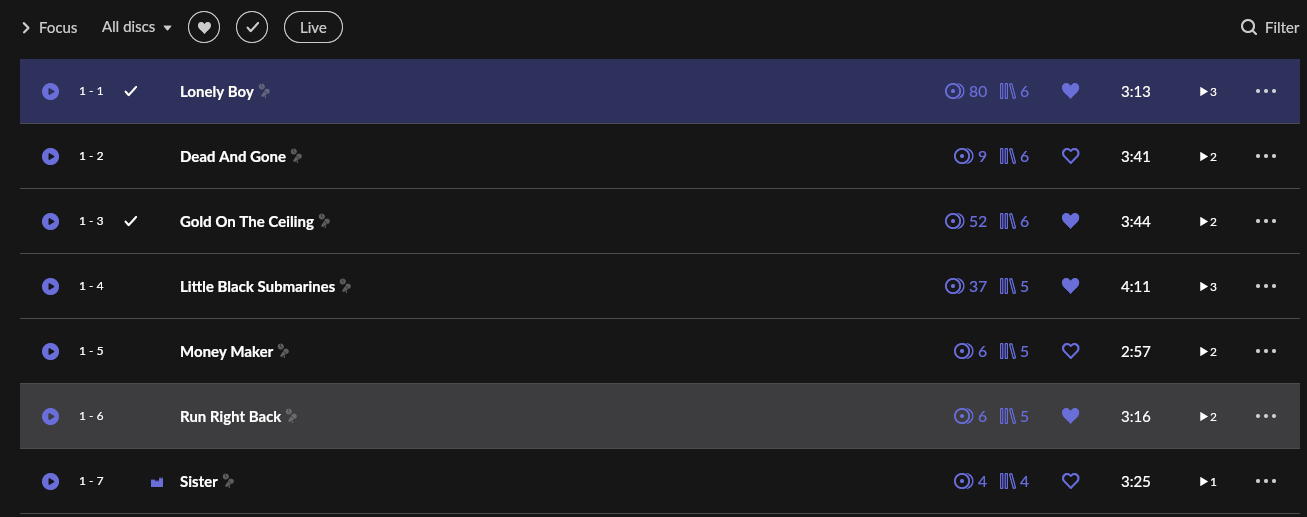
Sorry if the original post came a bit flat. I mean the track highlighted in grey is not the one playing. If I click back on the album, then it opens this view again, with the correct track hilghlighted (#7 Sister), but the error continues once it moves to the next track, over and over.
Good day @Dexter_prog !
Sorry to see you face this problem, actually the playing track is being indicated with this purple wave icon.

The one that is highlighted gray is likely something different.
Other than that, yesterday we released a new version of Roon.
Can you please try to update to it, check if the issue is still there and let us know back ?
Looking forward to your reply!
Regards.
??? Only in Early Access as far as I can tell
This is normal with Roon.
You would think the grey shading would follow track order. As mentioned by @alex_h from the Roon Support team, the pulsing graphic is the indicator for which track is playing.
As @Suedkiez mentions, the update yesterday was not for the production version of Roon but for the Early Access version.
Edit No1: I will correct myself here.
My iPad is moving with the current track playing but my Android phone remote doesn’t and portrays what your screenshot shows
What is the device you posted the screenshot from?
Edit No2: actually I can see what’s going on here. The screen you are on is the track list for the album and not the now playing queue.
Then it either needs to be corrected or removed as currently it serves no purpose: it is not highlighting the playing track (yes, I was aware of the moving icon), and it is neither highlighting the selected track (as if I click on it to make some actions).
Hi @Dexter_prog,
Could you provide a more specific step-by-step process for how you are able to land in this state?
Does this occur when you’re listening to an album not yet added to your library, and during playback, you decide to add the album to your library?
Does this happen no matter the remote device?
Yes:
This takes you to the album tracklist view, with the playing track highlighted in grey (as in my screenshot) and stays there when Roon moves to the next track (the old one remains grey)_
Hello @Dexter_prog,
The grey line marks the track from which you originally opened the album — for example, from the queue, Tracks, or any other view in Roon.
The track that’s actually playing is indicated by the playback icon that @alex_h shared.