Please try to restart your network setup by unplugging, waiting 30 seconds and then replugging in your networking gear.
· No, the issue remains the same
Please select how you've connected your Roon Server to the internet
· Roon Server is connected by *Ethernet*
Have you checked your firewall settings to ensure that Roon is allowed through?
· Roon still won't connect even after checking this aspect
Have you verified that Roon Server is on the same subnet as your Remotes?
· My Remotes and Server are on the same subnet and I still can't connect
Sometimes the issues can be resolved with a reinstall of your Roon Remote app. Let's try to perform a reinstall and see if it helps.
· I've reinstalled the Roon Remote but it did not help
What is the operating system of your Roon Server host machine?
· *Nucleus*
Select any of the following components that are present in your local network setup
· None of the above
Describe the issue
I can not obtain music stored in nucleus. In the control screen an arrow is spinning. I can not find nucleus in sources just my Mac computer. is it possible to speak to a technician, I'm 82 and a way out of my knowledge.
Describe your network setup
spectrum internet, modems and router, hard wire to nucleus, usb to PSaudio dac.
Thanks for writing in and for sharing your report! Sorry to hear about your issues connecting to your Nucleus.
Our team doesn’t offer phone support at this time, you have my apologies there. That said, you’re in the right spot to get help via the community, so lets dig right into it.
From your account admin, we can see both Roon Servers online and active: one on your Macbook, and one on your Nucleus.
If you can, open Roon like you normally would and access your:
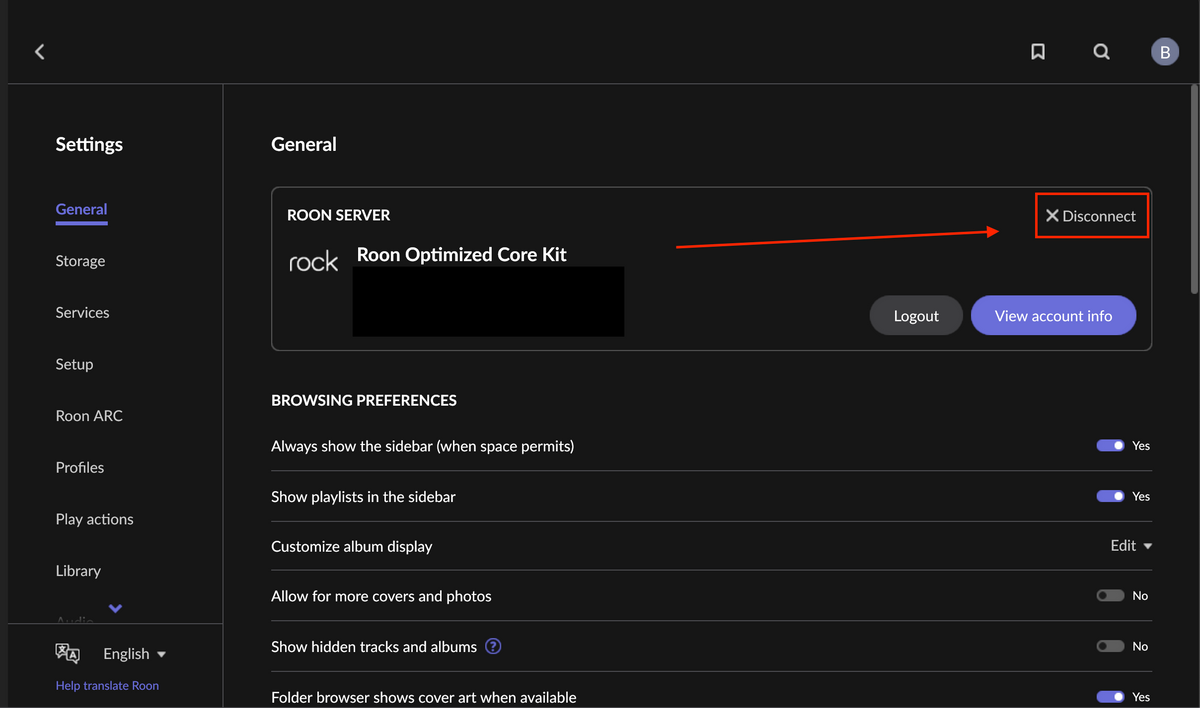
Settings (the cogwheel in the upper left hand corner of your Roon screen.
In General, click the ‘X Disconnect’ button.
This will guide you to a screen that lists all your options of available Roon Servers. Be sure your Nucleus is powered on and connected to your network, you should then see your Nucleus as an available server to select.
From there, select your Nucleus, and it should get you properly connected and synced with your music.
If you don’t see your Nucleus available, it may be worth checking to see if you can connect to the webUI of your Nucleus.
To do this, open a web browser on your Mac, and see if you can connect by inputting any of the following into your browser URL:
Just checking in on this, and I wanted to see whether you were able to try the server switch we mentioned, along with checking the Nucleus web UI in a browser. If the spinning arrow is still showing, please let us know whether the Nucleus appears in the server list after disconnecting, or whether it is missing there as well. We can take it from there, so reply with any update when you are ready.
Please note, if we don’t hear back from you this thread may close automatically soon. If the thread auto-closes and you need further assistance, please submit a reopen support request via the technical support help form below and specify that the issue should be reopened. Thank you.