· After roon did an update this weekend it locked me out of the app. I am running Roon on an iMac with macOS Big Sur 11.7.11. This is the latest macOS that is supported by apple for my iMac. I want to move my Roon core from the iMac to a Nucleus Titian. I need to transfer my music library to the titan. Do I need a new computer to do this or can I setup the new core on the Titan using an iPad.
Tell us about your home network
· My LAN network is connected to an ATT fiber modem/router my computer is directly connected.
How can I access my music files on my iMac to copy to a USB storage device now that I am locked out of the Roon app.
All of my music files were backed up within the Roon app. I do not have external backup copies on a USB or Naz drive all of the files reside on my iMac hard drive. I may be able to restore my iMac to an earlier version before the roon update was offered. I may be able to access those back up music files and download them to a USB drive. I have no idea what the size of those backup files are to save them to a USB drive. I have not had any success setting up Titan beyond connecting a to the network and plugging it in. The Roon app does not recognize my Titan as a device and I don’t know where to go from there to transfer the core from the iMac to Titan. Is there a technical support service that I can contact to get support other than the online from Ron, which is very difficult for me I’ve gotten nowhere after multiple attempt at trying to find a solution. Thank you so much, Dan.
Sorry, but the Roon Backup function does NOT backup music files. It backs up the Roon database. From the Help article on Backup:
Important: Your Roon Database isnotthe same thing as your music library (your collection of music albums and tracks contained in your Watched Folders). It is a separate database that is maintained by Roon.
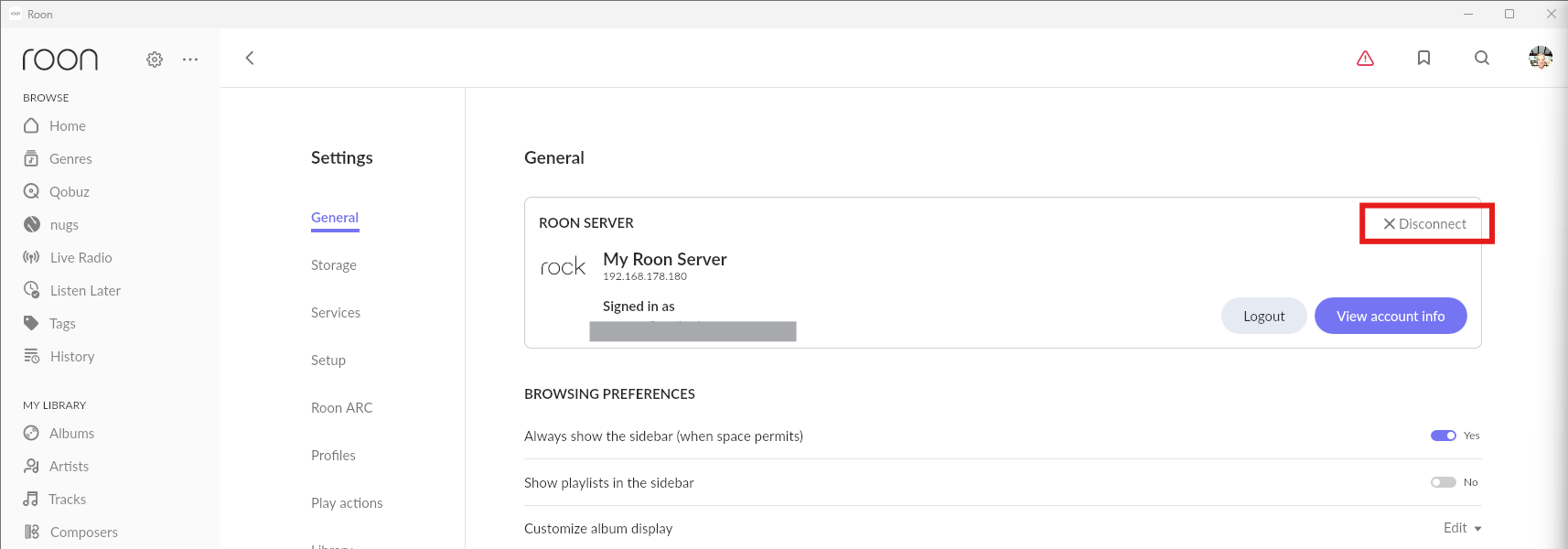
You’ve been running Roon connected to the Roon Server on your iMac. You need to disconnect the Roon client from this Roon Server, and then it will display all the Roon Servers active in your home network, which should include the Roon Server on the Titan. Just connect to this one.
To disconnect a Roon Server, go to Roon’s > General screen and click Disconnect in the Roon Server section. For example:
If you have a Roon database backup, then transferring it over is fairly simple, as outlined in our Nucleus Migration guide. The media files themselves are most likely still on your iMac, so you will need to either make them available over the network or move them to an internal storage drive in the Nucleus, if one is installed. The Nucleus does not include factory-installed internal storage.
I am so confused as to what to do to restore my Roon service I don’t know if I’m better off to start off with a new clean application and try to restore my music library? I am not worried about the files that I have uploaded from iTunes to roon I am more concerned about all of the shared files from Qobuz that appear in my roon directory. I just want to get back to the functionality that I had before the latest update or should I just take my losses and start new this is very frustrating that I don’t have a customer service direct contact to resolve this issue. It seems like my best solution is to write off everything that I’ve done to this point buy a new computer and install room from scratch onto the over $3000 Titan server they purchased in December to solve this problem that I have not been able to implement. I am very frustrated. I love the streaming service that room provides with Qobuz as long as it works. I wish I had been given an opportunity to opt out of an upgrade until I had been able to correct the operating system. I had no idea that my macOS was going to be deleted from the system. I am not an computer specialist in information technology that could decipher all of this on my own. I have no support from this company that I have a lifetime membership and I have to try to figure it out all on my own. This is very frustrating for a music server. Why don’t we have direct person to person IT help on something so complicated on your end? It seems very simple but it’s not it’s super complicated and I can’t figure it out so do I just start over new or can I restore my library after spending a lifetime membership? Thank you for your advice and support. Dan
@noris is a member of the Support team, and he replied to you with the suggestion to read the Nucleus Migration Guide.
You don’t have to figure this out on your own - we are trying to help you.
You really don’t have to worry about all the shared Qobuz files that were in your old Roon Library. Once you have your Titan up and running as your Roon Server, these will be added to your new Roon Library on your Titan automatically. That’s because you have them marked as Qobuz Favourites in the Qobuz service, and all Qobuz Favourites are automatically synchronised with a Roon Library.
As @noris said, your music files should still be on your Mac, so you have two options open to you:
Leave them in place on your Mac, and set up your Titan to access them. That’s done by following the article that he referenced on creating a shared folder of the Mac folder holding your music files and adding it as a Watched Folder in your Titan.
If you have added an optional drive to your Titan (either an internal drive or a USB drive), you could copy your music files across to this drive. This has the advantage that, unlike option 1, your local music is always available when your Titan is running, even when your Mac is switched off.
Have a read of those articles again and return here if you have more questions. We’ll be here to help.
 > General screen and click Disconnect in the Roon Server section. For example: