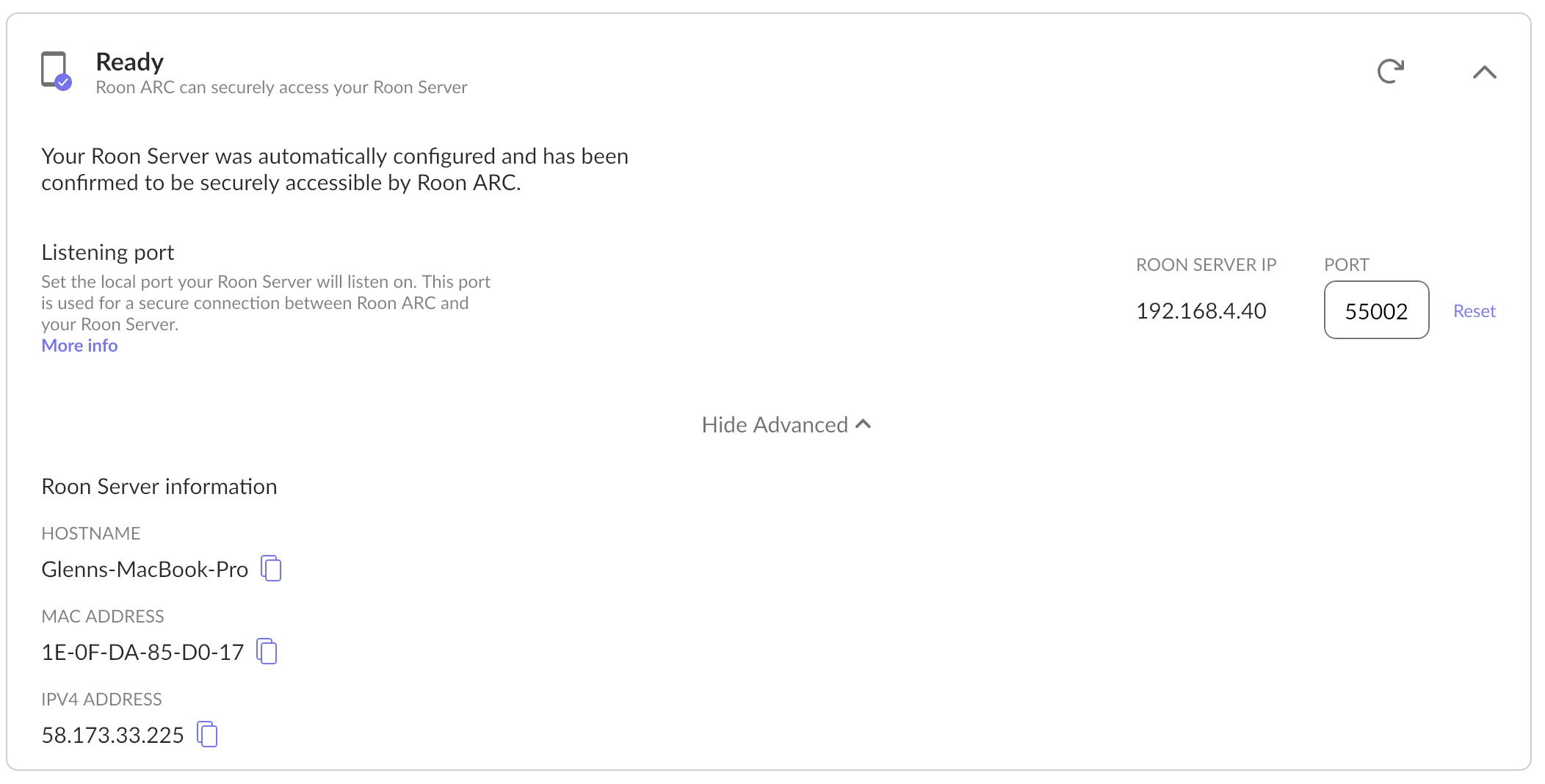
I have installed the Roon core on a Synology NAS. After a lot of messing about I have been able to get Roon to play on my MacBook and an iPhone locally (on the same wireless network). The problem that I'm now grappling with is that I cannot get Roon ARC on my iPhone to connect to the Roon Core installed on the Synology NAS. I've tried all of the tricks listed on the support / FAQ sites, but to no avail. What does confuse me is when I open ARC is shows both the MacBook and the NAS server as connect options. It will connect to the MacBook, but not the NAS. Not sure why the MacBook shows at all given I'm only using it for local access to the NAS. A screenshot showing ARC connected to the MacBook (not the Synology NAS) is provided below.
Describe your network setup
Synology DS920+ NAS running the latest version of DSM7. This is connected directly to my local Telco modem via Ethernet.
Please also note, that when I log into Roon on my iPone and click on ARC is says is can’t connect to the Roon server and provides the following error message.
{
according to our records your Computer and NAS have different IP ranges.
Can you please confirm whether they are in the same network on your side ?
Also, the error you have provided states that there is no UPNP enabled on your router which means that port forwarding won’t be configured automatically.
Can you please confirm the status of your network ?
Does it actually have UPNP enabled ?
Have you enabled manual port forwarding if UPNP is not active ?
I checked the UPnP on both the Telco modem (Telstra Smart Modem), and the connected mesh WiFi system (eero). Both show that UPnP is enabled. I have not tried enabling manual port forwarding. I did install Tailscale on both the NAS, Mac and iPhone, but subsequently removed it, as it made no difference to the outcome and I was concerned about conflict with my main VPN (Nordpass).
Below is a screenshot from Telstra modem showing there seems to be a connection to Roon.
OK. I’ve gone back to basics. Deleted everything, checked we’re all on the same network (there is only one), and tried to reinstall. Now it will not install Roon Server on the synology NAS. Says check network connection. At this rate Plex is looking a way better option that Roon. Last chance. What’s going on here? I’m spending hours checking settings and endless google and ChatGPT. Please step up and help fix this.
G
Apologies for any confusion here - it looks like you have Roon Server running on your Mac as well, you can quit this via the Mac taskbar, which should remove it as an option for you.
With that, we’re seeing a few different subnets active within your local network, and so it could be the case that your NAS and mobile device are on different subnets.
If you have multiple routers, you’ll want to set one as a bridge and one as your primary router. Is that what you have setup?
Based on the screenshots you’re showing, we don’t see any devices under the 192. 168.0 subnet - I think clearing this up will likely solve your issues.
If that doesn’t help, check the IP of your NAS, and create a manual port forwarding rule routing to this same IP, as well as the port number listed under your Roon Settings > Roon Arc.
OK - things have moved on. Thanks to some input from CharGPT, I have been able to complete a manual install of Roon on my Synology NAS. As a next step I downloaded the Roon app onto my Mac and iPhone. It found Roon on the NAS ok and I thought it connected OK. The problem now is that it seems I cannot log into Roon on either device. I seem to get stuck in an endless sign in loop.
Can you please advise how I can break this endless cycle.
Do you have any 3rd party firewall tools or hardware firewalls that could be blocking Roon from connecting to the login server? If you can use these instructions to access your logs and upload a set to the below link, we can take a look to see if there are any specific errors. You are also welcome to peruse the logs yourself for errors.
Hi Noris, this is all too hard. I spent several hours again today trying to sort this out. I managed to get the server installed on the NAS, but got no sound from the Mac. This was where I started. I did get Arc to work for a while. In an effort to fix the sound problem I uninstalled and reinstalled the software on the NAS and now it can’t find the server. I also noticed that there was no RAATserver file when I was getting ready to send you the logs.
I’m going to stick with Plex. The sound might not be as good, but at least it works.
Yes, this is expected behavior when perfoming a reinstall of RoonServer, and can be resolved by clicking on the “Select a different Roon Server button”.
Understood. Since you’ve decided not to persue more troubleshooiting at this time, I’ll go ahead and close the thread. If you would ever want to try Roon again, please feel free to reach out to contact@roonlabs.com and we’ll happily get you set up with another free trial.