Hi! What’s not quite right with Roon?
· Can’t reach my Server, remotes or ARC
Can’t connect to my Server, remotes or ARC
· Other ARC issues
Tell us what's going on
· cannot establish ARC test
Tell us about your home network
· Using Deco XE75pro
· Can’t reach my Server, remotes or ARC
· Other ARC issues
· cannot establish ARC test
· Using Deco XE75pro
Although you see this error, ARC should continue to work remotely. Can you check by disabling Wi-Fi on your mobile device?
I disconnected wifi and opened Roon on my mobile it cannot find Roon server.
I have two apps on my mobile, one is Roon ARC and the other just got the name Roon, both cannot find the server.
No worry, of still cannot work I will stop subscribing it.
Getting support from noon is hopeless anyway!
That’s not caused by the (currently widespread but harmless) error message in your first post and a different problem.
It’s a Saturday and this is the first topic you ever opened in Support. If you read this category, you will see that it’s not true.
Support staff will get to this after the weekend.
thanks for the reply, I need solution not comment that is not helping. I know it is Sat and is not expecting response.
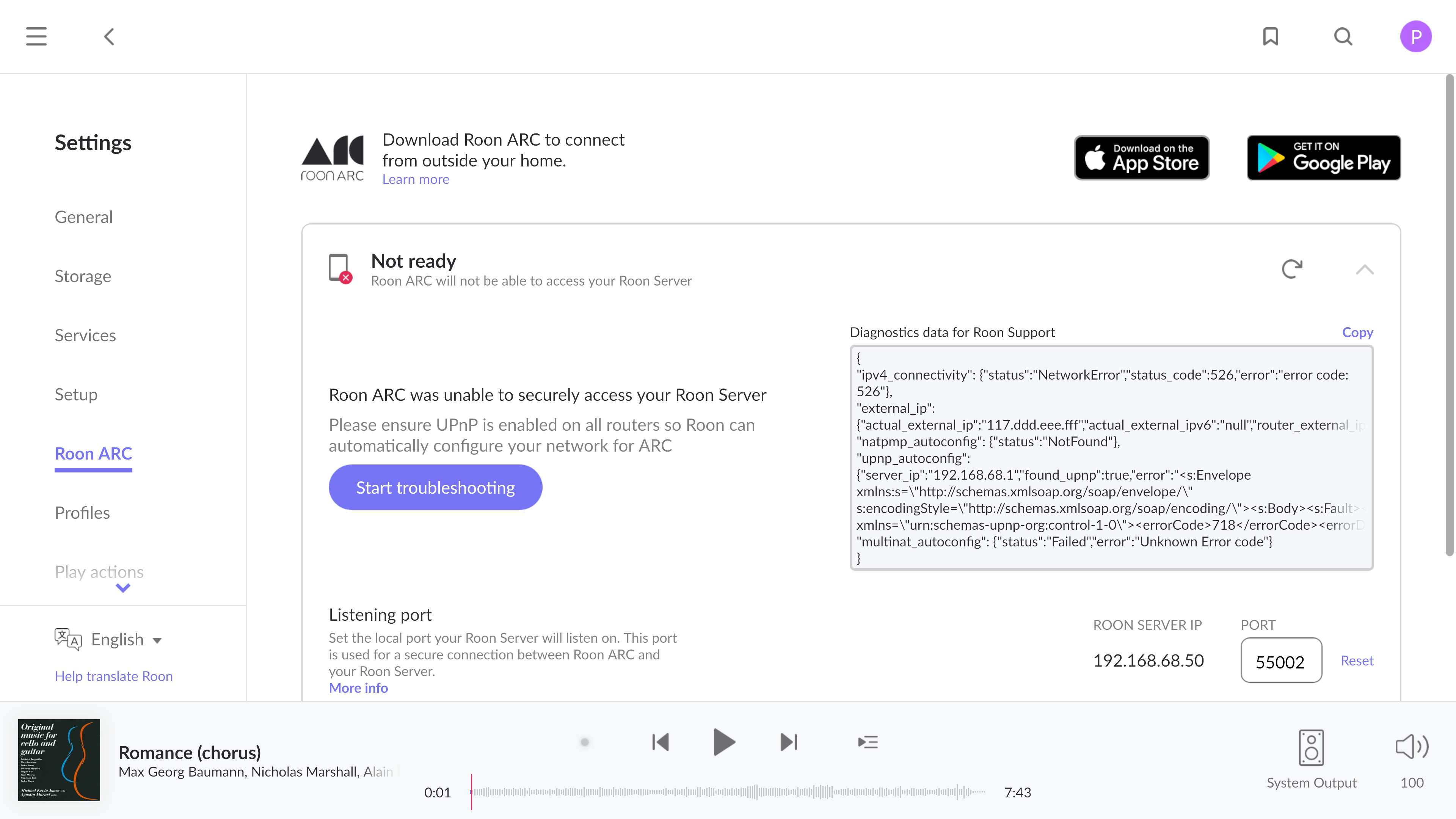
You need to provide more information. It’s understandable if you thought that the error code in the ARC diagnostics may be related to your problem, but it definitely is not:
Please be respectful when people are offering assistance. Thank you.
Hi @petermui88,
I completely understand your frustration—troubleshooting on a weekend is never how anyone wants to spend their time.
I’ve just taken a look at your account logs, and I found the specific culprit: auth invalid; reason: expired.
Essentially, your phone’s security “handshake” with the Roon Server has timed out, but the app hasn’t automatically refreshed it. This is why it can’t find the server at all right now—it’s knocking on the door with an old key.
Please try this simple fix first:
Delete the Roon ARC app from your phone entirely.
Reinstall it from the App Store.
Log in again.
This will force a fresh authentication token.
One important note for after you log in: Once you are back in, you might still see an “Error 526 / Not Ready” message in your Settings. Please ignore this. We are currently fixing a display glitch that shows this error even when everything is working perfectly.
Try the reinstall and let us know if you can play music!
Hello Vadim,
Thanks for your reply, sorry I was frustrated because it was difficult to find the official contact and when I finally got it, it go to a public community where non roon staff pretended they know something giving unnecesssary comments not relating to solution. Don’t quite understand why this has to gone through community and getting more confuse when someone give you misleading reply.
Anyhow I follow your recommendation and reinstall roon arc, however when I tried to open the roon arc app on my Samsung mobile phone s23+ it stuck with the app icon and freeze there.
I installed the roon app on the same phone and it connect to my roon server on the same wifi net work. When I turned off my wifi connection on my mobile phone, the roon app shown “tring ro connect but it taking longer then normal”. Does that mean I can only connect to roon server with the same wifi and cannot connect when I am on the road?
Thanks
Hi @petermui88,
What do you currently see in your Settings → ARC page within Roon? Is there a different diagnostic message currently than that which contained the 526 error code in your original report?
Also, who is your internet service provider?
We ask because there are two basic reasons why ARC wouldn’t be able to reach your Roon Server machine:
or
We’ll watch for your response. Thank you!
Hi @petermui88,
We haven’t seen a response on this thread in several days and we wanted to circle back before the weekend. We’ll require the information described in my post above in order to take action from here. Please let us know if we can answer any clarifying questions.
Sorry, been busy and don’t have time to work through. Will figure it out myself, thank you
Hi @petermui88,
Understood, certainly let us know if you have any additional questions along the way. 