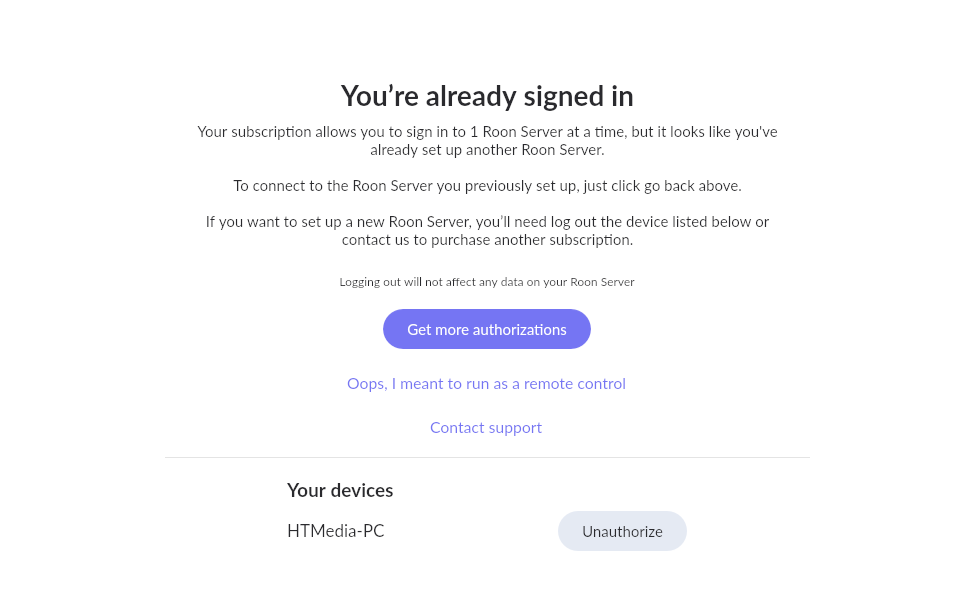
· unable to log into to roon core after PC crash and rebuild. I reinstalled roon core and roon app. Error message says I am only allowed to log into 1 core at a time. I then unauthorize access to my new core name and try again to log in I get the same error. The old server name was HTMEDIA-PC before computer crash and new server name is HTMedia-PC. New graphics card installed as old graphics card died which caused OS corruption and computer crash, which required new Windows 11 reinstall.
Tell us about your home network
· PC is connected to a Linksys 16 port switch that uplinks to my Asus RT-AX88U router. No network issues are seen. I also use Trendmicro internet security anti-virus software on this PC. I have shutdown this software on the computer to see if that was causing the issue and same thing. Tell me if I need to add I firewall rule on the router and I will add it. I pay for yearly subscription to use roon.
What I think is needed is to link my current subscription to new Roon Core PC name "HTMedia-PC" and re-authorize this PC. Please remove old roon core name HTMEDIA-PC from subscription. This should allow my 1 paid subscription to work.
After following your directions below. I get the same error as noted in screenshot below. I have a previous subscription before my PC crashed. After reinstalling Windows I had to give the PC a new name “HTMedia-PC”. The old PC name was “HTMEDIA-PC” which is the old name in roon backup. Based on the error below this software will not allow me to log in without purchasing another subscription because the previous subscription is still tied to the old name. Can you unauthorize the old subscription so it can be used on this PC with the new name “HTMedia-PC”.
UPDATE: After clicking the unauthorize button a couple of times. It now proceeded to add new folder for this server “HTMedia-PC” and it is now up and running from my tablet.