What’s happening?
· Other
How can we help?
· None of the above
Other options
· I don't like how the product works
Describe the issue
Cannot remove artist from Listen Later Queue
Describe your network setup
Not Applicable
· Other
· None of the above
· I don't like how the product works
Cannot remove artist from Listen Later Queue
Not Applicable
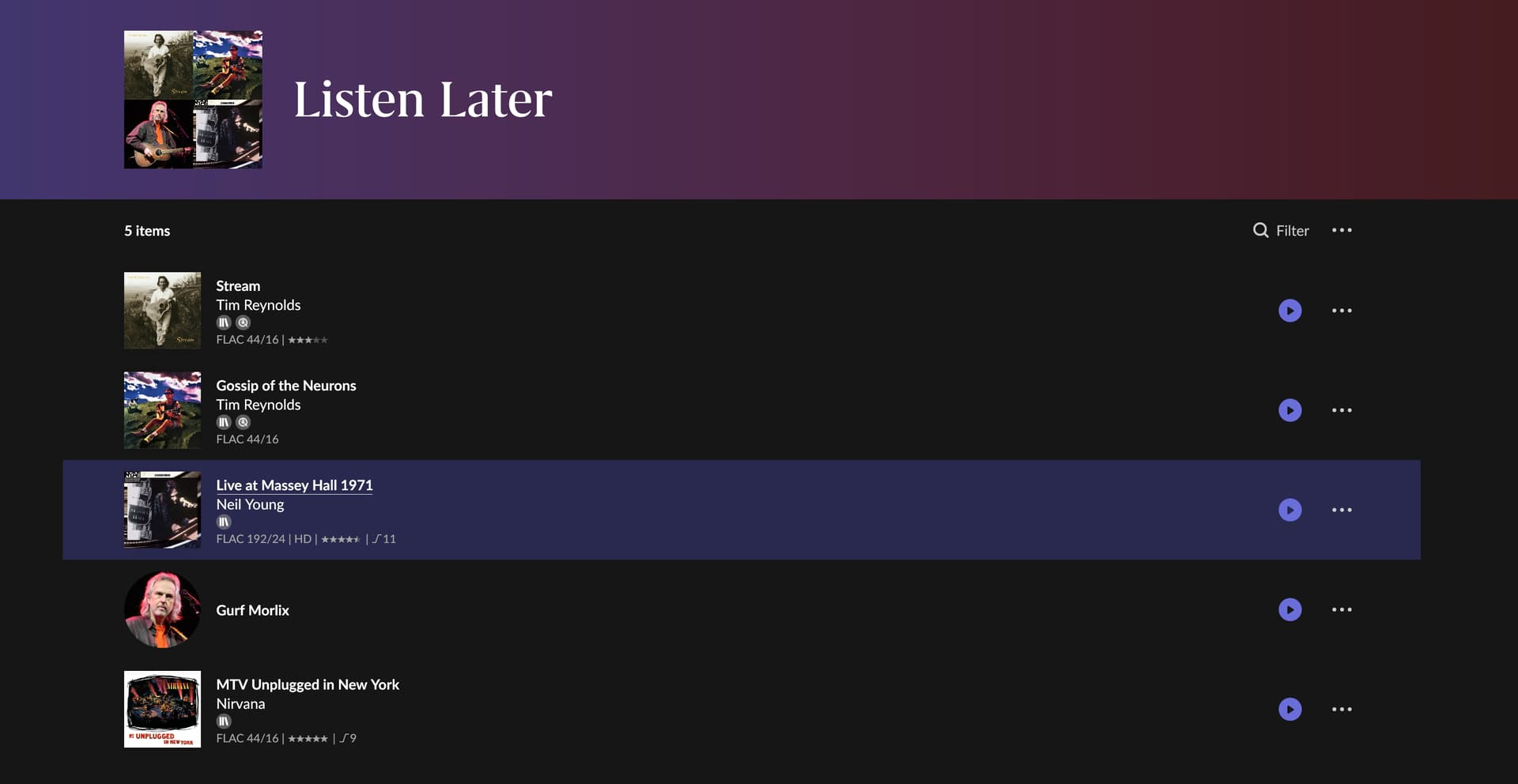
I have an artist in my listen later queue that doesn’t indicate they have Listen Later selected. I can add them to listen later and they get bumped to the top of the list allowing removal. After restarting Roon server he reappears in my queue.
Good day @DrTone !
I hope you’re doing well today and we’re sorry to hear that you’re facing such a problem with the Queue.
Just to confirm the problem, do we get it correctly that you’re able to remove the artist from the “Play Later” queue and if you restart the Roon the removed artist appears there again ?
Can you also let us know whether you manage this from the Server PC or from the Client while being connected to the server via local network ?
Thanks!
Regards.
I’m using the client on my iMac. Server is running on a separate windows machine.
Hi @DrTone,
Thanks for the step-by-step! Do you only see this happening with this specific artist? Or, can you reproduce it with any Qobuz artist?
Are you also removing the album from your favorites after rebooting?
Can you reproduce this no matter the remote device being used?
It will be helpful to grab a copy of your current database to attempt to reproduce the issue in-house.
RoonBackups folder (right-click it and select “Compress…”): 3. Submit the .zip file to us through our Database upload portalLet me know when this is complete - thank you @DrTone! 
Only this artist.
I don’t have any of his albums added to library.
It happens on my iOS clients as well.
I’ll try to find time to get you the database backups. I do have a rather large collection so not sure if it will be too large.
Sounds good @DrTone!
In the meantime, let’s also clear your Qobuz cache as a small side test:
RoonServer/Cache/Cache folder elsewhere, like your desktopThank you!
Yes it still happens.
My RoonBackups folder is well over 10GB. Takes forever for NAS to even calculate. It contains 3 backups.
Good day @DrTone.
I’m so sorry to hear about the trouble you’re having with your Listen Later Queue.
Your symptoms might indicate that the database is having a problem.
If you don’t mind, I’m hoping you could take two minutes to send us your database. That way our team can analyze the type of issue.
Here’s how you can send it:
RoonBackups folder (right-click it and select “Compress…”):Let us know please once you uploaded your database to our portal.
Have a nice day!
Regards.
My complete RoonBackup folder is 39GB. I’m working on compressing just the last backup for you, it’s only 13GB.
Sounds good, thank you @DrTone! 
Thanks for sending that over @DrTone , I’ve forwarded the database to our QA team to try to reproduce this in-house. Testing may take some time, but we will let you know what they say, thank you.
Hello @DrTone ,
I wanted to circle back to your case here. Our QA team tried to reproduce the issue using your backup, but they were unable to see the behavior you described happen on their end. Can you please reproduce the issue once more and let us know the exact local time + date you are able to reproduce it? We’ll enable diagnostics for your account to see if the logs contain further clues. Thanks!
I’m not sure what you want me to reproduce? I just did the following at 6:44AM CST.
Gurf Morlix is currently listed in my listen later queue.
When you click on Gurf Morlix in my listen later queue and visit Gurf Morlix’s Artist page, the listen later indicator is off already so there is no way to remove him.
Hello @DrTone
Thank you for the update.
We are discussing the issue with the R&D and QA team and will get back here with the updates as soon as possible.
This topic was automatically closed 9 days after the last reply. New replies are no longer allowed.
Has this finally be addressed with EA Build 1584?
Hello @DrTone ,
I don’t beleive that the bugfix mentioned in Early Access is the same one that you experienced here. The ticket that we originally opened regarding the issue is presently with the QA team. We are certainly still on reproducing the issue though from my understanding it has proven to be tricky.