Unwanted audio conversion with Magnetar UDP800MKII on Roon (ref#K3WCS1)

Hi! What’s not quite right with Roon?

· None of the above quite fits

None of the above quite fits

· None of these quite match

Tell us what's going on

· Hi all, today I add my new Roon certified Magnetar UDP800MKII in my audio/video system.
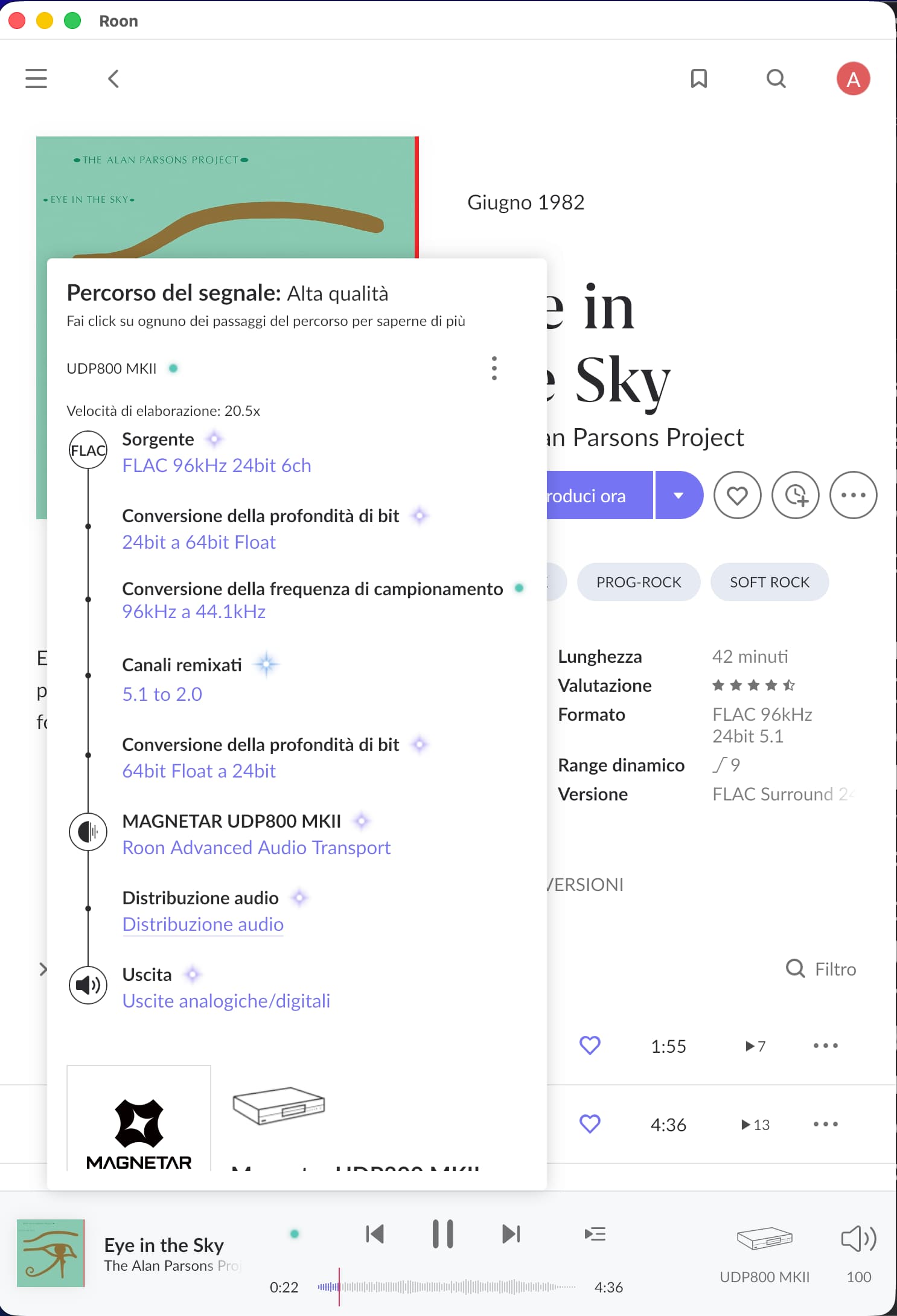
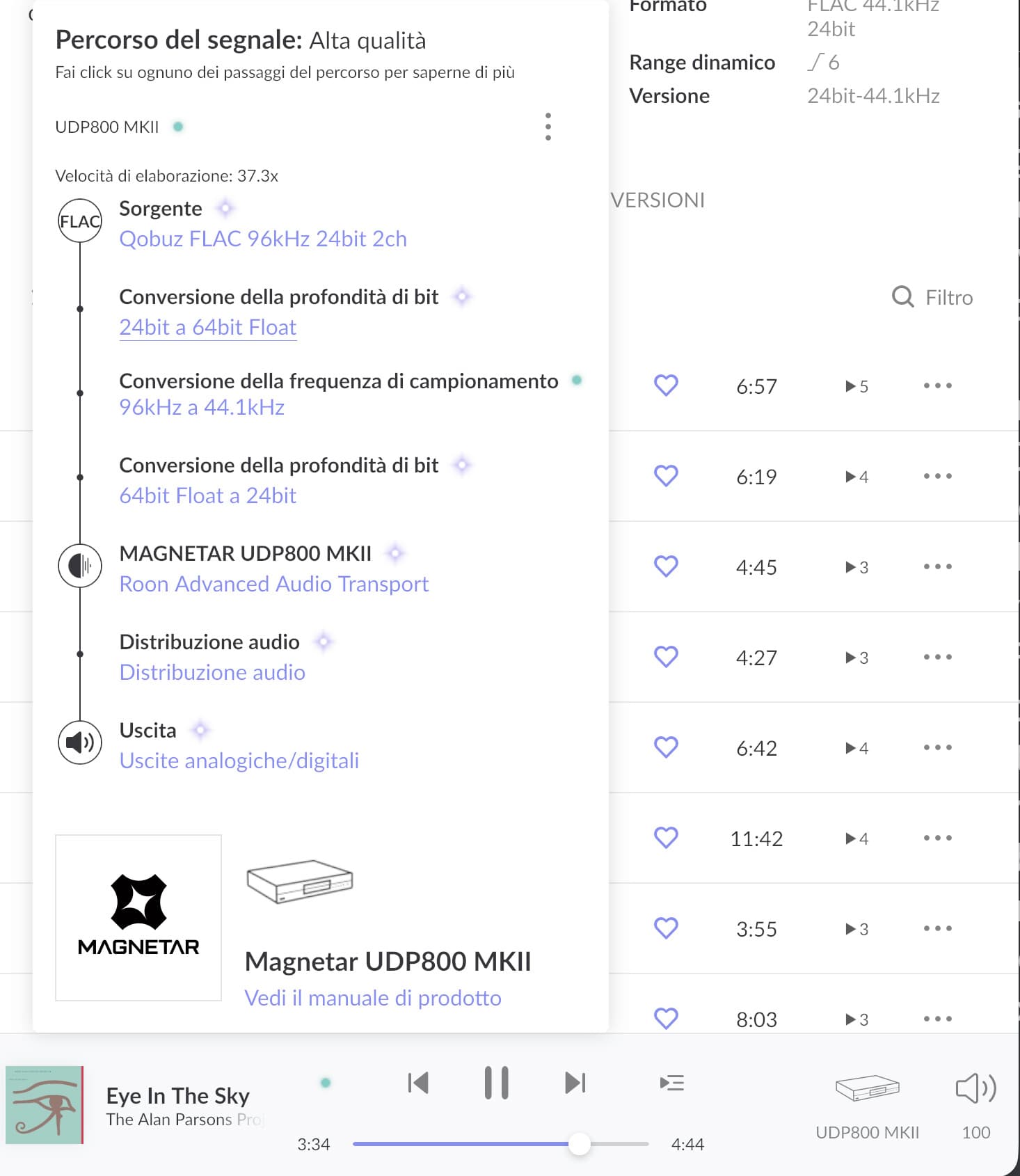
I have Roon Rock server on intel nuc with Qobuz and a large stereo and 5.1 track collection on local storage. I have UDP800MKII connected by hdmi and rca to my Anthem MRX740. Roon discover correctly the new Magnetar device but during playback add unnecessary covertion on audio track down sampling to 44,1

Tell us about your home network

· I have a complex home network witha cisco switch, a fortinet firewall, all my audio/video system object are in the same subnet and i don't have any other network issues

Hi @andrea_marotta,

Thanks for sharing the logs — they clearly show what’s happening.

From the Roon Server logs we can see that playback is intentionally started at 44.1 kHz, even though the source is 96 kHz:

01/25 10:50:38 [Local 01/25 11:50:38] Trace: [UDP800 MKII] [zoneplayer/raat] StartStream Sooloos.Broker.Transport.RaatZonePlayer+Endpoint: StreamFormat(channels=2, bitspersample=24, samplerate=96000, isdts=False) => StreamFormat(channels=2, bitspersample=24, samplerate=44100, isdts=False) streamid=729526761

This means Roon is not being limited by the source or the server, but is adapting to what the playback device / output path reports as supported at that moment. In other words, the Magnetar (in its current output mode and downstream connection) is advertising 44.1 kHz as the active supported format, so Roon resamples before sending audio.

This is typically caused by:

  • The active output path on the Magnetar (for example HDMI audio mode / compatibility mode), and/or
  • The downstream device connected to the Magnetar (such as an AVR or processor) limiting the supported sample rates via HDMI or internal DSP.

What we recommend checking on your side:

  1. On the Magnetar, review the active audio output mode (HDMI / PCM / compatibility settings).
  2. If the Magnetar is connected to an AVR or processor, try a test where DSP / room correction is disabled, or temporarily disconnect the downstream device to see if higher sample rates become available.
  3. Check the different outputs

At this point, Roon is behaving as expected and simply matching the capabilities reported by the playback chain. Let us know what you find after checking the items above, and we’ll be happy to continue from there.

Hi @vadim and thx for your reply…
I performed a series of tests following your instructions, verifying the following scenarios:

Scenario A) Magnetar UDP800MKII connected to my Anthem MRX740 exclusively in analog RCA, with a 2.0 speaker configuration (FrontRight-FrontLeft-using Anthem’s amp matrix function). In this scenario, when playing the Qobuz stereo track at 96 kHz and 24 bits, Roon downsamples to 44.1 kHz as previously reported. The same problem was also detected when playing the same track (Eye in the Sky)x via ROON but using version 5.1 (still 96 kHz at 24 bits) from the local archive, with the only difference being the conversion step from 5.1 to 2.0 channels. However, I don’t see how, in this scenario, the amplifier settings could influence the rest of the upstream chain in any way, given that the connection between Magnetar and Anthem is purely analog.

Scenario B) Magnetar UDP800MKII connected to my AnthemMRX740 exclusively via HDMI, with a 5.1 speaker configuration (again using Anthem’s amp matrix function).
In this scenario too, when playing both the stereo and multichannel tracks via ROON, ROON’s behavior remains exactly the same (channel mapping conversion and downsampling).

Scenario C) Playback of the same two test tracks (stereo and multichannel) but this time using the HDMI connection of the Intel NUC where ROON Rock is installed, again to the Anthem. In this case, Roon behaves as expected, sending the signal without any channel mapping conversion or downsampling.

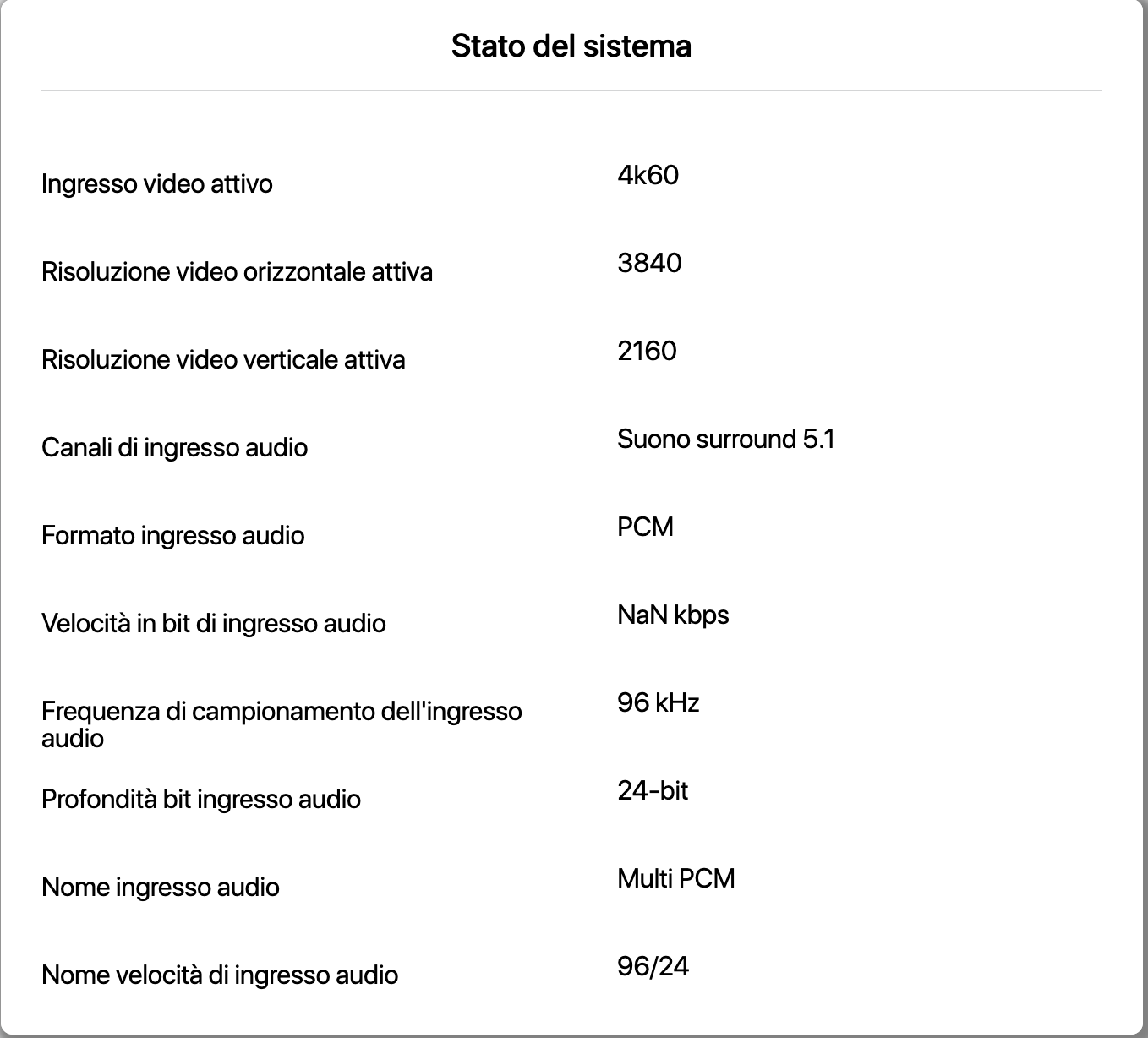
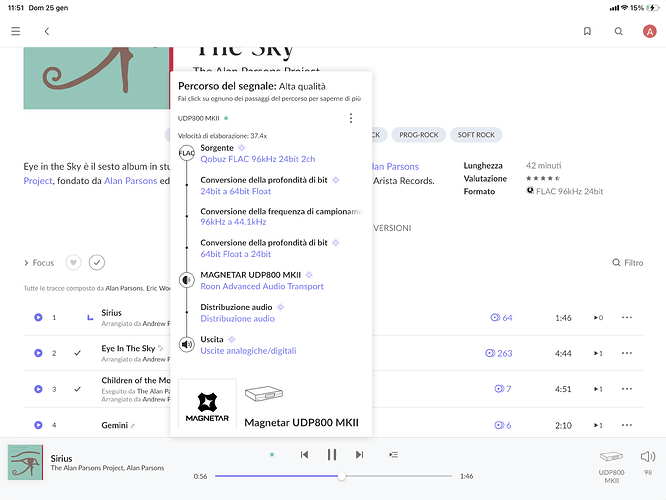
Scenario D) playback of the same 2 test tracks (stereo and multichannel from local archive), but this time using the Magnetar’s HDMI connection to the Anthem, and everything worked as I expected (I am attaching the Anthem info page where you can verify that the channel mapping, frequency, and bits are exactly those of the source).

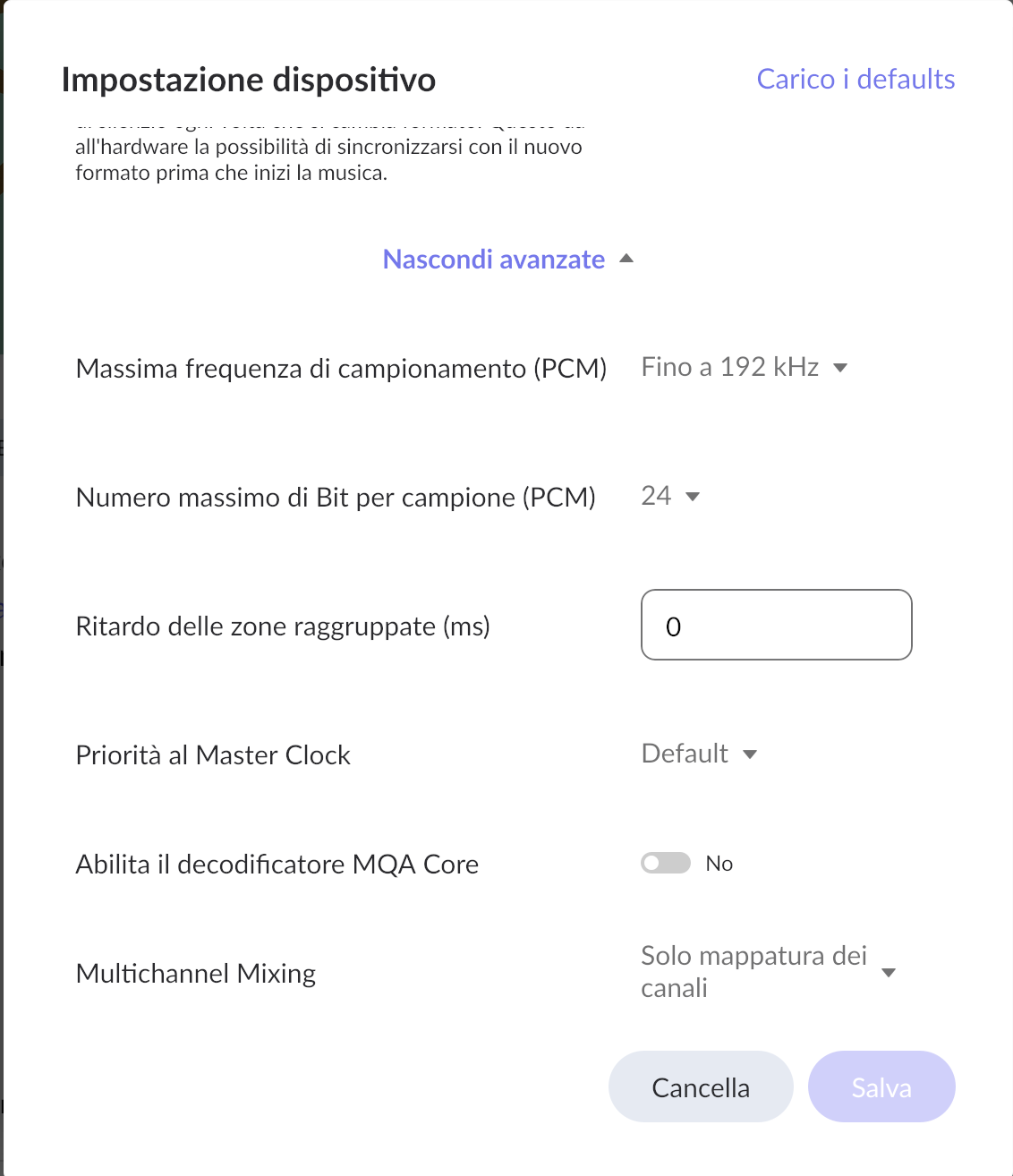
Another thing I noticed is than on ROON, the advanced settings for the Magnetar device are very sparse compared to those for the NUC device, for example, where there is an option for not converting a 2.0 channel source to 5.1.

I also carefully reviewed all the options on the Magnetar configuration pages, but I didn’t find any additional settings that could address the problems described.

In attach you will find varius screenshots of all my tested scenario.

I don’t know if other users have the same problem, but if the usage scenarios are as described, the features offered by ROON via the Magnatar UDP800MKII are currently very limited.

THX in advance for your reply…


Hey @andrea_marotta,

Thanks for all the additional information and testing! The most likely root cause here is Magnetar’s Roon Ready implementation is advertising incorrect or incomplete capabilities to Roon.

Specifically, one (or more) of the following:

  • PCM max rate incorrectly declared as 44.1
  • Multichannel PCM not declared
  • HDMI audio sink incorrectly described
  • No distinction between HDMI vs analog output paths
  • No exposed channel layout options
This explains all symptoms:
  • Forced downsampling
  • Forced channel remixing
  • Missing Advanced Settings
  • Identical behavior over HDMI and analog

To confirm - have you fully disabled all MUSE/DSP settings when the Magnetar zone is enabled and selected?

Can you please also confirm you are running the latest firmware version on the Magnetar? Perhaps performing a firmware reinstall would help here.

Let us know, thank you!

Hi,
I can confirm that the latest firmware available (V987) is installed on the Magnetar. On the Roon side (here too, the latest updates are installed on both the server and client sides), I can confirm that I have not applied any MUSE options/corrections for either the Magnetar or any other devices.

I look forward to receiving further clarification from you. Thank you


Hello @andrea_marotta,

Thank you for the detailed follow-up — this helps clarify the situation.

Based on both your testing and our certification records, the behavior you’re seeing is expected given how the Magnetar UDP800 MKII is currently exposed to Roon as a Roon Ready device.

Important clarification

In its Roon Ready certification, the Magnetar UDP800 MKII advertises itself as a 2-channel PCM endpoint with support for sample rates up to 192 kHz. Multichannel PCM is not declared at the endpoint level.

Because of this, whenever Roon encounters:

  • a 5.1 source, or
  • a playback path where multichannel capability is not explicitly advertised,

Roon will correctly:

  • remix multichannel content to 2.0, and
  • adapt the sample rate to match the capabilities reported by the endpoint.

This explains:

  • the forced 5.1 → 2.0 conversion,
  • the downsampling you’re seeing,
  • and why the Advanced Settings for the Magnetar zone are more limited compared to the Intel NUC HDMI output (which advertises full multichannel PCM support).

Even when the Magnetar is connected via analog outputs, Roon can only act on the capabilities reported by the Roon Ready endpoint itself. Roon does not infer or override capabilities based on downstream analog or HDMI devices.

At this point, Roon is behaving as designed based on the information provided by the playback device.
If multichannel PCM playback and additional channel-mapping controls are expected when using the Magnetar as a Roon endpoint, this would require changes in how the device advertises its capabilities to Roon.

We recommend continuing this discussion with Magnetar, as any expansion of multichannel or endpoint-level options would need to come from their Roon Ready implementation.

Please let us know if you have any further questions — we’re happy to help clarify.

1 Like

And there we go again. The same as with the Oppo UDP 205. Just when I thought I have found a new Mutlichannel Audio streamer.

If you look into the Audio Setup in Roon, does the Mangetar indeed appear only as a Stereo output? If that really is the case that would be quite a bummer Andrea.
I wonder what Magnetar has to say about this.

Hi @vadim,
thanks for your reply but I don’t entirely agree with what you wrote…

Having established that the problem lies in how the device’s certification has been defined, why does Roon downsample a native 96 kHz stereo track to 44.1 kHz when the certification sets this limit at 192 kHz? (I am reattaching the screenshot of the test I did).

According to what you have described, this should not happen!

As for multichannel track support, I should ask to Magnetar, right?

Thanks in advance!

Hi Frank, that’s right! There is no option to manage multichannel tracks… Unfortunately for me, I bought it a Magnetar UDP800 MKII for €2000!!!
I’ll contact Magnetar now, but I don’t think their support is as responsive as Roon’s…
Bye

1 Like

@andrea_marotta,

Thanks for following up on this.

We have double-checked the specifications, and you are absolutely correct regarding the sample rate support. According to the Roon Ready certification for this DAC, it should support a much wider range of formats.

However, for some reason, your device is currently reporting to Roon that it only supports 44.1kHz.

We have raised this issue with our device partners team, and they are reaching out to the manufacturer to investigate why the device is advertising its capabilities incorrectly.

We will update you in this thread as soon as we have more information.

Thanks.

Thex @alex_h,
Please also inform Magnetar that there is no reference to Roon limitations on multichannel tracks in the specifications published on their channels.
Furthermore, when these kind of tracks are played directly from Magnetar (without using Roon, for example from an external USB or network source), they are both encoded in analog 2.0 by its internal DAC and sent in bitstream to the HDMI output.
Therefore, a customer cannot imagine the absence of features (Roon) that are possible from other sources.
For us customers, this is a very serious lack of clarity!!! Unacceptable on a product that costs €2,000!!!

THX!!!

1 Like

Hello Alex. I know it is actually not “your problem” but maybe you could also raise the Multichannel item to them? There is absolutely nothing about only Stereo limitation support on their Website regarding Roon Ready.
While this is of course their shortcoming it might get some frustration on Roon users as well. If manufactors are not very clear about their Support output of Roon Ready devices, maybe they should not get a Roon Ready Certification in the first place.

Hi @andrea_marotta and @Frank_Nickel,

We’ll certainly mention it, but it would still be most effective to reach out to them directly as well. :folded_hands:

No worries. I already did.

@andrea_marotta,

Our Partners team has been in touch with the manufacturer of your DAC, and they confirmed that a firmware patch has been released to address this issue.

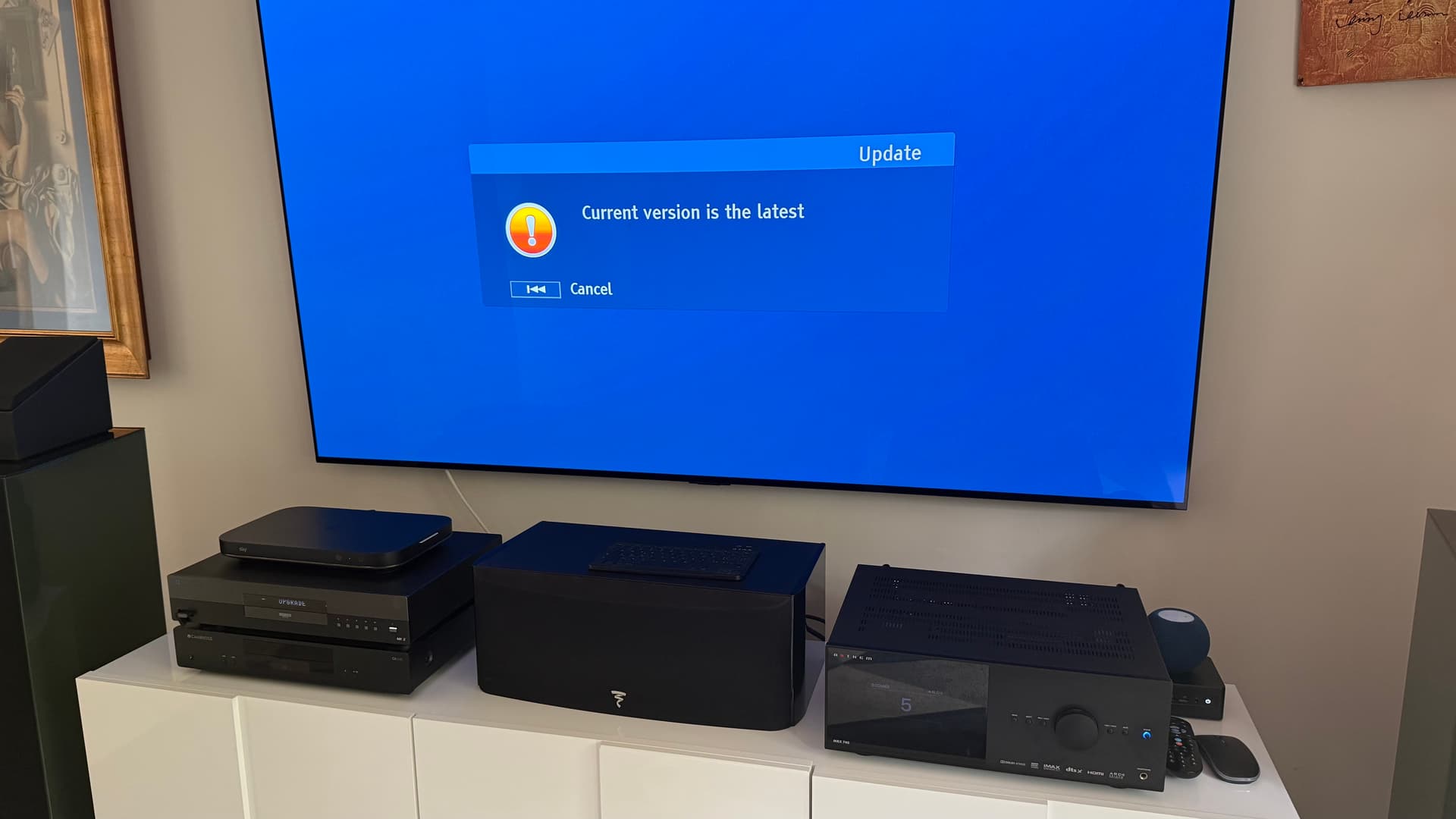
Could you please try updating your DAC and let us know if that resolves the problem?

Thanks.

1 Like

Hi @alex_h,
today, by network update, I have installed a new firmware update…

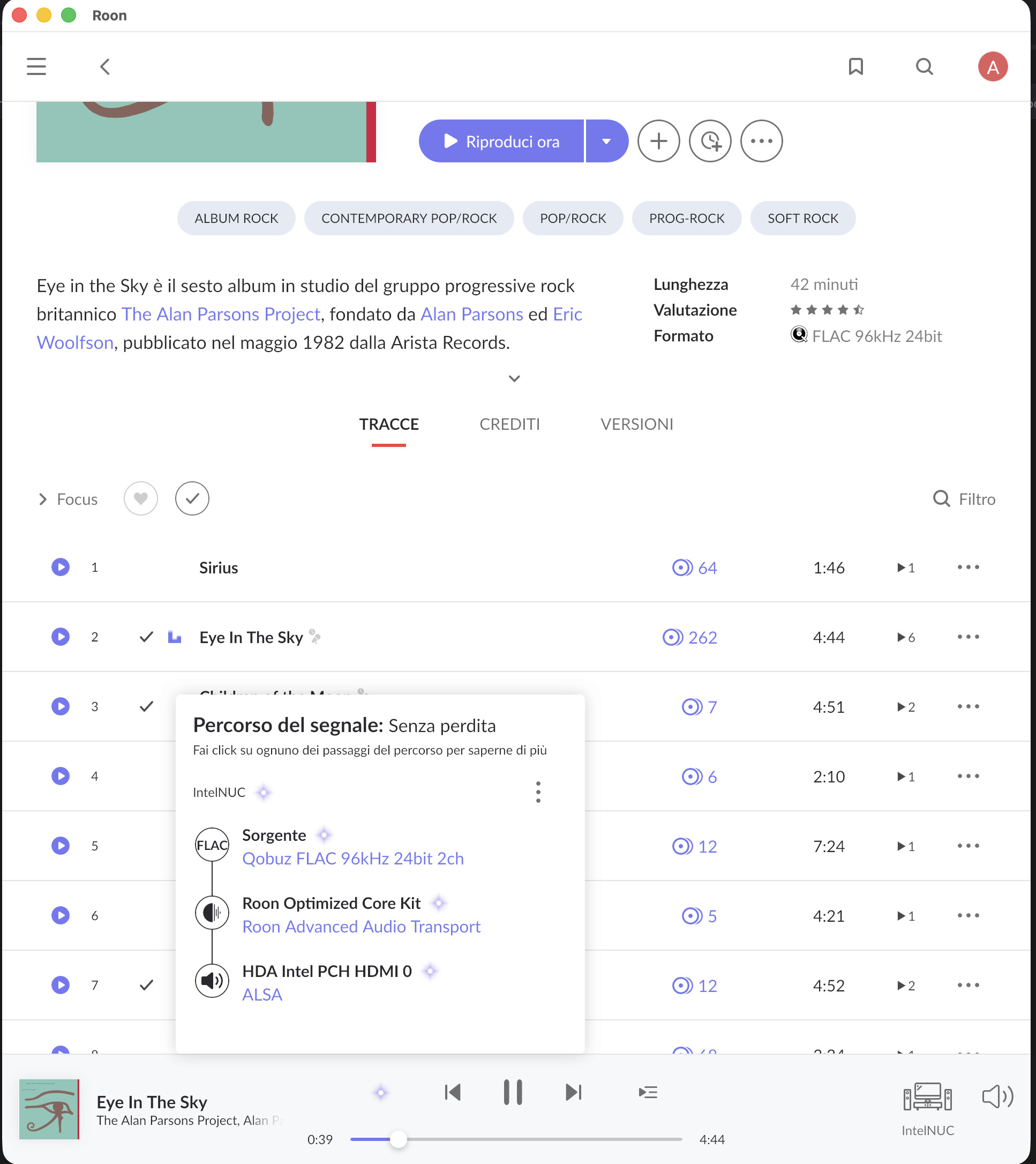
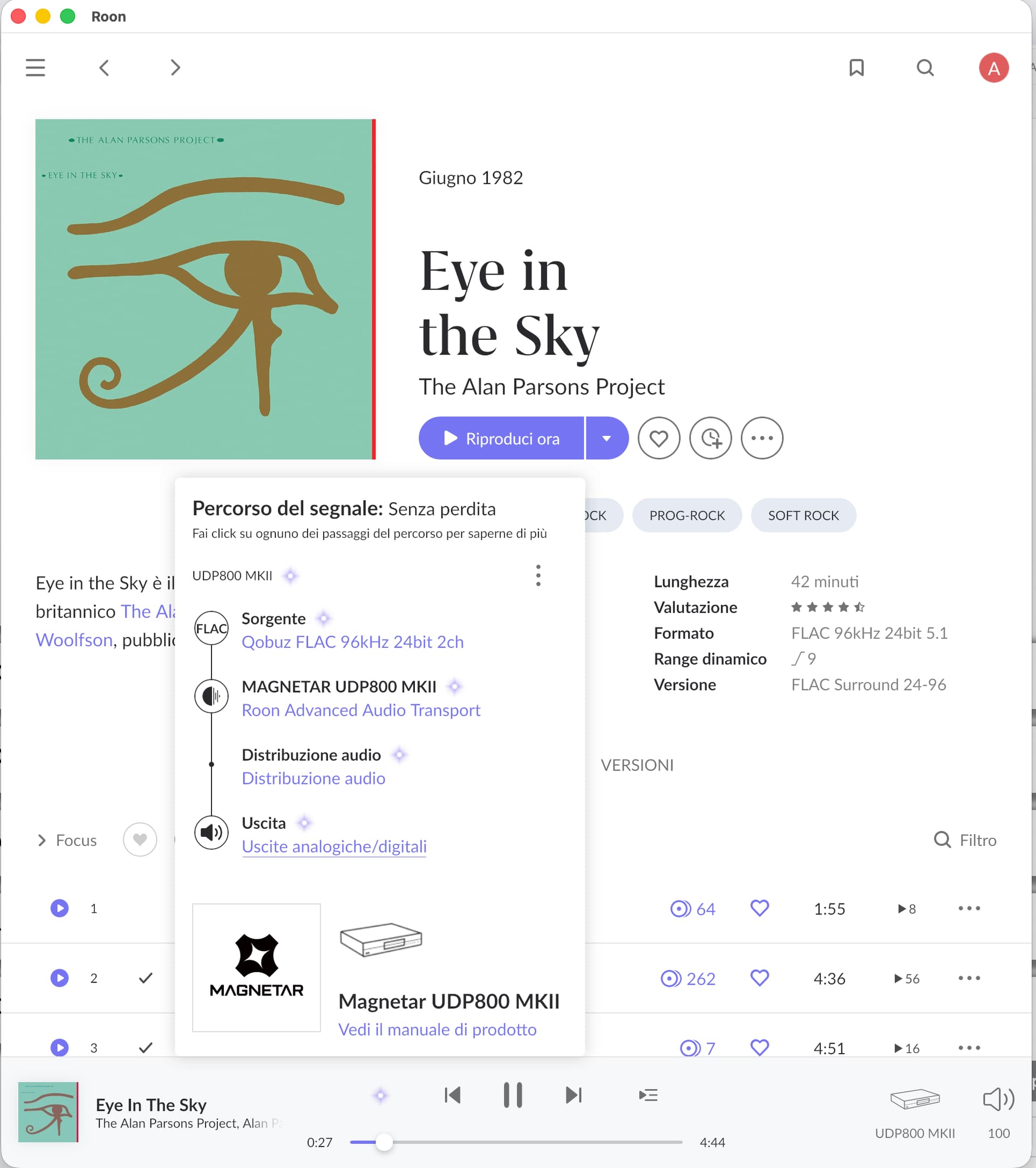
I started my test as usual… in attach my evidence.


As you can see, the downsample error on 2.0 tracks has been corrected.
Unfortunately, I must point out that despite my numerous attempts through Magnetar support channels (European channel, American channel, Italian distributor), the problem with channel mapping of 5.1 sources remains unresolved.

I will continue my attempts with Magnetar, hoping that this feature will soon be usable correctly. However, given the manufacturer’s approach, which I must admit is very different from ROON’s extremely professional one, I do not believe that a quick resolution is likely.

In the meantime, I would like to thank ROON support, which is always attentive, professional, and effective!

I hope to be able to give you some news on this issue soon…
Best regards to all.

You mean >2.0 is still being mapped/down converted to 2.0?
Didn’t see the unit is a BR player. Did you check pot. speaker configuration settings somewhere in the Magnetar? Are they set to >= 5.1?
roon Ready devices accepting multichannel over RAAT/Ethernet are still rather exotic ones. They do exist. But don’t hold your breath.

I don’t think they will implement this. It is just the same blunder as with the Oppo’s. Indeed no answer from Magnetar about my question over Multichannel Roon Ready. I will definitely not purchase if they don’t change this.

Hi @maddib,
Nothing esoteric… if you read my previous posts, I explain that I have two configurations (NAS and ROON Rock) that easily allow this specification via HDMI… in my opinion, it’s just a matter of profound ignorance on the part of us users about how multichannel works… The Magnetar udp800 from other sources (USB or network shares) easily manages the reading of 5.1 files and their conversion if you intend to use balanced or RCA 2.0 outputs. On the other hand, if you intend to use the audio output via HDMI (both HDMI1 and HDMI2), it allows you to manage the stream in either bitstream or PCM. I don’t see what could change if the source is ROON via RAAT.

I hope @Frank_NIckel will reply sooner or later. Unfortunately, as I already told you, I’ve already spent €2000 on this thing, which doesn’t even read .iso files or Blue Ray folders…

We’ll see.
Greetings to all.

@andrea_marotta,

Thanks for confirming that the downsampling issue is resolved.

Regarding the channel mapping, the situation is slightly different.

Your device is certified as Roon Ready (RAAT) with support for a maximum of 2 channels. This means that when streaming over the network, the device is limited to stereo playback.

To achieve full 5.1 multichannel audio, you would need to connect the device directly to your Roon Server machine via USB or HDMI.

Thanks.