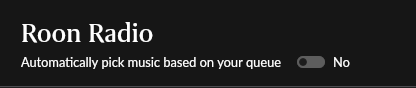
· I want to disable Roon Radio and I'm not able to do that. I have switched the slider at the bottom of the Queue interface for Roon Radio to "No" several times and it has automatically switched back to "Yes". There is no other menu option for this that I can find. I want to know how to completely disable this feature so that it never turns on again and when the album I am listening to finishes there is silence. Please advise.
Tell us about your home network
· Nothing special that would affect this issue. It's a question about in-app interface controls. I use the Roon Desktop App on a Windows 11 PC.
The slider at the bottom of the Queue is the right control, and there is no account-wide setting that turns Roon Radio off everywhere.
The part that catches most people: that slider is per zone, not per account. Each zone keeps its own setting, so switching it off while looking at one zone leaves every other zone as it was. If you play to more than one device, that alone can look exactly like the setting refusing to stick.
If it is genuinely reverting on the same zone, we would like to see it. Could you tell us:
Which zone you are setting it on, and whether you have more than one.
Whether it flips back straight away, or after something specific: the album ending, restarting the app, restarting Roon Server, grouping or ungrouping zones.
Whether it behaves the same if you set it from a different remote.
With those we can pull the logs from your server and look at the exact moment it changes.
Hi, thanks for your reply. When you say “zone” do you mean different physical devices or different areas of the app interface?
I am currently only using the Roon app on one device - a Windows 11 desktop PC with the Roon Desktop app installed linked to files on my hard drive and a Qobuz subscription. I have not tracked exactly how long it takes before it switches back but it’s not immediately, seems to happen every 2-3 weeks and it seems to happen regardless of the album source (my person library on the hard drive, Qobuz search or Roon recommended).
So basically what happens is I play an album start to finish with the slider set to “No” and when the album ends nothing plays - all good. Then after a couple weeks of listening to albums/songs/playlists through the app almost every day it will (seemingly) randomly switch back to “Yes” and I only notice because I play an album and when it ends some random new song starts to play. I don’t look at the Queue screen every time I play an album to check the slider status (but maybe I need to).
Do I just need to keep changing it to “No” every time this happens? Is it a bug in the current version of the desktop app?