Hi! What’s not quite right with Roon?
· None of the above quite fits
None of the above quite fits
· None of these quite match
Tell us what's going on
· VRAM Memory Leak
Tell us about your home network
· BT Home Hub + 3 Extenders

· None of the above quite fits
· None of these quite match
· VRAM Memory Leak
· BT Home Hub + 3 Extenders
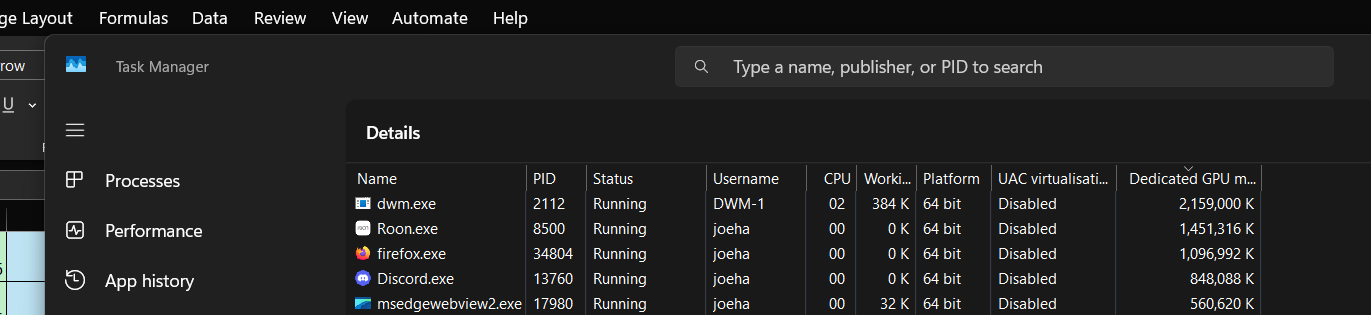
more info: Roon starts at about using 500mb VRAM but slowly inflates over time and I have to end process and restart process about once a day or I face slowdown on the rest of my system. I tested it over 3 days and it ended up using 6gb and it just increases until you manually stop it.
Roon version 2.57 built 1598
GPU AMD Radeon 9700 XT 16GB VRAM driver 25.12.1
64gb DDR5 RAM @ 6000 mt/s
CPU AMD 9900X3D
Roon loads (some of) it’s database into RAM.
The amount of ram depends on a few things, mainly library size.
How many tracks are in your library?
He’s talking about video memory. Different thing.
Now I’ve read the end of the 2nd post I now see that 
I took VRAM as they were refering to virtual.
Should have been more specific but yes I mean video memory/GPU memory.
Since my last reply 500mb has turned into 1.2gb over approximately 1-2 hours and it will continue to swell until it’s taking in excess of several gigabytes.
Thanks for reaching Roon support.
We have analyzed the diagnostic traces from your Core (Server) logs, and the backend process is completely healthy. System RAM usage is stable with normal garbage collection cycles, so the “brain” of Roon is not leaking.
To help us pinpoint where the graphics resources are being held, could you clarify your usage pattern:
Please let us know the results of minimizing the window. This will help us determine if the GPU driver is failing to release textures or if the application is actively holding onto them.
Hi, thanks for the response.
Hope this helps you diagnonse the issue!
ah to clarify my previous comment on ‘two desktops’ I mean the virtual desktop feature withinn Windows 10 and 11 that allows you to swap between several virtual desktops (I have two - desktop 1 for browsing/social media, desktop 2 for anything music related) - it’s all on the same desktop PC.
Thank you for the additional information @Joseph_Hawker! Our team is taking a closer look internally, and we should have more information to share once additional analysis has taken place.
We’ll follow up with updates as soon as possible - thank you for your ongoing patience here.