Is the affected network Zone connected with Ethernet or WiFi?
· WiFi
Does the issue affect all file formats?
· The issue affects *multiple/all* file formats.
Does the issue happen with local library music, streaming service music, or both?
· *Both streaming and local* *library* music are affected.
Do you encounter any playback errors with the "System Output" Zone?
· The System Output has the same problem as my other Zone.
Do you have a complex network setup?
· Both the device and RoonServer are connecting to a *single router*
Please try rebooting your router.
· No, I'm still having trouble
Do you have an approximate timestamp of when the issue last occurred?
· 10:19 am October 9, the track was Peanut Face by George Graham on the album With More Help From my Friends
What are the make and model of the affected audio device(s) and the connection type?
· Windows 11 PC, Sonar audio software via Steelseries GG, no exteral DAC. I am using an set of speakers connected via usb-c which also have a headphone jack that I sometimes use. The speakers are Arena 9 by steelseries.
Describe the issue
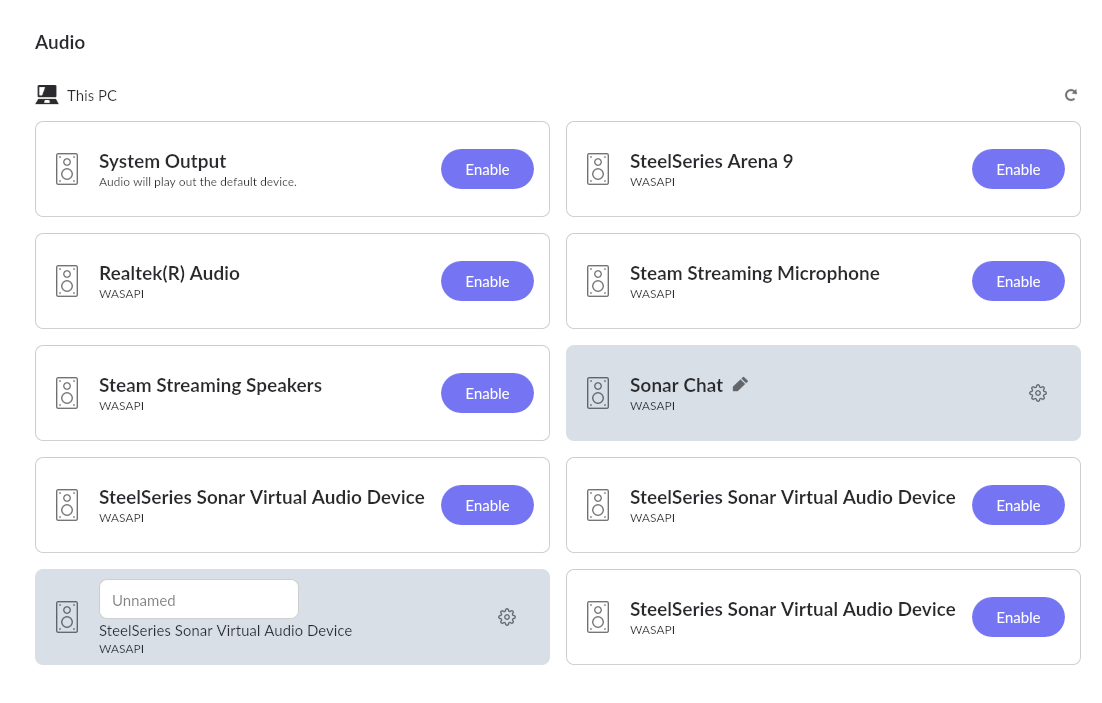
On the Windows 11 pc that I am having issues with I am running what is essentially a software mixer called Sonar via an application called Steelseries GG. The software has virtual audio outputs which can be level adjusted individually. Roon will only play through one of these audio outputs and not through the others. When it fails on one of the other outputs I get a 'too many failures, stopping playback' message. I want to rout Roon through the media output but it will only play though the chat output which I also use for voice chat. Other applications like Qobuz and Tidal will play through the media output and can be reassigned via the mixer but Raat server needs me to set it from within Roon and will only work from the chat output. Interestingly, it will also 'work' though the mic channel and will show levels on the mixer, though there isn't any output. If I stop the Sonar/GG audio software and try to play through the speakers directly they also will not play via Roon although they will play other sound from the pc fine and will work if I restart the software and use the chat virtual audio device/channel. My other endpoints - the ones not on this machine - are all working.
I can see all of the virtual audio devices in Roon Settings although it does not recognize the names of each. Chat I was able to label in Roon because I could see the audio levels in the mixer.
I have tried using each virtual device with exclusive mode on and off, as well as private set on and off. I’ve also made sure the dsp settings in the Sonar software are off for each. For some reason chat is the only one that works. Interestingly, I get the same failure when trying to play through the usb speakers themselves (Steelseries Arena 9) with the audio software off. So why the Chat virtual audio channel works with the software running but nothing else will when I have all the settings the same I cannot understand.
At around 10:58 am CST US today I tried using the Arena 9 speakers without the audio software and got the failure.
I then started the audio software and at 11:02 CST US or so I tried using one of the virtual channels and it failed.
If there is something else you mean in particular about time stamp please let me know, I didn’t see anything in particular in Roon.
Other apps (Tidal, Qobuz, browser, etc.) → Media output → works
This indicates:
Roon is failing to negotiate audio stream format (bit depth, rate, exclusive mode, or device handshake).
Try:
Open Windows Sound Settings → Sound Control Panel → Playback tab.
Select each of these devices in turn:
SteelSeries Sonar - Chat
SteelSeries Sonar - Media
SteelSeries Arena 9 Speakers
Click Properties → Advanced tab and check:
Default Format (e.g. 24-bit 48000 Hz)
Make sure they all match.
Temporarily disable Exclusive Mode (“Allow applications to take exclusive control”).
Try setting all to 24-bit, 48000 Hz - this is Sonar’s native rate and what Roon should handle comfortably.
Then restart Roon and retry playback.
If that doesn’t help - Roon can only talk to one device stack at a time. If Sonar is wrapping WASAPI or ASIO behind its own filter, Roon might not get a valid handshake except on “Chat.”
Try this test:
In Roon Settings → Audio → scroll down to the “System Output” (Windows default output).
Enable that and see if playback works when you change Windows’ default output to:
“SteelSeries Sonar - Media”
or “Speakers (SteelSeries Arena 9)”
If Roon → “System Output” plays fine when the default device is Media, that means the issue is limited to RAAT’s direct device enumeration.
If not, it’s a driver handshake or sample-rate issue, not routing.
If you still have issues - Even if Sonar installs an ASIO layer, try using WASAPI (non-exclusive) in Roon for the failing outputs:
Go to Settings → Audio → Device Setup for each endpoint
I tried the troubleshooting steps that you provided.
I think I may have uncovered the problem, or part of it. All of the virtual devices except chat only have 8 channel, 24 bit 96000 hz available as default format in sound control panel, even when I click restore defaults.
I don’t see “DSD Playback Strategy” under device setup for any of my devices.
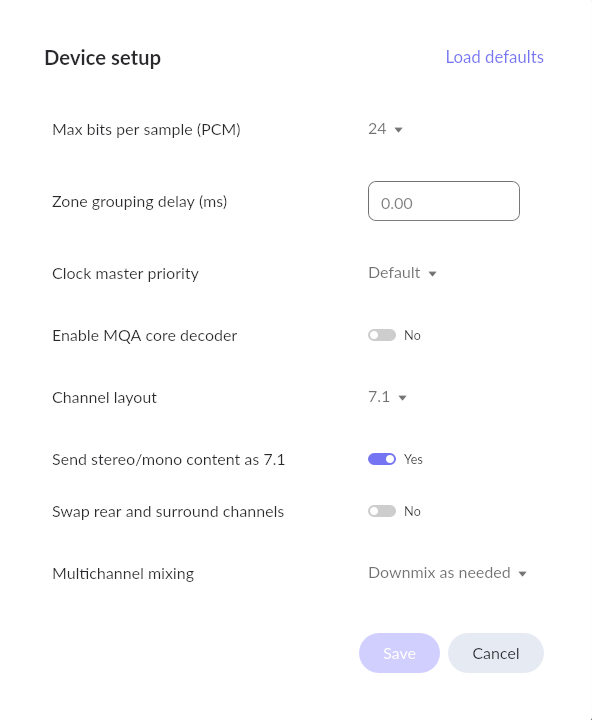
If you navigate to the Device Setup tab for the non-working zones → Advanced, do you see the option to set the channel layout to 7.1? This is an older screenshot, but it should look something like this:
Thank you for checking those settings and for your detailed follow-up.
Based on your findings, this behavior makes sense — Roon works differently from most other applications when it comes to audio routing.
While other apps send their sound through the Windows system mixer, which then communicates with the device driver, Roon communicates directly with the device driver itself using WASAPI or ASIO.
In your case, SteelSeries Sonar creates virtual devices with their own driver layer and an internal mixer that manages how audio is routed between “Chat,” “Media,” and other virtual outputs. This design can limit how external applications like Roon interact with these devices..
We’ll discuss this internally with our R&D team to see if there’s any possible way to improve compatibility on our side.
If we determine that Roon can’t bypass these driver-level restrictions, the next step would be to reach out to SteelSeries Support so they can confirm whether their virtual devices can expose a more standard WASAPI or ASIO interface for direct playback.
We’ll keep you posted once we have more details from our side.
Got it. I do have other endpoints that I can do more critical listening on but it would be great if I could eventually get things working on that pc for times that I’m using it. I appreciate all the help.
As you have stated it looks like the rest of your virtual devices support 24 bits 96 kHz and 8 ch.
Can you the please try to open the settings of that Zone and make sure that your audio stream matches the supported format of the virtual device ? (Set Channel Layout to 7.1, 24 bit and 96 Khz)
Let us know please if it is working in such scenario.