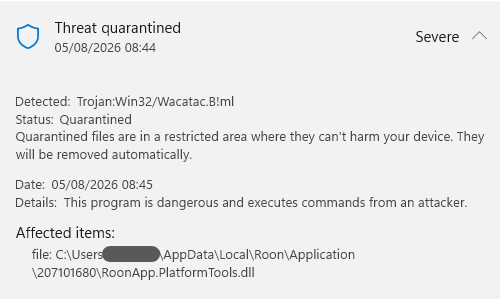
For context, I found that since the latest app update, I’m unable to open Roon from my work laptop. I thought the stringent software install policies were preventing this but found the message indicated an anti-virus quarantine as per the screenshot: Trojan:Win32/Wacatac.B!ml
The ‘learn more’ takes me to this following Microsoft weblink
Yes, I sense that to be the case and frustrating that MS is picking it up. However, I felt it my community duty to report it in case this was genuine or if it is happening to others. This is the first time it has happened but security on apps is becoming tighter and tighter but they’ll never take my pen and paper off me! Now, where did I put that pen?
Thanks for writing in and for sharing your report. @Suedkiez is quite correct with the above information, but thank you for reporting your findings no matter!
Here is more information on Roon with antivirus software:
You may be running into a slightly different issue with the latest Roon update, here’s more information surrounding what other windows users are facing:
The short-term workaround is to disable Smart App Control, the new Windows AI security features that works in concert with the Microsoft Defender firewall to statefully police network-dependent apps. Take this step if only you are willing, although the Defender firewall will remain active either way. To turn off Smart App Control in Windows 11, open the Start menu, search for and open Windows Security, click App & browser control, select Smart App Control settings, and change the option to Off
Thank you for everyone’s help, much appreciated. As this is a work laptop I’m limited in my options but that’s okay it is one of those things. I’ll read up on the false positive reporting side and hope this resolves in time.
Thanks for the update, and for taking the time to dig into the false positive reporting side as well. Since this is a work laptop, we realize your options are limited, so it makes sense to stay within what your setup allows.
Please let us know how it goes if you do decide to revisit this, and if anything changes on your end. We’ll keep an eye out for your update.
Just checking in on this. Since this is a work laptop, we know your options are limited, but if you do revisit it, could you let us know whether anything changed after you rechecked the false positive reporting side of things? If you have an update on that setup or run into a different result, reply back here and we’ll take it from there.
Please note, if we don’t hear back from you this thread may close automatically soon. If the thread auto-closes and you need further assistance, please submit a reopen support request via the technical support help form below and specify that the issue should be reopened. Thank you.