I used a “Socket Spy” to capture the exchanges between the Web Display application and the Roon server.
The thread I mentioned helped me find an example of real-time lyrics, like a karaoke song.
Very happy to have discovered this app, just what I wanted. Thanks for all your hard work, Russell!
One quirk I’m experiencing:
In Browse mode, for me the playlists sidebar tab shows only the playlists in one of my folders, and none of the playlists that are in the other folders or aren’t in any folder. By contrast, if I go to the globe sidebar tab and then to the playlists button there, it shows all playlists altogether regardless of folder status (although I can’t see any logic to the order in which they are displayed). Is there a way to get the playlists sidebar tab, similarly, to show everything?
(And sorry if this has already been addressed in the long thread above and I missed it.)
Can’t believe I’m just finding this app. I have a gen 2 4K Apple TV that can’t find the core. Even after filling in ip and port number. This Apple TV is on WiFi because the ethernet jack no longer works. I tried an gen 3 with working ethernet jack and it found it no problem. Any suggestions on how to get the WiFi Apple TV to see the core?
@Benjamin_Schramm, is your Apple 4K TV a registered device in your Apple Home application? Newer Apple devices using AirPlay 2 seem to require this, older one using AirPlay 1 do not (from my experience).
Manually entering the ip:port and enabling manual connection should be all that’s needed with regards to the app. Sounds like something else may be going on, have you tried a reboot of core and network?
I need advice from someone who knows how to operate and explain tv:remote for Apple TV. I am stuck.
I downloaded the app to my ATV device. On my iPad, I went to Settings>Extensions and authorized the extension.
I get video output from the ATV, showing the connection, the controls, playlists, library, etc. So far, so good.
Using my iPad, I select my main Roon playback zone. I see it “checked” on the ATV app. When I cue up an audio track, I see the art work and the playback controls that mimic those on my iPad. But when I hit the playback button, on either the iPad or the on screen extension app, I get no audio from the Apple TV device. Volume slider is set at 45%.
Any ideas what I am doing wrong? This is my second attempt at making the app work. It is as close as we are likely to get as a “Roon bridge” to an ATV, and I want to make it work.
It sounds like the TV:Remote might be working as expected. It only offers remote and browsing functionality, no audio endpoint. That’s handled by AirPlay in the ATV. Selecting a zone in the app from the zones list will show what’s playing and give transport and volume control for the selected zone.
What’s your main Roon playback zone?
If you want to stream audio to the Apple TV you’ll need to enable it as a zone in Roons audio device settings.
Just wanted to come here and say thanks! Seems it took me almost 5 years to learn about this app (on Reddit btw). I have 5 Apple TVs. This is Very cool. I can see it coming in handy when we have people over.
Are you still developing it? If so, one thing I instantly wanted was to sort by the usual things like Artist, date added, date, etc.
But I get it if that’s a heavy lift. I’m happy with what I have.
Apologies if this has been already asked and answered. I did not read the entire (massive) thread.
Thanks again!
Just wanted to add my thanks for this app - it’s great!
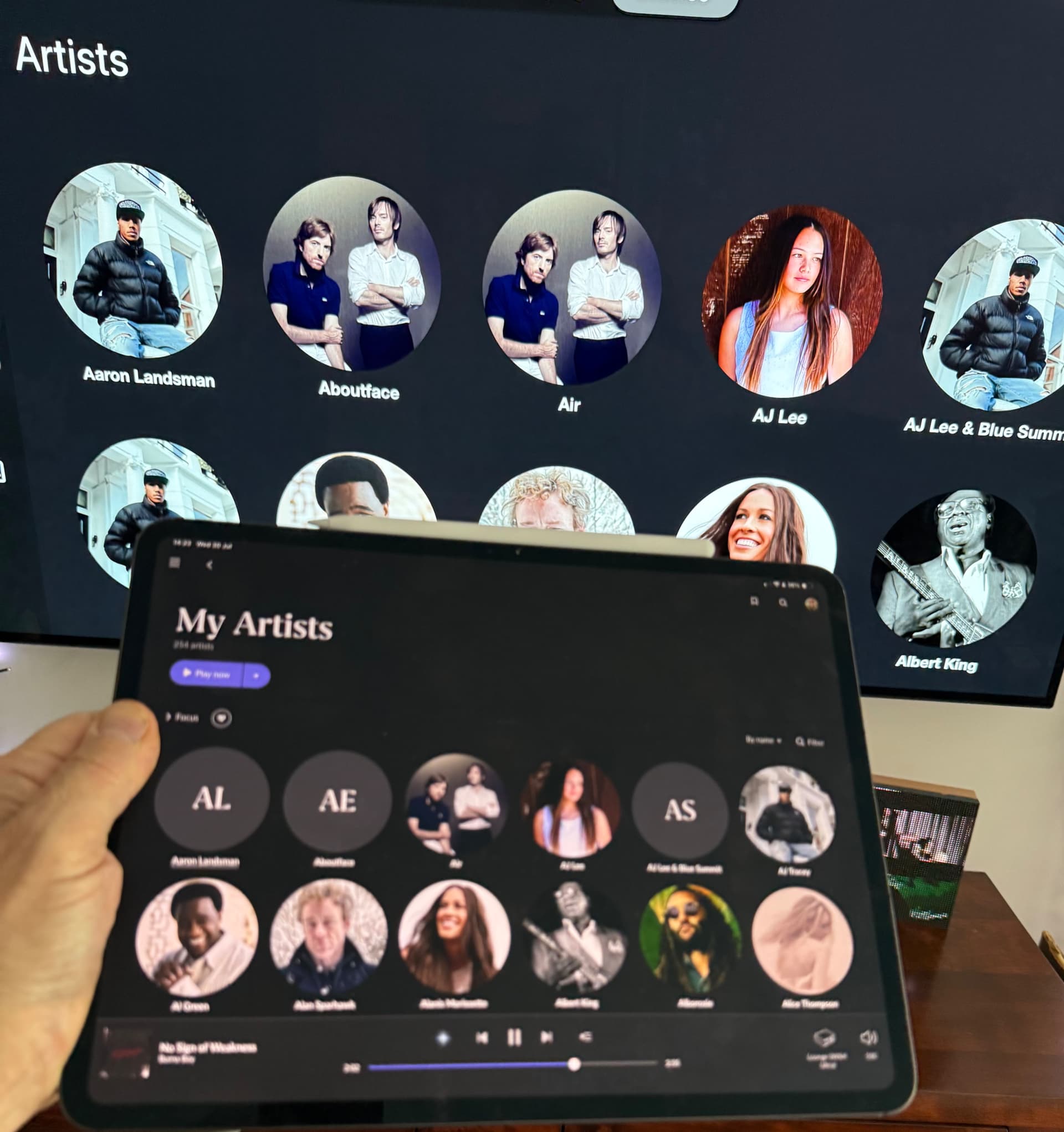
One small bug I have noticed is that in the Artist view, if there is no Artist art then an incorrect image is shown, instead of just Artists Initials. Hopefully this is clear from my photo with the TV behind and an IPad running Roon at the front. It’s not a big deal but thought I’d highlight in case you have not noticed it.
I’ve had some weird behaviors with my Apple TV, and now that most of that is now settled, the only unresolved is TV:Remote. At first, I was unable to see the Apple TV/HomePod speaker pair as a Roon endpoint. I deleted and reloaded the app, checked my settings, confirmed that other content was coming through the HomePod verifying that AirPlay is enabled, but still…