BETA Release 2026.02

@spockfish
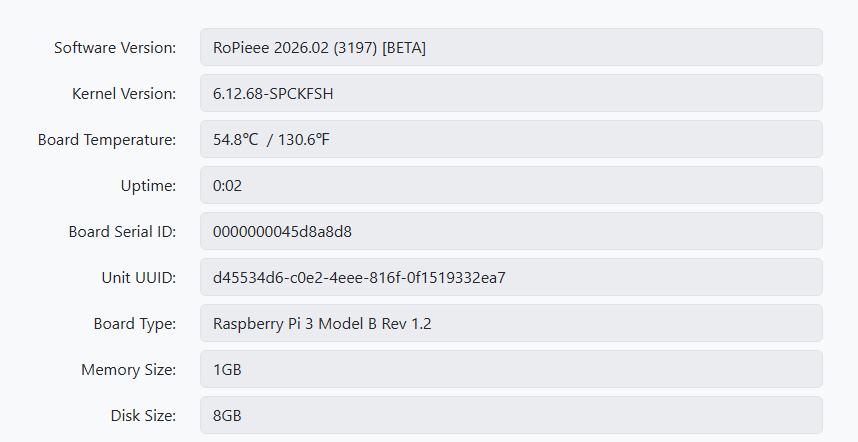
I am having an issue with my RPi3b with display running RoPieee 2026.02

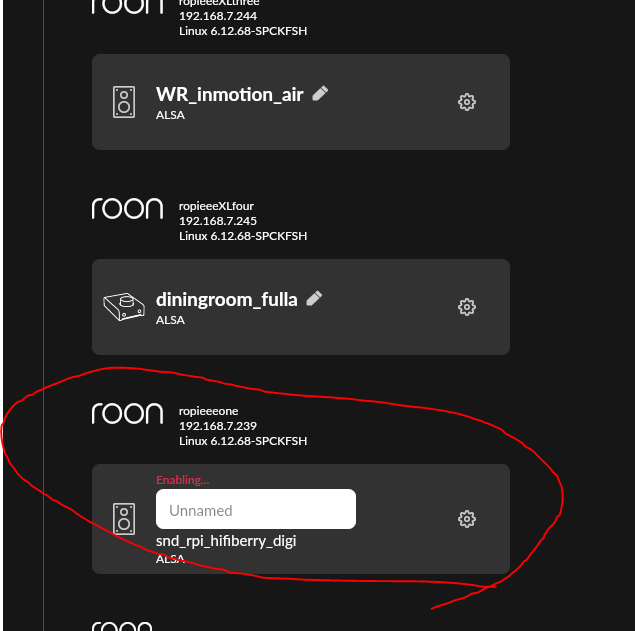
I noticed the display stopped working and it is not enabling the zone in Roon.

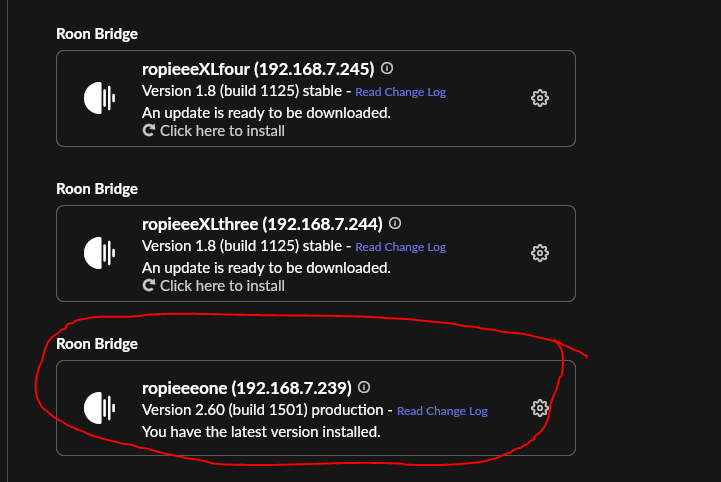
Investigating I found that the Roon bridge has updated itself to 2.60 (build 1501) production.

The other RPis I have (4s with no display) are still on 1.8 (build 1125) Stable and do show up properly.

I have tried reinstalling the roon bridge from the webui, several times, but this has not helped.

feedback sent: c377123e01e90aed

There has been some weirdness going on with my Roon today (freezes, database needing to be restored, and for some reason my android phone is running production version app when I am on beta/early access). So I have tried several other things including restoring Roon DB backup, and reinstalling Roon OS from WebUI on my Rock/Nuc. Just in case something there might have caused this.

I am at a loss, any help would be appreciated. Thanks.

Hi,

Unfortunately I can’t do much: you’re on the EA, and there is a problem with the latest Roon Bridge being pushed out. There’s a separate thread about this: Roon Bridge 2.60 (build 1501) Production with EA Roon Server

I hope this get’s resolved ‘quickly’…

Thanks

1 Like

Well, this is not about recognize: it just isn’t there: there is no device whatsoever.

I’m pretty sure that this is not related to the beta build.

The Stack has a USB power switch on the back. Have you played with that? Not all DAC’s support that…

Yes, I know, but I haven’t touched this switch, which must be set to On to work with my DAC.

I Reflash the Link this weekend and we’ll see what happens next.

Regards

Hello Harry,

End of topic

The USB port on the Link II is no longer working, and this happened around the same time as the update to 2026.02.

Best regards

So, the device is broken?

Not completely, only the USB port dedicated to the DAC is down, but there is another standard USB port that works. However, I no longer see the point in continuing to use it for my audio system, except for testing purposes.

I’m going to switch to an RPI4 with a good power supply and a good USB filter.

1 Like

Hi,

I pushed out another beta build with stuff all over the place:

  • we’ve got a French translation thanks to @alec_eiffel !
  • some translation fixes all over the place
  • on the HQPlayer the version of the running NAA is displayed
  • switching channels will always result in downloading the latest version in the newly chosen channel
  • fix an issue when the mixer name is non-standard, which fails ‘force volume’ on USB.

Enjoy!

5 Likes

6 RoPieees updated without any issue.
@spockfish Thanks again for the new Beta-release.
Kind regards, Frank.

1 Like

Ropieee updated straight-forward with no issue on RPI5 with Display2. Hqplayer detected 2 concurrent usb channels and working fine.

Thanks again

1 Like

All three of my units (one RPi3b with display and two RPi4s) no issues noted.

1 Like

So I will install last beta and check again, my polish translation.

Thank you :slight_smile:

Good evening Harry

Both screens ara up and running. No issues at all
Display 1 on Raspberry Pi 4 Model B Rev 1.4
Display 2 on Raspberry Pi 4 Model B Rev 1.5

Tnx again

1 Like

Hi Harry,

Swithing channels test OK with an RIP4 and a Stack Audio LinkII

Testing French translation in progress

Regards

2 Likes

Device RP 4 works well.

No issue found.

I was add some polish translation fix.

Good Job!

Regards!

Salut Jean-Paul,

I’ve already proposed improvements for the next Beta see Improvements following 1st "real life" review of French translation in Beta 3212 by aleceiffel-stack · Pull Request #26 · RoPieee/ropieee-l10n · GitHub

If you see more just send me a private message.

2 Likes

Hi Harry,

I’ve upgraded 4 of mine without issue. All on ethernet, but a mix of Rpi 3 and Rpi4, HAT/USB and Display 1.

Cheers,
James

1 Like

Hi,

I’ve pushed out another beta build. Stuff all over the place (mainly refactoring for future stuff).

What stands out is an update for the Airplay component, so it would be great if people can test this (as I don’t have an ‘i’ device).

@Ken_Schneider this build also has a patched kernel for the HiBy FC4 native DSD support. Can you test this and let me know if it works?

Oh. One more thing. There’s user that has issues with ‘Force Volume’ on his USB DAC (Topping E70). I can’t figure out what’s going on, so this beta build has some extensive logging when it comes to USB DAC’s with mixer controls.

If there are users that use the beta and are also using ‘force volume’ on their USB DAC, it would be great to get some feedback logs from this.
Thanks!

6 Likes

5 RoPieees upgraded (3 * RPI3B+ and 2 * RPI4B). All went well.
Thank you again for this update.
Kind regards, Frank.

1 Like

The beta pushed this afternoon and now my HiBy FC4 is showing Native DSD support as default.
Thank you for the quick fix!
Ken

2 Likes