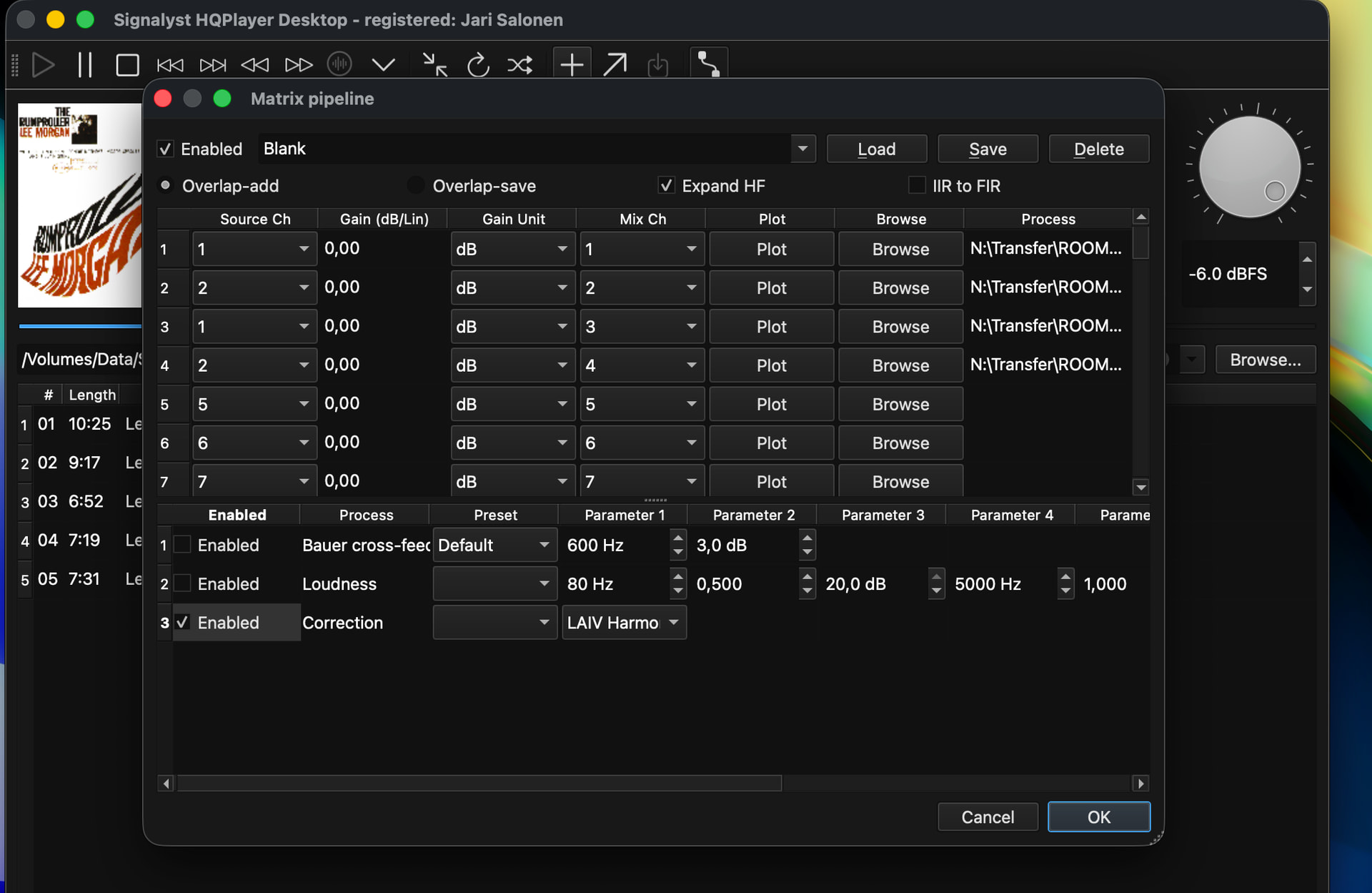
I bought a new Ferrum Wandla with board version 4, and now the Dac Correction shows up.
However,the old one is version 2, it does not.
It should be more about the installed firmware version, than the board revision…
But both Ferrum Wandla Firmwares are the same version i.e. 2.0.0
That is rather weird. I think my Wandla is among the first ones. I guess the board revision is not visible without opening the box?
I guess the board revision is not visible without opening the box? – Yes ..Only showing on the display
OK, found it. Mine is 2.2… And naturally DAC correction works with this one. Same firmware version, and same Serce version (3.0). Which I think would matter more in this respect.
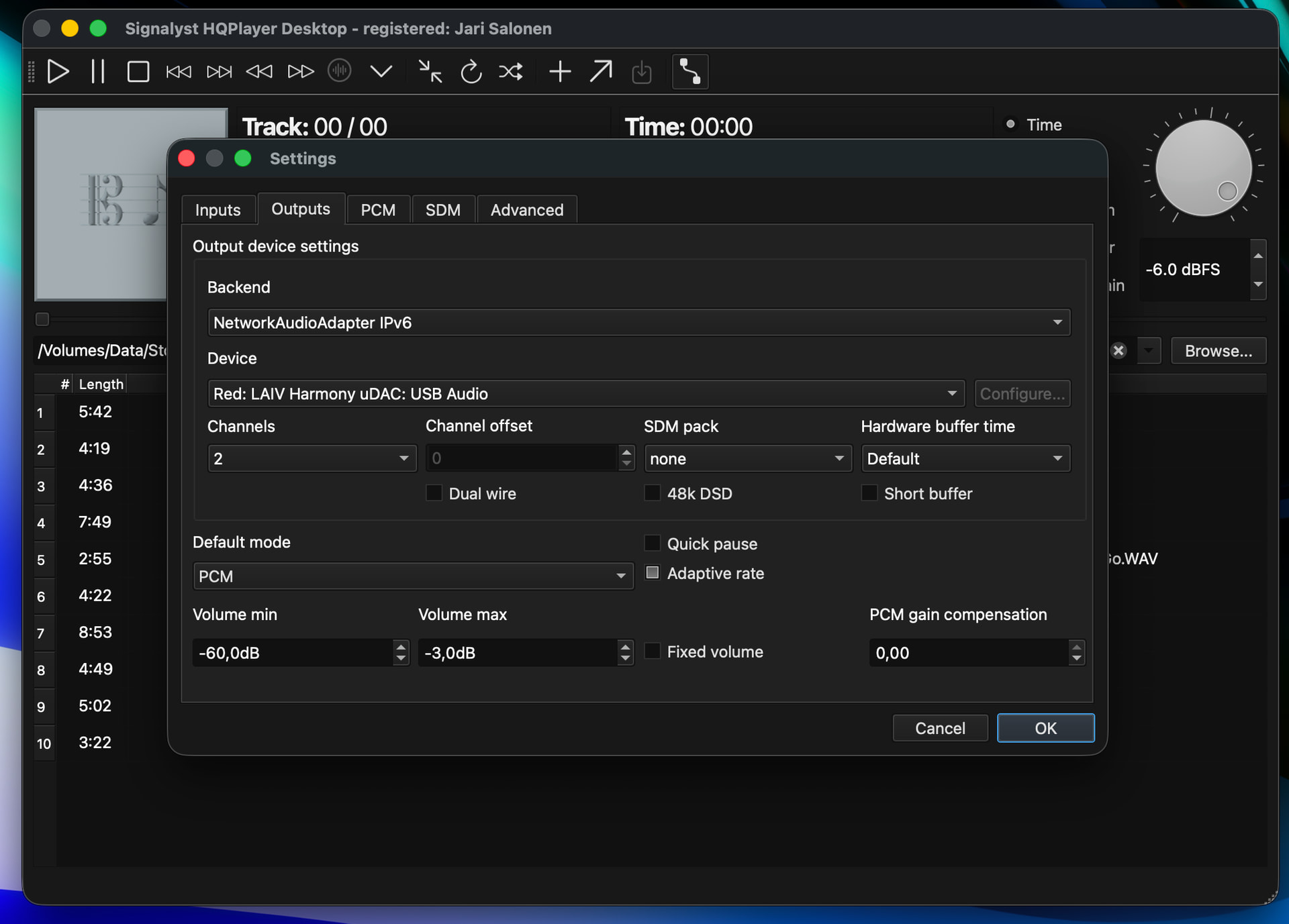
I’m trying to get dac correction for Laiv Hamony uDac funtioning. I have Holo Audio Red as NAA adapter. Using USB-cable between Red and Laiv. Without correction plays fine, but when I enable correction, no sound.
I assume you are on latest HQPlayer version?
You could email me a log file (as attachment please) of playback attempt with that setup, so I can take a look.
I was on version 5.17.0, but after updating to latest version, the problem remains.
I’m trying to figure out how to send log file as an attachment in email…
From Tools-menu “Log export…” and then attach that file to an email.
Hi!
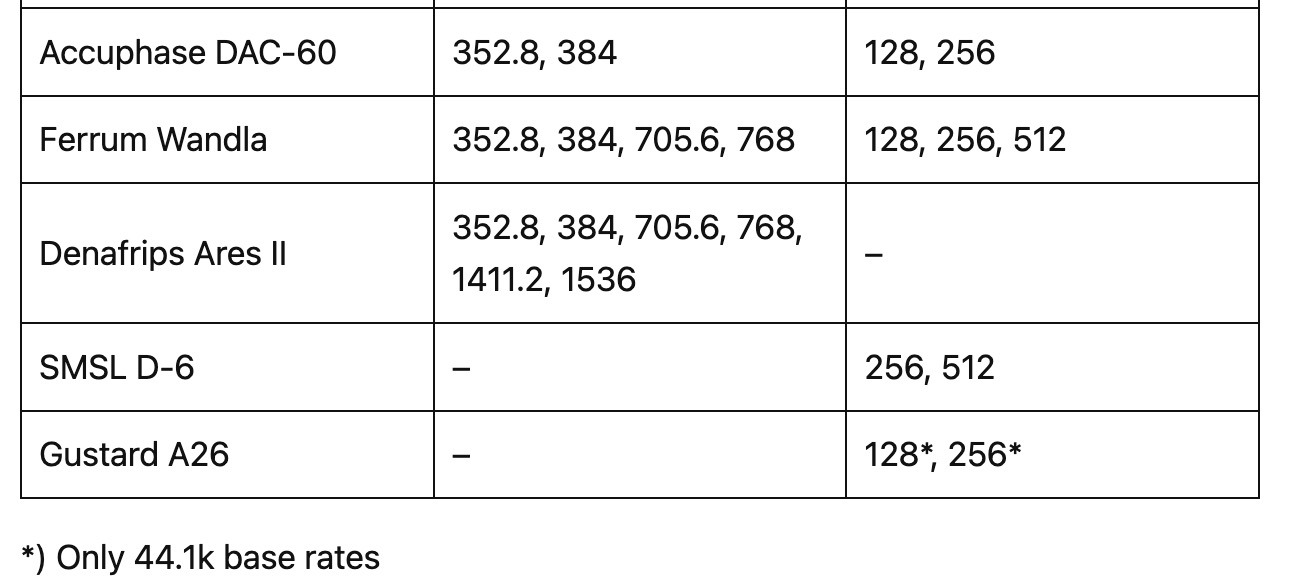
Just a heads up for the Accuphase DAC-60, it only supports 44.1k base rates on DSD. Missing "* " on 128,256.
I still got one on my e-280, and the DAC corrections are really enjoyable!
Hi @jussi_laako,
I use a Holo Cyan 2 with HQPlayer’s DAC correction, and I recently came across the Technics SL-G700M2. I’m planning to audition it, and its “Coherent Processing” caught my attention.
Technics’ engineers seem to place particular emphasis on phase accuracy and impulse reproduction. They describe DSP ahead of the DAC that pre-compensates for amplitude and phase errors arising across the entire D/A conversion circuit, with the aim of producing a more accurate analog output.
What especially interests me is the development process behind it. According to the development coverage, the engineers measured the actual analog output circuitry and used those characteristics as the basis for the digital pre-compensation. My understanding is that this amounts to correction based on a measured model of the hardware’s behavior, treating the complete D/A chain and its final analog output as the design target rather than considering the digital and analog stages separately.
Technics’ description and block diagram
Development report — AV Watch
To me, this sounds conceptually quite similar to HQPlayer’s DAC correction. Their specific emphasis on correcting amplitude and phase is what brought it to mind. I looked through some earlier discussions, but couldn’t find a detailed explanation of how HQPlayer’s correction works. My understanding from your comments is that it is quite involved and goes well beyond simply selecting a different interpolation filter.
What I find particularly puzzling is that Technics only applies Coherent Processing to PCM up to 192 kHz. At 352.8/384 kHz, and with native DSD/SACD, it is bypassed altogether. HQPlayer’s DAC correction supports much higher PCM and SDM output rates, depending on the DAC, so I don’t quite understand the reasoning behind excluding those formats from the Technics correction scheme.
I’d be interested to hear your thoughts on this approach overall, particularly what you make of that design choice.
Yes, HQPlayer does all that, and more.
It is because it is much lighter and easier to restrict it to 192k PCM.
It is like with many of those hardware based DSP devices and DAC chips, the computing resources are rather limited. And doing processing for example at native DSD rates is rather technically complex and resource intensive. So it is supported only within available computing resources and simpler cases. Typical internal processing rate for hardware DSP products is either 96k or 192k.
Other than that, they use just a regular ESS DAC chip, instead of their own discrete DAC or such.
Thanks again — your explanation helped me understand much better what HQPlayer is actually doing on the digital side.
The main reason I became interested in the Technics is that it already combines hardware-specific correction, some fairly sophisticated digital processing, and a well-designed analog stage in one box. I had also considered the WANDLA, but while it includes some of your HQPlayer-derived filters internally, DAC-specific correction still requires HQPlayer running externally.
What I’d really like is to keep that correction available for all of my sources. My DAC is connected not only to a PC and a dedicated streamer for serious listening, but also to things like a PlayStation. In gaming, the difference a good DAC makes to spatial presentation and immersion is large enough that I’d really like to preserve the corrected path there as well.
For file playback I already have a simple workflow built around HQPlayer itself, using a small script to push local files and other network sources into it. The part I haven’t really solved is low-latency real-time input.
If the source were fixed at 24/48 and I didn’t need the most extreme HQPlayer modes — DSD256 would already be more than enough for me — how would you recommend configuring HQPlayer for the lowest practical latency while still keeping DAC correction and high-quality processing?
What filter/output mode and buffer settings would you start with for this kind of use?
HQPlayer has three “Short buffer” settings. The default (longest FIFO) which is best for music playback. Half size, for reduced delay to volume control, etc. And minimal for use with video or otherwise delay sensitive cases like live sound.
Then there is “Buffer time” which is about the hardware DMA buffer size. You can set this to 1 ms for minimal delay due to the hardware buffer. If you are using ASIO backend, then this setting should be left “Default” and the the buffer size adjusted from the driver control panel instead.
Note that using “minimal” for FIFO and something like 1 ms for DMA, means that the system comes sensitive to drop-outs.
Default filters and modulator are mostly fine. But you can minimize delay there too by using either a shorter filter, or alternatively minimum-phase filter. Minimum-phase filters systematically have the lowest delay.
How to optimize the delays also depends on the hardware and overall setup used.
Thank you!
@jussi_laako
I have 3 units of SMSL SU1 (which is a great, inexpensive DAC) in 3 of my setups. I do PCM to DSD64 upsampling with the Sinc L and ASDM7EC Super. (My laptop and NUC cant handle more than DSD64 unfortunately).
I have two questions:
is the signal still going through the modulator inside the dac? As per my understanding, in Audio Science Review forum, one user said that SMSL had disabled DSD Direct mode. I cant find any info.
is there going to be a dac correction for SU1? I see D6 listed, which uses the same AKM chip as the SU1.
And in general, am i missing out on using SU1 over a NOS R2R dac because SU1 is still doing some internal processing inside before the analog output stage?
Thanks, greetings from India.
Difficult to know, it would need measurements to figure out. But in any case the DAC chip performs better from DSD source, although I would strongly recommend to use minimum DSD256 rate. You get much better performance that way, maybe it would work for example with default filters and ASDM7EC-ul modulator for example? RPi5 can do DSD256 with those settings…
I find it unlikely to happen.
This is difficult to answer without a reference point, and it will also depend on your system and personal preferences.
Thanks for your reply. I can do DSD256 with the ASDM7EC-ul and poly sinc gauss long and poly sinc gauss long hires lp without any hiccups.
This is sort of a question about matrix pipelines, but afaik a lot of people use matrix pipelines primarily for DAC corrections, so putting it here.
If you have pipelines enabled, but your currently selected pipeline has nothing selected, so it’s a ‘null pipeline’ (no DAC correction, no down mix to 2ch, no loudness, nothing selected) is that the same thing as having pipelines turned off from a processing perspective - both the bitstream and the load on CPU/GPU? Feels like it must be, but just wanted to check. I use the API, and there’s no way to turn off pipelines there, but you can create a matrix profile called “Nothing”.