Ik draai al een paar jaar met Roon Rock op mijn NUC, met volle tevredenheid..
Nu lees ik op internet dat Diretta en Roon Rock samen kunnen werken.
Ik vraag me echter af wat hier de voordelen van zijn.
Klinkt het dan beter?.. wat mag ik klank matig verwachten als deze 2 samenwerken?
Verder heb ik echt geen idee hoe ik het dan zou moeten aansluiten, waar ik op moet letten?
Wat zijn de kosten?
Maandelijks?
Eenmalige aanschaf?
In mijn huidige set stream ik met; Fritzbox–switch–en streamer(Cambridge cxn V2).
Op de switch heb ik ook nog Roon Rock (NUC) aangesloten.
Hoe past hier Diretta bij?
Moet ik mijn NUC via usb verbinden met mijn streamer??
Kan ik Diretta ook proberen? Zonder eerst te kopen?
Ik heb ook nog een laptop, kan ik hier Diretta op zetten?
Veel vragen, hihihi, ik hoop dat iemand mij kan je wil helpen..
Maar mijn eerste en meest prangende vraag; hoe gaat het klinken met Diretta?.. warmer? Meer rust en of detail?
@Wim_Cordewener
No RAAT and Diretta are not going to fight each other.
As an example how you can implement Diretta on Roon:
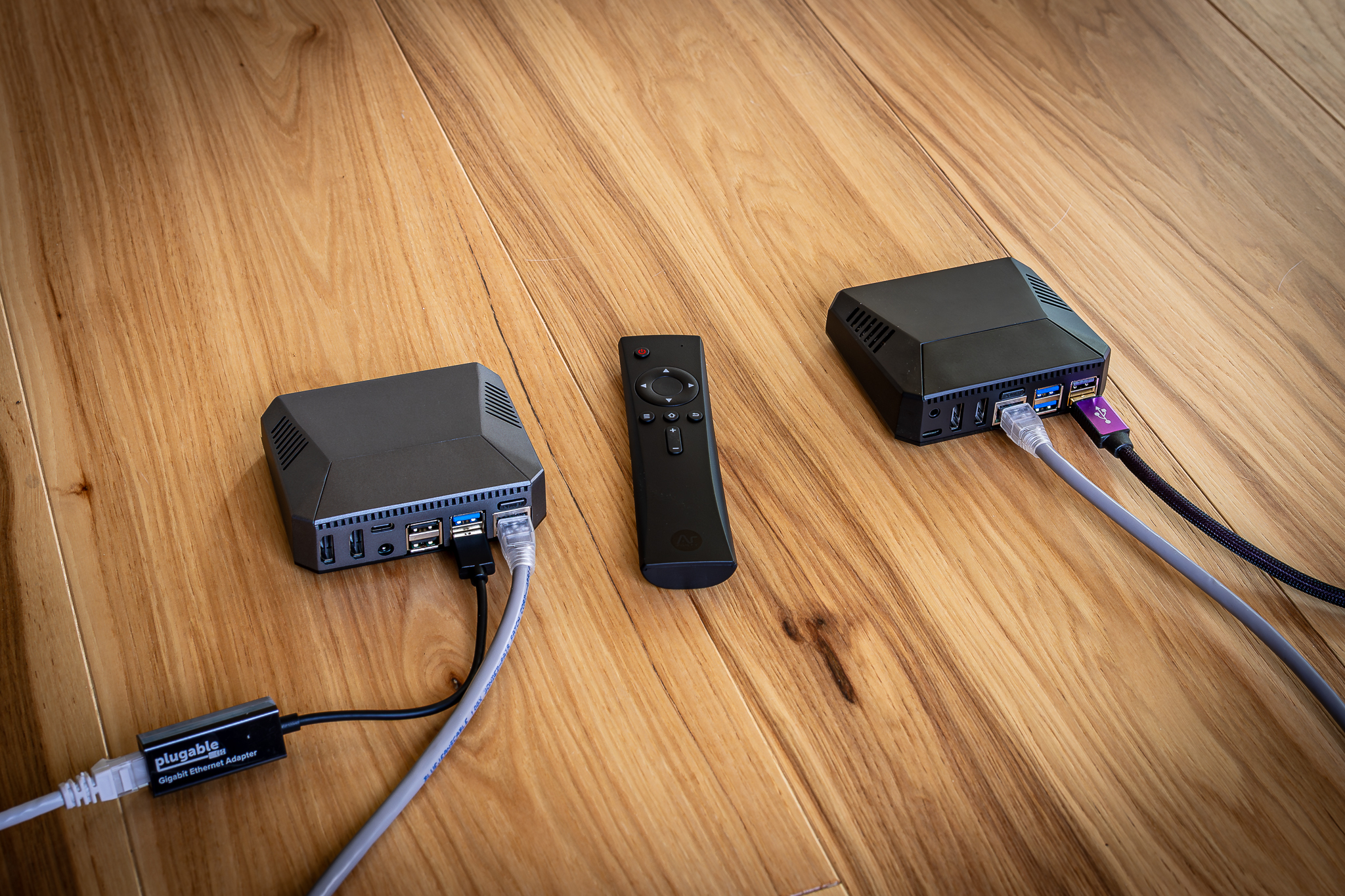
Use a Raspberry Pi as Diretta Host, which will need an additional network-port by using a USB-to-network-adaptor. You can use ex. GentooPlayer as operating system on the RPI.
On that Diretta Host, you can run Roon Bridge and Diretta Host together.
Then you need another Raspberry Pi as Diretta Target. On that one you also run GentooPlayer, here with only Diretta Target activated.
Now you can connect the USB-output of that Diretta Target RPI to your DAC.
The key thing is to connect the “Diretta Host” via the second network port to the network port of “Diretta Target” via an ethernet cable. That little network (consists only of “Diretta Host” and “Diretta Target”), is totally isolated from your home network. This makes the network port of the streamer (the “Diretta Target”) much quitter and easier to handle the traffic, and people claims that tis improve the sound (drastically). YMMV.
But please check the threat I used to think the DAC was 90% of the sound. This sub-$300 DIY project proved me wrong, which is all about this setup.
Kind regards, Frank.
I want to second the advice from @Frank_M. He is correct about the architecture.
To answer your specific questions based on my experience (I have been using Roon ROCK on a NUC for years, and Diretta since July):
1. Does it work with ROCK?
Yes, perfectly. Roon ROCK doesn’t even know Diretta exists. It just sees the “Diretta Host” as a normal Roon Bridge endpoint (like a RoPieee or DietPi zone). It sends standard RAAT to the Host, and the Host handles the translation to Diretta silently. They do not “fight”—they work in a relay.
2. How does it connect?
You do not connect the NUC directly to the streamer.
The NUC stays on your network (connected to your router/switch).
The Diretta Host connects to that same network (via Ethernet).
The Diretta Target connects to the USB Audio Input on your Cambridge CXN V2.
3. Will it sound better on your Cambridge CXN V2?
This is the tricky part. Your CXN V2 is a “Streaming DAC,” which means it has a computer inside it.
The Sonic Benefit: Feeding it a clean Diretta USB signal usually improves sound quality by bypassing the internal streaming processing.
The Trade-off (Important): If you use the USB input, you will likely lose the Album Art on the Cambridge display. The USB connection only carries audio data, so the screen will likely just show the sample rate (e.g., “USB Audio 44.1kHz”) rather than the “Now Playing” screen you are used to.
The “Noise Floor”: Since the Cambridge is an active streamer, its internal computer is always running (generating some electrical noise), even if you use USB. While Diretta will improve the signal getting in, the internal noise of the Cambridge might limit the ultimate performance compared to a dedicated DAC.
4. What does it sound like?
In my system, Diretta consistently sounds “calmer” with more precise imaging and greater “harmonic density” (richness). Listening sessions feel less fatiguing and more engaging.
Conclusion:
Since the parts for this project cost less than $300/€285 (two Raspberry Pis, SD cards, power supplies, a USB to Ethernet adapter, and a CAT6 cable), it is an inexpensive way to “kick the tires.” If you love the sound, you might eventually wish to move to a dedicated DAC later to get the full benefit.
No apology necessary—these are the right questions to ask before spending money!
1. Can you use a Raspberry Pi 2?
Unfortunately, no. The specific software we use (AudioLinux) has a real-time kernel that requires the processing power and 64-bit architecture of the Raspberry Pi 4 or 5. The Pi 2 is a bit too old for this high-performance task.
2. Must you spend €300 first?
Yes, you do need the hardware to build the “bridge.” However, there is a safety net: Raspberry Pi computers hold their value very well.
If you build it and decide it isn’t for you, you can easily sell the Pis on the used market and get most of your money back.
Or, you can repurpose them for other fun projects (like a standard Roon endpoint for another room).
3. What are the Software Costs?
AudioLinux: ~$79 USD. This is the operating system. You only need one license to cover both Raspberry Pis. More information at Audiolinux Store
Diretta:Free to try indefinitely! The standard version plays CD-quality music (44.1 kHz and 48 kHz) forever without a license. This is perfect for evaluating the sound.
Optional: If you decide later that you love it and want to play High-Res files (96kHz+), you can buy a Diretta Target license for €100. But you do not need this to start. You will get the Diretta purchase link from the Raspberry Pi Target since the license will be locked to your hardware and non transferrable.
So, your only “sunk cost” to try this is the $79 AudioLinux license. The hardware is an asset you can resell if needed.
I hope that helps you decide!
[Dutch Translation]
Hoi Wim,
Excuses zijn niet nodig—dit zijn precies de juiste vragen om te stellen voordat je geld uitgeeft!
1. Mag het ook een Raspberry Pi 2 zijn?
Helaas niet. De specifieke software die we gebruiken (AudioLinux) heeft een real-time kernel die de rekenkracht en 64-bits architectuur van de Raspberry Pi 4 of 5 vereist. De Pi 2 is iets te oud voor deze taak.
2. Moet je eerst €300 uitgeven?
Ja, je hebt de hardware nodig om de “brug” te bouwen. Er is echter een vangnet: Raspberry Pi-computers behouden hun waarde erg goed.
Als je het bouwt en besluit dat het niets voor jou is, kun je de Pi’s gemakkelijk op de tweedehandsmarkt verkopen en het grootste deel van je geld terugkrijgen.
Of je kunt ze gebruiken voor andere leuke projecten (zoals een standaard Roon-endpoint voor een andere kamer).
3. Wat kost de software?
AudioLinux: ~$79 USD. Dit is het besturingssysteem. Je hebt maar één licentie nodig voor beide Raspberry Pi’s. Meer informatie vind je op Audiolinux Store
Diretta:Gratis onbeperkt te proberen! De standaardversie speelt CD-kwaliteit muziek (44.1 kHz en 48 kHz) voor altijd af zonder licentie. Dit is perfect om het geluid te beoordelen.
Optioneel: Als je later besluit dat je het fantastisch vindt en High-Res bestanden (96kHz+) wilt afspelen, kun je een Diretta Target-licentie kopen voor €100. Maar dit heb je niet nodig om te beginnen. Je krijgt de aankooplink voor Diretta via de Raspberry Pi Target, aangezien de licentie aan je hardware wordt gekoppeld en niet overdraagbaar is.
Je enige “verloren kosten” om dit te proberen is dus de $79 AudioLinux-licentie. De hardware is een bezit dat je indien nodig weer kunt verkopen.