Hi,
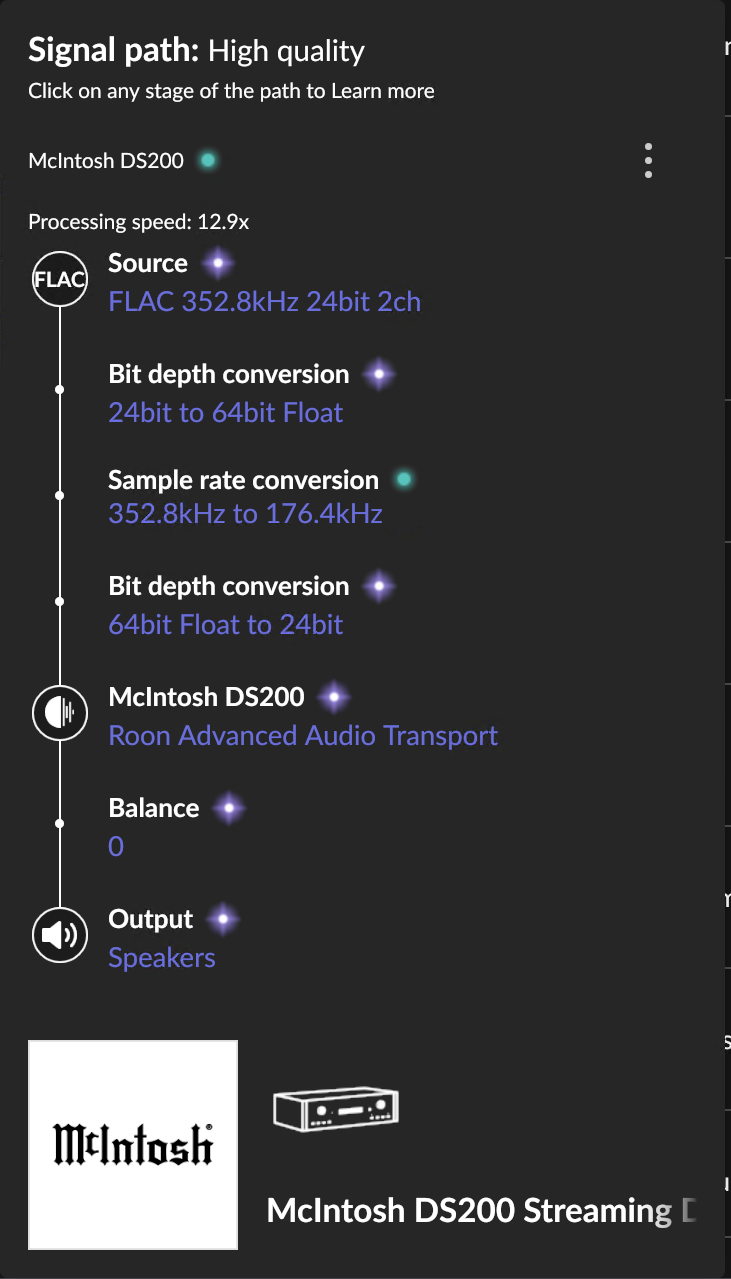
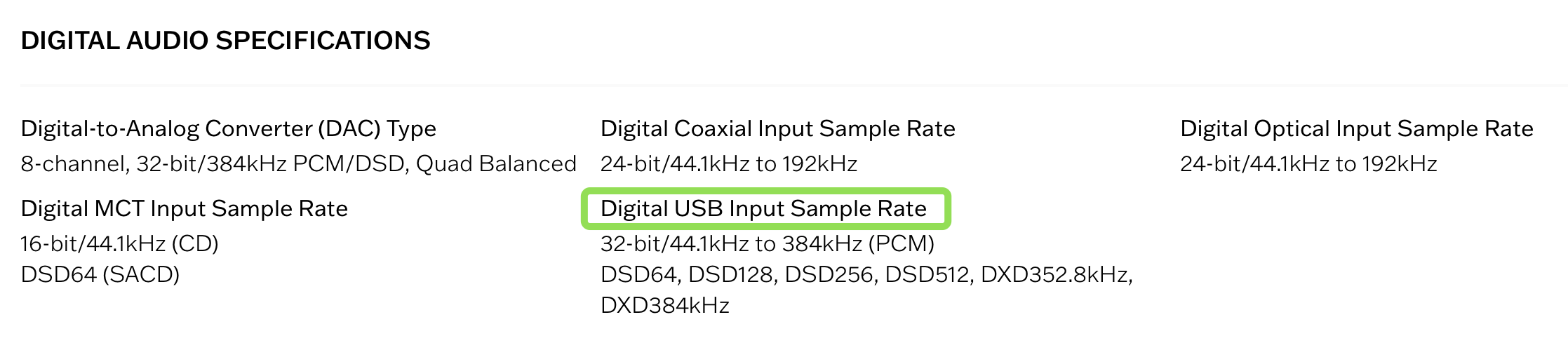
Why roon downsampling from 384KHz to 176KHz on a McIntosh DS200, If DS200 supports: DXD352.8kHz, DXD384kHz, DSD64, DSD128, DSD256, DSD512?
MUSE disabled
here is signal path
yes, I see about different inputs and different sample rates, but what about Roon? Roon server works via 1Gbs ethernet local network. So what’s relation Digital USB Input & Ethernet Input in the sample rate context? I think that data from Ethernet Input processes by same engine that data from USB Input
Can I connect to the roon server via USB Input? not sure…
Good day @Roman_Sht !
I hope you’re doing well today.
We have received and reviewed the analytics data reported by your Roon Server.
What we can see from there is that upon connection to your McIntosh he has advertised itself as supporter of following formats:
 "supported_formats": "96000/16/1|2,44100/24/1|2,44100/16/1|2,176400/16/1|2,192000/24/1|2,176400/24/1|2,96000/24/1|2,88200/24/1|2,192000/16/1|2,88200/16/1|2,48000/24/1|2,48000/16/1|2"
 },
Unfortunately, 384000 or 352800 is not among them and that is why Roon Downsampled the audio to the most suitable sample rate.
In this case we would recommend you to try to update your DAC’s software if any update is available or try to establish connection between roon server and DAC in a different way, that might be helpful in case your DAC supports different formats depending on the transport layer.
Regards.
Thanx for the answer!
Unfortunately McIntosh doesn’t answer for requests… Maybe you can get through to them.
The “supported_formats” is JSON-string. Is it possible to edit this line on the roon server side? While we waiting actions from McIntosh
Just because a device accepts a specific format over USB doesn’t guarantee that it accepts the same format over a different input, in this case the network.
Hi @Roman_Sht,
We’ll certainly pass along this information to our partners team who work with McIntosh directly.
Are you able to test things out over USB in the meantime?
If I connect my old Aurender N100 to DS200 via USB and play DXD or DSD512 tracks, DS shows on display 385KHz. The same tracks from roon via Ethernet are downsampling.
Hello @Roman_Sht
We’ve reviewed the current behavior and confirmed that Roon Ready streaming to your device supports up to PCM 24/192. From our side, we can guarantee stable playback within these officially supported formats:
When playing higher-rate files such as DXD (352.8 kHz) or DSD512, the Roon Core will downsample to the highest rate supported by the endpoint (e.g. 176.4 kHz in this case by the linear downsampling). This is expected behavior based on the information provided by McIntosh.
Regarding your question about editing the supported_formats string on the server side — this value is defined by the endpoint’s Roon Ready implementation and not something we can override from the Core.
We’ve also reached out to McIntosh directly for clarification or any possible updates on their side, and we’ll let you know as soon as we hear back.
At this point there’s nothing more we can adjust from the Roon side beyond ensuring playback works correctly within the supported formats.
I skimmed through this Community on this issue and I don’t want to be pushy or offend, but I’ve noticed that rather often Roon doesn’t “see” what device is actually capable of.
Maybe it would be worth considering why this happens?
Hello @Alicja_Lach
Thank you for the update.
We do not rely solely on what Roon detects regarding a device’s capabilities. Our assessments are based on internal testing conducted by our team, and we provide certification for the formats that can be played via the RAAT protocol, provided by the device manufacturer.
Our partners team has reached out to McIntosh and confirmed that the information in our logs reflects the maximum supported stream rates across all network protocols specifically, the DS200 supports a maximum resolution of 24-bit/192 kHz PCM for network streaming, which applies to all streaming protocols. If you need the confirmation, please feel free to reach out directly to the device manufacturer.
Only via a USB it appears 
Yeah, just few minutes ago stopped selling my old aurender! After getting answers for here
If it supports 192Khz, why 384Khz downsampling to 176Khz, not 192?
Does it? From your screenshot in your first post it is down-sampling 352,8 (8 x 44.1) kHz to 176,4 (4 x 44.1) kHz.
Correct, 176,4! But why not 192 kHz? 192 better 176,4)
I already answered that:
Addendum: Roon’s simple settings only allow diversion from the Power of 2 rule if set to always convert to the maximum supported sample rate. To create rules that affect down-sampling only, one has to choose Custom.
Hello @Roman_Sht
The reason lies in the “families” of sample rates.
In digital audio, all sample rates come from two basic families:
Each family is a multiple of its base frequency (44.1 or 48).
Your file has 352.8 kHz, which belongs to the 44.1 family.
To avoid complicated and less accurate conversions between different families (e.g., 352.8 → 192), Roon (and most players) always performs integer-multiple conversions within the same family.
So:

 (this would require asynchronous resampling, which is more complex and can reduce quality).
That’s why Roon downsamples to 176.4 kHz, as it’s the closest multiple within the same sample rate family.
More info you can find here:
Please let me know if you have any other problems with the Roon product functionality
Thanks for the comprehensive explanation! No questions anymore👍